
Nintendo HAC-001(-01)
Nintendo Switch (HAC-001(-01)) Instruction Manual
Model: HAC-001(-01)
1. Introduction
The Nintendo Switch system (model HAC-001(-01)) offers versatile gaming experiences, allowing seamless transition between home console and portable modes. This manual provides essential information for setting up, operating, maintaining, and troubleshooting your Nintendo Switch console.
Key features include:
- 6.2-inch LCD screen for vibrant visuals.
- Three distinct play modes: TV Mode, Tabletop Mode, and Handheld Mode.
- Support for local co-op, online multiplayer, and local wireless multiplayer.
- Detachable Joy-Con controllers for flexible gameplay.
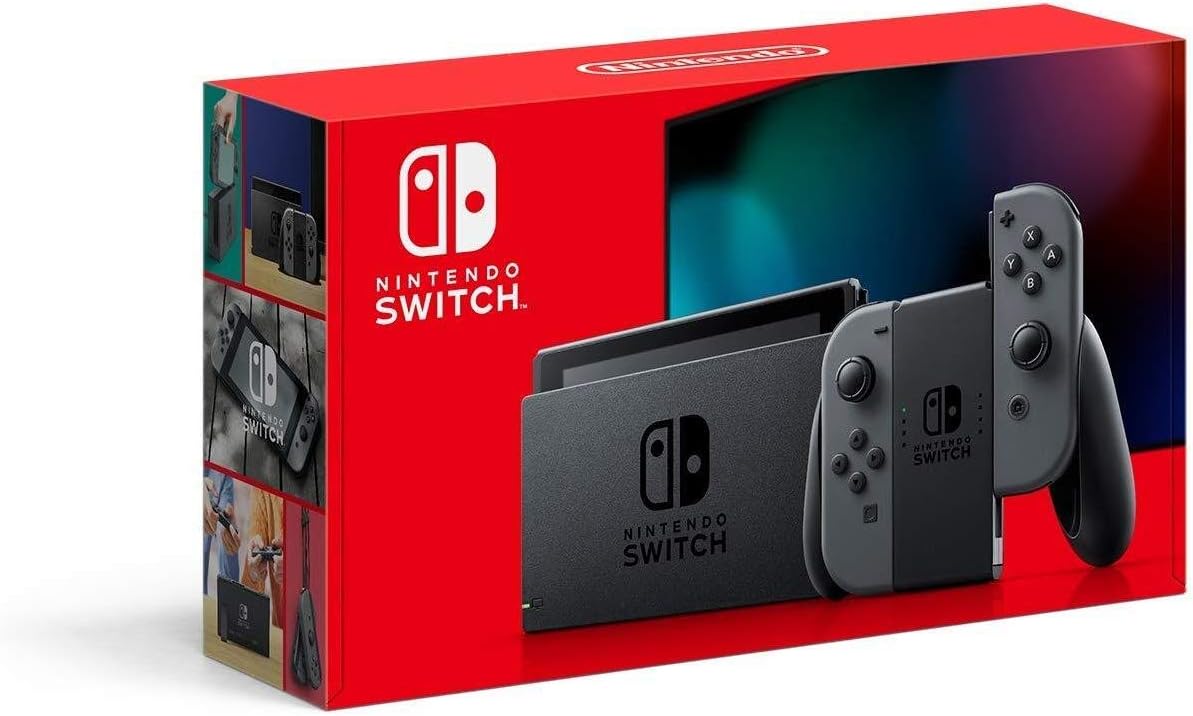
Figure 1.1: Nintendo Switch (HAC-001(-01)) retail packaging.
2. What's in the Box
Verify that all components are present in your Nintendo Switch package:
- Nintendo Switch Console
- Nintendo Switch Dock
- Joy‑Con (L) Gray controller
- Joy‑Con (R) Gray controller
- Joy‑Con Wrist Straps (2)
- Joy‑Con Grip
- High Speed HDMI Cable
- Nintendo Switch AC Adapter

Figure 2.1: Nintendo Switch Dock and Joy-Con Grip, essential accessories for TV mode and comfortable handheld play.

Figure 2.2: The included AC Adapter for power and charging, and the HDMI cable for connecting to a television.
3. Setup
3.1 Initial Charging and Power On
- Connect the Nintendo Switch AC Adapter to the console's USB-C port or to the Nintendo Switch Dock.
- Plug the AC Adapter into a wall outlet.
- Allow the console to charge for at least 30 minutes before initial use, or until the battery indicator shows sufficient charge.
- Press the Power Button located on the top of the console to turn it on.
3.2 Attaching Joy-Con Controllers
The Joy-Con controllers can be attached to the sides of the Nintendo Switch console for handheld mode or used wirelessly.
- To attach: Align the Joy-Con with the rail on the side of the console and slide it downwards until you hear a click.
- To detach: Press the small release button on the back of the Joy-Con and slide it upwards.

Figure 3.1: The Nintendo Switch console with its detachable Joy-Con controllers and the Joy-Con Grip, illustrating the modular design.
3.3 Connecting to a TV (TV Mode)
- Open the back cover of the Nintendo Switch Dock.
- Connect the HDMI cable to the HDMI OUT port on the dock and to an HDMI input on your television.
- Connect the AC Adapter to the AC ADAPTER port on the dock and to a wall outlet.
- Carefully slide the Nintendo Switch console into the dock, ensuring the screen faces the front and the USB-C port aligns with the dock's connector. The console screen will turn off, and the display will appear on the TV.
4. Operating Modes
The Nintendo Switch offers three distinct ways to play:
4.1 TV Mode
Play on your television by docking the Nintendo Switch console. This mode is ideal for playing with family and friends on a larger screen.
- Connect the console to the dock, and the dock to your TV via HDMI.
- Use the Joy-Con controllers attached to the Joy-Con Grip, or as individual controllers.
4.2 Handheld Mode
Attach the Joy-Con controllers to the console and play on the go. This mode provides a portable gaming experience similar to a traditional handheld device.

Figure 4.1: The Nintendo Switch in handheld mode, ready for portable gaming with Joy-Cons attached.
4.3 Tabletop Mode
Flip out the console's kickstand and use the detached Joy-Con controllers to play anywhere. This is suitable for multiplayer gaming on a flat surface.

Figure 4.2: The Nintendo Switch console positioned in tabletop mode using its kickstand, with detached Joy-Con controllers for flexible play.

Figure 4.3: Multiple users engaging with the Nintendo Switch in tabletop mode, demonstrating its multiplayer capabilities.
5. Joy-Con Controllers
The Joy-Con controllers are a core component of the Nintendo Switch's versatility. They can be used in various configurations:
- Attached to Console: For handheld play.
- Attached to Joy-Con Grip: To form a traditional-style controller for TV or tabletop mode.
- Used Individually: Each Joy-Con can function as a standalone controller, enabling two-player gaming with a single console.
- Motion Controls: Both Joy-Cons feature advanced motion sensors for interactive gameplay.
- HD Rumble: Provides realistic vibrations for an immersive experience.

Figure 5.1: The Gray Joy-Con controllers combined with the Joy-Con Grip, forming a single, more traditional controller layout.

Figure 5.2: Joy-Con controllers with wrist straps, demonstrating their use for motion-controlled games and to prevent accidental drops.
6. Charging and Battery Life
The Nintendo Switch (HAC-001(-01)) model features improved battery life compared to earlier versions, offering extended playtime in handheld mode.
- Console Charging: The console charges when connected to the AC Adapter directly or when docked. A full charge takes approximately 3 hours.
- Joy-Con Charging: Joy-Con controllers charge automatically when attached to the console while the console itself is charging or fully charged. Each Joy-Con has an estimated battery life of up to 20 hours.
- Power Banks: The Nintendo Switch is compatible with external USB-C power banks. Ensure the power bank provides at least 5 Volts and 2.4 Amps for effective charging.
7. Maintenance
- Cleaning: Use a soft, dry cloth to clean the console, Joy-Cons, and dock. Avoid abrasive cleaners or solvents.
- Screen Protection: The console's screen is made of plastic. It is recommended to apply a screen protector to prevent scratches.
- Ventilation: Ensure the air vents on the console (top and bottom when docked) are not obstructed to prevent overheating, especially during extended use.
- Storage: Store the console and accessories in a cool, dry place away from direct sunlight and extreme temperatures.
8. Troubleshooting
- Console Not Powering On: Ensure the console is sufficiently charged. Connect the AC Adapter and allow it to charge for a period before attempting to power on again.
- No Display on TV:
- Verify the HDMI cable is securely connected to both the dock and the TV.
- Ensure the TV input is set to the correct HDMI channel.
- Confirm the AC Adapter is connected to the dock and a power outlet.
- Ensure the console is correctly seated in the dock.
- Joy-Cons Not Responding:
- Ensure Joy-Cons are charged by attaching them to the console while it's charging.
- If using wirelessly, press the SYNC Button on the Joy-Con to re-pair it with the console.
- Console Overheating: If the console feels excessively hot, stop playing, remove it from the dock (if applicable), and allow it to cool down in a well-ventilated area. Ensure vents are clear.
9. Specifications
| Feature | Detail |
|---|---|
| Product Dimensions | 14 x 8 x 3.5 inches |
| Item Weight | 1.76 ounces |
| Model Number | HAC-001(-01) |
| Batteries | 1 Lithium Polymer battery required (included) |
| Date First Available | August 1, 2019 |
| Platform | Nintendo Switch |
| Color | Gray HAC-001(-01) |
| Connectivity Technology | HDMI, USB |
10. Safety Information
Please read all safety information before using the Nintendo Switch console. Adhere to all warnings and precautions to ensure safe operation and prevent damage to the product or injury.
Specific safety information for this product is not available in the provided data. Always refer to the official safety guidelines provided by Nintendo with your product.
11. Warranty and Support
For warranty details, technical support, and additional product information, please visit the official Nintendo support website or contact Nintendo customer service.
Official Nintendo Support: www.nintendo.com/support/
Related Documents - HAC-001(-01)
 |
Nintendo Switch Left Joy Con Sensor Rail Replacement Guide Step-by-step instructions to replace a broken or faulty left Joy Con sensor rail on your Nintendo Switch game console. |
 |
任天堂Switch左侧Joy-Con手柄传感滑轨更换指南 本指南详细介绍了如何更换任天堂Switch左侧Joy-Con手柄的传感滑轨,包括所需工具、零件和详细步骤。 |
 |
Nintendo Switch: Important Information and Safety Guide Discover essential safety guidelines, usage tips, parental controls, and disposal information for the Nintendo Switch, Nintendo Switch OLED Model, and Nintendo Switch Lite consoles. Nintendo provides comprehensive support and product details on their official website. |
 |
Nintendo Switch Joy-Con Controller: Health, Safety, and Usage Guide Official guide for Nintendo Switch Joy-Con controllers, covering essential health and safety information, proper usage, technical specifications, and disposal instructions. |
 |
Nintendo Switch Joy-Con Health and Safety Information and Technical Specifications Comprehensive health, safety, and technical information for the Nintendo Switch Joy-Con controllers, including warnings, usage instructions, and specifications. |
 |
Nintendo Switch Exterior Power and Volume Button Replacement Guide A free guide on how to replace the outside power and volume buttons and internal button board on a Nintendo Switch gaming console. |
Ask a question about this manual
Ask about setup, troubleshooting, compatibility, parts, safety, or missing instructions. Manuals+ will review the question and use this page’s manual context to help answer it.