
1. Overview
The ZHIWHIS HRD-737 is a compact and versatile portable radio designed for wide frequency reception. It supports multiple bands including FM, AM, Shortwave (SW), Citizens Band (CB), Aircraft Band (AIR), and Very High Frequency (VHF). This digital DSP radio offers a range of features such as a sleep timer, alarm clock, and memory storage for up to 50 stations per band, making it suitable for various listening environments and emergency preparedness.

This image displays the ZHIWHIS HRD-737 radio along with its included accessories: an external antenna, wired earphones, and a USB charging cable. The radio features a digital display showing the frequency, and a speaker grille on the front.
2. Key Features
- Digital DSP Radio: Supports FM, AM, SW, CB, Air, and VHF bands for comprehensive reception.
- Full Band Receiver: Provides access to a wide range of frequencies, enhancing listening options.
- Built-in Rechargeable Battery: Equipped with a 700mAh lithium battery for extended operation.
- Portable Design: Compact size and lightweight, ideal for travel and outdoor activities.
- Easy to Use: Features automatic scanning and manual search functions for station tuning.
- Memory Storage: Capable of storing up to 50 radio stations per band.
- Sleep Timer & Alarm Clock: Integrated functions for convenience and personalized use.
- 3.5mm Earphone Jack: Allows for private listening without disturbing others.
- Signal Strength Display: Shows the signal strength of each radio station on the digital display.

This graphic highlights the key functionalities of the ZHIWHIS HRD-737 radio, including Sleep Timer, Alarm Clock, 300 Memory Stations (total across all bands), Automatic Tuning Storage (ATS), Headphone Jack, Speaker, Digital Clock, and Built-in 700mAh Battery, emphasizing its long battery life of up to 15 hours.
3. Package Contents
Upon opening the package, please verify that all the following items are included:
- ZHIWHIS HRD-737 Portable Full Band Radio
- User Manual
- USB Charging Cable
- Stereo Earphones
- Extend Antenna (clip-on type)
- Neck Lanyard
- Waterproof Storage Bag

This image displays the complete set of items found within the ZHIWHIS HRD-737 product package, including the radio unit, user manual, lanyard, extend antenna, USB charging cable, stereo earphones, and a waterproof storage bag.
4. Controls and Functions
Familiarize yourself with the buttons and ports on your HRD-737 radio:
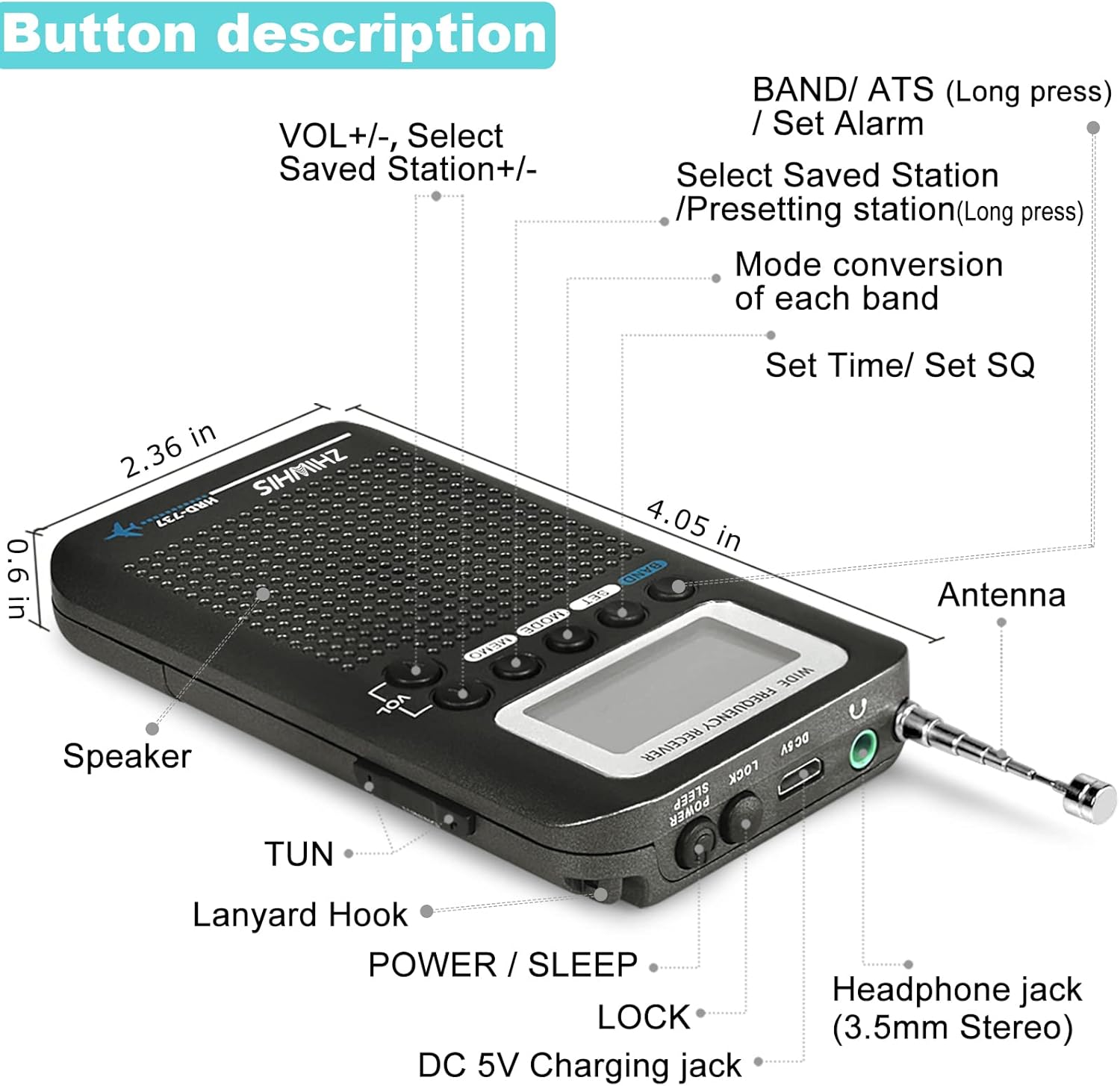
This diagram illustrates the various buttons and ports on the ZHIWHIS HRD-737 radio, including the speaker, antenna, headphone jack, DC 5V charging jack, LOCK switch, POWER/SLEEP button, TUN+/- buttons, VOL+/- buttons, BAND/ATS button, SET button, MODE button, and MEMO button.
- VOL+/-: Adjusts volume. Also used to select saved stations.
- BAND/ATS: Short press to cycle through bands (FM, AM, SW, CB, Air, VHF). Long press for Automatic Tuning Storage (ATS).
- SET: Used to set time and SQ (Squelch) level.
- MODE: Converts mode within each band.
- MEMO: Short press to select saved stations. Long press to save the current station.
- TUN+/-: Tunes frequency up or down.
- POWER/SLEEP: Short press to power on/off. Long press to activate sleep timer.
- LOCK: Slides to lock/unlock buttons to prevent accidental presses.
- Headphone Jack (3.5mm Stereo): For connecting earphones.
- DC 5V Charging Jack: Micro USB port for charging the internal battery.
- Antenna: Retractable telescopic antenna for signal reception.
- Lanyard Hook: Point for attaching the neck lanyard.
5. Setup
5.1. Charging the Battery
The HRD-737 radio comes with a built-in 700mAh rechargeable lithium battery. Before first use, it is recommended to fully charge the battery.
- Connect the small end of the provided USB charging cable to the DC 5V Charging Jack on the side of the radio.
- Connect the standard USB end of the cable to a USB power adapter (not included) or a computer USB port.
- The charging indicator light will illuminate. Once fully charged, the light may change color or turn off, depending on the specific unit.
- A full charge typically provides up to 15 hours of operation.

This image provides a view of the built-in 700mAh 3.7V large capacity lithium battery inside the ZHIWHIS HRD-737 radio, highlighting its power source.
5.2. Antenna Extension
For optimal reception, especially on FM, SW, CB, Air, and VHF bands, extend the telescopic antenna fully. For AM reception, the internal ferrite bar antenna is primarily used, but extending the telescopic antenna can sometimes improve signal.
- Gently pull the telescopic antenna upwards until it is fully extended.
- For certain bands or weak signals, you may use the included external extend antenna. Clamp the clip of the extend antenna to the tip of the telescopic antenna.
- Adjust the direction and length of the antenna to find the best receiving position for clearer audio.

This image shows the ZHIWHIS HRD-737 radio connected to its extend antenna, which is clipped to the telescopic antenna. The extend antenna is depicted as a long blue wire, illustrating how it can be positioned for better signal reception, particularly for FM and shortwave bands.
6. Operating Instructions
6.1. Power On/Off
Press the POWER/SLEEP button briefly to turn the radio on or off.
6.2. Band Selection
Press the BAND/ATS button briefly to cycle through the available frequency bands: FM, AM, SW, CB, Air, and VHF. The current band will be displayed on the screen.

This image highlights the wide frequency reception capabilities of the ZHIWHIS HRD-737 radio, showing the supported frequency ranges for VHF (87.5-108MHz), AIR (118-138MHz), CB (25-28MHz), SW (2.3-30MHz), and AM (522-1710KHz).
6.3. Tuning Stations
- Automatic Tuning Storage (ATS): Long press the BAND/ATS button. The radio will automatically scan and store available stations within the current band. Each band can store up to 50 stations.
- Manual Search: Use the TUN+/- buttons to manually adjust the frequency up or down. A short press will fine-tune, while a long press will initiate a quick scan to the next strong signal.
6.4. Saving and Recalling Stations
- To Save: Tune to the desired station. Long press the MEMO button. The display will show a memory location. Use VOL+/- to select a memory slot, then press MEMO again to confirm.
- To Recall: Short press the MEMO button. Use VOL+/- to cycle through saved stations.
6.5. Setting Time and Alarm
- Setting Time: Press the SET button. Use TUN+/- to adjust hours and minutes. Press SET again to confirm.
- Setting Alarm: While in clock mode, long press the BAND/ATS button (or follow specific instructions in the included user manual for alarm setup). Use TUN+/- to set the alarm time.
6.6. Sleep Timer
Long press the POWER/SLEEP button while the radio is on. The display will show the sleep timer duration (e.g., 90, 60, 30, 15 minutes). Continue pressing to cycle through options. The radio will automatically turn off after the selected time.
6.7. Using Earphones
Insert the 3.5mm plug of your stereo earphones into the headphone jack on the side of the radio. The internal speaker will be muted, allowing for private listening.
7. Maintenance
- Cleaning: Use a soft, dry cloth to clean the radio's exterior. Do not use abrasive cleaners, solvents, or strong chemicals, as they may damage the surface.
- Battery Care: To prolong battery life, avoid fully discharging the battery frequently. If the radio will not be used for an extended period, charge it at least once every three months.
- Storage: Store the radio in a cool, dry place away from direct sunlight, extreme temperatures, and high humidity. Use the provided waterproof storage bag for protection.
- Antenna Care: Handle the telescopic antenna gently to prevent bending or breaking. When not in use, retract it fully.
8. Troubleshooting
| Problem | Possible Cause | Solution |
|---|---|---|
| No power / Radio does not turn on | Battery is depleted. | Charge the radio using the USB cable. |
| Poor reception / Static | Antenna not extended or positioned correctly. Weak signal in current location. Interference from electronic devices. | Fully extend the telescopic antenna and adjust its direction. Use the external extend antenna for better reception. Move to a location with better signal. Move away from other electronic devices. |
| No audio from speaker/earphones | Volume is too low. Earphones not fully inserted. Radio is locked. | Increase the volume using VOL+ button. Ensure earphones are fully plugged in. Check the LOCK switch and unlock if necessary. |
| Cannot save frequencies | Incorrect procedure for saving. | Ensure you long press the MEMO button to initiate saving, then use VOL+/- to select a slot, and press MEMO again to confirm. Refer to section 6.4. |
| Display is frozen / Unresponsive buttons | Radio is locked. Temporary software glitch. | Check the LOCK switch and unlock if necessary. Try turning the radio off and on again. If issue persists, allow battery to fully drain and then recharge. |
9. Specifications
| Feature | Specification |
|---|---|
| Model Number | HRD-737 |
| Product Dimensions | 4.05 x 2.36 x 0.59 inches (10.29 x 5.99 x 1.5 cm) |
| Item Weight | 3.53 ounces (100 grams) |
| Battery | Built-in 700mAh rechargeable lithium battery |
| Tuner Technology | DSP (Digital Signal Processing) |
| Radio Bands Supported | FM, AM, SW, CB, AIR, VHF |
| Connectivity Technology | USB (for charging) |
| Special Features | Sleep Timer, Alarm Clock, Signal Strength Display, 3.5mm Headphone Jack |
| Memory Stations | Up to 50 per band |
10. Warranty and Support
ZHIWHIS is committed to providing high-quality radio products. If you encounter any problems with your HRD-737 radio, please contact the seller or manufacturer directly for assistance. They are dedicated to providing a satisfactory solution for any product-related issues.
For further support or inquiries, please refer to the contact information provided with your purchase or visit the official ZHIWHIS website.