
1. Important Safety Information
Please read and understand all safety instructions before installing or operating the projector lamp. Failure to follow these instructions may result in injury or damage to the product or projector.
- Burn Hazard: To avoid burns, do not drop the lamp module or touch the lamp bulb directly. Allow the projector to cool for at least 60 minutes before attempting to replace the lamp.
- Always disconnect the projector from the power outlet before performing any maintenance or lamp replacement.
- Do not operate the projector with the lamp cover removed.
- Dispose of used lamps according to local regulations.
2. Product Overview
The CARSN NP05LP is a high-quality replacement projector lamp designed to provide optimal brightness and a long lifespan for compatible NEC projector models. This lamp module includes the bulb and housing for convenient installation.
Key Features:
- Superior light output for enhanced image quality and reduced visual fatigue.
- Estimated lamp lifetime of approximately 2000 hours.
- Designed for easy and quick installation.
- Undergoes rigorous testing to ensure performance and reliability.
- Professional customer service support is available.
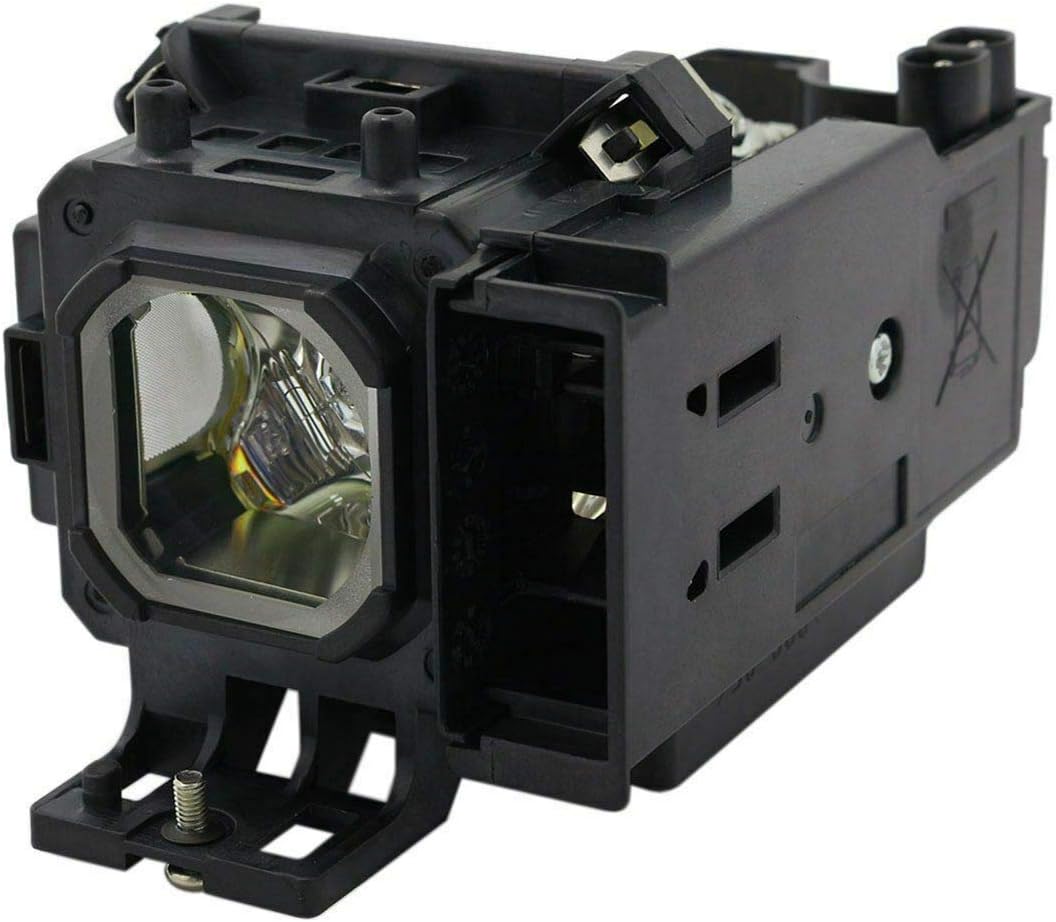
Image 1: Front view of the CARSN NP05LP replacement projector lamp module, showing the bulb and housing.

Image 2: Angled view of the CARSN NP05LP replacement projector lamp module, highlighting the internal components and connection points.
3. Compatibility
This CARSN NP05LP replacement lamp is compatible with the following NEC projector models:
- NEC NP901
- NEC NP905
- NEC VT700
- NEC VT800
- NEC NP901W
- NEC NP905G
- NEC NP901WG
- NEC VT800G
- NEC VT700G
4. Installation Guide
Follow these general steps to replace your projector lamp. Always refer to your specific projector's user manual for detailed, model-specific instructions and safety precautions.
- Power Off and Cool Down: Turn off the projector and unplug it from the power outlet. Allow the projector to cool down completely for at least 60 minutes to prevent burns from the hot lamp.
- Locate Lamp Compartment: Identify the lamp compartment cover on your projector. This is typically secured by screws.
- Remove Lamp Cover: Use a screwdriver to loosen the screws securing the lamp cover. Carefully remove the cover.
- Remove Old Lamp: Loosen the screws that hold the old lamp module in place. Gently pull the handle on the lamp module to slide it out of the projector. Avoid touching the glass part of the bulb.
- Insert New Lamp: Carefully insert the new CARSN NP05LP lamp module into the projector, ensuring it is seated correctly. Push it firmly until it clicks into place.
- Secure New Lamp: Tighten the screws to secure the new lamp module.
- Replace Lamp Cover: Reattach the lamp compartment cover and tighten its screws.
- Power On and Reset Lamp Timer: Plug the projector back into the power outlet and turn it on. Navigate to the projector's menu to reset the lamp timer. Refer to your projector's manual for specific instructions on resetting the lamp timer.
5. Operating Instructions
To maximize the performance and lifespan of your CARSN NP05LP projector lamp, consider the following operational guidelines:
- Avoid Frequent On/Off Cycles: Turning the projector on and off frequently can reduce lamp life. Allow the lamp to operate for a reasonable period before shutting down.
- Ensure Proper Ventilation: Operate the projector in a well-ventilated area. Blocked vents can lead to overheating and premature lamp failure.
- Use Eco Mode (if available): If your projector has an 'Eco Mode' or similar power-saving setting, using it can extend lamp life by reducing brightness and heat output.
- Allow Proper Cool Down: Always allow the projector's internal cooling fans to complete their cycle after turning off the projector before unplugging it or moving it.
6. Maintenance
Regular maintenance can help prolong the life of your projector and its lamp:
- Clean Air Filters: Periodically clean or replace the projector's air filters to ensure proper airflow and prevent dust buildup, which can cause overheating.
- Keep Projector Clean: Gently wipe the exterior of the projector with a soft, dry cloth. Avoid using abrasive cleaners or solvents.
- Avoid Touching the Bulb: When handling the lamp module, always hold it by its housing. Oils from your skin can damage the bulb and reduce its lifespan.
- Proper Storage: If the projector will not be used for an extended period, store it in a cool, dry place away from direct sunlight and extreme temperatures.
7. Troubleshooting
If you encounter issues after installing your new lamp, refer to the following common problems and solutions:
| Problem | Possible Cause | Solution |
|---|---|---|
| Lamp does not light up. | Lamp not properly installed, lamp cover not secured, projector not receiving power, faulty lamp. | Ensure lamp is fully seated and screws are tightened. Check lamp cover is securely closed. Verify power connection. If issues persist, contact support. |
| Image is dim or discolored. | Lamp nearing end of life, projector settings, dirty lens/filters. | Reset lamp timer. Check projector brightness/color settings. Clean projector lens and air filters. |
| Projector displays a lamp warning message. | Lamp timer not reset, lamp issue. | Reset the lamp timer in the projector's menu. If the warning persists after resetting, the lamp may be faulty. |
| Projector overheats and shuts down. | Blocked ventilation, dirty air filters. | Ensure projector vents are clear. Clean or replace air filters. Operate in a well-ventilated area. |
8. Specifications
| Specification | Detail |
|---|---|
| Bulb Model | NP05LP |
| Wattage | 220W |
| Lamp Type | Projector Lamp with Housing |
| Estimated Lifespan | Approximately 2000 hours |
| Material | NP05LP (Housing material not specified, but refers to the module type) |
| Item Weight | 9.1 ounces (258 grams) |
| Package Dimensions | 5.24 x 4.49 x 4.41 inches (13.3 x 11.4 x 11.2 cm) |
| UPC | 718774507235 |
| Manufacturer | Carsn |
9. Warranty and Support
CARSN is committed to providing quality products and customer satisfaction.
Warranty Information:
- CARSN Projector Lamps come with a 120-day warranty from the date of purchase.
- During the warranty period, CARSN offers technical support for any issues related to the product.
Customer Support:
For technical assistance, warranty claims, or any product-related inquiries, please contact CARSN customer service through the retailer's platform or the official CARSN support channels. Please have your purchase details and product model number (NP05LP) ready when contacting support.