
Introduction
This manual provides instructions for the Xtrasaver EN3R39S/EN3I39S remote control, designed as an original equipment manufacturer (OEM) replacement for various Sharp Smart 4K HDTV models. This remote control offers direct functionality without complex setup procedures.
Compatible Sharp TV Models include:
- LC-43N7002U, LC-43P7000, LC-43P7000U
- LC-50N7002U, LC-50N8002U, LC-50P7000, LC-50P7000U, LC-50P8000, LC-50P8000U
- LC-55N7002U, LC-55N8002U, LC-55P620, LC-55P620U, LC-55P7000, LC-55P7000U, LC-55P8000, LC-55P8000U
- LC-65N8002U, LC-65P6000, LC-65P6000U, LC-65P620, LC-65P620U, LC-65P8000, LC-65P8000U
Setup
The Xtrasaver EN3R39S/EN3I39S remote control is designed for immediate use with compatible Sharp Smart 4K HDTVs. No programming or pairing is required.
Battery Installation
- Locate the battery compartment cover on the back of the remote control.
- Slide the cover downwards or press the latch and lift to open the compartment.
- Insert two new AAA alkaline batteries, ensuring the positive (+) and negative (-) terminals align correctly with the markings inside the compartment.
- Replace the battery compartment cover by sliding it back into place until it clicks securely.
Once batteries are installed, the remote control is ready for operation.

Figure 1: Front view of the Xtrasaver EN3R39S/EN3I39S remote control. This image displays the button layout, including power, input, number keys, volume, channel, navigation, and dedicated smart TV app buttons.
Operating Instructions
Point the remote control directly at your Sharp Smart 4K HDTV. Ensure there are no obstructions between the remote and the TV's infrared receiver.
Key Functions:
- Power Button (●): Turns the TV on or off.
- Input Button: Cycles through available input sources (HDMI, AV, etc.).
- Number Buttons (0-9): Directly select TV channels or input numerical data.
- Volume Up/Down (VOL +/-): Adjusts the TV's volume level.
- Channel Up/Down (CH +/-): Changes TV channels sequentially.
- Navigation Pad (Up, Down, Left, Right, OK): Used to navigate menus and confirm selections.
- Back Button: Returns to the previous menu or screen.
- Apps Button: Accesses the TV's smart applications menu.
- Dedicated App Buttons (e.g., VUDU, Netflix, Fandango Now, YouTube, TikiLive, NRT, 4K Now): Provides direct access to specific streaming services or functions.
- Mute Button: Silences the TV audio.
- CC (Closed Caption): Toggles closed captions on or off.
- Theater, Sports, Aspect, Sleep: Access specific TV modes or functions.
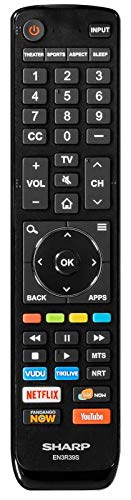
Figure 2: Angled view of the Xtrasaver EN3R39S/EN3I39S remote control, highlighting the ergonomic design and button placement.
Maintenance
Battery Replacement
Replace batteries when the remote control becomes unresponsive or its range decreases. Always replace both batteries simultaneously with new AAA alkaline batteries. Do not mix old and new batteries, or different types of batteries.
Cleaning
To clean the remote control, gently wipe its surface with a soft, dry cloth. For stubborn dirt, slightly dampen the cloth with water. Avoid using harsh chemicals, abrasive cleaners, or excessive moisture, as these can damage the remote's electronics or finish.
Storage
Store the remote control in a cool, dry place away from direct sunlight and extreme temperatures. If the remote will not be used for an extended period, it is recommended to remove the batteries to prevent leakage and potential damage.
Troubleshooting
| Problem | Possible Cause | Solution |
|---|---|---|
| Remote control is not working. | Dead or incorrectly inserted batteries. | Replace batteries with new AAA alkaline batteries, ensuring correct polarity. |
| Remote control range is poor or intermittent. | Weak batteries; obstruction between remote and TV; remote not pointed at TV. | Replace batteries. Ensure a clear line of sight to the TV's IR receiver. Point the remote directly at the TV. |
| Specific buttons are unresponsive. | Dirt or debris under the button; internal malfunction. | Clean the remote surface. If the issue persists, the remote may require replacement. |
| TV does not respond to any remote commands. | TV is off or unplugged; TV's IR receiver is blocked or faulty. | Ensure the TV is powered on and plugged in. Check for any physical obstructions in front of the TV's IR receiver. |
Specifications
| Feature | Detail |
|---|---|
| Model Number | EN3R39S (also compatible with EN3I39S) |
| Brand | Xtrasaver |
| Compatible Devices | Sharp Smart 4K HDTVs (specific models listed in Introduction) |
| Power Source | 2 x AAA Alkaline Batteries (not included) |
| Color | Black |
| Special Feature | Ergonomic design |
| Max Number of Supported Devices | 1 (Television) |
| Package Dimensions | 8.62 x 1.97 x 0.87 inches |
| Item Weight | 3 ounces |
| Date First Available | July 17, 2019 |
Warranty and Support
For warranty information and customer support regarding your Xtrasaver EN3R39S/EN3I39S remote control, please refer to the documentation provided at the time of purchase or contact the seller directly. As this product is manufactured by Xtrasaver, any specific warranty terms would be provided by them.
For technical assistance related to your Sharp Smart 4K HDTV, please consult your television's user manual or contact Sharp customer support.