
1. Introduction
This manual provides instructions for the proper setup, operation, and maintenance of your SKMEI Model 1537 Digital Sport Watch. This watch features a digital display, chronograph, alarm, 12/24-hour format, auto calendar, and a luminous backlight. It is designed for daily wear and suitable for various sports activities, including swimming, with a water resistance rating of 50 meters.
2. Watch Components
Familiarize yourself with the main components and buttons of your SKMEI 1537 watch:
- Display: Shows time, date, and other functions.
- Button A (Top-Left): Activates the backlight.
- Button B (Bottom-Left): Cycles through different modes (Time, Alarm, Chronograph).
- Button C (Top-Right): Used for starting/stopping functions and increasing values during setting.
- Button D (Bottom-Right): Used for resetting functions and decreasing/adjusting values during setting.
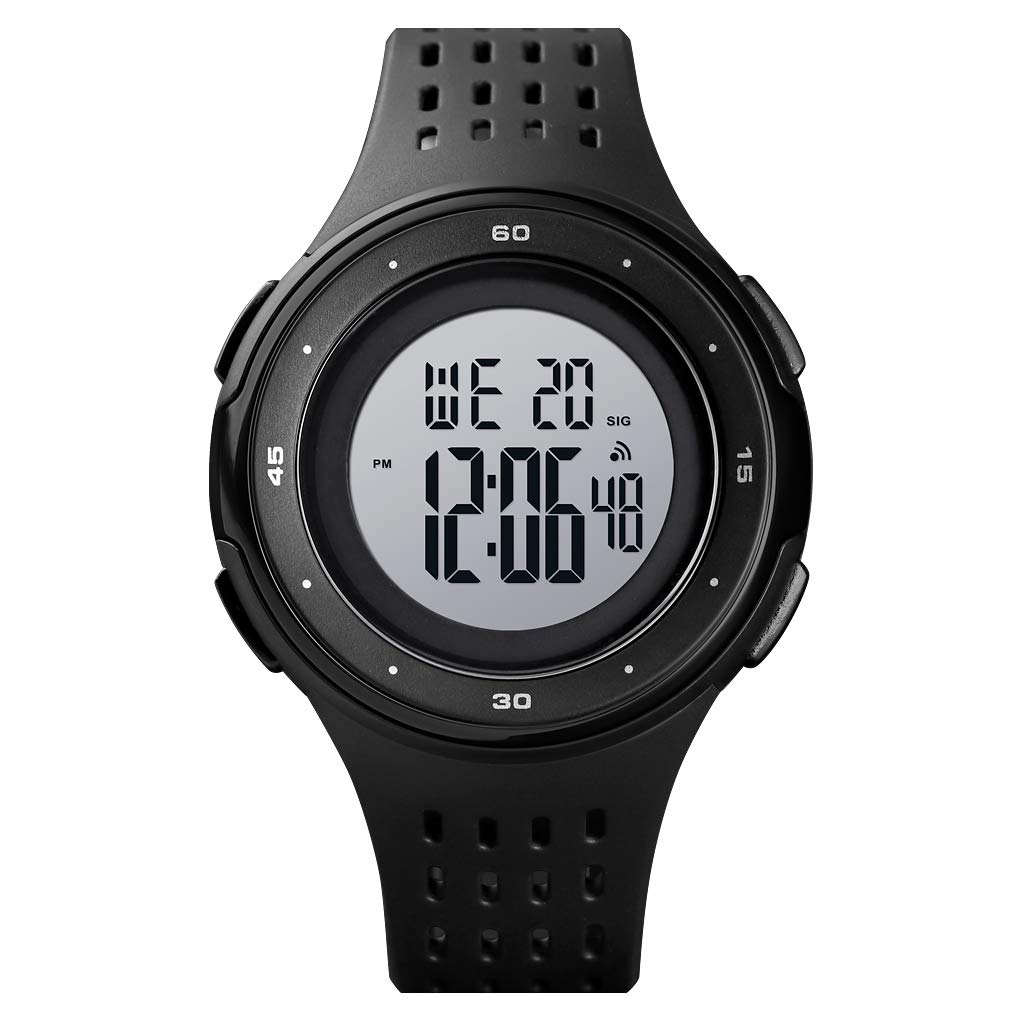
Figure 1: Front view of the SKMEI Model 1537 Digital Sport Watch, showing the digital display and four control buttons.
3. Setup and Basic Operation
3.1 Initial Power On
Your watch comes with a pre-installed battery. If the display is blank, press any button to activate it. Remove any protective film from the watch face before use.
3.2 Setting Time and Date
- From the normal time display, press Button B three times to enter the time setting mode. The seconds digits will begin to flash.
- Press Button D to reset the seconds to zero.
- Press Button B once to move to the hour setting. The hour digits will flash.
- Press Button C to increase the hour. Press Button D to decrease the hour. Note the 'PM' indicator for 12-hour format.
- Press Button B again to move to the minute setting. The minute digits will flash.
- Press Button C to increase the minute. Press Button D to decrease the minute.
- Continue pressing Button B to cycle through year, month, and day settings, adjusting each with Button C (increase) or Button D (decrease).
- After setting all desired values, press Button B to exit the setting mode and return to the normal time display.
3.3 Using the Backlight
To illuminate the display in low-light conditions, press Button A (Top-Left). The backlight will remain active for a few seconds.

Figure 2: Comparison of the SKMEI Model 1537 display in normal and luminous (backlit) modes.
4. Operating Functions
4.1 Alarm Function
- From the normal time display, press Button B once to enter the Alarm Mode.
- Press Button C to toggle the alarm ON/OFF. An alarm icon will appear/disappear on the display.
- To set the alarm time, press Button D. The hour digits will flash.
- Press Button C to increase the hour. Press Button D to move to the minute setting.
- Press Button C to increase the minute.
- Once the desired alarm time is set, press Button D to confirm and exit alarm time setting.
- Press Button B to return to the normal time display.
4.2 Chronograph (Stopwatch) Function
- From the normal time display, press Button B twice to enter the Chronograph Mode. The display will show '00:00:00'.
- Press Button C to start the stopwatch.
- Press Button C again to stop the stopwatch.
- While the stopwatch is stopped, press Button D to reset it to '00:00:00'.
- Press Button B to return to the normal time display.
4.3 12/24-Hour Format
During the time setting procedure (Section 3.2), when setting the hour, pressing Button C will cycle between 12-hour (with AM/PM indicator) and 24-hour formats.
5. Water Resistance
Your SKMEI 1537 watch is rated for 50 meters (5 ATM) water resistance. This means it is suitable for swimming, showering, and general water exposure. However, please observe the following precautions:
- Do not press any buttons while the watch is submerged in water. This can compromise the water seal and lead to water ingress.
- Avoid exposing the watch to hot water or steam (e.g., hot showers, saunas), as this can damage the seals.
- After exposure to saltwater, rinse the watch with fresh water and dry it thoroughly.
6. Maintenance
6.1 Cleaning
Wipe the watch case and strap regularly with a soft, dry cloth. For stubborn dirt, a slightly damp cloth can be used, followed by immediate drying. Avoid using chemical cleaners or solvents, as these can damage the watch materials.
6.2 Battery Replacement
The watch uses 1 Lithium Metal battery. When the display becomes dim or functions become erratic, it may be time to replace the battery. Battery replacement should ideally be performed by a qualified watch technician to ensure the water resistance seal is properly maintained.
6.3 Storage
When not in use for extended periods, store the watch in a cool, dry place away from direct sunlight and extreme temperatures.
7. Troubleshooting
- Display is blank: Check if the battery needs replacement. If recently replaced, ensure it is installed correctly.
- Time is incorrect: Re-set the time following the instructions in Section 3.2. Ensure the correct 12/24-hour format is selected.
- Alarm not sounding: Ensure the alarm function is activated (alarm icon visible) as per Section 4.1. Check alarm time setting.
- Buttons not responding: Try pressing all buttons firmly. If the issue persists, a battery replacement or professional inspection may be required.
8. Specifications
| Feature | Specification |
|---|---|
| Model Number | 1537 |
| Movement Type | Digital |
| Case Material | ABS Plastic |
| Strap Material | PU Plastic |
| Water Resistance | 50 Meters (5 ATM) |
| Display Type | Digital |
| Battery Type | 1 Lithium Metal (included) |
| Case Diameter | 47mm (approx. 1.85 inches) |
| Case Thickness | 14mm (approx. 0.55 inches) |
| Band Width | 20mm (approx. 0.79 inches) |
| Functions | Time, Date, Day, Alarm, Chronograph, Luminous Backlight, 12/24H Format |
9. Warranty and Support
For warranty information, please refer to the documentation provided at the time of purchase or contact your retailer. For product support or further assistance, please reach out to the seller or SKMEI customer service.