
1. Introduction
This manual provides essential instructions for the proper use, setup, operation, and maintenance of your Sanny Tetrapolar Bioimpedance Device, Model BIA 1010. Please read this manual thoroughly before operating the device to ensure accurate measurements and safe usage.
The Sanny Tetrapolar Bioimpedance device is designed to provide detailed body composition data, including:
- Skeletal Muscle Mass (SMM)
- Total Body Water (TBW)
- Fat-Free Mass
- Body Fat (BF)
- Ideal Weight
- Basal Energy Expenditure (BEE)
- Total Energy Expenditure (TEE)
The accompanying software generates graphs comparing current values with theoretical ideal values and provides comparative graphs between previous evaluations for comprehensive progress tracking.
2. Safety Information and Certifications
Your Sanny Tetrapolar Bioimpedance device complies with stringent safety standards. It holds ANVISA (National Health Surveillance Agency) REGISTRATION No. 81540240002 and compulsory certification, adhering to the technical standards ABNT NBR IEC 60601-1:2016; ABNT NBR IEC 60601-1-2:2013; ABNT NBR IEC 60601-1-6:2011; and ABNT NBR IEC 60601-1-9:2014.

Figure 2.1: Official certification details confirming the Sanny Tetrapolar Bioimpedance device complies with international IEC 60601 standards and has ANVISA registration.
Important Safety Precautions:
- Do not use the device on individuals with pacemakers or other implanted electronic medical devices.
- Keep the device away from water and extreme temperatures.
- Ensure all connections are secure before operation.
- Only use accessories provided or approved by Sanny.
3. Product Overview
The Sanny Tetrapolar Bioimpedance Device BIA 1010 is a compact and user-friendly instrument for body composition analysis. It utilizes tetrapolar bioimpedance technology for precise measurements.
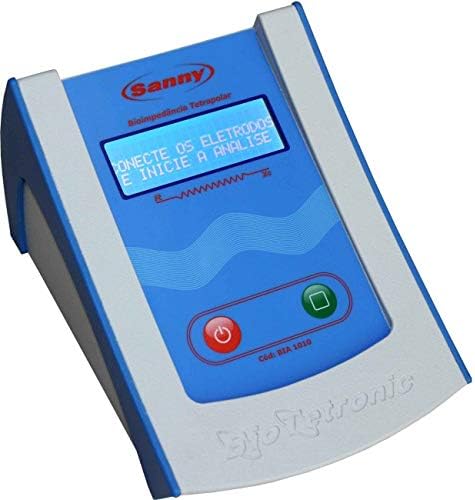
Figure 3.1: The Sanny Tetrapolar Bioimpedance device, model BIA 1010, features a clear display and intuitive control buttons for power and analysis initiation.
3.1 Components
The complete package includes the following items:
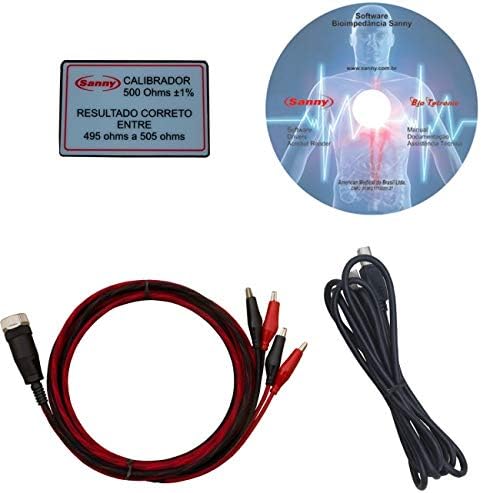
Figure 3.2: This image displays the complete set of components: the bioimpedance device, electrode cables, a 500 Ohm calibrator plate, and the software CD for data analysis.
- Sanny Tetrapolar Bioimpedance Device (BIA 1010)
- Electrode Cables
- Calibration Plate (500 Ohms ±1%)
- Software CD for Bioimpedance Analysis
- User Manual (this document)
4. Setup
Follow these steps to set up your Sanny Tetrapolar Bioimpedance Device:
- Unpack the Device: Carefully remove all components from the packaging.
- Power Connection: Connect the device to a suitable power source using the provided power adapter.
- Electrode Cable Connection: Connect the electrode cables to the designated ports on the Sanny device. Ensure a firm connection.
- Software Installation: Insert the software CD into your computer and follow the on-screen instructions to install the Sanny Bioimpedance Analysis Software. This software is crucial for data management and report generation.
- Device-to-Computer Connection: Connect the Sanny device to your computer using the appropriate cable (e.g., USB, if provided) to enable data transfer to the installed software.
5. Operating Instructions
Before performing an analysis, ensure the subject is properly prepared (e.g., fasted, hydrated, no strenuous exercise prior). Refer to clinical guidelines for specific preparation protocols.
- Power On: Press the red power button (●) on the device to turn it on. The display will illuminate.
- Connect Electrodes to Subject: Attach the electrodes to the subject's body according to the specific tetrapolar measurement protocol (e.g., hands and feet). Ensure good skin contact.
- Initiate Analysis: Once the electrodes are connected, the device display will show a prompt like "CONECTE OS ELETRODOS E INICIE A ANALISE" (CONNECT THE ELECTRODES AND START THE ANALYSIS). Press the green button (■) to begin the analysis.
- Wait for Measurement: The device will conduct the bioimpedance measurement. Keep the subject still during this process.
- Data Transfer: After the measurement is complete, transfer the data to the Sanny Bioimpedance Analysis Software on your computer for detailed interpretation and report generation.
6. Data Interpretation
The Sanny Bioimpedance Analysis Software provides comprehensive reports and graphical representations of the body composition data. Understanding these results is key to effective health monitoring.
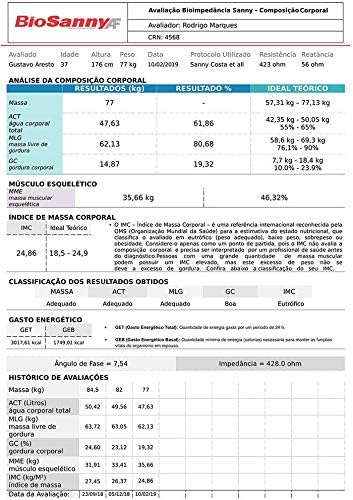
Figure 6.1: An example of the detailed body composition report generated by the Sanny software, including current values, percentage results, and theoretical ideal ranges for various metrics.
6.1 Key Metrics Explained
- Mass: Total body weight.
- ACT (Total Body Water): The total amount of water in the body.
- MLG (Fat-Free Mass): Body mass excluding fat, primarily composed of muscle, bone, and water.
- GC (Body Fat): The total amount of fat in the body.
- MME (Skeletal Muscle Mass): The mass of muscles attached to the skeleton.
- IMC (BMI - Body Mass Index): A measure of body fat based on height and weight.
- GEB (Basal Energy Expenditure): The minimum amount of energy required to maintain vital functions at rest.
- GET (Total Energy Expenditure): The total number of calories burned in a day, including activity.
6.2 Graphical Analysis
The software provides visual aids to track progress and compare results against theoretical ideals.

Figure 6.2: This image shows graphical representations of body composition data, comparing current results with theoretical ideals, and a trend graph for phase angle over multiple evaluations.
Graphs typically include:
- Bar charts comparing current values (e.g., Mass, ACT, MLG, GC) with theoretical minimum and maximum ideal ranges.
- Trend lines for metrics like Phase Angle over multiple evaluation dates, allowing for longitudinal analysis.
7. Maintenance
Proper maintenance ensures the longevity and accuracy of your Sanny Bioimpedance Device.
- Cleaning: Use a soft, dry cloth to clean the device's exterior. For stubborn marks, a slightly damp cloth with mild detergent can be used, ensuring no liquid enters the device.
- Electrode Care: Clean electrodes after each use with an appropriate disinfectant. Store them properly to prevent damage.
- Storage: Store the device in a cool, dry place, away from direct sunlight and extreme temperatures.
- Calibration: Periodically check the device's calibration using the provided 500 Ohm calibrator plate. Refer to the software instructions for calibration procedures.
8. Troubleshooting
If you encounter issues with your Sanny Bioimpedance Device, try the following steps:
- Device Not Powering On: Check the power cable connection and ensure the power outlet is functional.
- "Connect Electrodes" Message Persists: Verify that the electrode cables are securely connected to the device and that the electrodes are properly attached to the subject's skin. Ensure good skin contact.
- Inaccurate Readings: Ensure the subject is prepared according to guidelines (e.g., hydrated, no recent strenuous activity). Check electrode placement and device calibration.
- Software Connection Issues: Verify the device-to-computer connection cable is secure. Restart the software and/or computer if necessary.
For persistent issues, contact Sanny customer support or an authorized service center.
9. Specifications
| Brand | Sanny |
| Model | BIA 1010 |
| Manufacturer | American Medical do Brasil Ltda |
| ANVISA Registration | 81540240002 |
| Package Dimensions | 36 x 29 x 16 cm |
| Package Weight | 1.87 kg |
| ASIN | B07VDGQPXY |
| EAN | 7898676390326 |
| Available for purchase since | 17 July 2019 |
10. Warranty and Support
For warranty information, technical support, or service inquiries, please contact the manufacturer, American Medical do Brasil Ltda, or your authorized Sanny distributor. Ensure you have your device's model number (BIA 1010) and ANVISA registration number (81540240002) available when seeking support.
You can also visit the official Sanny store for more information: Sanny Official Store