1. Introduction
This user manual provides essential information for the safe and effective use of your FITHOOD replacement battery. Please read this manual thoroughly before installation and operation to ensure optimal performance and longevity of the battery.
This replacement battery is designed for specific Panasonic shaver models, including ER153, E150, E151, E152, E153, E154, E155, ER150, ER151, ER152, and ER154.
2. Safety Information
WARNING: Failure to follow these safety instructions may result in fire, electric shock, injury, or damage to the product or property.
- Do not attempt to disassemble, open, or service the battery pack.
- Do not crush, puncture, short external contacts, or dispose of in fire or water.
- Do not store above 60°C (140°F).
- Replace only with the battery pack designated for this product.
- Keep the battery out of reach of children.
- Dispose of used batteries according to local regulations.
- Ensure the battery is fully charged before first use to reduce risk of fire or burns.

Image 2.1: Side view of the FITHOOD replacement battery showing safety warnings and specifications.
3. Product Overview
The FITHOOD replacement battery (Model: CS-PHS920SL) is a high-quality Ni-MH battery designed to restore power to your compatible Panasonic shaver. It features a 2000mAh capacity and 2.4V voltage.

Image 3.1: The FITHOOD replacement battery pack, showing its dual-cell configuration and connection tabs.
3.1 Package Contents
- 1 x FITHOOD Replacement Battery (Model: CS-PHS920SL)
4. Setup and Installation
Note: Battery replacement in shavers often requires technical skill and may involve disassembling the shaver. If you are unsure, it is recommended to seek professional assistance or refer to your shaver's specific service manual.
- Power Off: Ensure your Panasonic shaver is completely powered off and disconnected from any charging source.
- Disassembly: Carefully disassemble your shaver according to its specific model's instructions to access the internal battery compartment. This may involve removing screws or prying open casing components.
- Remove Old Battery: Gently disconnect the old battery from the shaver's circuit board. Note the polarity (+/-) before removal.
- Install New Battery: Connect the FITHOOD replacement battery, ensuring correct polarity. The battery features tabs for soldering or secure connection.
- Reassembly: Carefully reassemble your shaver, ensuring all components are properly seated and secured.
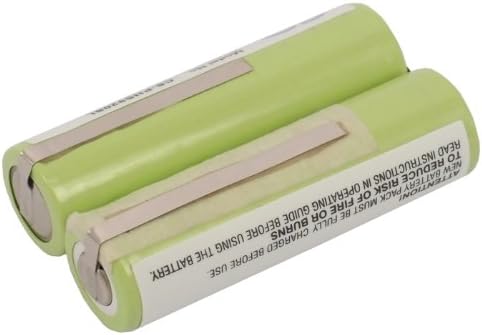
Image 4.1: Close-up of the FITHOOD replacement battery showing the model number (CS-PHS920SL), part number, rating (2.4VDC, 2000mAh, 4.8Wh), and Nickel Metal Hydride Battery Pack label.
5. Operating Instructions
5.1 Initial Charge
After installing the new battery, it is crucial to fully charge it before the first use. Connect your shaver to its original charging adapter and allow it to charge for the recommended duration as per your shaver's manual, typically 8-12 hours for a full charge cycle.
5.2 Regular Use
Use your shaver as normal. For optimal battery life, it is generally recommended to fully discharge the battery occasionally before recharging, especially for Ni-MH batteries, to prevent the "memory effect."
6. Maintenance and Storage
6.1 Storage
- Store the battery in a cool, dry place, away from direct sunlight and extreme temperatures.
- If storing for extended periods, charge the battery to approximately 50% capacity.
- Avoid storing the battery above 60°C (140°F).
6.2 Disposal
Do not dispose of the battery in household waste. Ni-MH batteries contain materials that should be recycled. Please dispose of the battery at a designated recycling facility in accordance with local environmental regulations.

Image 6.1: Bottom view of the FITHOOD replacement battery showing various international compliance and disposal symbols, including the "do not dispose in trash" symbol.
7. Troubleshooting
| Problem | Possible Cause | Solution |
|---|---|---|
| Shaver does not power on after battery replacement. | Incorrect battery installation (polarity), battery not charged, faulty connection. |
|
| Battery does not hold a charge. | Battery not fully charged, charger issue, battery defect. |
|
| Reduced shaver performance. | Battery not fully charged, shaver components need cleaning. |
|
8. Specifications
| Model Number: | CS-PHS920SL |
| Battery Type: | Ni-MH (Nickel-Metal Hydride) |
| Capacity: | 2000mAh |
| Voltage: | 2.4V |
| Watt-Hours (Wh): | 4.80Wh |
| Dimensions: | 48.73 x 28.68 x 14.31mm (1.92 x 0.56 x 1.13 inches) |
| Weight: | 120g / 4.23oz |
| Certifications: | ISO9001, RoHS, CE |
| Compatible Panasonic Models: | ER153, E150, E151, E152, E153, E154, E155, ER150, ER151, ER152, ER154 |
9. Warranty and Support
FITHOOD batteries are manufactured under strict quality control standards and are certified with ISO9001, RoHS, and CE for quality assurance.
For warranty information or technical support, please contact your retailer or the FITHOOD customer service department. When contacting support, please provide your battery model number (CS-PHS920SL) and details of your issue.
If you are unsure about compatibility, please send an email with your battery details or pictures to the seller for professional suggestions.