
1. Product Overview
This DCU TECNOLOGIC universal remote control is designed for use with LG LCD/LED televisions. It offers an operable distance of up to 8 meters and is ready to use without any complex setup procedures. The remote includes dedicated buttons for popular streaming services like Netflix and Prime Video, enhancing your viewing experience.
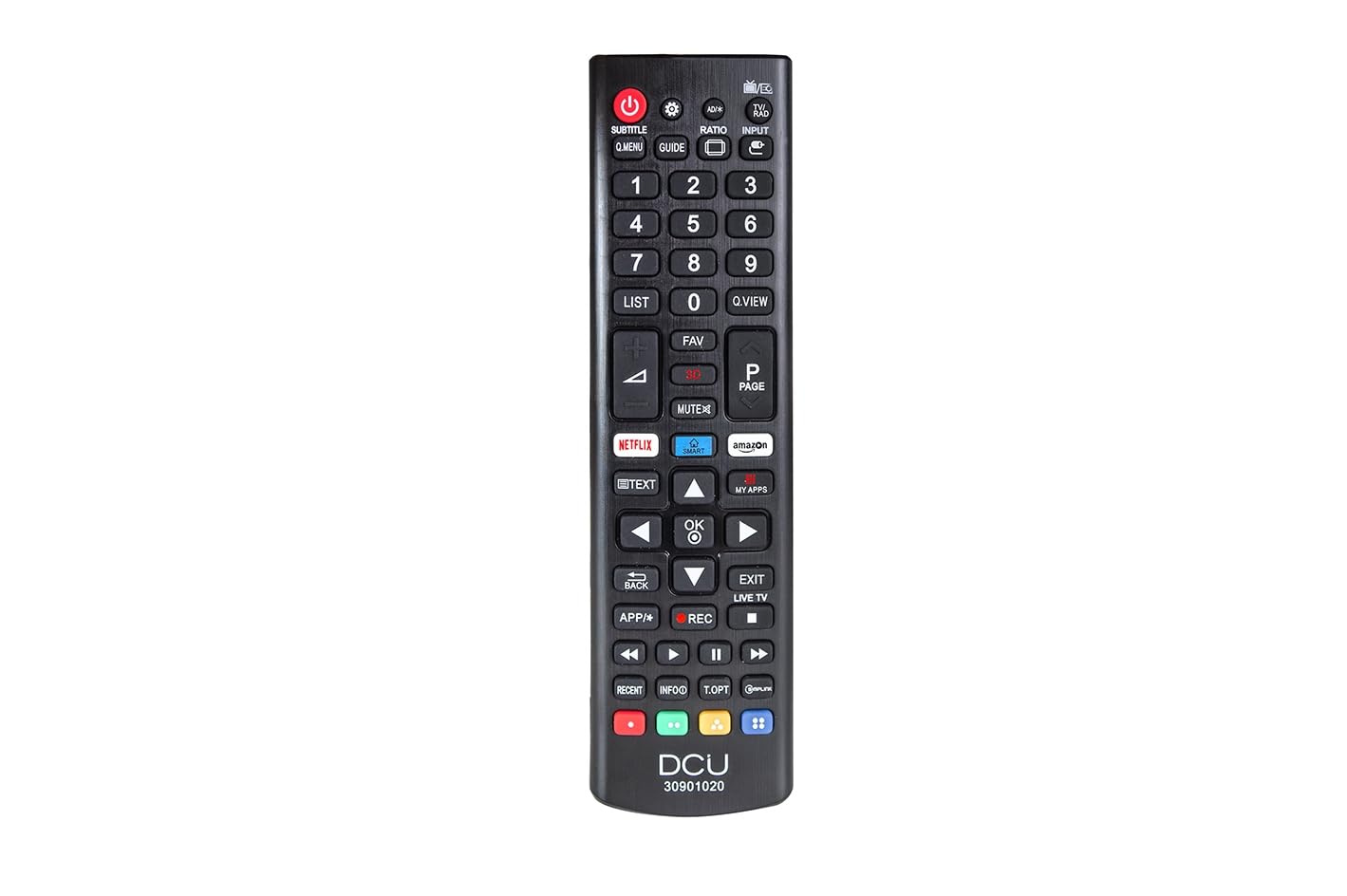
Image showing the front view of the DCU TECNOLOGIC LG Universal Remote Control, highlighting its button layout including dedicated Netflix and Prime Video buttons.
2. Setup
2.1 Battery Installation
The remote control requires two (2) AAA batteries for operation. Batteries are not included with the product.
- Locate the battery compartment on the back of the remote control.
- Slide the battery compartment cover downwards or in the direction indicated by an arrow to open it.
- Insert two AAA batteries, ensuring the positive (+) and negative (-) terminals align correctly with the markings inside the compartment.
- Replace the battery compartment cover by sliding it back into place until it clicks securely.
The remote control is now ready for use. No additional programming or pairing is required for compatible LG LCD/LED TVs.
3. Operating Instructions
This remote control functions identically to an original LG remote for basic TV operations.
3.1 Basic Functions
- Power Button: Turns the TV on or off.
- Volume Up/Down: Adjusts the sound level.
- Channel Up/Down: Changes TV channels.
- Number Buttons (0-9): Directly select TV channels.
- Navigation Buttons (Up, Down, Left, Right, OK/Enter): Used for menu navigation and selection.
- Mute Button: Silences the TV audio.
3.2 Special Features: Netflix and Prime Video Buttons
The remote includes dedicated buttons for quick access to Netflix and Amazon Prime Video. Pressing these buttons will launch the respective application on your LG Smart TV.
Important Note: The functionality of the Netflix and Prime Video buttons depends on whether your original LG TV remote control had these specific buttons and if your TV supports these applications. If your original remote did not feature these buttons, or if your TV model does not support direct app launch via remote, these buttons on the universal remote may not function.
4. Maintenance
- Cleaning: Use a soft, dry cloth to clean the remote control. Do not use liquid cleaners or abrasive materials.
- Battery Replacement: Replace batteries when the remote's response becomes sluggish or stops working. Always replace both batteries at the same time with new ones.
- Storage: Store the remote in a dry place, away from direct sunlight, extreme temperatures, and high humidity.
- Avoid Drops: Protect the remote from physical impact, as drops can damage internal components.
5. Troubleshooting
| Problem | Possible Cause | Solution |
|---|---|---|
| Remote control is not working. | Dead or incorrectly inserted batteries. Obstruction between remote and TV. Remote is too far from the TV. | Check and replace batteries, ensuring correct polarity. Remove any objects blocking the line of sight to the TV's IR receiver. Move closer to the TV (within 8 meters). |
| Netflix/Prime Video buttons do not work. | Original TV remote did not have these buttons. TV model does not support direct app launch. | Verify if your original LG TV remote had these specific buttons. Ensure your TV is a Smart TV and supports these applications. The universal remote replicates original remote functions; if the original lacked these, the universal remote's buttons may not activate them. |
| Buttons are unresponsive or sticky. | Dirt or debris under the buttons. | Clean the remote control with a soft, dry cloth. Avoid pressing buttons excessively hard. |
6. Specifications
| Feature | Detail |
|---|---|
| Brand | DCU TECNOLOGIC |
| Model Number | 30901020 |
| Compatible Devices | LG LCD/LED Televisions |
| Connectivity Technology | Infrared (IR) |
| Maximum Range | 8 meters |
| Power Source | 2 x AAA Batteries (not included) |
| Product Dimensions | 5 x 5 x 15 cm |
| Weight | 120 g |
| Special Features | Universal, Dedicated Netflix & Prime Video Buttons |
7. Warranty and Support
Information regarding product warranty and customer support is not provided in the available product details. Please refer to the product packaging or contact the retailer for specific warranty terms and support options.