
PUTORSEN GSMT-262P
PUTORSEN Dual Monitor Arm GSMT-262P Instruction Manual
Model: GSMT-262P
Introduction
Thank you for choosing the PUTORSEN Dual Monitor Arm GSMT-262P. This premium aluminum articulated gas spring arm is designed to enhance your workspace ergonomics by providing flexible positioning for two monitors. This manual provides essential information for safe installation, operation, and maintenance of your monitor arm.
Safety Information
- Read all instructions carefully before installation and use.
- Ensure your desk surface is strong enough to support the combined weight of the monitor arm and two monitors.
- Do not exceed the maximum weight capacity of 8 kg (17.6 lbs) per arm.
- Use only the provided hardware. If any parts are missing or damaged, contact customer support.
- Keep children and pets away during installation.
- Improper installation may result in property damage or personal injury.
Package Contents
Please verify that all components are present before beginning installation.
- Dual Monitor Arm Assembly
- Desk Clamp (C-clamp)
- Grommet Mount Hardware
- VESA Mounting Screws (various sizes)
- Hex Keys for Adjustment
- Cable Management Accessories
- Instruction Manual
Specifications
| Model Number | GSMT-262P |
| Material | Premium Aluminum |
| Color | Silver/Grey |
| Screen Size Compatibility | 17 - 32 inches |
| Weight Capacity per Arm | 3.3 - 17.6 lbs (1.5 - 8 kg) |
| VESA Compatibility | 75x75mm, 100x100mm |
| Tilt Range | +45° to -45° |
| Swivel Range | ±90° |
| Rotation | 360° |
| Desk Thickness (C-clamp) | 10mm - 85mm |
| Desk Thickness (Grommet) | 10mm - 85mm |

Figure 1: Universal Display Compatibility. This image illustrates the compatible screen sizes (17-32 inches), VESA mounting patterns (75x75mm and 100x100mm), and the weight capacity per arm (3.3-17.6 lbs).

Figure 2: Product Dimensions. This diagram provides detailed measurements of the monitor arm, including arm length, height adjustment range, and mounting base dimensions. Please review these dimensions carefully before purchase to ensure compatibility with your setup.
Setup (Installation)
The PUTORSEN Dual Monitor Arm offers two installation methods: C-clamp and Grommet Hole. Choose the method best suited for your desk.
1. Choose Your Mounting Method

Figure 3: Installation Flexibility. This image illustrates the two available mounting options: Grommet Hole and C-clamp, along with their respective compatible desk thickness ranges (10mm-85mm).
- C-clamp Installation: Ideal for desks without a pre-drilled grommet hole. Securely attach the C-clamp to the edge of your desk. Ensure the desk thickness is between 10mm and 85mm.
- Grommet Hole Installation: Use this method if your desk has a grommet hole (or if you can drill one). Ensure the hole diameter and desk thickness are compatible (10mm-85mm).
2. Assemble the Monitor Arm Base
Follow the specific instructions provided in the package for assembling the main pole and base according to your chosen mounting method.
3. Attach VESA Plates to Monitors
- Carefully place your monitor face down on a soft, clean surface.
- Attach the VESA plate to the back of your monitor using the appropriate screws from the hardware kit. Ensure a secure fit.
4. Mount Monitors to Arms
- Slide the monitor (with VESA plate attached) onto the end of each arm.
- Secure the monitor to the arm using the provided locking mechanism or screw.
Operating (Adjustments)
The PUTORSEN Dual Monitor Arm allows for extensive adjustments to achieve an optimal ergonomic viewing experience.
Monitor Positioning
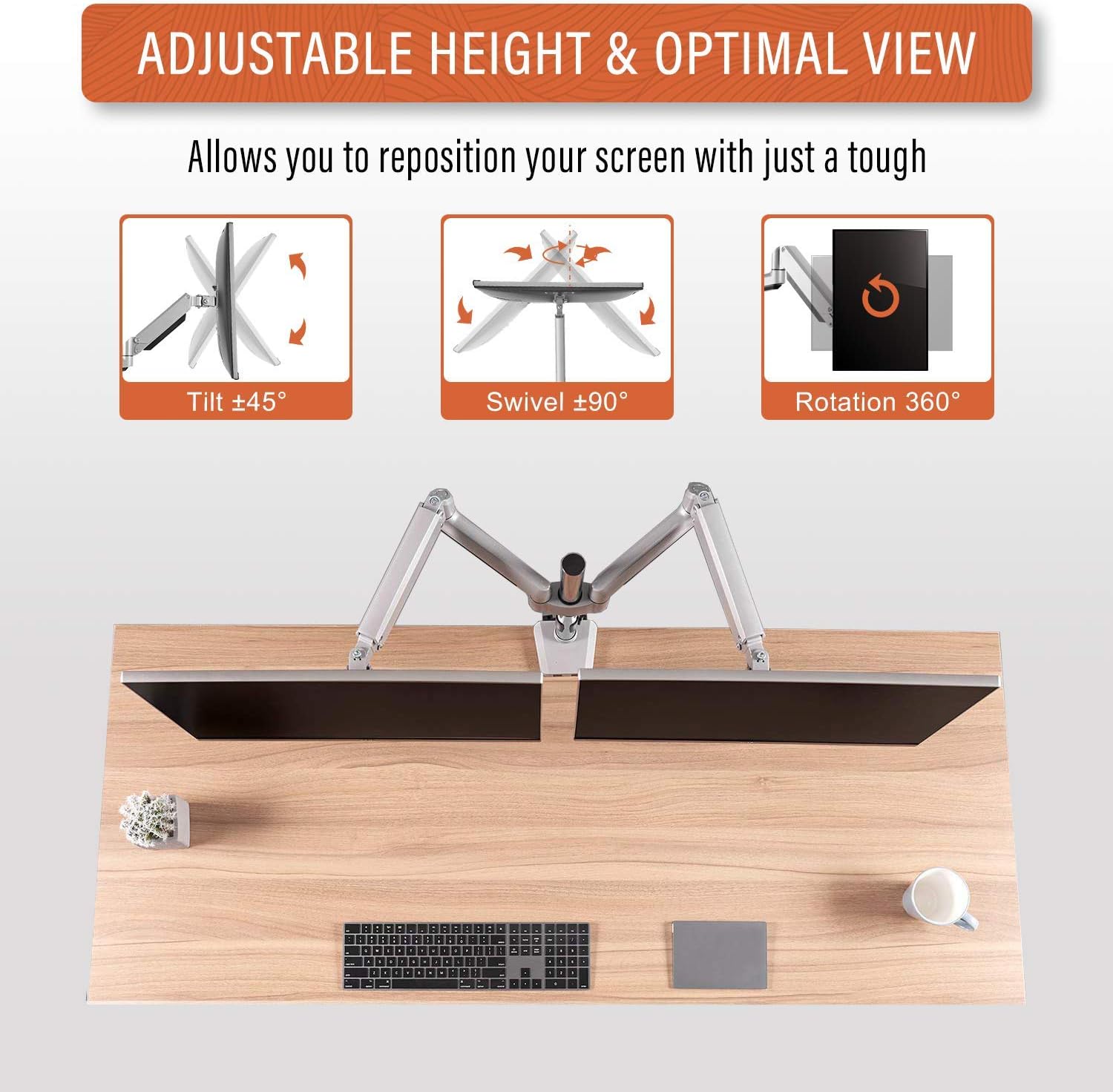
Figure 4: Adjustable Height & Optimal View. This image demonstrates the arm's flexibility, allowing for ±45° tilt, ±90° swivel, and 360° rotation to achieve your preferred viewing angle.
- Height Adjustment: The gas spring mechanism allows for smooth vertical movement. Gently push or pull the monitor to the desired height.
- Tilt: Adjust the monitor screen vertically from +45° to -45° to reduce glare and optimize viewing angles.
- Swivel: Pivot the monitor horizontally up to ±90° to share your screen or change viewing direction.
- Rotation: Rotate the monitor 360° to switch between landscape and portrait orientations.
Gas Spring Tension Adjustment

Figure 5: Tension Adjustment for Up & Down Arm. This image highlights the adjustment screw for the gas spring tension. Turn clockwise to reduce tension for lighter monitors, and counter-clockwise to increase tension for heavier monitors, ensuring the arm holds its position.
If your monitor does not stay at the desired height or drifts, you may need to adjust the gas spring tension:
- Locate the tension adjustment screw on the arm (refer to Figure 5).
- Use the provided hex key to turn:
- Clockwise: To reduce tension for lighter monitors.
- Counter-clockwise: To increase tension for heavier monitors.
- Adjust gradually and test the arm's movement until the monitor holds its position securely.
Cable Management
Utilize the integrated cable management clips or channels on the arm to route and organize your monitor cables, maintaining a tidy workspace.
Maintenance
- Regularly check all screws and connections to ensure they are tight and secure.
- Clean the monitor arm with a soft, damp cloth. Avoid abrasive cleaners or solvents.
- Periodically re-adjust the gas spring tension if you change monitors or notice the arm not holding its position correctly.
Troubleshooting
- Monitor sags or does not stay at desired height:
- Solution: Increase the gas spring tension by turning the adjustment screw counter-clockwise (refer to Figure 5).
- Monitor is too stiff to move up/down:
- Solution: Decrease the gas spring tension by turning the adjustment screw clockwise (refer to Figure 5).
- Monitor wobbles or feels unstable:
- Solution: Ensure all mounting screws (VESA plate, desk clamp/grommet) are securely tightened. Check that the desk surface is stable.
- Monitor does not fit VESA plate:
- Solution: Verify your monitor's VESA pattern (75x75mm or 100x100mm) matches the arm's compatibility. Ensure you are using the correct VESA screws.
Warranty and Support
The PUTORSEN Dual Monitor Arm GSMT-262P comes with a Lifetime Warranty.
For technical support, warranty claims, or any questions regarding your product, please contact PUTORSEN customer service through the retailer where you purchased the product or visit the official PUTORSEN website for contact information.
Related documentsGSMT-262P


Ask a question about this manual
Ask about setup, troubleshooting, compatibility, parts, safety, or missing instructions. Manuals+ will review the question and use this page’s manual context to help answer it.