Introduction
This manual provides comprehensive instructions for the installation, operation, and maintenance of your Furrion 2.1 Channel 2 Zone Soundbar Speaker. Designed for optimal audio performance, this soundbar integrates seamlessly into various environments, particularly vehicles, offering a rich sound experience with its 2.1 channel configuration and dual-zone capabilities. Please read this manual thoroughly before using the product to ensure proper function and longevity.
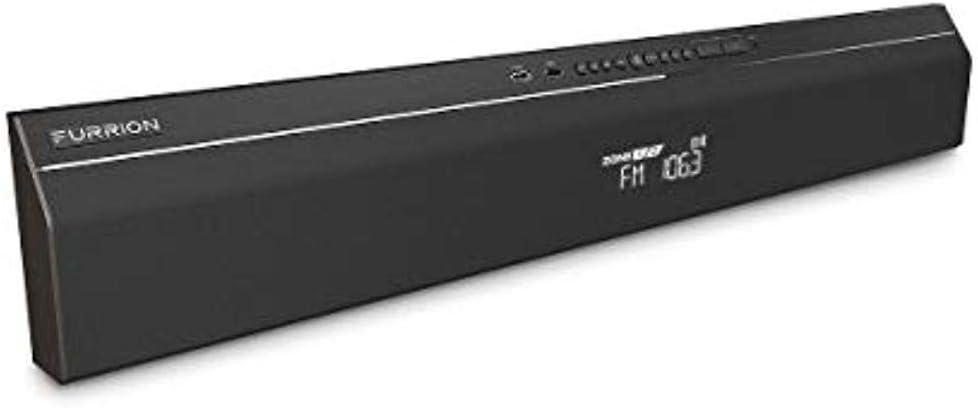
Figure 1: An angled view of the black Furrion 2.1 Channel 2 Zone Soundbar Speaker, showing its sleek design, front display, and top-mounted controls.
Setup
1. Unpacking
Carefully remove the soundbar and all accessories from the packaging. Verify that all components listed in the "What's in the Box" section are present. Retain the packaging for future transport or storage.
2. Placement and Mounting
The Furrion soundbar is designed for versatile placement, often in recreational vehicles or similar setups. Ensure the mounting surface is stable and can support the unit's weight (approximately 4.94 pounds). For optimal sound dispersion, position the soundbar centrally relative to your listening area. Refer to the included mounting template (if applicable) for precise installation.
3. Connections
- Power Connection: Connect the provided power cord to the soundbar's power input and then to a suitable power outlet. This unit operates on corded electric power.
- Audio Input:
- USB: For direct audio playback from USB devices.
- Bluetooth: For wireless audio streaming from compatible devices (smartphones, tablets, laptops).
- FM Radio: The soundbar includes an integrated FM tuner.
- Subwoofer Connection: If using an external subwoofer, connect it via the wired subwoofer connectivity port.
Operating Instructions
1. Power On/Off
Press the Power button located on the soundbar's control panel to turn the unit on or off. The display will illuminate when powered on.
2. Mode Selection
Use the Mode button to cycle through available audio sources: Bluetooth, FM Radio, and USB. The current mode will be indicated on the soundbar's display.
3. Volume Control
Adjust the volume using the Volume Up (+) and Volume Down (-) buttons on the control panel. The volume level will be shown on the display.
4. Bluetooth Pairing
- Ensure the soundbar is in Bluetooth mode. If not, press the Mode button until "Bluetooth" is displayed.
- On your mobile device, enable Bluetooth and search for available devices.
- Select "Furrion Soundbar" (or similar name) from the list.
- Once paired, the soundbar will confirm the connection, and you can begin streaming audio. The Bluetooth range is approximately 10 meters.
5. FM Radio Operation
In FM mode, use the Tune Up and Tune Down buttons to scan for radio stations. The frequency will be displayed.
6. App Control
This soundbar supports control via a dedicated application. Download the official Furrion app from your device's app store for enhanced control features.
Maintenance
1. Cleaning
To clean the soundbar, use a soft, dry cloth. Do not use liquid cleaners or aerosol sprays, as they may damage the finish or internal components. Ensure the unit is powered off and unplugged before cleaning.
2. Storage
If storing the soundbar for an extended period, disconnect it from power and store it in a cool, dry place, away from direct sunlight and extreme temperatures. It is recommended to use the original packaging for protection.
Troubleshooting
| Problem | Possible Cause | Solution |
|---|---|---|
| No sound from soundbar. | Power not connected; incorrect input selected; volume too low; device not paired (Bluetooth). | Check power connection; select correct input mode; increase volume; re-pair Bluetooth device. |
| Bluetooth connection unstable or disconnects. | Device out of range; interference; soundbar in pairing mode (blinking light). | Ensure device is within 10m range; reduce interference from other wireless devices; if blinking rapidly after TV off, power cycle the soundbar to reset Bluetooth. |
| FM radio static or poor reception. | Weak signal; antenna not extended (if applicable). | Adjust soundbar position; try tuning to a stronger station. |
Specifications
- Model Name: 2021123572
- Speaker Type: Soundbar
- Surround Sound Channel Configuration: 2.1
- Connectivity Technology: Bluetooth, USB
- Wireless Communication Technology: Bluetooth
- Bluetooth Range: 10 Meters
- Power Source: Corded Electric
- Color: Black
- Product Dimensions: 34.84 x 15.67 x 12.4 inches
- Item Weight: 4.94 pounds
- Recommended Uses: For Vehicles
- Control Method: Button, App
- Included Components: Furrion® - Furrion 2-Zone Soundbar Speaker with FM
Warranty Information
This Furrion product comes with a Limited Warranty. For specific terms, conditions, and duration of the warranty, please refer to the warranty card included with your product or contact Furrion customer support directly. Keep your proof of purchase for warranty claims.
Customer Support
For technical assistance, troubleshooting beyond this manual, or warranty inquiries, please contact Furrion customer support. Visit the official Furrion website for contact details and additional resources.
Important Safety Information
- Do not expose the soundbar to water or excessive moisture. This product is not water resistant.
- Do not block any ventilation openings.
- Do not install near any heat sources such as radiators, heat registers, stoves, or other apparatus (including amplifiers) that produce heat.
- Only use attachments/accessories specified by the manufacturer.
- Unplug this apparatus during lightning storms or when unused for long periods of time.


