
Neoteck NTK098
Neoteck 9999 Counts TRMS Auto-Ranging NCV Digital Multimeter User Manual
Model: NTK098
1. Introduction
The Neoteck 9999 Counts Digital Multimeter is a portable 3 9/10 bit automatic digital instrument designed for stable performance, high precision, clear readings, and overload protection. It features a large backlit LCD display powered by 1.5V AAA batteries, ensuring bright backlighting even with low battery levels. This multimeter is easy to carry and is a highly favored instrument among users. The backlight can be set to bright or automatically turn off after 15 seconds of inactivity.
This device is capable of measuring DC/AC voltage, DC/AC current, resistance, capacitance, frequency, temperature, and duty cycle. It includes features such as True RMS, data hold, flashlight, diode test, continuity test, overload protection, low battery indication, and auto power off.
2. Safety Information
To ensure safe operation and service of the meter, follow these instructions:
- Always ensure the meter is in the correct function and range for the measurement being taken.
- Do not apply more than the rated voltage, as marked on the meter, between the terminals or between any terminal and earth ground.
- Use caution when working with voltages above 30V AC RMS, 42V peak, or 60V DC. These voltages pose a shock hazard.
- Before measuring current, ensure the circuit power is off and the meter is connected in series with the circuit.
- Disconnect the test leads from the circuit before changing functions or ranges.
- Do not operate the meter if it appears damaged or if the insulation on the test leads is compromised.
- Replace the battery and fuses only with the specified type and rating.
- Keep fingers behind the probe barriers during measurements.
3. Product Features
- 9999 Counts Auto-Ranging Multimeter: Measures DC/AC voltage, DC/AC current, resistance, capacitance, frequency, temperature, and duty cycle. Features True RMS for accurate readings of non-sinusoidal waveforms. Includes data hold, flashlight, diode test (0.15V-3V), continuity, overload protection, low battery indication, and auto power off.
- NCV (Non-Contact Voltage) and Continuity Test: Safely detects AC voltage without direct contact. An alarm beep and LED flash indicate voltage presence. The continuity test sounds an alarm if resistance is below 50 Ω.
- Temperature Measurement: Equipped with a K-type thermocouple, it can measure temperatures from -20 ℃ to 1000 ℃ (-4 ℉ to 1832 ℉), functioning as a convenient thermometer.
- Backlit LCD Screen: Features a large display with automatic polarity indication for easy reading. The backlight ensures visibility in dark environments and automatically turns off after 15 minutes of inactivity to conserve battery.
- Protective Green Case with Stand: Designed to be anti-drop and anti-slip, the integrated stand allows the multimeter to be positioned at a 45° angle for hands-free operation.
4. Package Contents
The package includes the following items:
- Neoteck Digital Multimeter (Model NTK098)
- Test Leads (Red and Black)
- K-Type Thermocouple
- Alligator Clip Leads
- 2 x AAA Batteries
- User Manual

Image: Contents of the Neoteck Digital Multimeter package, including the multimeter, test leads, K-type thermocouple, alligator clip leads, and batteries.
5. Setup
5.1 Battery Installation
- Ensure the multimeter is turned off.
- Locate the battery compartment on the back of the device.
- Use a screwdriver to open the battery compartment cover.
- Insert two AAA batteries, observing the correct polarity (+/-).
- Replace the battery compartment cover and secure it with the screw.
5.2 Connecting Test Leads
For most measurements, connect the red test lead to the 'VΩHz' input jack and the black test lead to the 'COM' input jack. For current measurements, refer to the specific instructions in the operating section.

Image: Front view of the Neoteck Digital Multimeter with red and black test leads properly connected to the input jacks.
6. Operating Instructions
6.1 General Operation
- Power On/Off: Rotate the rotary switch from 'OFF' to any desired function to turn on the meter. Rotate back to 'OFF' to power off.
- Auto Power Off (APO): The meter automatically shuts off after approximately 15 minutes of inactivity. To disable APO, press and hold the 'SELECT' button while turning the meter on.
- Backlight: Press the 'SELECT' button briefly to toggle the backlight on/off.
- Data Hold: Press the 'HOLD' button to freeze the current reading on the display. Press again to release.
6.2 DC/AC Voltage Measurement
- Rotate the rotary switch to the 'V∼' (AC Voltage) or 'V—' (DC Voltage) position. The meter will automatically select the appropriate range.
- Connect the red test lead to the positive (+) side of the circuit and the black test lead to the negative (-) side or ground.
- Read the voltage value on the LCD display.
6.3 DC/AC Current Measurement
WARNING: Never attempt to measure current in parallel with a voltage source. This can damage the meter and cause injury.
- Rotate the rotary switch to the 'A∼' (AC Current) or 'A—' (DC Current) position. For small currents, use the 'mA' or 'µA' ranges. For larger currents, use the '10A' range and connect the red lead to the '10A' input jack.
- Turn off the power to the circuit under test.
- Break the circuit and connect the meter in series with the load.
- Turn on the power to the circuit.
- Read the current value on the LCD display.
6.4 Resistance Measurement
- Rotate the rotary switch to the 'Ω' position.
- Ensure the circuit is de-energized before measuring resistance.
- Connect the test leads across the component to be measured.
- Read the resistance value on the LCD display.

Image: The multimeter displaying capacitance (65.35 uF) and resistance (252.4 Ω) measurements, with test leads connected to a capacitor and a resistor respectively.
6.5 Capacitance Measurement
- Rotate the rotary switch to the 'F' (Capacitance) position.
- Discharge the capacitor completely before measurement to avoid electric shock.
- Connect the test leads across the capacitor terminals.
- Read the capacitance value on the LCD display.
6.6 Frequency/Duty Cycle Measurement
- Rotate the rotary switch to the 'Hz' position.
- Connect the test leads across the signal source.
- Read the frequency or duty cycle value on the LCD display. Use the 'SELECT' button to switch between frequency and duty cycle.
6.7 Temperature Measurement
- Rotate the rotary switch to the 'TEMP' position.
- Insert the K-type thermocouple into the input jacks, observing polarity.
- Place the thermocouple probe on or in the object whose temperature is to be measured.
- Read the temperature value on the LCD display.

Image: The multimeter displaying a temperature reading (0089 °C) while a K-type thermocouple is immersed in a glass of water.
6.8 Diode Test
- Rotate the rotary switch to the 'Ω' position and press 'SELECT' until the diode symbol appears.
- Connect the red test lead to the anode and the black test lead to the cathode of the diode.
- The display will show the forward voltage drop. Reverse the leads to check for open circuit (OL).
6.9 Continuity Test
- Rotate the rotary switch to the 'Ω' position and press 'SELECT' until the continuity symbol (buzzer) appears.
- Connect the test leads across the circuit or component.
- If the resistance is less than approximately 50 Ω, the buzzer will sound, indicating continuity.

Image: The multimeter displaying '000.0' and indicating a buzzing sound during a continuity test, with test leads touching each other.
6.10 NCV (Non-Contact Voltage) Detection
- Rotate the rotary switch to the 'NCV' position.
- Move the top end of the multimeter close to the AC voltage source (e.g., a live wire or outlet).
- The meter will emit an alarm beep and the LED will flash, with the display showing varying numbers of short lines (1 for low voltage, 4 for high voltage) to indicate the presence and strength of the AC voltage.

Image: The multimeter detecting non-contact voltage near an electrical outlet, with the display showing short line flickers to indicate voltage presence.
7. Maintenance
7.1 Cleaning
Wipe the meter with a dry, soft cloth. Do not use abrasives or solvents.
7.2 Battery Replacement
When the low battery indicator appears on the display, replace the batteries as described in Section 5.1. Always use two new AAA batteries.
7.3 Fuse Replacement
If the current measurement function stops working, the fuse may need replacement. Refer to the specifications for the correct fuse type and rating. Fuse replacement should only be performed by qualified personnel.
8. Troubleshooting
- No Display: Check battery installation and ensure batteries are not depleted. Replace if necessary.
- Incorrect Readings: Verify test lead connections, ensure the correct function and range are selected, and check for proper circuit connection.
- Current Measurement Not Working: Check the fuse. If blown, replace with a fuse of the correct rating.
- Continuity Buzzer Not Sounding: Ensure the resistance is below 50 Ω. Check test leads for damage.
9. Specifications
| Feature | Specification |
|---|---|
| Brand | Neoteck |
| Model Number | NTK098 |
| Display | 9999 Counts, Backlit LCD |
| Measurement Type | True RMS, Auto-Ranging |
| Power Source | 2 x AAA Batteries (included) |
| Dimensions (Product) | Approximately 146mm x 70mm x 32mm |
| Weight | Approximately 440 grams |
| Temperature Measurement Range | -20 ℃ to 1000 ℃ / -4 ℉ to 1832 ℉ |
| NCV Detection | Yes |
| Continuity Buzzer | Yes (below 50 Ω) |
| Diode Test | Yes (0.15V-3V) |
| Auto Power Off | Yes (after 15 minutes) |
| Overload Protection | Yes |
| UPC | 670924935681 |
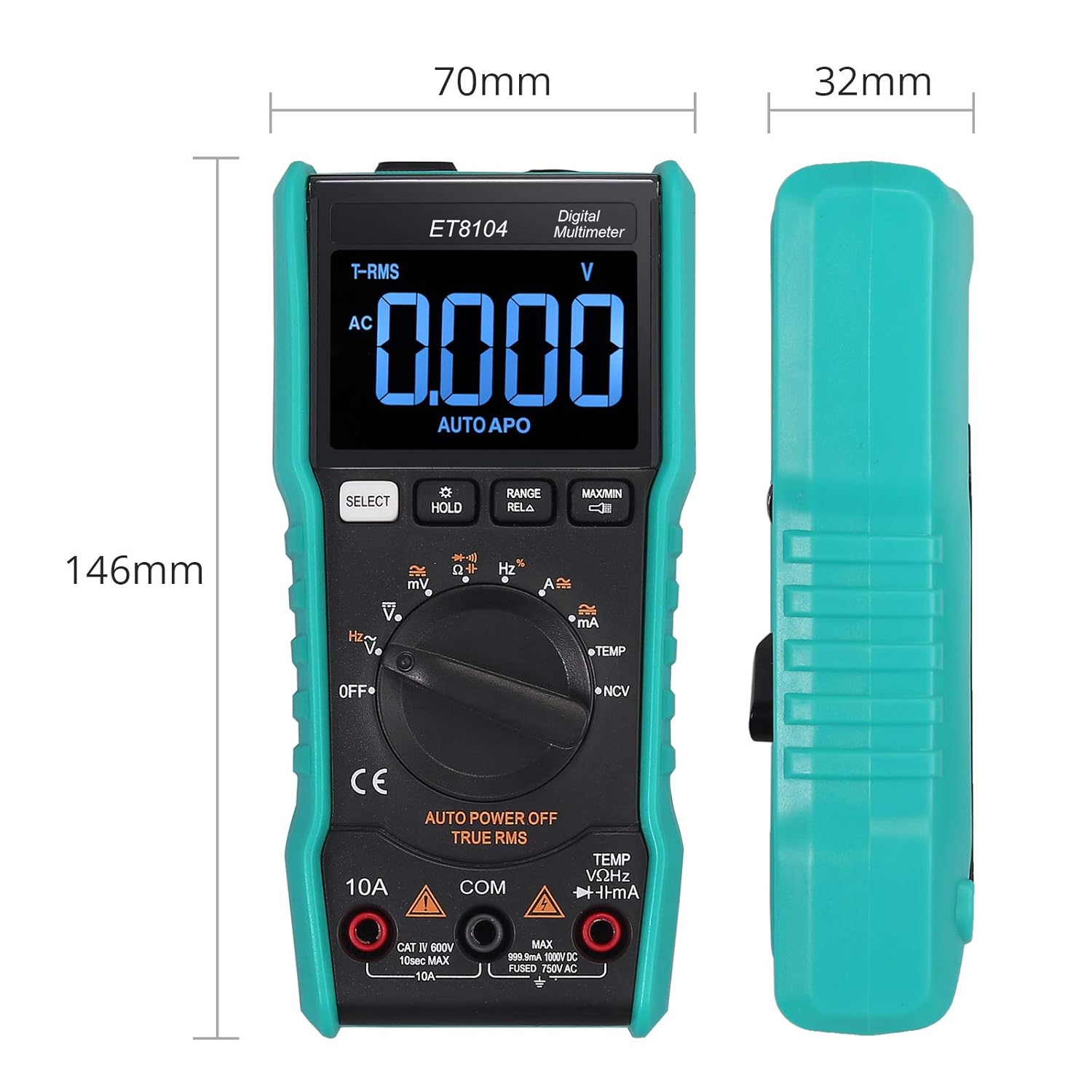
Image: Dimensions of the Neoteck Digital Multimeter, showing a height of 146mm, width of 70mm, and thickness of 32mm.
10. Warranty and Support
Neoteck products are designed for reliability and performance. For warranty information or technical support, please refer to the contact details provided with your purchase or visit the official Neoteck website. Keep your purchase receipt as proof of purchase for warranty claims.
Ask a question about this manual
Ask about setup, troubleshooting, compatibility, parts, safety, or missing instructions. Manuals+ will review the question and use this page’s manual context to help answer it.