
NAAFIE SL-4001
Digital Sound Level Meter Instruction Manual
Model: SL-4001 | Brand: NAAFIE
Introduction
The Lutron Digital Sound Level Meter SL-4001 is a precision instrument designed for accurate sound level measurements. It features a large LCD display for easy readability, and its frequency weighting networks are designed to meet IEC 651 Type 2 standards. The device supports both A and C weighting networks, along with FAST and SLOW time weighting dynamic characteristics. It includes AC/DC output for system expansion, a built-in adjustable VR for calibration, and a condenser microphone for high accuracy and long-term stability. The SL-4001 also offers a Max. Hold function to store maximum values, warning indicators for over and under load, and a low battery indicator. Its durable, lightweight ABS-plastic housing ensures longevity and ease of use.
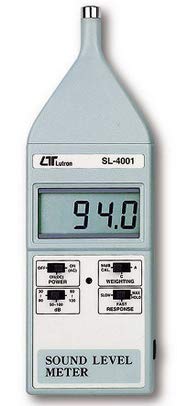
Figure 1: Front view of the SL-4001 Digital Sound Level Meter, showing the LCD display and control switches.
Setup
- Unpacking: Carefully remove the SL-4001 Sound Level Meter and all accessories from its packaging. Verify that all standard accessories, including the instruction manual and calibration screwdriver, are present.
- Battery Installation: The device operates on batteries. Locate the battery compartment, typically on the rear of the unit. Insert the required batteries, ensuring correct polarity. A low battery indicator will alert you when replacement is needed.
- Initial Inspection: Before first use, inspect the meter for any visible damage. Ensure the condenser microphone is clean and unobstructed.
Operating Instructions
Powering On/Off
- To power on the device, locate the ON/OFF switch and slide it to the 'ON' position.
- To power off, slide the switch to the 'OFF' position.
Selecting Measurement Range
- The SL-4001 offers three measurement ranges: 35 to 130 dB (typical 30 to 130 dB). Select the appropriate range using the range selector switch to ensure accurate readings and prevent over/under load warnings.
Frequency Weighting (A & C)
- A-weighting: Simulates the "Human Ear Listening" response. This setting is typically used for environmental sound level measurements.
- C-weighting: Provides a near "Flat" response. This is suitable for checking machinery noise (Quality Control) and determining the sound pressure level of tested equipment.
- Select the desired weighting using the A/C weighting switch.
Time Weighting (FAST & SLOW)
- FAST (200ms): Use for capturing rapidly changing noise levels.
- SLOW (500ms): Use for measuring average noise levels or when the sound level is relatively stable.
- Select the desired response time using the FAST/SLOW switch.
Max. Hold Function
- Activate the Max. Hold function to capture and display the maximum sound level detected during a measurement period. The stored value will remain on the display until reset or a higher value is detected.
AC/DC Output
- The SL-4001 provides AC/DC output terminals for system expansion, allowing connection to external recording devices or data loggers.
Calibration
- The meter features a built-in adjustable VR (Variable Resistor) for easy calibration. Refer to the specific calibration procedure in the detailed manual for precise adjustment using a sound calibrator.
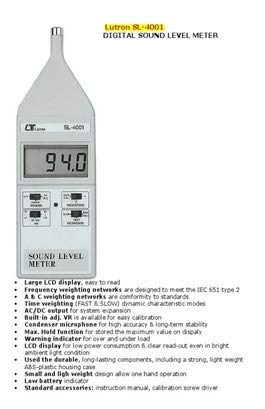
Figure 2: Key features and components of the SL-4001 Digital Sound Level Meter, including the LCD display, control switches, and microphone.
Maintenance
- Cleaning: Use a soft, dry cloth to clean the exterior of the meter. Do not use abrasive cleaners or solvents. Ensure the microphone is kept free of dust and debris.
- Storage: When not in use for extended periods, remove the batteries to prevent leakage. Store the meter in a cool, dry place, away from direct sunlight and extreme temperatures. The durable ABS-plastic housing provides good protection, but avoid dropping or subjecting the device to severe impacts.
- Calibration: Regular calibration is recommended to maintain measurement accuracy. Refer to the calibration section or consult a professional for periodic calibration.
Troubleshooting
- No Display/Power:
- Check if the batteries are correctly installed and have sufficient charge. Replace if necessary.
- Ensure the power switch is in the 'ON' position.
- "OVER" or "UNDER" Warning Indicator:
- This indicates that the measured sound level is outside the currently selected measurement range. Adjust the range selector switch to a more appropriate setting.
- Inaccurate Readings:
- Ensure the microphone is clean and unobstructed.
- Verify that the correct frequency weighting (A or C) and time weighting (FAST or SLOW) are selected for your application.
- Consider performing a calibration using a sound calibrator.
- Low Battery Indicator:
- Replace the batteries immediately to ensure continued accurate operation.
Specifications
| Parameter | Value |
|---|---|
| Model | SL-4001 |
| Measurement Function | dB (A & C frequency weighting), Time weighting (Fast/Slow), Max. hold, AC output, DC output |
| Measurement Range | 3 ranges: 35 to 130 dB (typical 30 to 130 dB), input signal only |
| Resolution | 0.1 dB |
| Accuracy (23 ± 5°C) | Frequency weighting meets IEC 651 Type 2. Calibrating input signal on 94 dB (31.5 Hz to 8 kHz), then the accuracy of A weighting is specified as following:
|
| Frequency Weighting Network | A weighting (Human Ear Listing response), C weighting (Flat response) |
| Time Weighting | FAST (200ms), SLOW (500ms) |
| Microphone | Condenser microphone |
| Display | Large LCD display |
| Power Source | Batteries (details not specified, implied by "low power consumption" and "low battery indicator") |
| Material | ABS-plastic housing case |
| Item Weight | 1 kg |
| Package Dimensions | 18.77 x 9 x 4 cm |
| Country of Origin | Taiwan |
Warranty
The Lutron Digital Sound Level Meter SL-4001 comes with a 2 Years Warranty from the date of purchase. This warranty covers manufacturing defects and malfunctions under normal use. Please retain your purchase receipt as proof of warranty. For warranty claims or service, please contact the seller or authorized service center.
Support
For further assistance, technical support, or inquiries regarding the Lutron Digital Sound Level Meter SL-4001, please refer to the contact information provided by your retailer or the official NAAFIE support channels. Always ensure to provide your product model number (SL-4001) when seeking support.
For more information, you may visit the NAAFIE brand page on Amazon.
Related Documents - SL-4001
 |
Bayco Buyer's Guide: Work Lights and Extension Cords Comprehensive buyer's guide for Bayco work lights, extension cords, and related accessories, featuring detailed specifications, part numbers, and product descriptions. |
 |
Cerwin-Vega! SL Series Owner's Manual Comprehensive owner's manual for the Cerwin-Vega! SL Series loudspeakers and subwoofer, covering safety instructions, placement, installation, features, troubleshooting, and specifications for models SL-5M, SL-45C, SL-25C, SL-8, SL-28, SL-12, SL-15, and SL-10S. |
 |
SMARTLIFT Zubehör Guide - SL This comprehensive accessory guide for SMARTLIFT SL series machines details a wide array of optional equipment. Explore spare parts, specialized wheels, ramps, various vacuum gripper systems, lifting attachments, control accessories, and protective covers designed to enhance the functionality and versatility of your SMARTLIFT equipment. |
 |
LEDVANCE SL COMPACT LED Street Light - Technical Specifications and Installation Guide Comprehensive technical specifications, dimensions, and installation guide for the LEDVANCE SL COMPACT LED street lighting fixture. Includes data on lumen output, power, IP rating, electrical characteristics, and mounting. |
 |
microSHIFT Thumb Shifter User Manual: Installation and Adjustment Guide Comprehensive user manual for microSHIFT Thumb Shifters, covering installation, cable routing, adjustments, and friction mode for various mountain and road bike models. Includes detailed step-by-step instructions and part information. |
 |
Speed-Lift Owner's Manual | Superior Handling Equipment Comprehensive owner's manual for Superior Handling Equipment Speed-Lift models. Includes installation, operation, maintenance, troubleshooting, specifications, and parts lists. |
Ask a question about this manual
Ask about setup, troubleshooting, compatibility, parts, safety, or missing instructions. Manuals+ will review the question and use this page’s manual context to help answer it.