
Kilo X13
Kilo X13 Bluetooth Car MP3 Player FM Transmitter Dual USB Charger User Manual
Model: X13 | Brand: Kilo
Introduction
Thank you for choosing the Kilo X13 Bluetooth Car MP3 Player FM Transmitter. This device allows you to stream music, make hands-free calls, and charge your devices conveniently in your car. Please read this manual carefully before use to ensure proper operation and to maximize your experience.
Safety Information
- Do not operate the device in extremely hot, cold, dusty, or humid environments.
- Avoid dropping or subjecting the device to strong impacts.
- Do not disassemble or modify the device. This will void the warranty and may cause damage.
- Keep out of reach of children.
- Ensure the device is securely plugged into the car's cigarette lighter socket.
Package Contents
- 1 x Kilo X13 Car MP3 Player FM Transmitter
- 1 x Charging Cable
- 1 x User Manual
Product Overview
Familiarize yourself with the components of your Kilo X13 device.


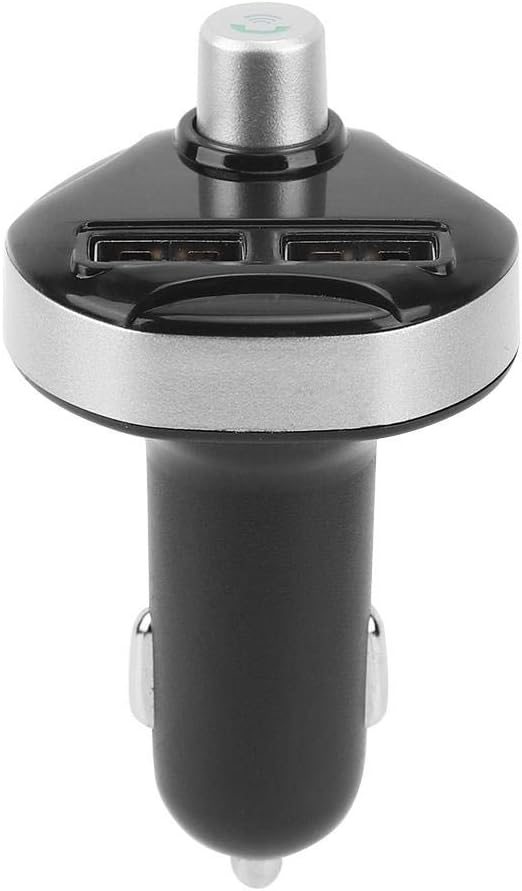
Specifications
| Model | X13 |
| Brand | Kilo |
| Connectivity Technology | Bluetooth V4.0, USB |
| FM Frequency Range | 87.5 - 108.0 MHz |
| Bluetooth Connection Distance | Up to 5 meters |
| Power Input | 12V / 24V DC (Vehicle Power) |
| USB Charger Output | 3.1A and 1A (Dual USB) |
| Supported Music Formats | MP3, WMA (via Bluetooth, USB disk, TF card) |
| Special Features | Bluetooth FM Transmitter, Built-in Microphone, Hands-free Calling, Power-off Memory |
| Material | Acrylonitrile Butadiene Styrene (ABS) |
| Compatible Devices | Smartphones (Android/iOS), MP3 Players, Speakers |
Note: Car battery voltage display feature indicates potential issues if below 11.5V/23.1V or above 14.9V/27.3V for 12V/24V systems respectively.
Setup Instructions
- Insert into Car Cigarette Lighter: Plug the Kilo X13 FM Transmitter firmly into your car's 12V or 24V cigarette lighter socket. The device will power on automatically.
- Set FM Frequency:
- Tune your car radio to an empty, clear FM frequency (e.g., FM 87.5 MHz). Avoid frequencies with strong radio signals to minimize interference.
- On the Kilo X13, long-press the multi-function answer button until the LED display flashes.
- Rotate the multi-function knob to adjust the FM frequency on the transmitter to match the frequency set on your car radio.
- Briefly press the answer button again to confirm and lock the frequency.
- Pair with Bluetooth Device:
- Once powered on, the device will announce "Bluetooth ready to pair".
- Enable Bluetooth on your smartphone or other audio device.
- Search for "X13" (or similar device name) in your device's Bluetooth settings and select it to pair.
- Once connected, the device will announce "Bluetooth connection successful".
Operating Instructions
Music Playback
The Kilo X13 supports music playback from multiple sources with the following priority: Bluetooth > TF Card > USB Disk.
- Bluetooth Music: After successful Bluetooth pairing, play music on your smartphone. The audio will be transmitted to your car's speakers via the set FM frequency.
- USB Disk/TF Card Music: Insert a USB flash drive or TF card (up to 32GB, not included) containing MP3/WMA files into the designated port. The device will automatically detect and play music.
- Control Music: Use the multi-function knob to control playback:
- Briefly press the knob: Play/Pause.
- Rotate left/right: Previous/Next track.
Hands-Free Calling
With the built-in microphone, you can safely make and receive calls while driving.
- Answer Call: When an incoming call is received, the device will automatically switch from music playback to hands-free mode. Briefly press the multi-function answer button to answer the call.
- Reject Call: Long-press the multi-function answer button to reject an incoming call.
- Hang Up: During a call, briefly press the multi-function answer button to end the call.
- Redial Last Number: Double-press the multi-function answer button to redial the last dialed number.
Charging Devices
The Kilo X13 features dual USB ports for charging your mobile devices.
- Connect your device's USB charging cable to either the 3.1A or 1A USB port on the FM transmitter.
- The 3.1A port provides faster charging for compatible devices.
Maintenance
- Clean the device regularly with a soft, dry cloth.
- Do not use harsh chemicals or abrasive cleaners.
- Ensure the cigarette lighter socket and USB ports are free from dust and debris.
Troubleshooting
| Problem | Possible Cause | Solution |
|---|---|---|
| No power | Device not properly inserted; car socket fuse blown. | Ensure device is fully inserted. Check car's fuse box. |
| Static/Noise during playback | FM frequency interference. | Find a clear, unused FM frequency on your car radio and match it on the Kilo X13. Avoid frequencies with strong local radio stations. |
| Cannot pair Bluetooth | Bluetooth not enabled on phone; device not in pairing mode; too far from device. | Ensure Bluetooth is on and visible on your phone. Restart the Kilo X13. Keep phone within 5 meters. |
| Poor call quality | Microphone obstruction; environmental noise; weak FM signal. | Ensure microphone is clear. Reduce car noise. Adjust FM frequency if needed. |
| USB charging not working | Cable issue; device not compatible; Kilo X13 not powered. | Try a different USB cable. Ensure Kilo X13 is powered on. Check device compatibility. |
Car Battery Voltage Indicator: The device displays your car battery voltage. If the voltage is below 11.5V (for 12V systems) or 23.1V (for 24V systems), or above 14.9V (for 12V systems) or 27.3V (for 24V systems), it may indicate a problem with your car battery or charging system. Consult a professional if you observe these readings consistently.
Warranty and Support
The Kilo X13 Bluetooth Car MP3 Player FM Transmitter comes with a standard manufacturer's warranty. Please refer to the packaging or contact your retailer for specific warranty terms and conditions.
For technical support or customer service, please contact the vendor or manufacturer through their official channels. Keep your purchase receipt for warranty claims.
Ask a question about this manual
Ask about setup, troubleshooting, compatibility, parts, safety, or missing instructions. Manuals+ will review the question and use this page’s manual context to help answer it.