
Yale YDR4110 Plus
Yale YDR 4110 Smart Rim Door Lock User Manual
Model: YDR4110 Plus
Introduction
The Yale YDR 4110 Smart Lock is an advanced digital door lock designed to provide secure and convenient access to your home or office. This manual provides essential information for the proper installation, operation, and maintenance of your new smart lock, ensuring optimal performance and security.
Important Safety Information
Do Not Expose to Water.
Always ensure proper installation to prevent malfunction and ensure the security of your premises. Avoid using harsh chemicals or abrasive materials for cleaning, as this may damage the lock's finish or internal components.
Product Overview and Features
The Yale YDR 4110 offers a range of features designed for enhanced security and user convenience:
- Various Access: YDR 4110 has multiple options to access the lock - Fingerprint, Pin Code & BLE (enabled with accessory).
- Yale App and Wi-Fi Bridge: With the Yale App and an optional Wi-Fi bridge, you can lock or unlock your door, share keys with family and friends, and receive notifications when someone comes home, all from your mobile app.
- Convenience: It can upgrade your existing door lock and supports door thickness from 35 mm to 55 mm.
- Operation Status Notification: Different patterns of numbers present various operation notifications after each operation.
- Voice Guide Feature: A voice guide is offered that lets you know the operation status and how to set each feature and mode for easier and more convenient use.
- Automatic Locking: YDR 4110 automatically locks the door after checking it is properly closed. (Manual operation is also available).
- Alarm (Break/Damage/Fire): An 80dB alarm goes off if anyone attempts to damage the lock or force the door open.
- Low Battery Alarm and Emergency Power Supply Terminal: It warns in case of low battery with alarm and LED. When the batteries are completely discharged, you can easily supply emergency power to the lock with a standard 9V battery.
- Connectivity: Wireless connectivity with Video Door Phones (Separate Accessories required).

Figure 1: Front view of the Yale YDR 4110 Smart Lock, highlighting the keypad and fingerprint scanner for various access methods.
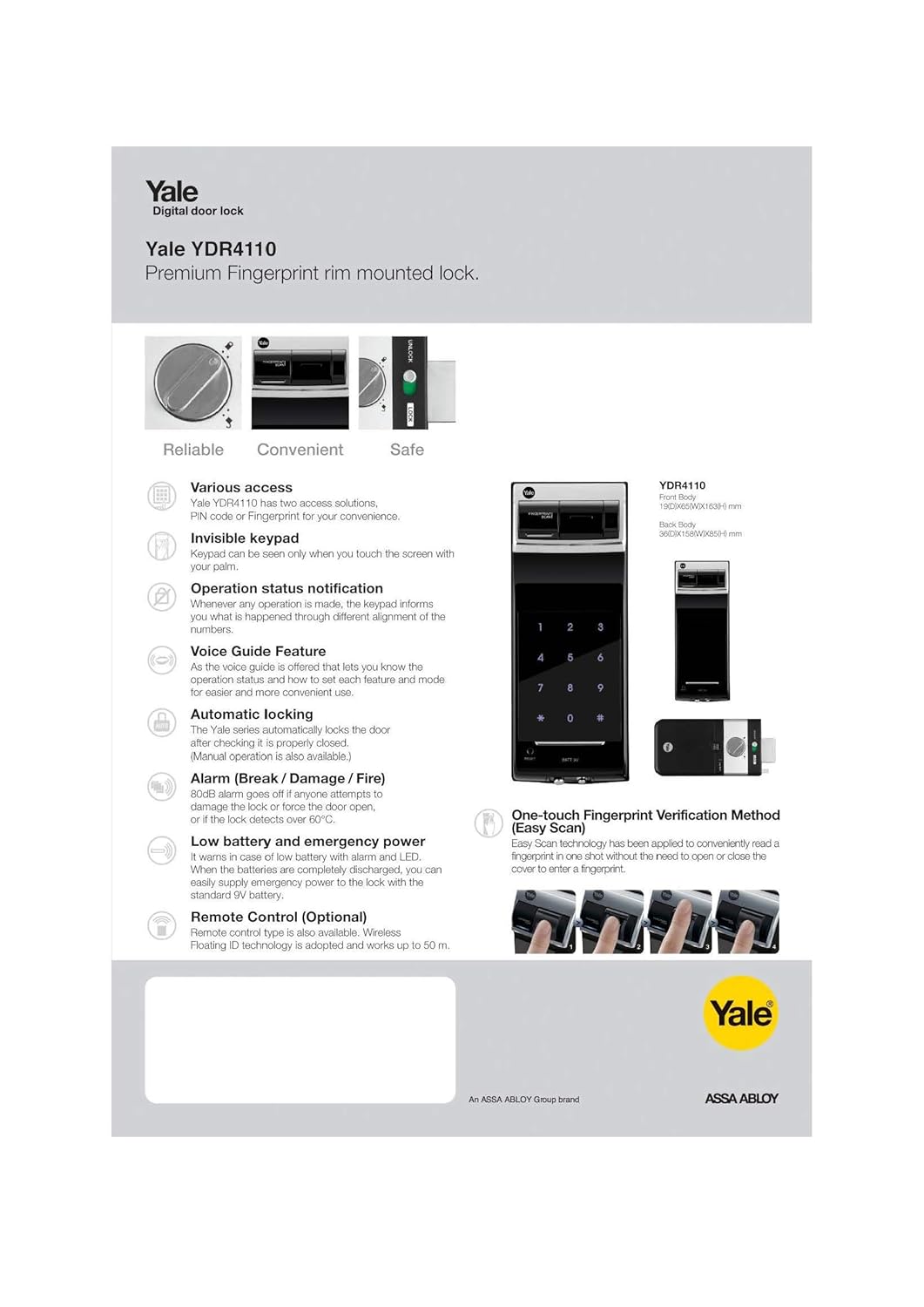
Figure 2: Overview of key features including multiple access options, voice guidance, and security alarms.
Package Contents
The following components are included with your Yale YDR 4110 Smart Lock:
- 1 Smart Rim Lock
- Lock Accessories (e.g., screws, mounting plate, strike plate)

Figure 3: Internal view of the Yale YDR 4110 Smart Lock, illustrating the main body and locking mechanism.
Setup and Installation
The Yale YDR 4110 is designed for straightforward installation. For detailed, step-by-step instructions, please refer to the dedicated installation guide provided in your product packaging. Ensure your door thickness is between 35 mm and 55 mm for proper fitment.

Figure 4: Side view of the Yale YDR 4110 Smart Lock, demonstrating its installed appearance on a door.
Operating Your Smart Lock
Access Methods
The YDR 4110 offers multiple ways to unlock your door:
- Fingerprint: Place your registered finger on the biometric sensor.
- PIN Code: Enter your registered PIN code on the illuminated keypad.
- Bluetooth (BLE): Use the Yale Link App via Bluetooth (requires accessory).
- Wi-Fi: Control remotely via the Yale Link App with an optional Wi-Fi bridge.
Automatic Locking
The lock features an automatic locking function that engages once the door is properly closed. This ensures your door is always secured. A manual locking option is also available for user preference.
Voice Guide Feature
The integrated voice guide provides audible feedback on the lock's status and assists with setting up various features and modes, making operation more intuitive.
Maintenance
To ensure the longevity and optimal performance of your Yale YDR 4110 Smart Lock, follow these maintenance guidelines:
- Cleaning: Wipe the lock's surface with a soft, dry cloth. Do not use abrasive cleaners, solvents, or liquid sprays directly on the lock.
- Battery Check: The lock will provide a low battery alarm (visual LED and audible warning). Replace batteries promptly when indicated.
- Emergency Power: If batteries are completely depleted, you can supply emergency power using a standard 9V battery at the designated terminal on the lock.
Troubleshooting
If you encounter issues with your Yale YDR 4110 Smart Lock, refer to the following common problems and solutions:
- Lock not responding:
- Check battery levels. Replace batteries if low.
- If completely discharged, use a 9V battery for emergency power.
- Fingerprint not recognized:
- Ensure your finger is clean and dry.
- Try placing your finger in different positions on the sensor.
- If issues persist, re-register your fingerprint.
- PIN code not working:
- Verify that you are entering the correct PIN code.
- Ensure the keypad is active (illuminated) before entering the code.
- Alarm sounds unexpectedly:
- An 80dB alarm will activate if the lock detects tampering, forced entry, or fire.
- Inspect the lock for any signs of damage or attempted forced entry.
Technical Specifications
| Brand | Yale |
| Model Name | YDR4110 Plus |
| Lock Type | Electronic Lock |
| Special Feature | Biometric Fingerprint Sensor |
| Material | Zinc |
| Colour | Black |
| Item Dimensions (L x W x H) | 10.3 x 25.2 x 28 Centimeters |
| Item Weight | 1.47 kg (1470 Grams) |
| Finish Type | Polished |
| Control Method | App, Finger Print Control |
| Connectivity Protocol | Wi-Fi (with accessory) |
Warranty and Support
The Yale YDR 4110 Smart Rim Door Lock comes with a 3-year warranty from the date of purchase. For any technical assistance, troubleshooting, or warranty claims, please contact Yale customer service.
For more information and support resources, you can visit the official Yale Store:
Related Documents - YDR4110 Plus
 |
Yale Reflecta Biometric Door Lock: Features and Specifications Discover the Yale Reflecta Biometric, a stylish and functional door lock offering secure PIN and fingerprint access. Learn about its features, specifications, and installation suitability for doors 30-50mm thick. |
 |
Yale YDM7116 Smart Door Lock User Guide: Features, Installation, and Operation Comprehensive user guide for the Yale YDM7116 Smart Door Lock, covering biometric access, PIN codes, RFID cards, mechanical keys, app control, and installation instructions. Learn about its features, settings, and safety precautions. |
 |
Yale Reflecta PIN: Secure Your Door with Smart Access Discover the Yale Reflecta PIN, a sleek, mirror-finished rim lock offering straightforward, reliable security for any door. Learn about its features, PIN access, emergency backup, and dimensions for easy installation. |
 |
Conexis L2 Smart Lock User Manual - Installation and Setup Guide Comprehensive user manual for the Yale Conexis L2 Smart Lock, covering installation, setup, app integration, and troubleshooting. Learn how to install and use your smart lock. |
 |
Fechadura Yale Real Living™ YDR 220L: Guia de Instalação e Programação Obtenha instruções detalhadas para instalar e programar sua Fechadura Yale Real Living™ YDR 220L com maçaneta. Este manual cobre todos os passos para uma configuração segura e eficiente. |
 |
Yale Connect Wi-Fi Bridge FAQ and Remote Access Guide Frequently asked questions about the Yale Connect Wi-Fi Bridge, covering its functionality, setup, Wi-Fi compatibility, power requirements, and remote access features for Yale Smart Locks. |