
GIONIEN GIB464SC
GIONIEN Induction Hob User Manual
Model: GIB464SC
1. Product Overview
The GIONIEN GIB464SC Induction Hob is a modern, efficient, and safe cooking appliance designed for contemporary kitchens. Featuring four cooking zones and precise touch controls, it offers a versatile cooking experience. Its sleek ceramic glass surface is not only aesthetically pleasing but also easy to clean and maintain.

Figure 1: Top view of the GIONIEN GIB464SC Induction Hob, showcasing its four cooking zones and touch control panel.
Key Features:
- Easy Operation & Cleaning: Intuitive touch controls for power selection and a seamless, polished glass finish for effortless cleaning.
- Four Cooking Zones: Provides ample space and flexibility for cooking multiple dishes simultaneously, with an optimized layout to prevent cookware crowding.
- Precise Power & Timer Control: Offers 9 power levels up to 6kW for delicate heating to rapid boiling, with a 0-99 minute timer for each zone to prevent overcooking.
- Rapid Heating & Cooling: Utilizes electromagnetic induction for quick and even heat distribution, suitable for iron, stainless steel, and alloy pans.
- Enhanced Safety: Equipped with a child lock, residual heat indicator, and automatic safety shut-off for user protection.
2. Safety Information
Please read all safety instructions carefully before installing and operating the appliance. Keep this manual for future reference.
- Electrical Safety: Ensure the appliance is connected to a properly grounded electrical outlet with the correct voltage and current rating. Do not use extension cords or adapters.
- Child Safety: This appliance is not intended for use by persons (including children) with reduced physical, sensory or mental capabilities, or lack of experience and knowledge, unless they have been given supervision or instruction concerning use of the appliance by a person responsible for their safety. The child lock feature should be activated when not in use.
- Hot Surface Warning: The cooktop surface will remain hot after use due to residual heat. Avoid touching the surface until the residual heat indicator turns off.
- Proper Ventilation: Ensure adequate ventilation around the appliance during operation to prevent overheating.
- Cookware: Only use induction-compatible cookware. Non-compatible cookware will not heat up.
- Flammable Materials: Do not store flammable materials near or on the cooktop.
- Cleaning: Disconnect power before cleaning. Do not use abrasive cleaners or sharp objects that could scratch the glass surface.

Figure 2: The GIONIEN Induction Hob includes safety features like auto shut-down and overheat protection for user peace of mind.
3. Installation
Installation should be performed by a qualified technician in accordance with local regulations and standards.
3.1 Unpacking
Carefully remove the cooktop from its packaging. Inspect for any damage during transit. Report any damage to your supplier immediately.
3.2 Cut-out Dimensions
Ensure the countertop cut-out dimensions match the appliance specifications. Refer to the diagram below for precise measurements.
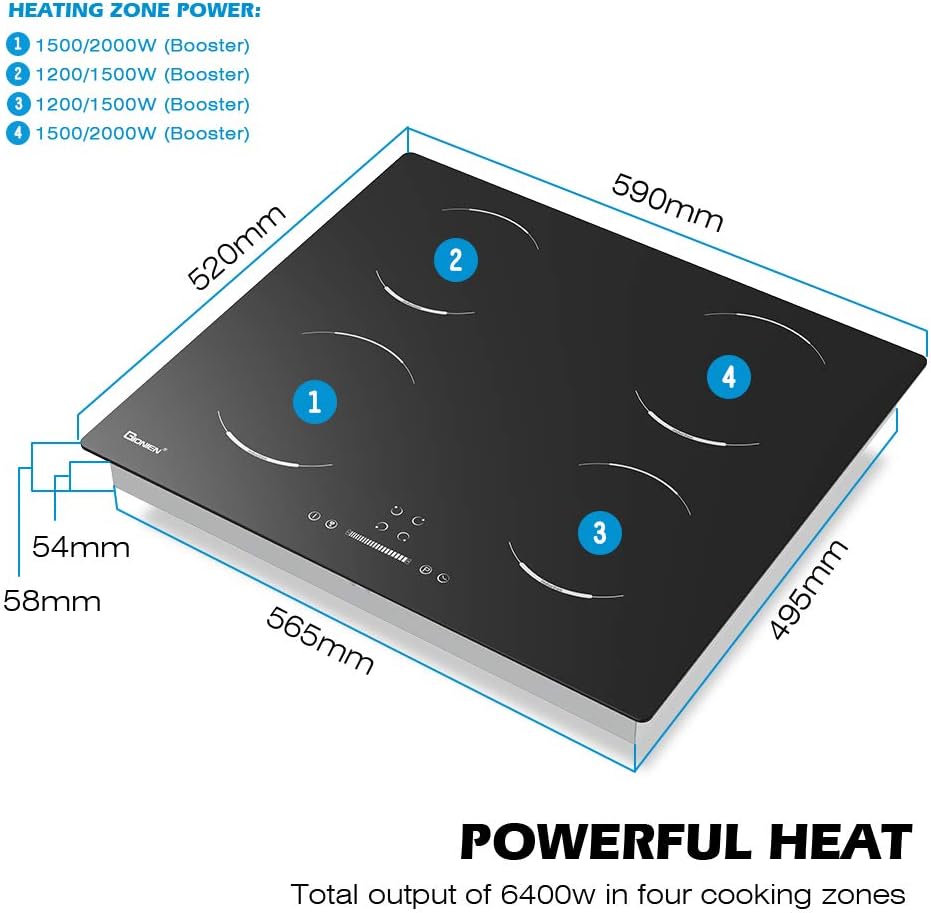
Figure 3: Dimensional diagram of the GIONIEN Induction Hob (590mm x 520mm x 58mm), indicating heating zone power distribution.
- Product Dimensions: 59 cm (width) x 52 cm (depth) x 5.8 cm (height).
- Cut-out Dimensions: Refer to the installation template provided with the product for exact cut-out requirements.
3.3 Electrical Connection
The appliance requires a wired electrical connection. Ensure the power supply matches the requirements stated on the product label (e.g., 230V, 16A). The total output is 6400W.
Note: Electrical installation must be carried out by a licensed electrician.
4. Operating Instructions
The GIONIEN Induction Hob features intuitive touch controls for easy operation.
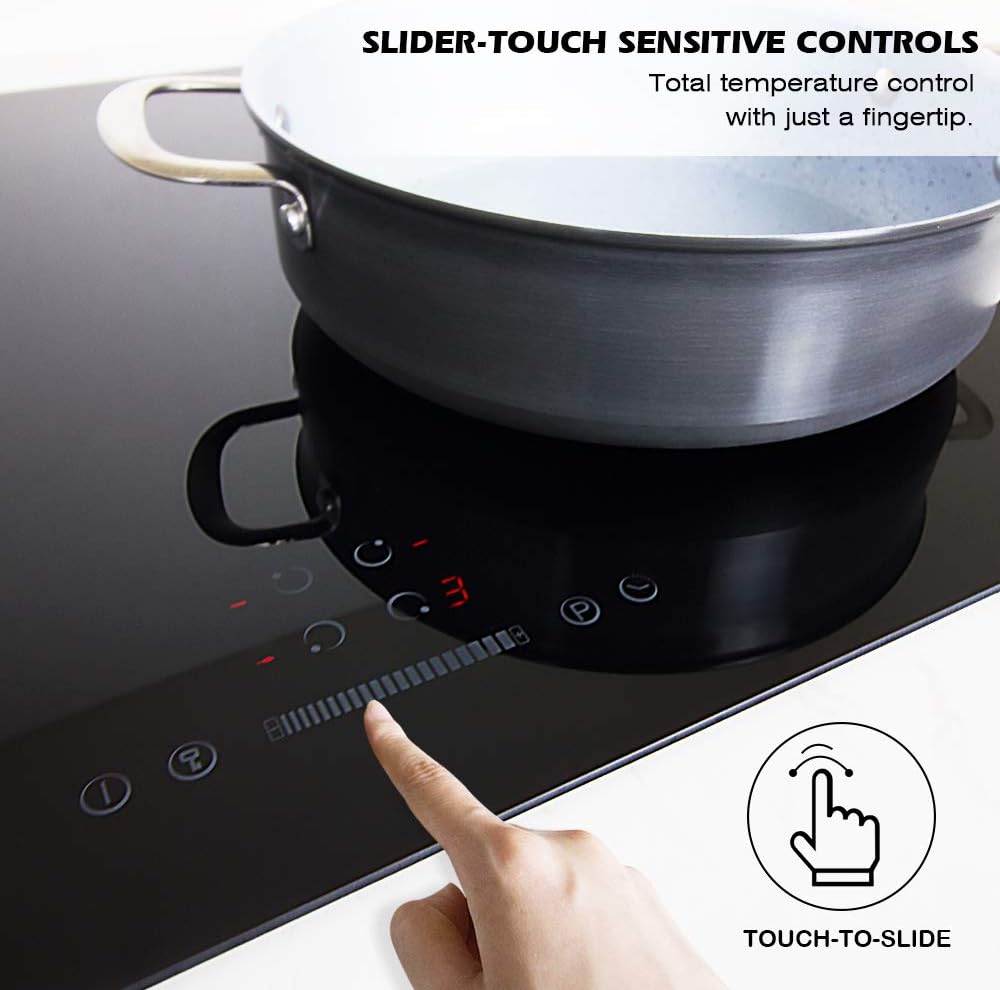
Figure 4: Slider-touch sensitive controls allow for precise temperature adjustment with a fingertip.
4.1 Powering On/Off
- Touch the Power On/Off button to activate the hob. The display will show "0" for all zones.
- To turn off, touch the Power On/Off button again.
4.2 Selecting a Cooking Zone and Power Level
- Place an induction-compatible pan on the desired cooking zone.
- Touch the corresponding zone selection button.
- Use the slider control or '+' / '-' buttons to adjust the power level from 1 to 9.
- The hob offers 9 power levels, providing precise control for various cooking needs.
4.3 Timer Function
- After selecting a cooking zone and power level, touch the Timer button.
- Use the slider or '+' / '-' buttons to set the desired cooking time (0-99 minutes).
- The timer will count down, and the cooking zone will automatically switch off when the time expires.
4.4 Child Lock
- To activate the child lock, touch and hold the Lock button for a few seconds. An indicator light will illuminate.
- When the child lock is active, all controls are disabled.
- To deactivate, touch and hold the Lock button again until the indicator light turns off.
5. Cookware Compatibility
The GIONIEN Induction Hob works efficiently with induction-compatible cookware. This typically includes pots and pans made of:
- Iron
- 304 Stainless Steel
- Alloy Pans with a magnetic base
To check if your cookware is compatible, place a magnet on the bottom of the pan. If the magnet sticks firmly, the pan is suitable for induction cooking.
Recommended Cookware Diameter:
- Minimum: 15 cm (5.9 inches)
- Maximum: 26 cm (10 inches)
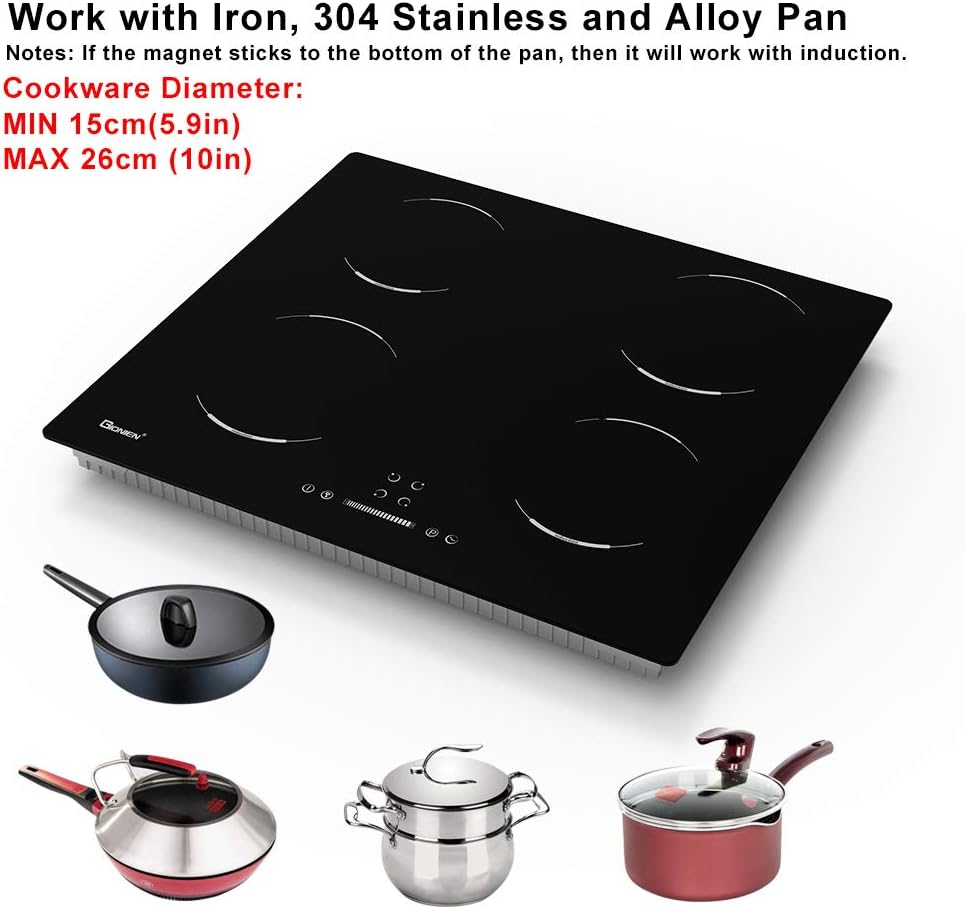
Figure 5: Examples of induction-compatible cookware and recommended diameter ranges for optimal performance.
6. Cleaning and Maintenance
Regular cleaning and proper maintenance will ensure the longevity and optimal performance of your GIONIEN Induction Hob.
6.1 Daily Cleaning
- Always ensure the hob is cool and disconnected from power before cleaning.
- Wipe the ceramic glass surface with a soft cloth or sponge dampened with warm soapy water.
- For stubborn stains, use a specialized ceramic hob cleaner.
- Dry the surface thoroughly with a clean, soft cloth to prevent water marks.
6.2 Avoid
- Do not use abrasive sponges, scouring pads, or harsh chemical cleaners, as these can scratch or damage the glass surface.
- Do not use steam cleaners.
- Avoid dropping heavy or sharp objects on the hob surface.
7. Troubleshooting
If you encounter any issues with your GIONIEN Induction Hob, please refer to the following table before contacting customer service.
| Problem | Possible Cause | Solution |
|---|---|---|
| Hob does not turn on. | No power supply; Child lock activated. | Check power connection; Deactivate child lock. |
| Cooking zone not heating. | Non-compatible cookware; Pan not centered; Pan too small/large. | Use induction-compatible pan; Center pan on zone; Use pan within recommended diameter. |
| Hob makes unusual noise. | Normal operation (cooling fan, pan vibration); Loose pan handle. | This is usually normal; Check pan handles. |
| Error code displayed. | Specific internal fault. | Refer to the full user manual for specific error codes or contact customer support. |
| Automatic shut-off. | Overheat protection; Long period of inactivity. | Allow hob to cool; This is a safety feature. |
8. Specifications
| Feature | Detail |
|---|---|
| Brand | GIONIEN |
| Model Number | GIB464SC |
| Product Dimensions (L x W x H) | 59 cm x 52 cm x 5.8 cm |
| Weight | 9.4 kg |
| Number of Heating Elements | 4 |
| Burner Type | Induction |
| Heater Surface Material | Ceramic Glass |
| Material | Ceramic |
| Power Source | Wired Electric |
| Total Power Output | 6400W |
| Special Feature | Timer, Child Lock, Residual Heat Indicator, Auto Shut-off |
| Color | Black |
| Country of Origin | China |
9. Warranty and Support
For warranty information and customer support, please refer to the documentation provided with your purchase or contact GIONIEN customer service directly. Keep your proof of purchase for any warranty claims.
For general return policies, please consult the retailer's website where the product was purchased.