
Yogpun D1001W
Yogpun Drone Strobe Light D1001W Instruction Manual
Model: D1001W
Product Overview
The Yogpun Drone Strobe Light D1001W is an anti-collision lighting solution designed for drones, ensuring compliance with FAA regulations for night flying. It features 5 super bright LEDs, providing 500 lumens of light visible from over 3 miles away with 360-degree visibility. The light is compact, lightweight, and includes a built-in rechargeable battery for extended use.

Image: Yogpun Drone Strobe Light D1001W with included 3M Dual Lock mounts and Micro USB charging cable.
Package Contents
- Yogpun Drone Strobe Light D1001W
- 3M Dual Lock Mounts
- Micro USB Charging Cable
Setup Instructions
1. Charging the Strobe Light
- Locate the Micro USB charging port on the strobe light.
- Connect the provided Micro USB charging cable to the strobe light and a compatible USB power source (e.g., computer, USB wall adapter).
- The light will indicate charging status (e.g., an indicator light). A full charge typically takes approximately 60 minutes.
- Once fully charged, the strobe light provides up to 3 hours of continuous operation.

Image: Diagram illustrating 1 hour charging time for 4 hours of battery life in flash mode.
2. Mounting the Strobe Light
The strobe light uses 3M Dual Lock technology for secure attachment to your drone. This method is designed to be stronger and more durable than traditional Velcro.
- Identify a flat, clean surface on your drone where the strobe light can be securely mounted without obstructing sensors or propellers.
- Peel the protective backing from one side of the 3M Dual Lock mount.
- Attach this side firmly to the chosen surface on your drone. Press down for several seconds to ensure good adhesion.
- Peel the protective backing from the other side of the 3M Dual Lock mount and attach it to the bottom of the strobe light.
- Align the strobe light with the mount on your drone and firmly press them together until you feel them lock into place.

Image: Visual guide demonstrating the application of 3M Dual Lock mounts to the drone and strobe light for secure attachment.

Image: A drone equipped with the strobe light, flying against a mountain backdrop at dusk, highlighting FAA compliance and visibility.
Operating Instructions
Powering On/Off
To power on the strobe light, slide the switch located on the side of the unit to the "ON" position. To power off, slide the switch to the "OFF" position.
The strobe light is designed to emit a bright, anti-collision flash pattern immediately upon activation. This pattern is optimized for maximum visibility during night flying operations.

Image: The strobe light actively flashing on a drone, demonstrating its brightness and visibility.
FAA Compliance and Visibility
This strobe light is designed to meet FAA requirements for anti-collision lighting during night operations. Its 500 lumens brightness and 360-degree visibility ensure your drone remains detectable from over 3 miles away, aiding in maintaining visual line of sight and enhancing safety for other airspace users.
Maintenance
Charging
Regularly charge the strobe light after each use or when the indicator lights suggest low battery. Avoid completely draining the battery to prolong its lifespan. Recharge time is approximately 1 hour.
Cleaning
Wipe the exterior of the strobe light with a soft, dry cloth to remove dust or debris. Do not use harsh chemicals or abrasive materials, as these may damage the casing or lens.
Storage
Store the strobe light in a cool, dry place away from direct sunlight and extreme temperatures. If storing for an extended period, ensure the battery is partially charged (around 50%) to maintain battery health.
Troubleshooting
- Light Not Turning On:
Ensure the strobe light is fully charged. Connect it to the Micro USB charging cable and allow it to charge for at least 60 minutes. Verify the power switch is in the "ON" position.
- Light Not Holding Charge:
Battery performance can degrade over time. Ensure you are using the provided charging cable and a reliable power source. If the issue persists, the internal battery may require replacement or the unit may need servicing.
- Strobe Light Detaches During Flight:
Ensure the 3M Dual Lock mounts are applied to clean, dry surfaces on both the drone and the strobe light. Press firmly when attaching the strobe to the drone to ensure the Dual Lock fasteners are fully engaged. Consider replacing the 3M Dual Lock mounts if they show signs of wear or reduced adhesion.
Specifications
| Model | D1001W |
| Brand | Yogpun |
| Light Source Type | LED (5 Cree LEDs) |
| Brightness | 500 Lumens |
| Visibility | 3+ Miles, 360° |
| Power Source | Battery Power (1 Lithium Polymer battery included) |
| Battery Life (Flash Mode) | Up to 3 hours |
| Charging Time | Approx. 60 minutes (via Micro USB) |
| Mounting Type | 3M Dual Lock (Surface Mount) |
| Dimensions (L x W x H) | 1.6" x 1.2" x 0.4" (40.6mm x 30.5mm x 10.2mm) |
| Item Weight | 1.58 ounces (approx. 45 grams) |
| Material | Plastic |
| Voltage | 5 Volts |
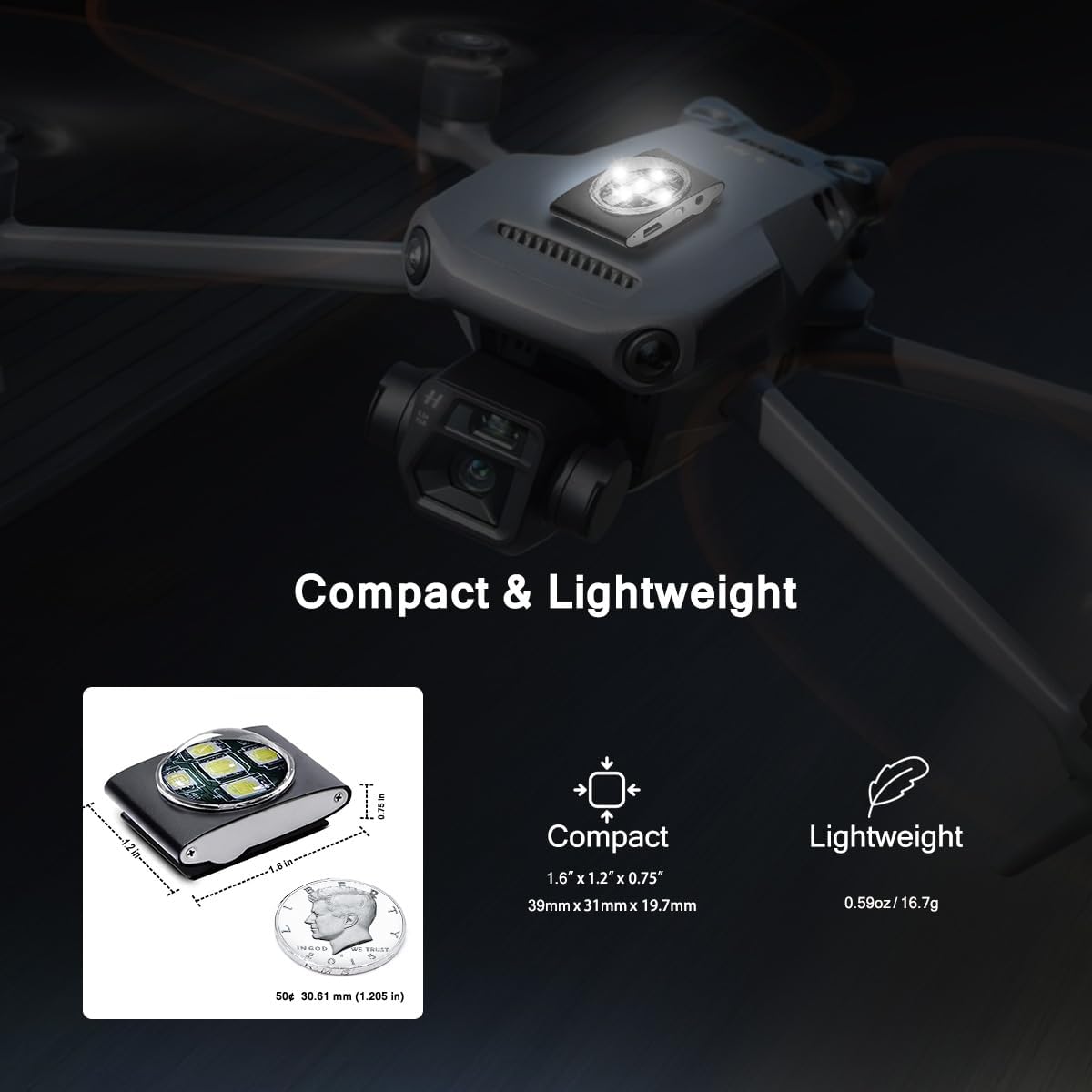
Image: Detailed dimensions of the strobe light, illustrating its compact and lightweight design compared to a coin.
Warranty and Support
Warranty Information
Specific warranty details for the Yogpun Drone Strobe Light D1001W are not provided in this manual. Please refer to the product packaging or the retailer's website for the most current warranty information.
Customer Support
For technical assistance, troubleshooting, or inquiries regarding your Yogpun Drone Strobe Light D1001W, please contact your point of purchase or visit the official Yogpun website for support resources.
Ask a question about this manual
Ask about setup, troubleshooting, compatibility, parts, safety, or missing instructions. Manuals+ will review the question and use this page’s manual context to help answer it.