
1. Introduction
Thank you for choosing the SHRRADOO Extra Large 50L Travel Laptop Backpack. This manual provides essential information for the proper setup, operation, maintenance, and care of your new backpack. Please read it thoroughly to ensure optimal performance and longevity of your product.

Image 1.1: Front view of the SHRRADOO Extra Large 50L Travel Laptop Backpack.
2. Features Overview
The SHRRADOO Travel Laptop Backpack is designed for versatility and comfort, offering extensive storage and convenient features for various uses, including travel, college, and business.
2.1. Large Capacity and Organization
- Features 20 independent pockets for efficient storage and organization.
- Includes 3 spacious main compartments with multiple hidden pockets.
- Dedicated padded laptop compartment accommodates laptops up to 17 inches.
- Side deep zipper pocket for easy access to essentials.
- Side elastic net pockets for water bottles or umbrellas.

Image 2.1: Illustration of the backpack's large capacity and various compartments.
2.2. Convenient and Multipurpose Design
- External USB charging port with a built-in charging cable for device charging (power bank not included).
- Integrated password lock device for enhanced security of contents.
- Sturdy top handle for easy carrying.
- Luggage strap allows the backpack to slide over luggage handles for convenient transport.
- Designed to unfold 90-180 degrees for easy packing and airport security checks.

Image 2.2: Details of the external USB port and password lock feature.

Image 2.3: Demonstration of the luggage strap and the backpack's 90-180 degree opening capability.
2.3. Comfort and Ergonomics
- U-shaped three-dimensional ventilation design on the back for heat dissipation.
- Comfortable, wide, breathable mesh shoulder straps with ample sponge padding to relieve shoulder pressure.
- Shoulder straps include hanging ropes for small items like sunglasses.
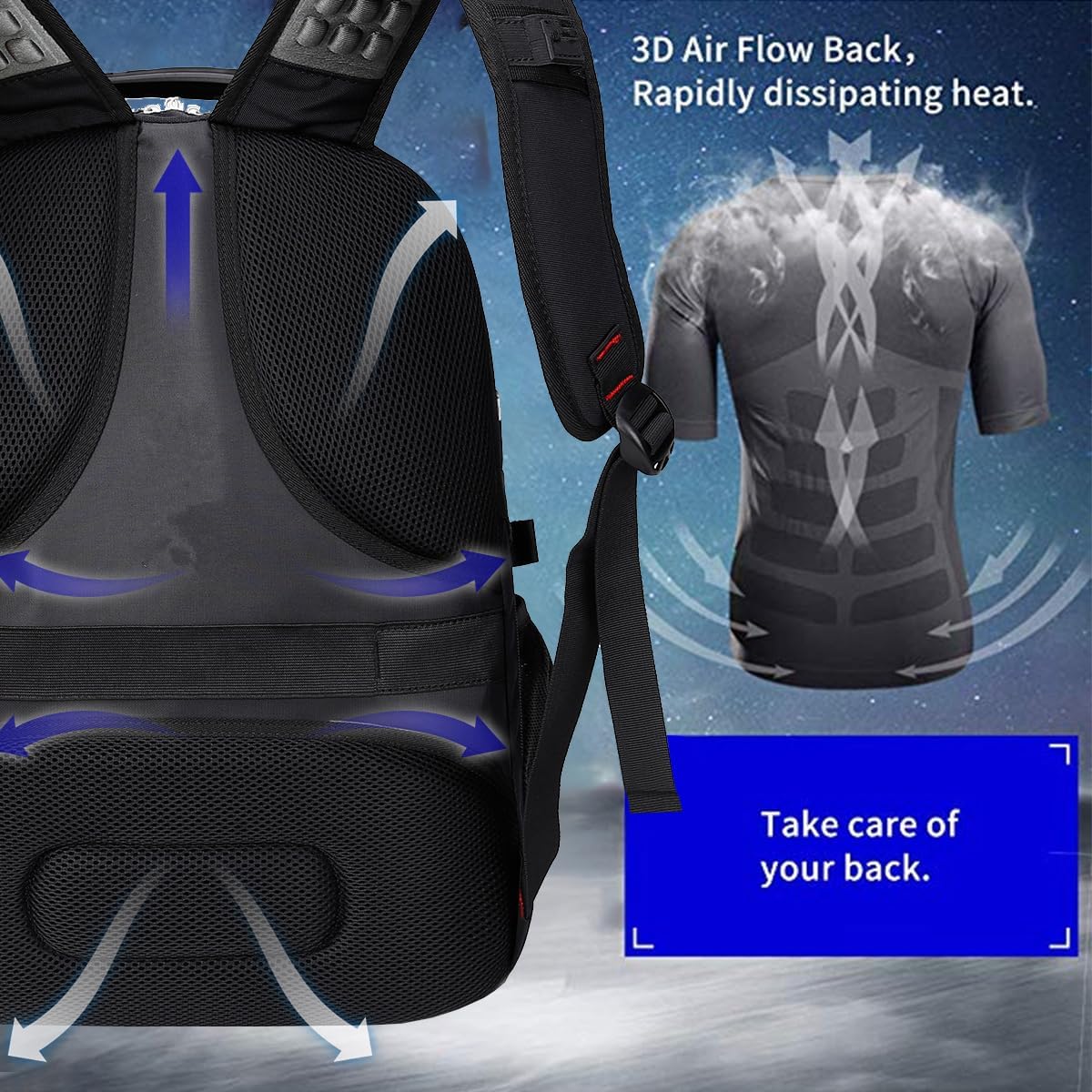
Image 2.4: Explanation of the 3D Air Flow Back system for comfort.
2.4. Durable Construction
- Constructed from high-quality polyester fiber material for long-lasting use.
3. Setup
3.1. USB Charging Port Connection
- Locate the internal USB cable inside the backpack, typically in a dedicated pocket near the external USB port.
- Connect your personal power bank (not included) to the internal USB cable.
- To charge your device, connect your device's charging cable to the external USB port on the side of the backpack.
3.2. Setting the Password Lock
The backpack comes with a pre-set combination, usually 0-0-0. Follow these steps to set your personal combination:
- Ensure the lock is set to the current combination (factory default is 0-0-0).
- Press and hold the reset button (a small button usually located next to the dials) with a pen or pointed object until you hear a click.
- While holding the reset button, set your desired 3-digit combination by turning the dials.
- Release the reset button. Your new combination is now set.
- Test the new combination to ensure it works correctly before securing your belongings.
Important: Remember your combination. There is no master key or override if you forget it.
4. Operating Instructions
4.1. Packing Your Backpack
- Utilize the main compartments for larger items like clothing, books, or travel accessories.
- Place your laptop in the dedicated padded laptop compartment for maximum protection.
- Use the numerous smaller pockets for organizing stationery, cables, chargers, and personal items.
- For easy access, store frequently used items in the front access pockets or side pockets.
4.2. Carrying and Adjusting
- Adjust the shoulder straps to ensure the backpack sits comfortably on your back, distributing weight evenly.
- The U-shaped ventilation system on the back is designed to reduce heat buildup during extended wear.
- For travel with wheeled luggage, slide the backpack's luggage strap over the handle of your suitcase.
4.3. Travel Considerations
- The backpack's ability to unfold 90-180 degrees facilitates easier packing and quicker passage through airport security by allowing flat scanning of contents.
- Always check airline carry-on size restrictions before travel, though this backpack is generally designed to be airline approved.

Image 4.1: Examples of backpack use during travel and daily activities.
5. Maintenance
5.1. Cleaning Instructions
- For minor dirt or stains, wipe the backpack with a damp cloth and mild soap.
- Avoid using harsh detergents, bleach, or abrasive cleaners, as these can damage the fabric.
- Do not machine wash or tumble dry. Air dry completely away from direct sunlight or heat.
5.2. Storage
- Store the backpack in a cool, dry place when not in use.
- Avoid storing heavy items on top of the backpack to prevent deformation.
6. Troubleshooting
6.1. USB Port Not Charging
- Ensure your power bank is fully charged and properly connected to the internal USB cable.
- Verify that your device's charging cable is securely connected to the external USB port.
- Test with a different power bank or charging cable to rule out accessory issues.
6.2. Password Lock Malfunction
- Ensure the dials are precisely aligned with your set combination. Slight misalignment can prevent opening.
- If the lock mechanism feels stiff, try gently wiggling the dials while entering the combination.
- If you have forgotten your combination, unfortunately, there is no reset method without knowing the original code.
7. Specifications
| Feature | Detail |
|---|---|
| Product Dimensions | 15 x 11 x 19.5 inches (L x W x H) |
| Item Weight | 2.8 pounds |
| Capacity Total | 50 Liters |
| Laptop Compartment | Fits up to 17-inch laptops |
| Material | High-quality Polyester Fiber |
| Model Number | 983035 |
| Manufacturer | SHRRADOO |

Image 7.1: Detailed dimensions of the backpack.
8. Warranty and Support
SHRRADOO offers a comprehensive after-sales service for this product. Within one year of receiving your backpack, if any quality defects occur during normal use, please contact us. You will need to provide a photo of the defective product. We commit to providing a solution within 24 hours, which may include sending a new identical product as a replacement free of charge.
For support or warranty claims, please refer to the contact information provided with your purchase or visit the official SHRRADOO website.