
Important Safety Information
Read all instructions carefully before assembly and installation. Failure to follow these instructions may result in injury or damage to the product. Keep this manual for future reference.
- Always use appropriate safety gear, including eye protection, during assembly.
- Ensure the mounting surface (wall) is structurally sound and capable of supporting the weight of the entertainment center and your television.
- Locate wall studs for secure mounting. If mounting to drywall without studs, use the provided toggle bolts or other appropriate heavy-duty anchors. Consult a professional if unsure about wall type or mounting methods.
- Do not overtighten screws, as this may damage the material.
- Keep small parts away from children during assembly to prevent choking hazards.
- Distribute weight evenly on shelves. Do not exceed the recommended weight capacity for any shelf.
Package Contents
Verify that all components are present before beginning assembly. If any parts are missing or damaged, contact customer support.
- Main Wall Panel
- Overhead Decor Display Shelf
- Two (2) Open Media Shelves
- One (1) Glass Decor Shelf Divider
- TV Mounting Brackets
- Assembly Hardware (screws, dowels, toggle bolts for drywall)
- Instruction Manual
Tools Required
The following tools are recommended for assembly and installation:
- Phillips Head Screwdriver
- Drill (with appropriate drill bits for pilot holes and wall anchors)
- Level
- Tape Measure
- Pencil
- Stud Finder (recommended for wall mounting)
- Hammer (for dowels, if applicable)
Assembly Instructions
Follow these steps carefully to assemble and install your floating entertainment center.
Step 1: Unpacking and Part Identification
Carefully unpack all components and lay them out on a clean, soft surface to prevent scratches. Identify each part using the provided parts list (if included separately) and ensure all hardware is present.
Step 2: Wall Mounting the Main Panel
Determine the desired height and location for your entertainment center. Use a stud finder to locate wall studs for optimal support. Mark the drilling points on the wall. Drill pilot holes as instructed. Secure the main wall panel to the wall using the appropriate mounting hardware. For drywall installations without studs, use the provided toggle bolts, ensuring they are correctly installed for maximum stability.

Image: Rear view of the main panel, illustrating the designated mounting points for wall attachment.

Image: Detailed diagram displaying the overall dimensions of the entertainment center, including length, height, and depth.
Step 3: Attaching Shelves
Attach the overhead decor display shelf and the two open media shelves to the main panel using the provided hardware. Ensure they are level and securely fastened. Install the glass decor shelf divider in its designated position.

Image: Close-up view of an assembled floating shelf, demonstrating its attachment to the main panel.
Step 4: TV Installation
Utilize the included TV mounting brackets to securely attach your television to the main panel. Follow your TV's specific mounting instructions in conjunction with the provided brackets. Ensure the TV is centered and level.
Step 5: Wire Management
Route all power and media cables through the integrated media holes in the panel to maintain a tidy and organized appearance. This helps prevent cable clutter and enhances safety.

Image: Feature diagram illustrating key aspects such as TV mounting brackets, overhead decor shelf, and media holes for wire management.
Product Overview Video
Video: An overview of the Manhattan Comfort Plaza Floating Entertainment Center (Model 224BMC), showcasing its design, features, and various color options. This video provides a visual guide to the product's appearance and functionality.
Operating Instructions
Once assembled and installed, the entertainment center is ready for use.
- Place your television on the mounted brackets. Ensure it is securely attached according to the TV manufacturer's instructions.
- Arrange media devices (e.g., DVD players, gaming consoles) on the open media shelves.
- Utilize the overhead shelf for decorative items or smaller audio components.
- Route all cables through the designated media holes to maintain a clean and organized setup.
- Avoid placing excessively heavy items on any shelf. Refer to the specifications for general weight guidelines.
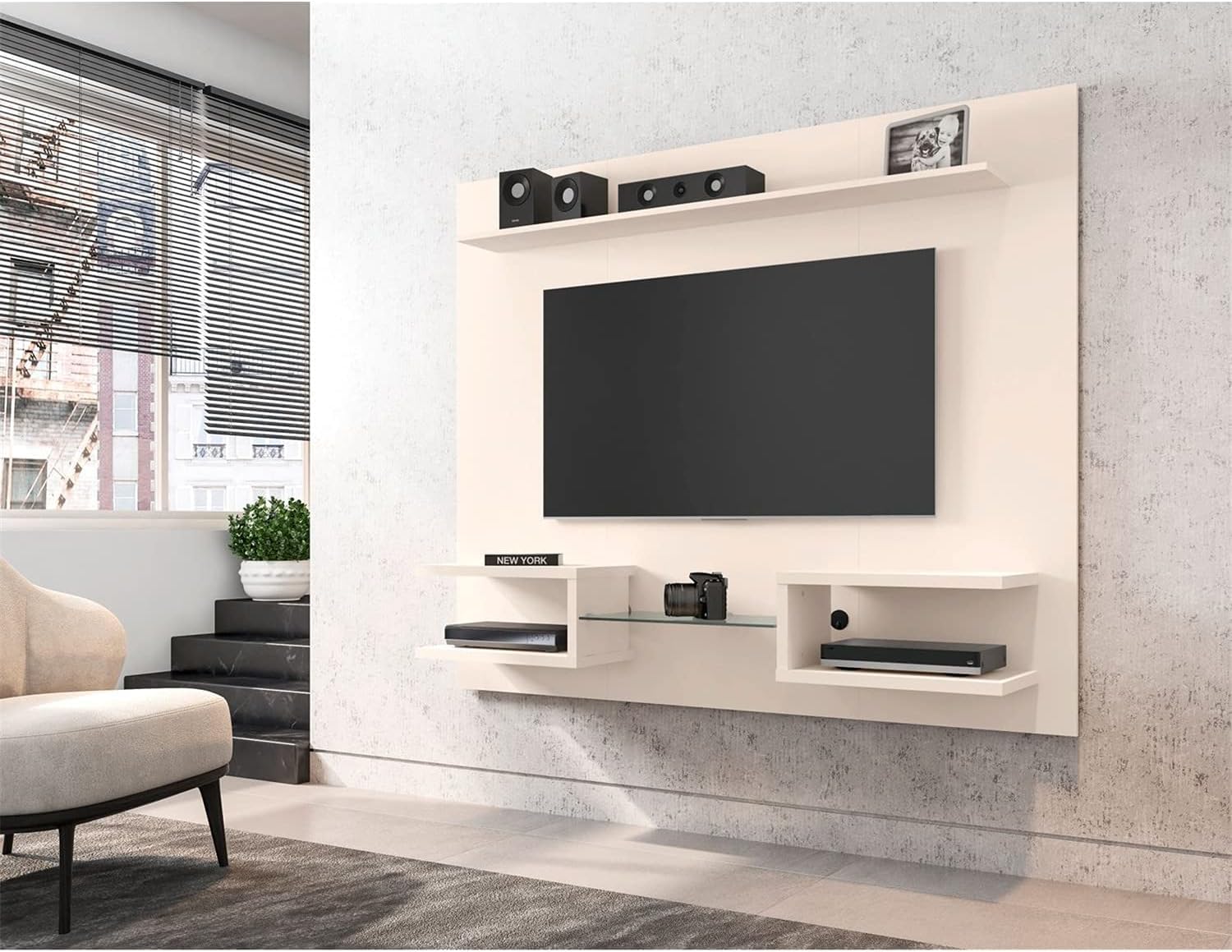
Image: The Manhattan Comfort Plaza Floating Entertainment Center in Off White, shown fully assembled and in use with a television, speakers, and various media devices.
Maintenance and Care
To ensure the longevity and appearance of your entertainment center, follow these care guidelines:
- Cleaning: Wipe surfaces with a dry, soft cloth. Avoid abrasive cleaners, harsh chemicals, or excessive moisture, as these can damage the finish.
- Inspection: Periodically check all screws and connections to ensure they remain tight. Retighten if necessary.
- Sunlight Exposure: Avoid prolonged exposure to direct sunlight, which can cause fading or discoloration.
- Heat and Moisture: Keep the unit away from direct heat sources and areas of high humidity.
Troubleshooting
If you encounter any issues with your entertainment center, consider the following:
- Unit feels unstable: Ensure all wall mounting hardware is securely fastened. If mounted to drywall, verify that toggle bolts are properly engaged. Recheck all internal assembly screws.
- Shelves are not level: Loosen the shelf attachment screws slightly, adjust the shelf to be level, and then retighten firmly.
- Scratches or minor damage: For minor blemishes, touch-up pens or furniture repair kits matching the finish may be used.
- Missing parts: If parts were missing upon delivery, contact customer support immediately with your purchase details.
Specifications
| Model Number | 224BMC |
| Brand | Manhattan Comfort |
| Overall Dimensions (L x H x D) | 64.25 in. x 53.54 in. x 11.65 in. |
| Recommended TV Size | Up to 50 inches |
| Material Type | Wood |
| Number of Shelves | 6 (1 overhead, 2 open media, 1 glass divider) |
| Features | Wire Management, TV Mounting Brackets Included |
| Assembly Required | Yes |
Warranty Information
For detailed warranty information, please refer to the product description on the store page or contact Manhattan Comfort customer support directly. Keep your proof of purchase for any warranty claims.
Customer Support
If you have any questions, require assistance with assembly, or need to report missing/damaged parts, please contact Manhattan Comfort customer support. Have your model number (224BMC) and purchase information ready when contacting support.
You can often find contact information on the manufacturer's official website or through the retailer where the product was purchased.