
1. Introduction
This instruction manual provides essential information for the safe and effective use of your YEIBOBO! 6-Channel Mini RC Submarine Toy (Model 777-586). Please read this manual thoroughly before operating the product to ensure proper functionality and to prevent damage or injury. This remote-controlled submarine is designed for recreational use in water environments such as bathtubs, pools, and ponds.

Image: The black YEIBOBO! Mini RC Submarine and its remote control, ready for operation.
2. What's in the Box
Your YEIBOBO! Mini RC Submarine package includes the following items:
- 1 x YEIBOBO! 6-Channel Mini RC Submarine (Model 777-586)
- 1 x Remote Control
- 1 x USB Charging Cable
- 1 x Instruction Manual

Image: The YEIBOBO! Mini RC Submarine, its remote control, and a USB charging cable are shown, indicating the items included in the package.
3. Setup
3.1. Charging the Submarine
- Locate the charging port on the submarine.
- Connect the USB charging cable to the submarine's charging port.
- Connect the other end of the USB charging cable to a computer's USB port or a USB wall adapter (not included).
- The submarine requires approximately 20 minutes for a full charge, providing about 15 minutes of playtime.
- Important: Do not connect the USB cable directly to a wall plug without a proper adapter, as this may damage the built-in battery.
3.2. Remote Control Battery Installation
The remote control requires batteries (not included). Please refer to the remote control's battery compartment for specific battery type and installation instructions.
3.3. Initial Power-On
The submarine features a safety mechanism: it will only power on when placed in water. It automatically powers off when removed from water.
4. Operating Instructions
Familiarize yourself with the remote control layout and functions before operating the submarine.

Image: A diagram illustrating the remote control buttons for forward, backward, turn left, turn right, floating, and diving, alongside corresponding submarine movements.
4.1. Basic Controls
- Forward: Press the designated button to move the submarine forward.
- Backward: Press the designated button to move the submarine backward.
- Turn Left: Use the left directional control to steer the submarine left.
- Turn Right: Use the right directional control to steer the submarine right.
- Floating: Press the designated button to make the submarine ascend to the surface.
- Diving: Press the designated button to make the submarine descend underwater.
4.2. Operating Environment
- The submarine is suitable for use in bathtubs, pools, and ponds.
- Ensure the water depth is appropriate for safe operation (maximum dive depth is 4.92ft).
- The remote control distance is approximately 16.4ft. Maintain this range for optimal control.
Video: A YEIBOBO! Mini RC Submarine operating underwater, demonstrating its movement capabilities and LED lights.
5. Maintenance
- After each use, thoroughly dry the submarine to prevent water damage to internal components.
- Store the submarine and remote control in a cool, dry place away from direct sunlight and extreme temperatures.
- Regularly check the propellers for any debris or entanglement and clean as necessary to ensure smooth operation.
- Ensure the sealing ring at the interface is intact and waterproof glue seal is not leaking to maintain water resistance.
6. Troubleshooting
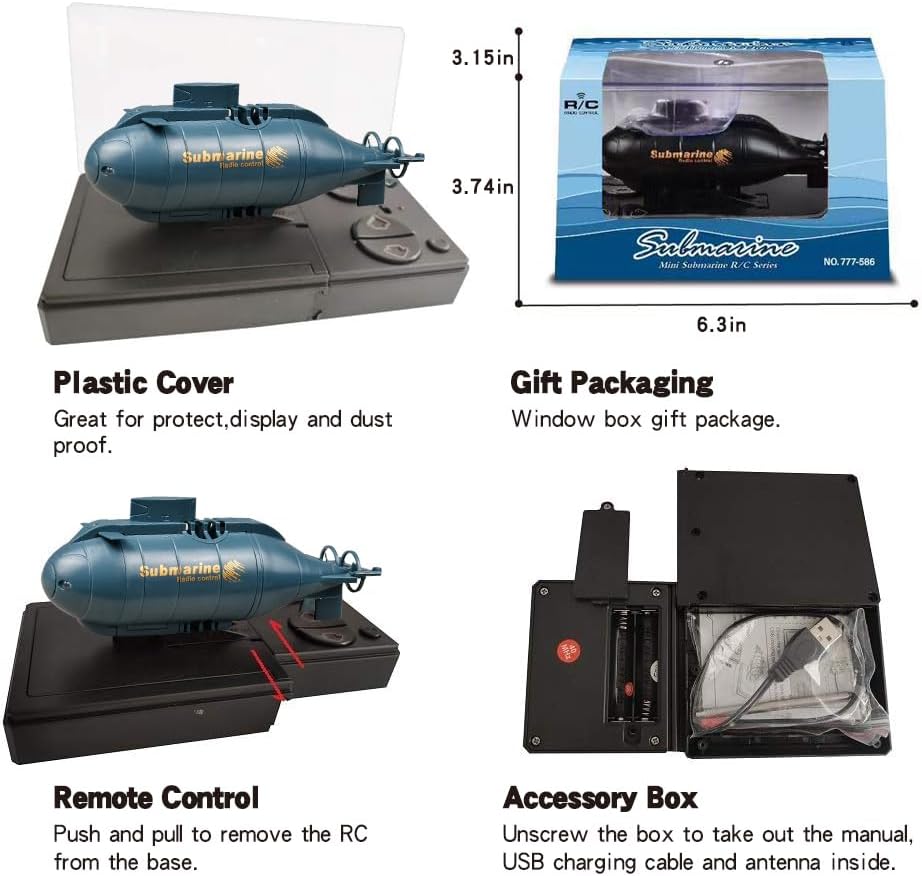
Image: A visual troubleshooting guide addressing common issues like the submarine not working, intermittent operation, and charging instructions.
- Q: Why is the submarine not working?
A: It has security protection. The submarine cannot be used until it is in the water. If the basin is too small or the water is too shallow, the operation will be less sensitive, and the reaction will need to be pressed for a while. Consider using a larger container and filling it with more water.
- Q: Why do the submarines work intermittently?
A: Firstly, charge it fully. Then, keep the remote control distance not too far from it (within 4m).
- Q: How do I charge?
A: You can use RC or USB charging. If the RC cannot be charged, it may be that the RC battery is dead. You can charge with USB. But the USB must be connected to the computer to recharge. If the plug is directly connected to charge, it will burn out the built-in battery.
7. Specifications
| Feature | Detail |
|---|---|
| Brand | YEIBOBO! |
| Model Number | 777-586 |
| Channels | 6 Channels |
| Functions | Forward, Backward, Turn Left, Turn Right, Floating, Diving, 2 LED Lights |
| Playtime | Approx. 15 minutes (after 20 min charge) |
| Remote Control Distance | 16.4 ft (5 meters) |
| Dive Depth | 4.92 ft (1.5 meters) |
| Power System | Two motors, two propellers |
| Safety Features | In-water power-on, out-of-water power-off, sealed design |
| Product Dimensions | 4.9 x 1.4 x 1.8 inches |
| Item Weight | 8.8 ounces |
| Battery | 1 Lithium Ion battery (built-in) |
| Recommended Age | 8 years and up |
8. Warranty & Support
If there is any problem within 90 days after receiving the item, please contact the seller for replacement or refund. For further assistance or inquiries, please refer to the contact information provided on the product packaging or the official YEIBOBO! website.