
1. Introduction
Thank you for choosing the MEIER Portable Radio M-161BT. This manual provides essential information for the safe and efficient operation of your device. Please read it thoroughly before use and retain it for future reference.
2. Safety Information
- Do not expose the device to rain, moisture, or extreme temperatures.
- Avoid disassembling or modifying the radio, as this may void the warranty and pose safety risks.
- Use only the specified charging cable and power adapter (if applicable) to prevent damage.
- Keep the device away from strong magnetic fields.
- Dispose of batteries responsibly according to local regulations.
3. Package Contents
Please check that all items are present:
- MEIER Portable Radio M-161BT Unit
- USB Charging Cable
- Rechargeable Battery (pre-installed or separate)
4. Product Overview
4.1. Device Layout
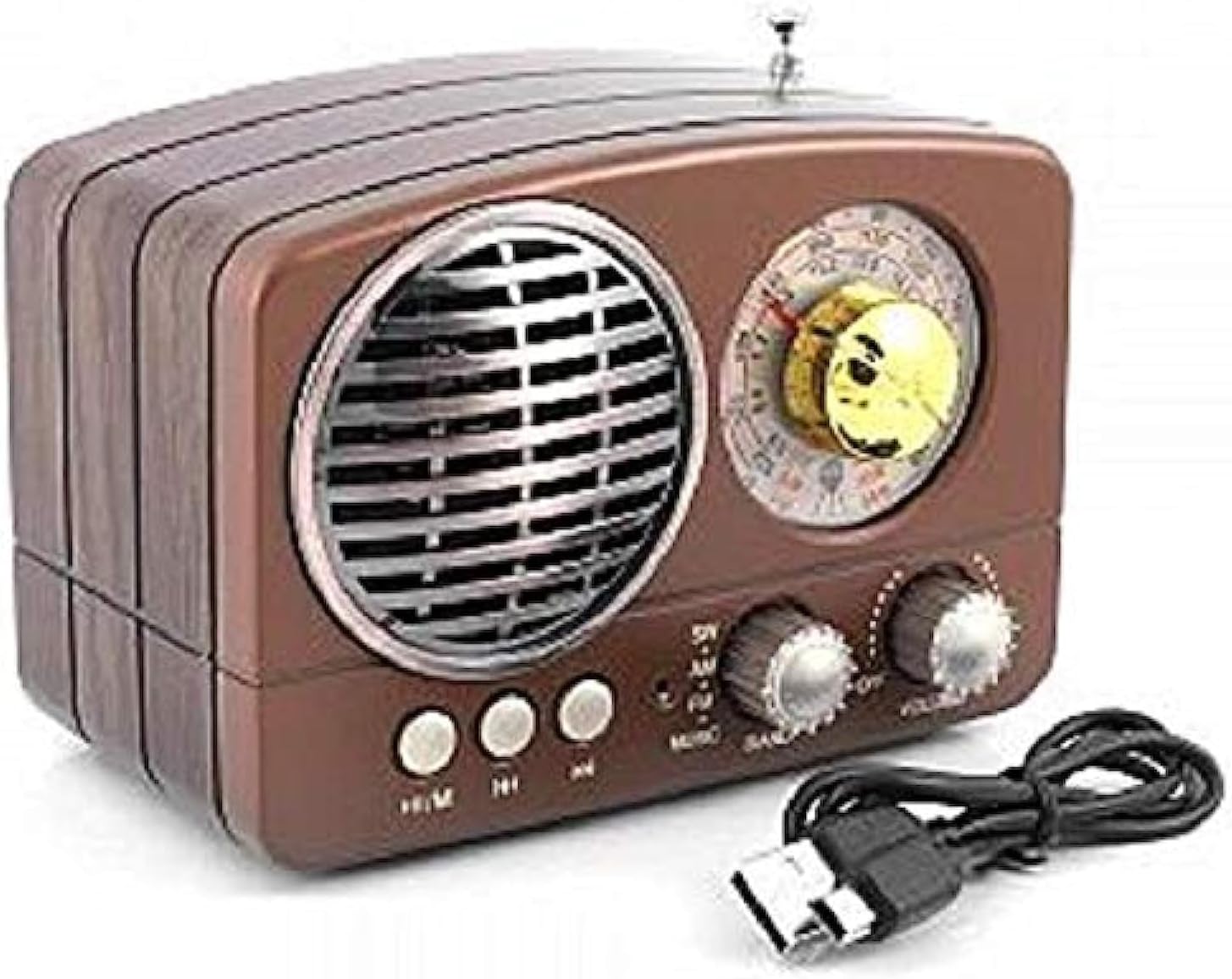
Image: The MEIER Portable Radio M-161BT, featuring a classic brown wooden-style casing. On the front, a large circular speaker grille is on the left, and a tuning dial with a gold knob is on the right. Below these are three small circular buttons and two larger rotary knobs for volume and tuning. A USB charging cable is shown next to the radio. An extendable antenna is visible on top.
4.2. Controls and Ports
- Speaker: Audio output.
- Tuning Dial: Used to select radio frequencies.
- Volume/Power Knob: Rotate to adjust volume; press or rotate fully counter-clockwise to power on/off.
- Mode Buttons: Select between Radio (AM/FM/SW), Bluetooth, USB, and Memory card modes.
- USB Port: For connecting USB flash drives for audio playback or for charging.
- Memory Card Slot: For inserting TF/MicroSD cards for audio playback.
- Antenna: Extendable antenna for improved radio reception.
5. Setup
5.1. Battery Installation
If the battery is not pre-installed:
- Locate the battery compartment on the back or bottom of the radio.
- Open the compartment cover.
- Insert the rechargeable battery, ensuring correct polarity (+ and -).
- Close the battery compartment cover securely.
5.2. Charging the Battery
- Connect the small end of the USB charging cable to the charging port on the radio.
- Connect the larger end of the USB cable to a USB power adapter (not included) or a computer's USB port.
- The charging indicator light (if present) will illuminate during charging and turn off or change color when fully charged.
- A full charge typically takes 3-5 hours.
5.3. Powering On/Off
To power on the radio, rotate the Volume/Power knob clockwise until you hear a click and the display (if any) illuminates. To power off, rotate the knob fully counter-clockwise until it clicks off.
6. Operating Instructions
6.1. Radio Mode (AM/FM/SW)
- Power on the radio.
- Press the 'Mode' button (or corresponding radio band button) to select FM, AM, or SW (Shortwave) band.
- Extend the telescopic antenna for optimal FM and SW reception. For AM, the internal antenna is usually sufficient, but rotating the radio may improve reception.
- Rotate the Tuning Dial to scan for radio stations.
- Adjust the Volume/Power knob to your desired listening level.
6.2. Bluetooth Mode
- Power on the radio.
- Press the 'Mode' button until you hear an audible prompt indicating Bluetooth mode (e.g., "Bluetooth Mode" or a pairing tone).
- On your mobile device, enable Bluetooth and search for available devices.
- Select "M-161BT" (or similar name) from the list of devices to pair.
- Once paired, you can play audio from your device through the radio.
6.3. USB/Memory Card Playback
- Power on the radio.
- Insert a USB flash drive into the USB port or a TF/MicroSD card into the memory card slot.
- The radio should automatically switch to USB or Memory Card mode and begin playing audio files. If not, press the 'Mode' button to select the correct input.
- Use the playback control buttons (if available, typically Play/Pause, Next/Previous) to manage your audio.
7. Maintenance
- Cleaning: Wipe the radio with a soft, dry cloth. Do not use abrasive cleaners or solvents.
- Storage: When not in use for extended periods, store the radio in a cool, dry place. Consider removing the battery if storing for several months to prevent leakage.
- Battery Care: Recharge the battery regularly, even if not in use, to maintain its lifespan. Avoid fully discharging the battery frequently.
8. Troubleshooting
| Problem | Possible Solution |
|---|---|
| Radio does not power on. | Ensure the battery is correctly installed and charged. Connect the radio to a power source using the USB cable. |
| No sound from the speaker. | Check the volume level. Ensure the correct mode (Radio, Bluetooth, USB) is selected. |
| Poor radio reception. | Extend the antenna fully. Try repositioning the radio or rotating it for better signal. Avoid interference from other electronic devices. |
| Bluetooth device not pairing. | Ensure the radio is in Bluetooth pairing mode. Make sure Bluetooth is enabled on your device and it is within range. Try restarting both devices. |
| USB/Memory card not playing. | Ensure the USB drive or memory card is inserted correctly and contains compatible audio files (e.g., MP3). Try re-inserting the media. |
9. Specifications
- Model: M-161BT
- Radio Bands Supported: AM/FM/Weather (3 waves)
- Connectivity: Bluetooth, USB, Memory Card (TF/MicroSD), Wired (if AUX input is present, not explicitly listed but common)
- Power Source: Battery Powered
- Special Features: Portable
- Frequency: Up to 108 MHz (FM)
10. Warranty and Support
This product is covered by a standard manufacturer's warranty. Please refer to the warranty card included with your purchase for specific terms and conditions. For technical support or service inquiries, please contact your retailer or the MEIER customer service department.
Note: Product specifications and features are subject to change without prior notice.