
Introduction
The Ocean Digital DK23 is a compact and portable digital radio designed for versatile audio entertainment. It supports DAB, DAB+, and FM radio stations, offering a wide range of listening options. Featuring a built-in rechargeable battery, sleep timer, and earphone jack, this radio is ideal for use at home or on the go. Its intuitive design ensures ease of use for all listeners.
What's in the Box

Image: The Ocean Digital DK23 radio, its USB charging cable, and the user manual as packaged in the box.
- 1 x Ocean Digital DK23 DAB Radio
- 1 x USB Charging Cable
- 1 x User Manual
Product Overview
The Ocean Digital DK23 radio features a sleek, rectangular design with a front-facing speaker grille and a clear LCD display. The top panel includes control buttons and a volume knob, while the rear panel houses the antenna, charging port, and earphone jack.
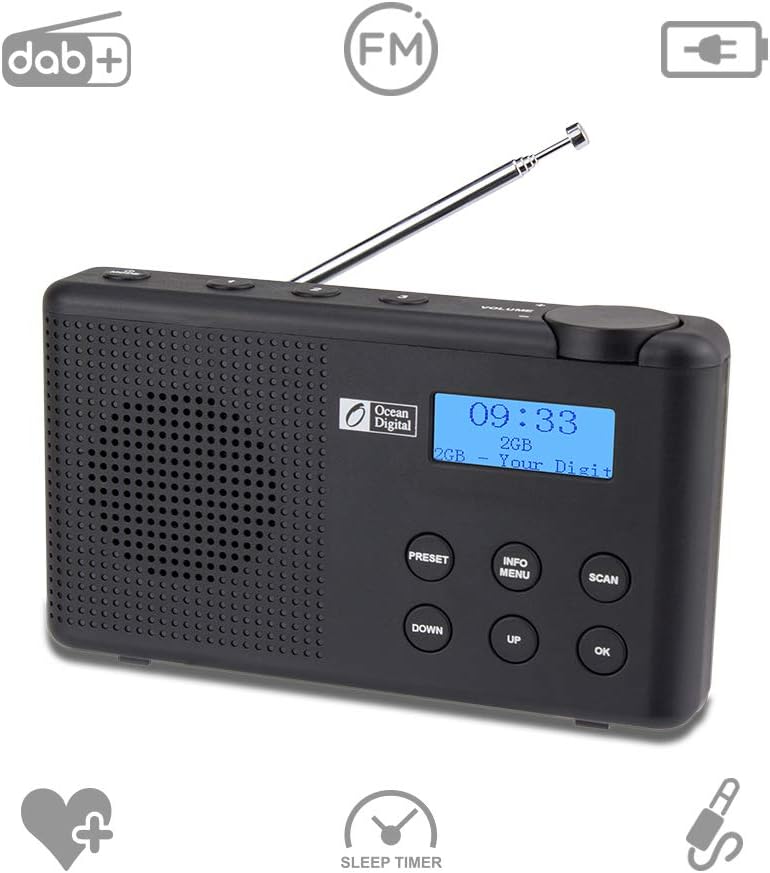
Image: Front view of the Ocean Digital DK23 radio, highlighting the speaker, LCD display, and main control buttons.
Controls and Ports

Image: Rear view of the Ocean Digital DK23 radio, detailing the telescopic antenna, micro USB charging port, and 3.5mm earphone jack.
- Volume Knob: Located on the top right, rotate to adjust audio output level.
- Preset Buttons (1, 2, 3): Quick access to saved favorite stations.
- PRESET Button: Access and save preset stations.
- INFO/MENU Button: Display station information or access the menu settings.
- SCAN Button: Initiate an automatic scan for available radio stations.
- DOWN Button: Navigate downwards through menus or station lists.
- UP Button: Navigate upwards through menus or station lists.
- OK Button: Confirm selections in menus.
- 3.5mm Earphone Jack: For private listening with headphones.
- USB Port (DC IN 5V): For charging the internal battery.
- Telescopic Antenna: Extend for optimal radio signal reception.
Setup
Charging the Battery
The Ocean Digital DK23 features a built-in 1200mAh Li-ion rechargeable battery. Before first use, it is recommended to fully charge the device.
- Connect the supplied USB charging cable to the USB port (DC IN 5V) on the back of the radio.
- Connect the other end of the USB cable to a compatible USB power adapter (5V 1A, not supplied) or a powered USB port.
- The LED indicator will illuminate during charging and turn off when the battery is fully charged. A full charge provides over 7 hours of playtime at medium volume.

Image: The Ocean Digital DK23 radio, emphasizing its rechargeable battery feature with a battery icon.
Antenna Setup
For optimal radio reception, fully extend the telescopic antenna located on the back of the unit. Adjust its position to improve signal strength if reception is poor.
Initial Power On and Language Selection
- Press and hold the Power button (usually combined with the Volume knob) to turn on the radio.
- Upon first power-on, the radio may prompt you to select a language. Use the UP and DOWN buttons to navigate through the available languages (English, French, German, Italian) and press OK to confirm your selection.
Operating Instructions
Power On/Off
- To turn on the radio, press and hold the Power button (often integrated with the Volume knob).
- To turn off the radio, press and hold the Power button again.
Mode Selection (DAB/DAB+/FM)
To switch between DAB/DAB+ and FM radio modes, press the MODE button (if available, otherwise consult the specific button layout for mode switching, often the INFO/MENU button or a dedicated mode button).
Scanning for Stations
DAB/DAB+ Auto Scan
- Ensure the radio is in DAB mode.
- Press the SCAN button. The radio will automatically scan for all available DAB/DAB+ stations and store them. This process may take a few minutes.
- Once the scan is complete, the radio will tune to the first available station. Use the UP and DOWN buttons to browse through the found stations.
FM Scan
- Ensure the radio is in FM mode.
- Press the SCAN button to perform an auto-scan for FM stations. The radio will stop at the next strong signal.
- Alternatively, use the UP and DOWN buttons to manually tune the frequency in small increments.
Saving and Recalling Preset Stations
The radio allows you to save up to 20 DAB and 20 FM preset stations for quick access.
Saving a Preset
- Tune to the desired DAB or FM station.
- Press and hold the PRESET button until the display shows "Preset Store" or a similar message.
- Use the UP or DOWN buttons to select the desired preset number (e.g., P01, P02).
- Press OK to confirm and save the station to the selected preset number.
Recalling a Preset
- Press the PRESET button (do not hold) to enter preset recall mode.
- Use the UP or DOWN buttons to navigate through the saved preset stations.
- Press OK to tune to the selected preset station.
- For quick access, use the dedicated preset buttons (1, 2, 3) on the top panel if available.
Volume Control
Rotate the Volume Knob clockwise to increase the volume and counter-clockwise to decrease it.
Sleep Timer
The sleep timer allows the radio to automatically turn off after a set period.
- Press the INFO/MENU button repeatedly until you find the Sleep Timer option in the menu.
- Use the UP or DOWN buttons to select the desired sleep duration (e.g., 15, 30, 45, 60, 90 minutes).
- Press OK to confirm the setting. The radio will automatically power off after the selected time.
Earphone Usage
For private listening, connect standard 3.5mm earphones (not supplied) to the earphone jack located on the back of the radio. The internal speaker will automatically mute when earphones are connected.

Image: The Ocean Digital DK23 radio, highlighting the 3.5mm earphone jack for private listening.
Maintenance
- Cleaning: Wipe the radio with a soft, dry cloth. Do not use abrasive cleaners or solvents.
- Battery Care: To prolong battery life, avoid fully discharging the battery frequently. Charge the radio regularly, even if not in use for extended periods.
- Storage: Store the radio in a cool, dry place away from direct sunlight and extreme temperatures.
Troubleshooting
| Problem | Solution |
|---|---|
| Radio does not power on. | Ensure the battery is charged. Connect the USB charging cable and allow it to charge for a period. |
| Poor radio reception or static. | Fully extend the telescopic antenna. Try repositioning the radio to a location with better signal. Perform a new auto-scan for stations. |
| Cannot find desired stations. | Ensure you are in the correct mode (DAB/DAB+ or FM). Perform a full auto-scan to update the station list. |
| Buttons are unresponsive. | Try resetting the device by turning it off and on again. If the issue persists, allow the battery to fully discharge and then recharge it. |
| Display shows incorrect time. | In DAB mode, the time is usually automatically set by the broadcast signal. Ensure good DAB reception. |
Technical Specifications

Image: The Ocean Digital DK23 radio with its physical dimensions indicated: 155mm (length), 27mm (depth), and 88mm (height).
- DAB Frequency Range: 174.928MHz (5A) - 239.200MHz (13F)
- FM Frequency Range: 87.5-108MHz
- Power Input: 5V 1A
- Battery Power: Lithium battery 1200mAH
- Audio Socket: 3.5mm earphone jack
- Unit Dimensions (L x D x H): 155 x 27 x 88 mm
- Item Weight: 320 Grams
- Display Technology: LED
- Connectivity Technology: USB
Warranty and Support
The Ocean Digital DK23 radio comes with a standard manufacturer's warranty. Please refer to the warranty card included in your product packaging for specific terms and conditions, including the warranty period and coverage details.
For technical support, troubleshooting assistance, or warranty claims, please contact Ocean Digital customer service. Contact information can typically be found in the user manual or on the official Ocean Digital website. Keep your purchase receipt as proof of purchase for warranty purposes.


