
1. Introduction
This manual provides essential information for the safe and efficient operation of your Geepas GMS8429 Home Theater System. Please read these instructions thoroughly before using the product and retain them for future reference.
The Geepas GMS8429 is a 2.0 channel professional karaoke amplifier system designed for home entertainment, group gatherings, and karaoke. It features powerful audio output, versatile connectivity, and user-friendly controls.
2. Important Safety Instructions
- Read all instructions before operating the appliance.
- Keep this manual for future reference.
- Do not expose this appliance to rain or moisture to prevent fire or shock hazards.
- Ensure proper ventilation. Do not block any ventilation openings.
- Do not install near any heat sources such as radiators, heat registers, stoves, or other apparatus that produce heat.
- Protect the power cord from being walked on or pinched, particularly at plugs, convenience receptacles, and the point where they exit from the appliance.
- Only use attachments/accessories specified by the manufacturer.
- Unplug this appliance during lightning storms or when unused for long periods.
- Refer all servicing to qualified service personnel. Servicing is required when the apparatus has been damaged in any way, such as power-supply cord or plug is damaged, liquid has been spilled or objects have fallen into the apparatus, the apparatus has been exposed to rain or moisture, does not operate normally, or has been dropped.
3. Package Contents
Verify that all items listed below are included in your package:
- Geepas GMS8429 Home Theater System (Main Unit)
- Remote Control
- 1 Wireless Microphone
- RCA Cables
- Instruction Manual (This Document)
4. Product Features
The Geepas GMS8429 Home Theater System offers a range of features for an enhanced audio experience:
- Type: Professional Karaoke Amplifier 2.0 Channel
- Display: LCD Screen
- Media Playback: USB/SD Card Reader
- Control: Remote Control included
- Audio Output Power: 36000 Watts (PMPO)
- Audio Controls: Independently adjustable Master, Bass, Treble, and Microphone volume.
- Karaoke Function: Echo function with 2 microphone jack inputs.
- Equalizer: 7-Band EQ for sound customization.
- Microphone: Includes 1 wireless microphone.
- Radio: FM Radio tuner.
- Lighting: Multi-color disco light feature.
- Speaker Configuration: Each main speaker unit includes two 10-inch woofers and two tweeters.
- Frequency Response: 40Hz ~ 20kHz
- Impedance: 4 Ohm
- Distortion: <0.5%
- Signal-to-Noise Ratio (S/N): >85dB
- Power Supply: AC 220-240V 50/60Hz
5. Setup
5.1 Unpacking and Placement
- Carefully remove all components from the packaging.
- Place the main unit and speakers on a stable, flat surface. The system is designed for floor-standing placement.
- Ensure adequate ventilation around the unit. Avoid placing it in enclosed spaces or near heat sources.
5.2 Connecting the Speakers
Connect the speaker cables from the main unit to the corresponding speaker terminals. Ensure correct polarity (positive to positive, negative to negative) for optimal sound quality.
5.3 Power Connection
Plug the power cord into a standard AC 220-240V, 50/60Hz electrical outlet. Ensure the power switch on the unit is in the OFF position before plugging it in.
5.4 Connecting External Devices (RCA)
Use the provided RCA cables to connect external audio sources such as a TV, DVD player, or game console to the RCA input jacks on the rear of the main unit. Match the red plug to the red jack (right channel) and the white/black plug to the white/black jack (left channel).
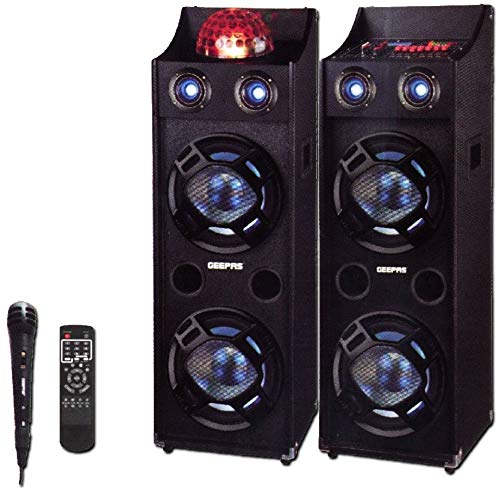
Figure 1: Geepas GMS8429 Home Theater System. This image shows the main unit with its control panel and two accompanying floor-standing speakers.
6. Operating Instructions
6.1 Powering On/Off
Press the Power button on the front panel or the remote control to turn the system ON or OFF.
6.2 Source Selection
Press the 'Input' or 'Source' button on the front panel or remote control to cycle through available input sources (e.g., USB, SD, FM, RCA).
6.3 Volume Control
Adjust the Master Volume knob on the front panel or use the volume buttons on the remote control to set the overall sound level.
6.4 Audio Adjustments
Use the Bass and Treble knobs on the front panel to fine-tune the low and high frequencies. The 7-Band EQ allows for more precise sound customization. Refer to the display for EQ settings.
6.5 Karaoke Function
- Plug a wired microphone into one of the two microphone input jacks, or ensure the wireless microphone is powered on and paired.
- Adjust the Microphone Volume knob to control the microphone's output level.
- Use the Echo knob to add an echo effect to the microphone's sound.
6.6 FM Radio Operation
- Select 'FM' as the input source.
- Press the 'Scan' or 'Auto Tune' button to automatically search and save available radio stations.
- Use the 'Previous' and 'Next' buttons to navigate through saved stations.
6.7 USB/SD Playback
- Insert a USB flash drive or SD card into the respective slot.
- The system should automatically switch to USB/SD mode and begin playback. If not, select 'USB' or 'SD' as the input source.
- Use the 'Play/Pause', 'Previous', and 'Next' buttons to control playback.
6.8 Disco Light
The multi-color disco light can be activated or deactivated using a dedicated button on the front panel or remote control, if available.
7. Maintenance
7.1 Cleaning
- Always unplug the system from the power outlet before cleaning.
- Use a soft, dry cloth to wipe the exterior surfaces of the main unit and speakers.
- Do not use liquid cleaners, aerosols, or abrasive chemicals, as these may damage the finish.
7.2 Storage
If storing the system for an extended period, unplug it from the power source and store it in a cool, dry place, away from direct sunlight and extreme temperatures.
8. Troubleshooting
| Problem | Possible Cause | Solution |
|---|---|---|
| No power | Power cord not connected; Power outlet not active; Power switch off. | Ensure power cord is securely plugged in; Check power outlet with another device; Turn power switch ON. |
| No sound | Volume too low; Incorrect input source selected; Speaker cables disconnected; Mute function active. | Increase volume; Select correct input source; Check speaker connections; Deactivate mute. |
| Distorted sound | Volume too high; Poor audio source quality; Incorrect EQ settings. | Reduce volume; Try a different audio source; Adjust EQ settings. |
| Microphone not working | Microphone not connected; Microphone volume too low; Wireless microphone not paired/powered. | Connect microphone securely; Increase microphone volume; Ensure wireless microphone is on and paired. |
| Remote control not working | Batteries depleted; Obstruction between remote and unit; Remote sensor blocked. | Replace batteries; Remove obstructions; Ensure remote sensor is clear. |
9. Specifications
| Feature | Specification |
|---|---|
| Model Name | GMS8429 |
| Brand | Geepas |
| Speaker Type | Home Theater System / Karaoke Amplifier (Floor Standing) |
| Audio Output Mode | Stereo (2.0 Channel) |
| Max Speaker Output Power | 36000 Watts |
| Frequency Response | 40Hz ~ 20kHz |
| Impedance | 4 Ohm |
| Distortion | <0.5% |
| Signal-to-Noise Ratio (S/N) | >85dB |
| Power Source | Corded Electric (AC 220-240V, 50/60Hz) |
| Connectivity Technology | USB, RCA |
| Control Method | Remote |
| Included Components | Remote control, 1 wireless microphone, RCA cables |
| Compatible Devices | Karaoke machine, TV, laptop, home theater, game console |
10. Warranty and Support
10.1 Limited Warranty
This Geepas GMS8429 Home Theater System comes with a limited warranty. Please refer to the warranty card included in your package for specific terms, conditions, and duration of coverage. The warranty typically covers manufacturing defects under normal use.
10.2 Customer Support
For technical assistance, service inquiries, or to obtain replacement parts, please contact Geepas customer support. Contact information can usually be found on the product packaging, warranty card, or the official Geepas website.
When contacting support, please have your product model number (GMS8429) and purchase date available.