
Dualpest An-B019
Dualpest AN-B019 Ultrasonic Pest Repellent User Manual
Brand: Dualpest | Model: AN-B019
1. Introduction
The Dualpest AN-B019 is a multi-functional ultrasonic pest repellent designed to effectively deter various pests from your living spaces. This device combines electromagnetic waves, ultrasonic sound waves, and anion purification to create an uncomfortable environment for pests, encouraging them to leave.
It also features a built-in night light for added convenience.
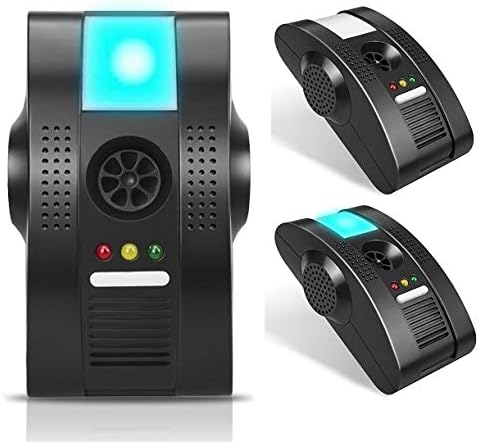
Image: Front view of the Dualpest AN-B019 Ultrasonic Pest Repellent, showing its compact design and blue night light.
2. Key Features and Affected Pests
The AN-B019 utilizes a combination of advanced technologies to ensure comprehensive pest control:
- Electromagnetic Waves: Emitted through the electrical wiring of your home, these waves disrupt the nervous systems of pests, making the environment unbearable for them.
- Ultrasonic Sound Waves: High-pressure, omnidirectional ultrasonic waves are emitted, covering your entire room and disorienting pests. These waves are inaudible to humans and pets.
- Anion Purification: An ionic air purification feature helps to clean the air, contributing to a healthier living environment.
- Night Light: A super bright LED night light provides ambient illumination.
- Safety Window: Designed to protect against short circuits and electric shock.
Pests Affected:
The Dualpest AN-B019 is effective against a wide range of common household pests, including:
- Rodents (Mice, Rats)
- Cockroaches
- Ants (including fleas and ticks)
- Spiders
- Mosquitoes

Image: An illustrative diagram highlighting the multi-functional capabilities of the AN-B019, including electromagnetic waves, ultrasonic driver, anion purification, safety, night light, and compatible plug standards. It also lists the types of pests it affects, such as rodents, cockroaches, ants, spiders, and mosquitoes.

Image: A visual representation of the Dualpest AN-B019 plugged into an outlet, showing blue waves emanating from it, symbolizing the electromagnetic and ultrasonic waves that create a healthy and comfortable environment by broadcasting through the electrical wiring within walls.
3. Setup and Placement
Setting up your Dualpest AN-B019 is simple. Follow these guidelines for optimal performance:
- Power Connection: Simply plug the Dualpest AN-B019 into a standard 220 Volt electrical outlet. Ensure the outlet is functioning correctly.
- Optimal Placement: For maximum efficiency, choose an outlet that is in a central location within the area you wish to protect.
- Clear Surroundings: Ensure there are hard surfaces opposite the device to allow ultrasonic waves to reflect effectively. Avoid placing the unit behind obstacles such as sofas, couches, or heavy curtains, as these can absorb the ultrasonic waves and reduce effectiveness.
- Height: Position the device between 20cm and 60cm (approximately 8 to 24 inches) above the floor.
- Coverage Area: One Dualpest AN-B019 unit is effective in an area of approximately 40-50 square meters (430-538 sq ft). For larger areas or multiple rooms, it is recommended to use more than one unit.

Image: This image illustrates the "Safety Window" feature, which protects the device from short circuits and electric shock. Below, it provides usage instructions, emphasizing the importance of plugging the device into a 220 Volt outlet and selecting a central location, free from obstacles, and at an optimal height (20-60cm from the floor) for maximum efficiency.
4. Operation
Once plugged in, the Dualpest AN-B019 begins to operate automatically. The device works continuously to deter pests.
Operating Modes and Indicators:
- Electromagnetic Waves (Red Indicator): The device emits electromagnetic waves through your home's wiring. This mode is indicated by a red light.
- Anion Purification (Yellow Indicator): The anion purification function is active, indicated by a yellow light.
- Ultrasonic Waves (Green Indicator): High-frequency ultrasonic waves are continuously emitted, indicated by a green light. The "Green Light Mode" specifically refers to the triple superstrong ultrasonic feature that reduces linear propagation and covers the entire room.
- Night Light: The blue LED night light provides ambient illumination.
The AN-B019 disrupts the hearing and perception reflexes of pests within seconds, preventing them from entering the protected area. This immediate effect mechanism causes previously nested pests to become ill, disrupting their breeding, sleeping, and feeding patterns, ultimately compelling them to leave the protected area.

Image: This image illustrates the electromagnetic waves (Green Light Mode) in action, showing the device plugged into a wall outlet with blue waves emanating from it. The text explains that this mode emits high ultrasonic waves in all directions, covering the entire room, and how it disrupts pests' reflexes, causing them to leave the area.

Image: This image depicts the AN-B019 emitting omnidirectional ultrasonic waves and purifying the air with O3 (ozone) symbols, indicating a healthier living environment. It also lists the distinguishing features of the Dualpest AN-B019, such as high-pressure ultrasonic sound waves, electromagnetic wave progression in cables, ionic air purification, super bright LED technology, three high-capacity speakers, and the modern ambiance provided by its night light feature.
5. Maintenance
The Dualpest AN-B019 requires minimal maintenance. To ensure its longevity and continued effectiveness:
- Cleaning: Periodically wipe the exterior of the device with a soft, dry cloth to remove dust. Do not use harsh chemicals or abrasive cleaners.
- Continuous Operation: For best results, keep the device continuously plugged into the outlet. Its power consumption is very low, and continuous operation is crucial to prevent pests from returning to the environment.
- Avoid Obstruction: Regularly check that the front of the device, especially the speaker grilles and light indicators, are not obstructed by furniture, curtains, or other objects.
6. Troubleshooting
If you experience issues with your Dualpest AN-B019, consider the following:
- Device Not Working (No Lights):
- Ensure the device is securely plugged into a 220 Volt outlet.
- Check if the outlet is functional by plugging in another appliance.
- Verify that there is no power outage in your area.
- Reduced Effectiveness:
- Check for obstructions in front of the device (e.g., furniture, curtains) that might be absorbing ultrasonic waves. Relocate the device if necessary.
- Ensure the device is placed at the recommended height (20-60cm from the floor).
- Confirm that the area is within the effective range (40-50m²). For larger areas, consider adding more units.
- Pests may initially appear more active as they are disoriented and trying to leave the area. Allow a few days for the full effect to be observed.
- Night Light Not Functioning:
- If the device is otherwise working, the night light LED might be faulty. Contact customer support if this is the case.
7. Specifications
| Feature | Detail |
|---|---|
| Brand | Dualpest |
| Model | AN-B019 |
| Manufacturer | Dualpest |
| Part Number (ASIN) | B07V1NR2S5 |
| Number of Pieces | 1 |
| Effective Area | Approx. 40-50 m² (430-538 sq ft) per unit |
| Power Consumption | Very low (designed for continuous operation) |
| Power Requirement | 220 Volt AC Outlet |
| First Available Date | July 8, 2019 |

Image: This image displays the Dualpest AN-B019 in white, black, and gray color options. It also provides a detailed diagram of the product, labeling its components such as the night light, ultrasonic emitters (1, 2, 3), electromagnetic waves (red indicator), anion (yellow indicator), ultrasonic (green indicator), switch, and air purifier. The text confirms its effectiveness in 40-50m² areas and its low power consumption for continuous use.
8. Warranty and Support
Specific warranty information is not provided in the product details. For warranty claims, technical support, or further inquiries, please refer to the seller's information on the purchase platform or contact Dualpest customer service directly.
Always retain your proof of purchase for any warranty-related matters.
Ask a question about this manual
Ask about setup, troubleshooting, compatibility, parts, safety, or missing instructions. Manuals+ will review the question and use this page’s manual context to help answer it.