
Melissa & Doug 31800
Melissa & Doug Wooden Get Well Doctor Activity Center Instruction Manual
Model: 31800
Introduction
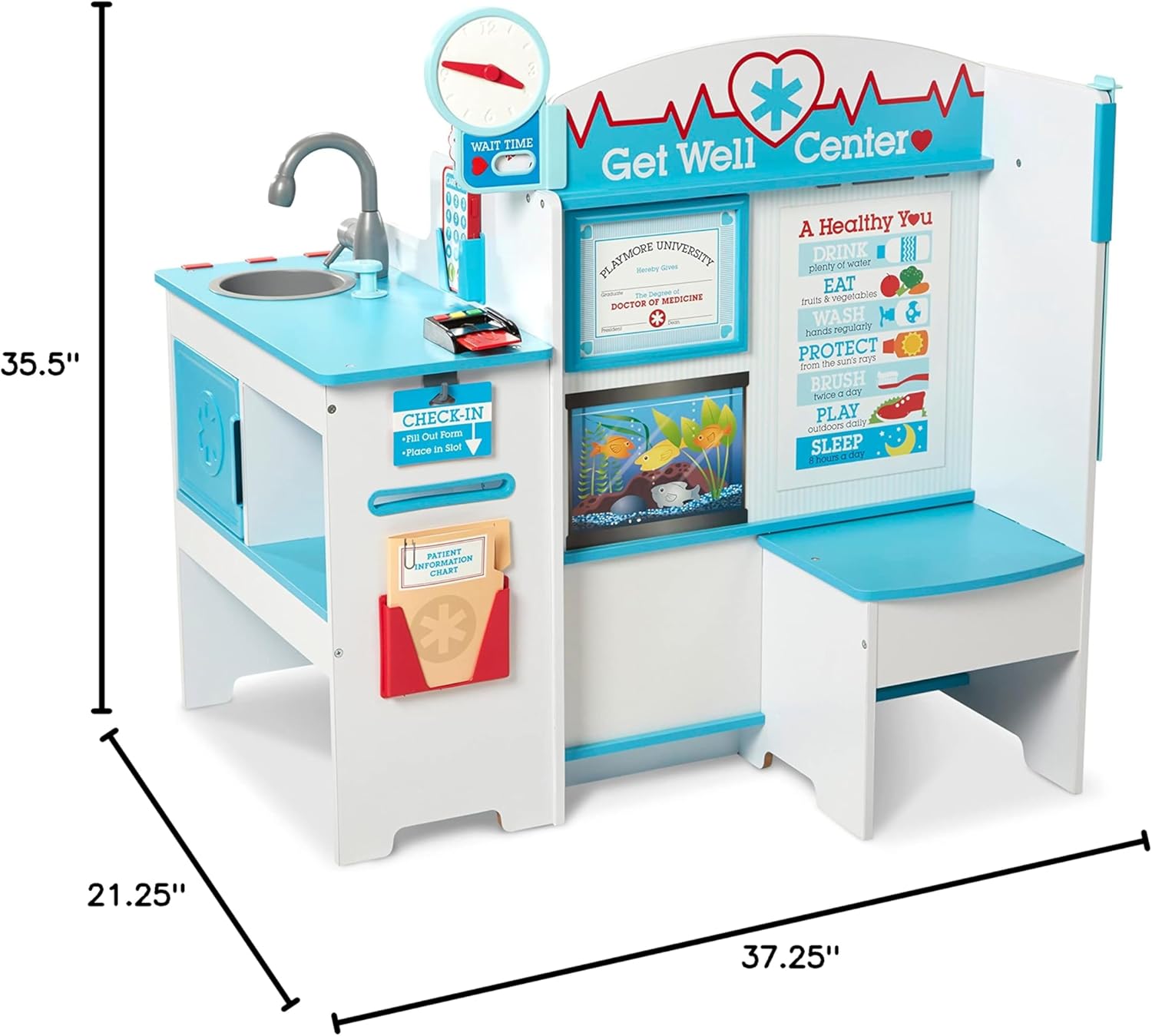
This manual provides detailed instructions for the assembly, operation, and maintenance of your Melissa & Doug Wooden Get Well Doctor Activity Center. Designed for imaginative role-play, this multi-sided wooden play space allows children to explore various roles within a doctor's office setting, including patient, doctor, receptionist, or nurse. It aims to foster nurturing and empathetic play while helping to ease children's anxieties about doctor visits.
Safety Information
- Adult Assembly Required: This product contains small parts and requires adult assembly.
- Age Recommendation: Suitable for children aged 36 months to 7 years.
- Supervision: Adult supervision is recommended during play.
- Placement: Place the activity center on a flat, stable surface to prevent tipping.
- Maintenance: Regularly check all fasteners and connections to ensure they are secure.
- Cleaning: Clean with a damp cloth and mild soap. Do not use abrasive cleaners or harsh chemicals.
Parts List
Before assembly, please ensure all components listed below are present. Refer to the included assembly instructions for a complete visual guide.
- Wooden activity center frame components
- 2 X-rays
- Double-sided diploma/window card
- Patient file
- Double-sided sign
- Credit card
- 3 instrument holders
- Wooden phone
- Assembly hardware (screws, dowels, etc.)
Note: A Phillips head screwdriver is required for assembly (not included).
Setup and Assembly
The Melissa & Doug Wooden Get Well Doctor Activity Center requires adult assembly. Please follow the detailed, illustrated instructions provided in the product packaging carefully. The general steps are:
- Unpack all components and verify against the parts list.
- Identify each piece using the labels or diagrams in the instruction booklet.
- Assemble the main frame structure, securing all connections with the provided hardware and a Phillips head screwdriver.
- Attach all accessory components such as the sink, clock, instrument holders, and decorative panels.
- Ensure all screws are tightened securely and the structure is stable before allowing children to play.

The assembly process typically takes between 1 to 2 hours. For optimal stability, ensure all pieces are correctly aligned and fastened.
Operating Instructions and Features
The Get Well Doctor Activity Center offers multiple interactive areas for engaging play:
1. Waiting Area
- Patient Seat: A designated area for patients or companions to sit while waiting.
- Clock: Features movable hands to teach time concepts or indicate wait times.
- Changeable Artwork: Allows for customization and varied play scenarios.
2. Reception Area
- Credit Card Reader and Card: For check-in and check-out role-play.
- Reusable Patient File: To record patient information and appointments.
- Wooden Play Phone: For scheduling appointments and communication.
- Double-sided Sign: Can be flipped to indicate different statuses (e.g., 'Open', 'Closed').

3. Exam Room
- Sink and Sanitizer Pump: For hygiene role-play.
- X-ray Display: Two X-rays can be displayed for examination.
- Blood Pressure Monitor: Features an adjustable cuff for interactive play.
- Scale with Movable Weight: For checking patient weight.
- Adjustable Height Bar: To measure patient height.
- Eye Chart: For vision tests.
- Movable Tool Hooks and Holders: To organize medical instruments (instruments sold separately).


Care and Maintenance
- Cleaning: Wipe all surfaces with a soft, damp cloth and mild soap. Avoid using harsh chemicals, abrasive cleaners, or excessive water, which can damage the wood finish.
- Inspection: Periodically inspect all wooden components for signs of wear, splintering, or damage. Ensure all screws and fasteners remain tight to maintain structural integrity.
- Storage: Store the activity center in a dry environment, away from direct sunlight or extreme temperatures, to prevent warping, fading, or cracking of the wood.
Troubleshooting
If you encounter any issues with your Melissa & Doug Wooden Get Well Doctor Activity Center, please consider the following:
- Stability Issues: If the unit feels wobbly after assembly, re-check all assembly screws and ensure they are fully tightened. Refer to the assembly instructions to confirm all parts are correctly installed.
- Missing Parts: If any parts were missing upon arrival, please contact Melissa & Doug customer service immediately for assistance.
- Damaged Parts: If any components arrived damaged, do not proceed with assembly. Contact customer service for replacement parts before attempting to use the product.
Specifications
| Feature | Detail |
|---|---|
| Product Dimensions (Assembled) | 35.5” (H) x 37.25” (W) x 21.25” (D) |
| Item Weight | 1 pound (Note: This weight is as provided in product data and may refer to packaging weight or a specific component.) |
| Model Number | 31800 |
| Recommended Age | 36 months - 7 years |
| Material | Wood (FSC-certified for new inventory) |
Warranty and Customer Support
For specific warranty information, replacement parts, or any other inquiries regarding your Melissa & Doug Wooden Get Well Doctor Activity Center, please contact Melissa & Doug customer service directly. Refer to the contact information provided on the product packaging or visit the official Melissa & Doug website.
Online Resources: You may find additional support and product information on the Melissa & Doug Store on Amazon.
Related Documents - 31800
 |
Melissa & Doug Deluxe Standing Art Easel Assembly and Usage Guide Step-by-step assembly instructions and usage tips for the Melissa & Doug Deluxe Standing Art Easel, a dual-sided art station designed to foster creativity in children. |
 |
Melissa & Doug Grocery Store Lemonade Stand Assembly Instructions Step-by-step assembly guide for the Melissa & Doug Grocery Store Lemonade Stand (Item #4070), including parts list, hardware details, safety warnings, and usage tips. |
 |
Tiny Love 5-in-1 Here I Grow Stationary Activity Center - Instruction Manual Comprehensive instruction manual for the Tiny Love 5-in-1 Here I Grow Stationary Activity Center, detailing assembly, safety guidelines, parts list, and care instructions. |
 |
KidKraft Deluxe Activity Cube Assembly Instructions Step-by-step assembly guide for the KidKraft Deluxe Activity Cube (Model 63298), including parts list and contact information. |
 |
Melissa & Doug Wooden Lift-Top Desk & Chair Assembly Instructions Step-by-step assembly instructions for the Melissa & Doug Wooden Lift-Top Desk & Chair. Includes parts list, hardware details, safety warnings, and maintenance tips. |
 |
Tiny Love 4-in-1 Here I Grow Mobile Activity Center User Guide User guide for the Tiny Love 4-in-1 Here I Grow Mobile Activity Center (Model WA077). Includes assembly instructions, safety warnings, usage modes, care and maintenance, and warranty information. |
Ask a question about this manual
Ask about setup, troubleshooting, compatibility, parts, safety, or missing instructions. Manuals+ will review the question and use this page’s manual context to help answer it.