
TEKMAGIC 43528-116657
TEKMAGIC 10ATM Waterproof Digital Scuba Diving Watch User Manual
Model: 43528-116657
Introduction
This manual provides detailed instructions for the operation and maintenance of your TEKMAGIC 10ATM Waterproof Digital Scuba Diving Watch. Please read this manual thoroughly to ensure proper use and to maximize the lifespan of your watch.
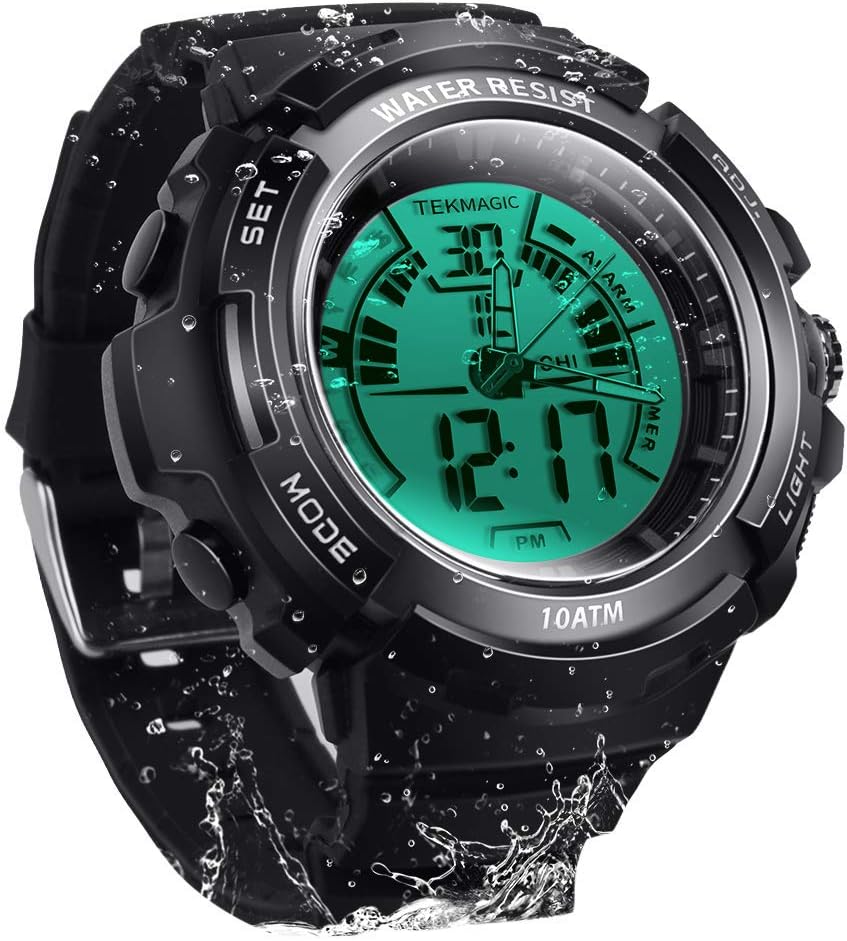
Image: Front view of the TEKMAGIC 10ATM Waterproof Digital Scuba Diving Watch, showcasing its digital and analog display with water droplets.
Key Features
- 10 ATM Water Resistance: Designed for underwater operation up to 100 meters (328 feet), suitable for swimming, snorkeling, and recreational scuba diving.
- Dual Time Display: Features both digital and analog movements for versatile timekeeping.
- Multiple Functions: Includes chronograph (stopwatch), countdown timer, dual time zone, alarm, and hourly chime.
- Luminous Display: Positive electro luminescent backlight and luminous hands for visibility in low-light conditions.
- Time Format Options: Supports 12-hour and 24-hour time formats.
- Durable Construction: High transparency resin dial window, ABS plastic case, and comfortable PU band strap.
- Shock Resistant: Built to withstand impacts.
Components and Button Functions
Your watch features four primary buttons for navigation and setting. Refer to the image below for button identification.

Image: Detailed view of the watch dial, buttons, and strap. Labels indicate "SET", "MODE", "ADJ", and "LIGHT" buttons, along with dial width, thickness, strap width, and total length measurements.
- SET Button (Top Left): Used to enter and confirm settings.
- MODE Button (Bottom Left): Cycles through different watch modes (Time, Chronograph, Countdown, Alarm, Dual Time).
- ADJ Button (Top Right): Adjusts values during setting.
- LIGHT Button (Bottom Right): Activates the backlight.
Setup: Initial Time and Date Setting
- In Time Mode, press and hold the SET button until the seconds begin to flash, indicating setting mode.
- Press the MODE button to cycle through the settings: Seconds → Hour → Minute → Year → Month → Day → 12/24 Hour Format.
- Use the ADJ button to increase the flashing value. Hold ADJ for faster adjustment.
- Once all settings are correct, press the SET button to exit setting mode.
- The analog hands will automatically synchronize with the digital time after setting. If they do not, manually adjust them by pulling out the crown (if present, otherwise refer to specific analog adjustment instructions if available, or assume automatic synchronization).
Operating Modes
1. Time Mode
This is the default display mode, showing the current time, date, and day of the week.

Image: The watch display showing both normal and LED luminous modes, highlighting the "Light Button" for activation.
- Press the LIGHT button to activate the electro luminescent backlight for approximately 3 seconds.
- To switch between 12-hour and 24-hour format, enter time setting mode (as described in Setup) and use the ADJ button when the 12/24 hour indicator is flashing.
2. Chronograph (Stopwatch) Mode
The chronograph measures elapsed time.

Image: A person running on a track, with an overlay of the watch displaying the stopwatch function, indicating its use for tracking activity.
- From Time Mode, press the MODE button repeatedly until "STW" or "CHRONO" appears on the display.
- Press the ADJ button to start the stopwatch.
- Press ADJ again to pause.
- Press ADJ to resume.
- To reset, while paused, press the SET button.
3. Countdown Timer Mode
The countdown timer allows you to set a specific duration, after which an alarm will sound.
- From Time Mode, press the MODE button repeatedly until "TMR" or "COUNTDOWN" appears.
- To set the countdown time, press and hold the SET button until the hours begin to flash.
- Use the MODE button to select hours, minutes, or seconds. Use the ADJ button to adjust the value.
- Press SET to confirm the setting and exit.
- Press the ADJ button to start the countdown.
- Press ADJ again to pause/resume.
- When the countdown reaches zero, an alarm will sound. Press any button to stop the alarm.
4. Dual Time Zone Mode
This feature allows you to track a second time zone.

Image: Two watches side-by-side, each displaying a different time, superimposed over images of famous landmarks from different time zones (e.g., Moscow and Paris), illustrating the dual time zone feature.
- From Time Mode, press the MODE button repeatedly until "T2" or "DUAL TIME" appears.
- Press and hold the SET button until the hours begin to flash.
- Use the MODE button to select hours or minutes. Use the ADJ button to adjust the value.
- Press SET to confirm the setting and exit.
5. Alarm Mode
Set a daily alarm to sound at a specific time.

Image: A hand reaching for the watch on a bedside table, with lightning bolt icons indicating an alarm sounding, demonstrating the alarm feature.
- From Time Mode, press the MODE button repeatedly until "ALM" or "ALARM" appears.
- Press and hold the SET button until the hours begin to flash.
- Use the MODE button to select hours or minutes. Use the ADJ button to adjust the value.
- Press SET to confirm the setting and exit.
- To turn the alarm ON/OFF, press the ADJ button while in Alarm Mode (not in setting mode). An alarm icon will appear/disappear on the display.
6. Hourly Chime
The hourly chime provides a short beep every hour on the hour.
- While in Alarm Mode, press the MODE button once to toggle the hourly chime ON/OFF. A chime icon will appear/disappear.
Water Resistance (10 ATM / 100m)
Your TEKMAGIC watch is rated for 10 ATM (Atmospheres) water resistance, equivalent to 100 meters (328 feet). This means it is suitable for:

Image: The watch submerged in water, with text indicating "100m Underwater Waterproof" and "Diving grade waterproof standard," emphasizing its water resistance.
- Daily use, including hand washing and rain.
- Showering and bathing.
- Swimming and snorkeling.
- Recreational scuba diving.
Important: Do not operate any buttons while the watch is submerged in water, as this can compromise the water resistance seal. Avoid exposing the watch to extreme temperature changes (e.g., hot showers followed by cold water) as this can also affect seals.
Maintenance
Battery Replacement
The watch uses a CR2025 battery. The operating battery life is approximately 1.5 to 2 years. If the watch stops working or the display becomes unclear, the battery may need replacement.
- Battery replacement should ideally be performed by a qualified watch technician to ensure the water resistance seal is properly maintained.
- If replacing yourself, carefully open the back case, replace the CR2025 battery, and ensure the gasket is correctly seated before securely closing the case.
Cleaning
Clean your watch regularly with a soft, damp cloth. For stubborn dirt, a mild soap solution can be used, followed by rinsing with clean water and thorough drying. Avoid harsh chemicals or abrasive materials.
Troubleshooting
| Problem | Possible Cause / Solution |
|---|---|
| Watch not working / Display unclear | Battery may be low or depleted. Replace the CR2025 battery. |
| Analog hands do not match digital time | Ensure digital time is set correctly. The analog hands should synchronize automatically. If not, check for a manual adjustment crown or consult a technician. |
| Water inside the watch | Water resistance may have been compromised. Avoid pressing buttons underwater. Seek professional repair immediately to prevent further damage. |
| Buttons are unresponsive | Ensure the watch is not in a locked mode (if applicable, though not specified for this model). A low battery can also affect button responsiveness. |
Specifications
| Feature | Detail |
|---|---|
| Model Number | 43528-116657 |
| Water Resistance | 10 ATM (100 meters / 328 feet) |
| Movement | Digital and Analog |
| Time Accuracy | ±30 seconds per month |
| Battery Type | CR2025 |
| Battery Life | 1.5 to 2 years |
| Dial Window Material | High Transparency Resin |
| Case Material | ABS Plastic |
| Band Material | PU Band (Rubber) |
| Case Diameter | 45 mm |
| Case Thickness | 17 mm |
| Band Width | 20 mm |
| Maximum Wrist Circumference | 210 mm |
| Minimum Wrist Circumference | 155 mm |
| Product Dimensions | 2.17 x 0.79 x 6.5 inches; 5.6 ounces |

Image: Diagram illustrating the watch's dimensions, including dial width, dial thickness, strap width, total length, and maximum/minimum wrist circumferences.
Warranty and Support
For warranty information or technical support, please refer to the documentation included with your purchase or contact TEKMAGIC customer service through their official website. Keep your purchase receipt as proof of purchase.
Ask a question about this manual
Ask about setup, troubleshooting, compatibility, parts, safety, or missing instructions. Manuals+ will review the question and use this page’s manual context to help answer it.