
1. Introduction
Thank you for choosing the Andoer AD-560II Universal Camera Flash Speedlite. This manual provides comprehensive instructions for the safe and effective operation of your new flash unit. Please read this manual carefully before use to ensure optimal performance and to prevent damage to the product or injury to yourself. Keep this manual for future reference.
2. Product Overview and Package Contents
The Andoer AD-560II is a versatile camera flash speedlite designed for various DSLR cameras, featuring a high guide number, multiple flash modes, an adjustable LED fill light, and wireless triggering capabilities. It comes with essential accessories to enhance your photography.
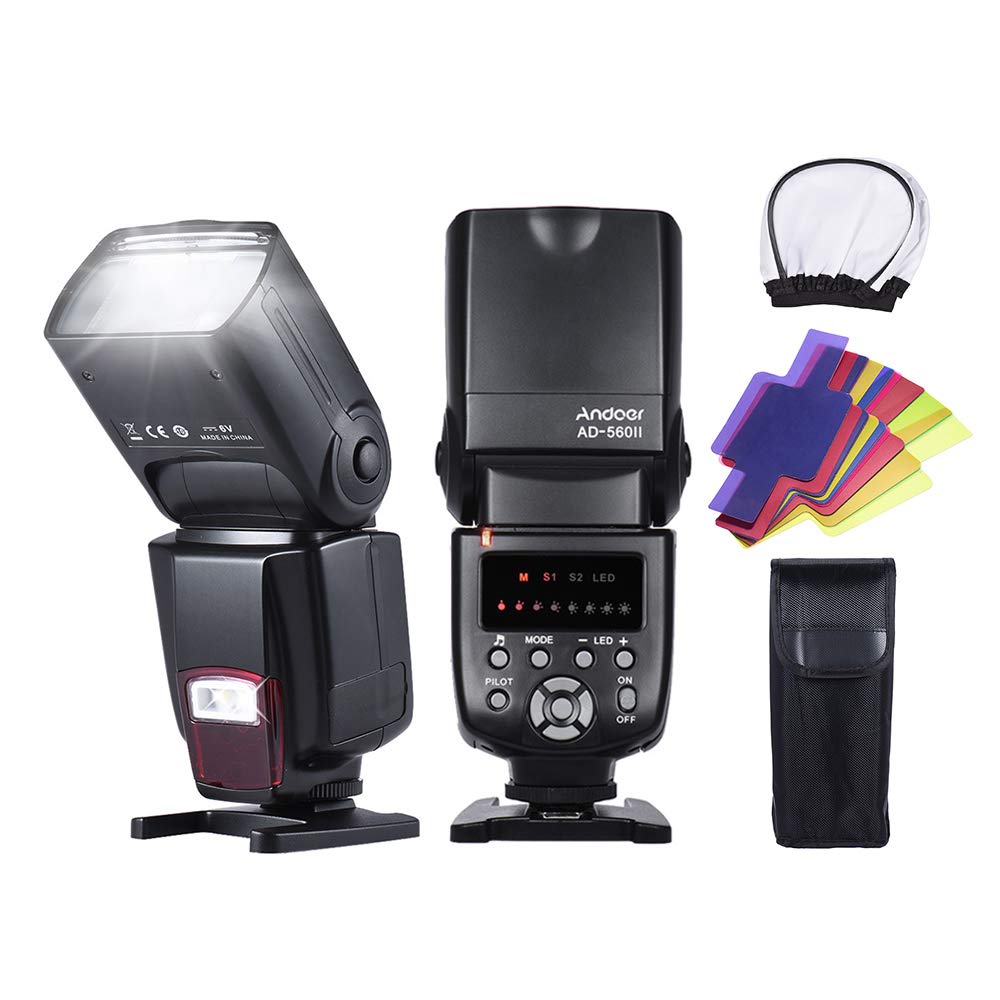
Image: The Andoer AD-560II Flash Speedlite shown with its protective bag, mini stand, diffuser, and a pack of color filters.
Package Contents:
- 1 x Andoer AD-560II Flash Speedlite
- 1 x Protecting Bag
- 1 x Mini Stand
- 1 x Diffuser
- 1 x Pack of Filters (20pcs)
- 1 x User Manual (English & Chinese)
Note: 4 x AA batteries are required for operation and are not included in the package.
3. Setup
3.1 Battery Installation
- Open the battery compartment cover located on the side of the flash unit.
- Insert four (4) AA batteries according to the polarity indicators (+/-) inside the compartment.
- Close the battery compartment cover securely.
Important: Ensure batteries are inserted correctly. Incorrect polarity can damage the unit. Use high-quality alkaline or Ni-MH rechargeable batteries for best performance.
3.2 Mounting to Camera
- Slide the hot shoe of the AD-560II into your camera's hot shoe mount.
- Tighten the locking ring or lever on the flash unit to secure it firmly to the camera.
The AD-560II is compatible with most DSLR cameras from brands like Canon, Nikon, Olympus, and Pentax that feature a standard hot shoe mount.
4. Operating Modes
The Andoer AD-560II offers several operating modes to suit various photographic needs. Use the 'MODE' button on the control panel to cycle through the available modes.

Image: Front view of the Andoer AD-560II showing the control panel with 'M', 'S1', 'S2', and 'LED' mode indicators.
4.1 M Mode (Manual)
In Manual mode, you have full control over the flash output power. The power can be adjusted from 1/128 to 1/1 (full power) in 8 levels, with 29 levels of fine tuning for precise control. Use the '+' and '-' buttons to adjust the flash output.
4.2 S1 Mode (Optical Slave)
S1 mode is an optical slave mode where the flash will trigger synchronously with the first flash detected from a master flash unit. This mode is suitable for use with manual flash units or cameras that do not emit a pre-flash.
4.3 S2 Mode (Pre-flash Cancel Slave)
S2 mode is an advanced optical slave mode designed for use with master flash units that emit a pre-flash. In S2 mode, the AD-560II will ignore the pre-flash and trigger only on the main flash, ensuring correct synchronization. This mode is ideal for use with TTL flash systems.
4.4 LED Mode (Fill Light)
The AD-560II features an integrated LED fill light. In LED mode, the brightness of this light can be adjusted to provide continuous illumination for video recording or as a constant light source for still photography. Use the '+' and '-' buttons to adjust the LED brightness.
5. Features
5.1 High Guide Number
The AD-560II boasts a high guide number of GN50 at ISO 100, providing ample power for various lighting situations.
5.2 Wireless Triggering
The high-sensitivity wireless triggering sensor allows S1 and S2 modes to be used effectively in outdoor environments, with a wireless triggering distance of up to 10-15 meters.
5.3 Sound Prompt Function
The flash unit includes a sound prompt function. Different sounds indicate various working situations, helping you focus on shooting without constantly checking the display. This function can be enabled or disabled as per your preference.
5.4 PC Port
A PC sync port is included, allowing you to connect the flash to cameras or external triggers via a PC sync cable for synchronous flash firing.
5.5 Fast Recycle Time
The AD-560II offers a fast recycle time of approximately 3 seconds after a full power output when using AA alkaline batteries. An external power pack (sold separately) can be connected to further accelerate the charging speed.
5.6 High-Speed Continuous Shooting
When the flash output level is set to 1/8 or below, the AD-560II supports high-speed continuous shooting at up to 8 frames per second (8FPS).
5.7 Automatic Setting Saving
The flash unit automatically saves your current settings, so they are retained even after the unit is powered off and on again.
5.8 Diffuser
A diffuser is included to soften the light output from the flash, reducing harsh shadows and creating a more even, natural-looking illumination.

Image: Two Andoer AD-560II flash units, one with the included diffuser attached to the flash head, demonstrating its use for softer light.
5.9 Color Filters
The package includes a set of 20 different color filters. These filters can be attached to the flash head to modify the color temperature or add creative color effects to your photographs.

Image: An Andoer AD-560II flash unit with a red color filter attached to its head, alongside a stack of various other color filters.
6. Maintenance
- Cleaning: Use a soft, dry cloth to clean the flash unit. Do not use solvents or abrasive cleaners.
- Storage: When not in use for extended periods, remove the batteries to prevent leakage and store the flash in its protective bag in a cool, dry place.
- Handling: Avoid dropping the flash unit or subjecting it to strong impacts. Keep it away from water and high humidity.
7. Troubleshooting
If you encounter issues with your Andoer AD-560II, please refer to the following common problems and solutions:
- Flash not firing:
- Check if the batteries are correctly installed and have sufficient power.
- Ensure the flash is securely mounted to the camera's hot shoe.
- Verify the flash is powered on.
- Slow recycle time:
- Replace old batteries with fresh ones.
- Allow the flash to cool down if it has been used continuously at high power, as overheating protection may be active.
- Wireless triggering issues:
- Ensure there is a clear line of sight between the master flash and the AD-560II's optical sensor.
- Check the distance; the effective range is 10-15 meters.
- Confirm the correct S1 or S2 mode is selected based on your master flash type.
- LED fill light not working:
- Ensure the flash is in LED mode.
- Check battery power.
If the problem persists after trying these solutions, please contact customer support.
8. Specifications
| Feature | Specification |
|---|---|
| Brand | Andoer |
| Model | AD-560II |
| Circuit Design | Insulated Gate Bipolar Transistor (IGBT) |
| Guide No. | 50 (ISO 100) |
| Flash Mode | M, S1, S2, LED |
| Vertical Rotation Angle | -7~90 degrees |
| Horizontal Rotation Angle | 0~270 degrees |
| Power Supply | 4 * AA batteries (not included) |
| Lighting Times | 100~1500 times (@ AA alkaline cell used) |
| Recycle Time | approx. 3s (@ AA alkaline cell used) |
| Color Temperature | 5600k |
| Flash Time | 1/200s~1/20000s |
| Flash Control | 8 levels of output control (1/128~1/1), 29 levels of fine tuning |
| External Interface | Hot shoe, PC port |
| Wireless Triggering Distance | 10~15m |
| Additional Features | Sound indicator, automatically saving, power saving mode, overheating protection |
| Item Weight (without battery) | 310g / 10.9oz |
9. Warranty and Support
Andoer products are manufactured to high-quality standards. For information regarding warranty coverage, please refer to the warranty card included with your purchase or visit the official Andoer website. For technical support, troubleshooting assistance, or service inquiries, please contact Andoer customer service through the contact information provided on their official website or your purchase platform.