
HigoKids HGKS-RS1PLUS-SOUL RED
HigoKids Electronic Handheld Game System User Manual
Model: HGKS-RS1PLUS-SOUL RED
Introduction
Thank you for purchasing the HigoKids Electronic Handheld Game System. This device is designed to provide hours of entertainment with its built-in classic retro video games. Featuring a 3.2-inch large screen and a portable design, it's an ideal companion for travel and leisure. Please read this manual thoroughly to ensure proper use, maintenance, and to maximize your gaming experience.

Figure 1: HigoKids Electronic Handheld Game System
What's in the Box
Upon opening the package, please verify that all components are present and in good condition:
- 1 x HigoKids Handheld Game Console
- 1 x USB Charging Cable
- 1 x AV Output Cable
- 1 x Rechargeable Lithium Battery (BL-5C type)
- 1 x Wrist Rope
- 1 x User Manual (this document)

Figure 2: Package Contents
Product Overview
Familiarize yourself with the various parts and controls of your HigoKids Handheld Game System.
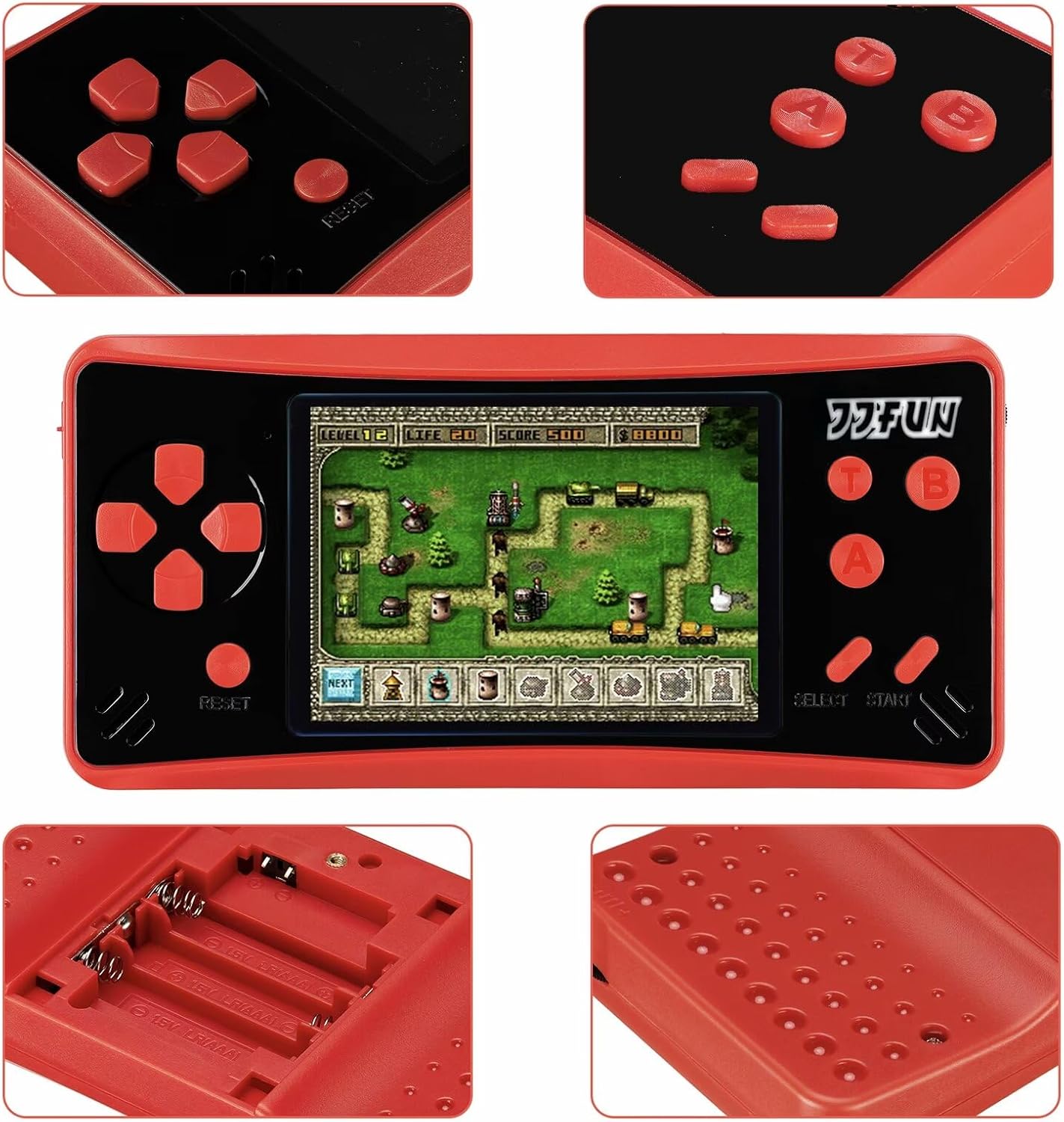
Figure 3: Detailed views of the console's features
Controls and Ports:
- D-Pad (Directional Pad): Used for movement and navigation within games and menus.
- Action Buttons (A, B, T, B): Primary buttons for in-game actions (e.g., jump, attack, confirm).
- SELECT Button: Typically used for selecting options or pausing in some games.
- START Button: Used to start games, pause, or confirm selections.
- RESET Button: Resets the current game.
- Volume Control: Adjusts the audio output level.
- Power Switch: Turns the device ON or OFF.
- USB Charging Port: For connecting the USB charging cable.
- AV Output Port: For connecting to a television or external display.
- Speaker: For audio output.
- 3.2-inch LCD Screen: Displays game visuals.
Setup
Battery Installation:
The HigoKids Handheld Game System supports two battery options: the included rechargeable lithium battery or 3 x AAA batteries (not included).
- Locate the battery compartment on the back of the console.
- Slide the battery compartment cover open.
- For Rechargeable Battery: Insert the provided BL-5C lithium battery into the compartment, ensuring the contacts align correctly.
- For AAA Batteries: Insert 3 x AAA batteries, observing the correct polarity (+/-) as indicated inside the compartment.
- Close the battery compartment cover securely.

Figure 4: Battery Installation Options
Initial Charging:
Before first use, it is recommended to fully charge the rechargeable battery. If using AAA batteries, this step is not necessary.
- Connect the small end of the USB charging cable to the USB charging port on the console.
- Connect the larger end of the USB cable to a USB power adapter (not included) or a computer's USB port.
- The charging indicator light will illuminate. Once fully charged, the light may change color or turn off (refer to device specific behavior).
- A full charge typically takes 2-3 hours and provides 4-6 hours of game time.
Operating Instructions
Powering On/Off:
- To turn ON the console, slide the Power Switch to the "ON" position.
- To turn OFF the console, slide the Power Switch to the "OFF" position.
Navigating Games:
The console comes with 218 built-in classic retro video games.
- Use the D-Pad (Up/Down) to scroll through the list of available games.
- Press the START button to select and begin playing a game.
- During gameplay, you can typically press START to pause the game.
- To return to the game selection menu, press the RESET button.

Figure 5: Extensive Game Library
Volume Adjustment:
Adjust the volume using the dedicated volume control switch or buttons on the side of the console.
Connecting to a Television (AV Output):
You can connect your HigoKids Handheld Game System to a television for a larger screen experience using the included AV output cable.
- Ensure both the game console and the television are turned OFF.
- Connect the multi-colored plugs of the AV cable (yellow for video, white for left audio, red for right audio) to the corresponding input ports on your television.
- Connect the single plug end of the AV cable to the AV output port on the game console.
- Turn ON your television and select the correct AV input source (e.g., AV1, Video, Input).
- Turn ON the HigoKids Handheld Game System. The game display should now appear on your television screen.
- Note: If the image quality is poor or unstable, check the AV cable connection. Some users have reported issues with the included AV cable; if problems persist, consider trying a different compatible AV cable.
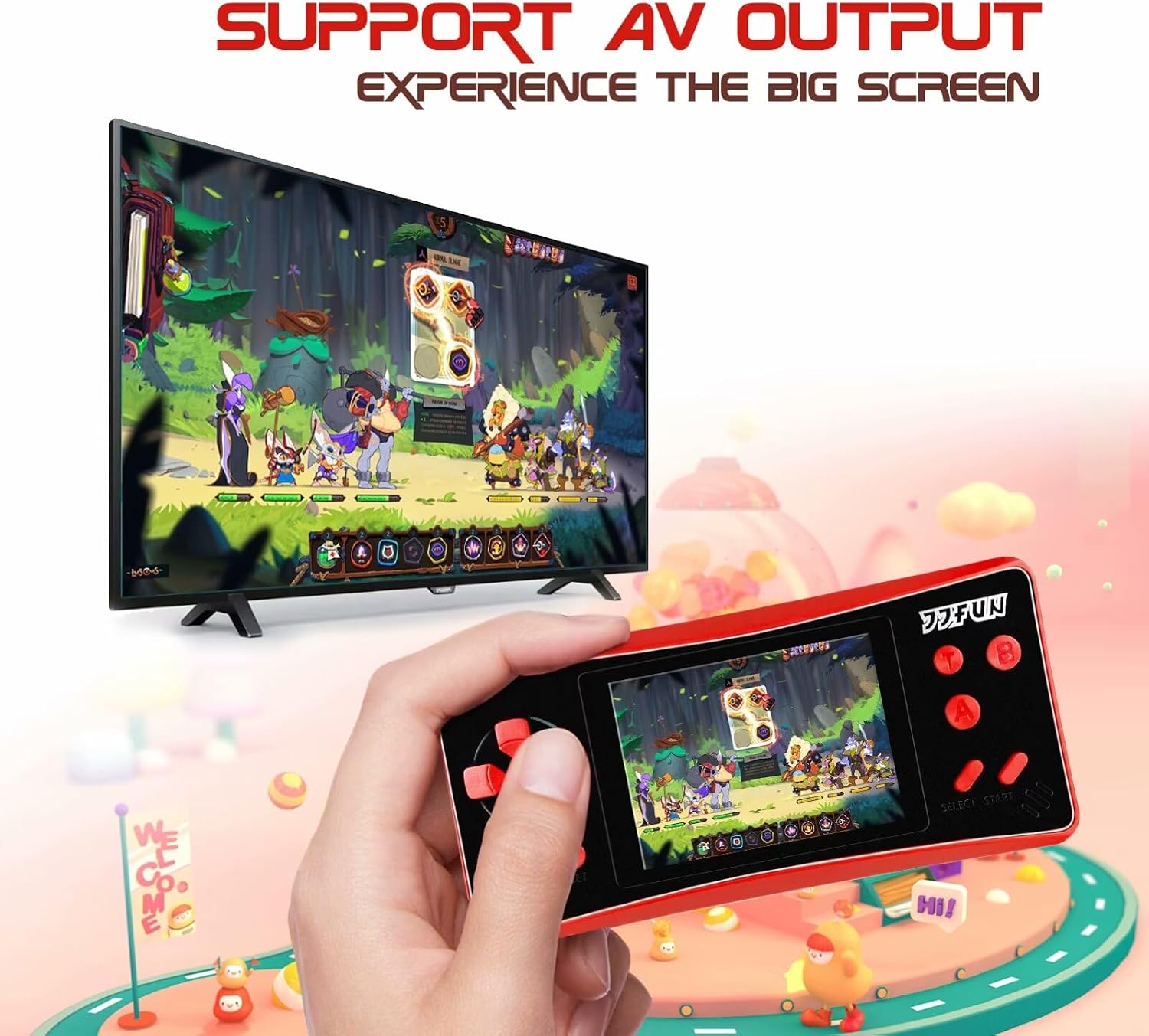
Figure 6: Connecting to TV via AV Output
Maintenance
- Keep the device dry. Avoid exposure to water or high humidity.
- Clean the console with a soft, dry cloth. Do not use liquid cleaners or aerosols.
- Avoid dropping the device or subjecting it to strong impacts.
- Store the device in a cool, dry place when not in use.
- If using AAA batteries, remove them if the device will not be used for an extended period to prevent leakage.
Troubleshooting
| Problem | Possible Cause | Solution |
|---|---|---|
| Device does not power on. | Battery is low or not installed correctly. | Charge the rechargeable battery or replace AAA batteries. Ensure batteries are inserted with correct polarity. |
| Screen is blank or flickering. | Low battery; loose internal connection; faulty screen. | Charge the battery. If problem persists, contact customer support. |
| No sound. | Volume is too low or muted; faulty speaker. | Increase volume. If problem persists, contact customer support. |
| Game freezes or crashes. | Software glitch. | Press the RESET button to restart the game. If issues continue, power off and on the console. |
| Poor image quality on TV via AV output. | Loose AV cable connection; faulty AV cable. | Ensure AV cable is securely connected to both the console and TV. Try a different compatible AV cable if available. |
Specifications
- Model: HGKS-RS1PLUS-SOUL RED
- Display: 3.2-inch LCD Screen
- Built-in Games: 218 Classic Retro Video Games
- Power Source: Rechargeable Lithium Battery (BL-5C) or 3 x AAA Batteries
- Battery Life: 4-6 hours (with rechargeable battery)
- Charging Interface: USB
- Output: AV Output (for TV connection)
- Material: ABS Plastic
- Product Dimensions: 6.2 x 3 x 1 inches (approx.)
- Item Weight: 5.4 ounces (approx.)
Warranty and Support
For warranty information or technical support, please contact the manufacturer, HigoKids, or your retailer. Keep your purchase receipt as proof of purchase.
While specific warranty terms may vary by region and retailer, HigoKids aims to provide reliable products. If you encounter any issues not covered in the troubleshooting section, please reach out to their customer service for assistance.
For further assistance, please visit the official HigoKids website or contact their customer support channels.
Ask a question about this manual
Ask about setup, troubleshooting, compatibility, parts, safety, or missing instructions. Manuals+ will review the question and use this page’s manual context to help answer it.