1. Introduction
The GTMOTOR RA003 Active Fuel Management (AFM/DFM) Disabler Device is designed to maintain your GM V6 or V8 vehicle in full cylinder mode at all times. This device prevents the engine from switching to a reduced cylinder mode (e.g., V4), ensuring consistent engine performance.
This manual provides essential information for the proper installation, operation, and maintenance of your RA003 device. Please read it thoroughly before use.

Image 1.1: Front view of the GTMOTOR RA003 AFM/DFM Disabler Device.
2. Product Features
- AFM/DFM Disablement: Keeps the vehicle in V8 mode (or full cylinder mode for V6 engines) continuously.
- Plug and Play Installation: Requires no tools for installation.
- Non-Invasive: Does not reprogram the vehicle's Engine Control Unit (ECU) and does not affect other vehicle functions.
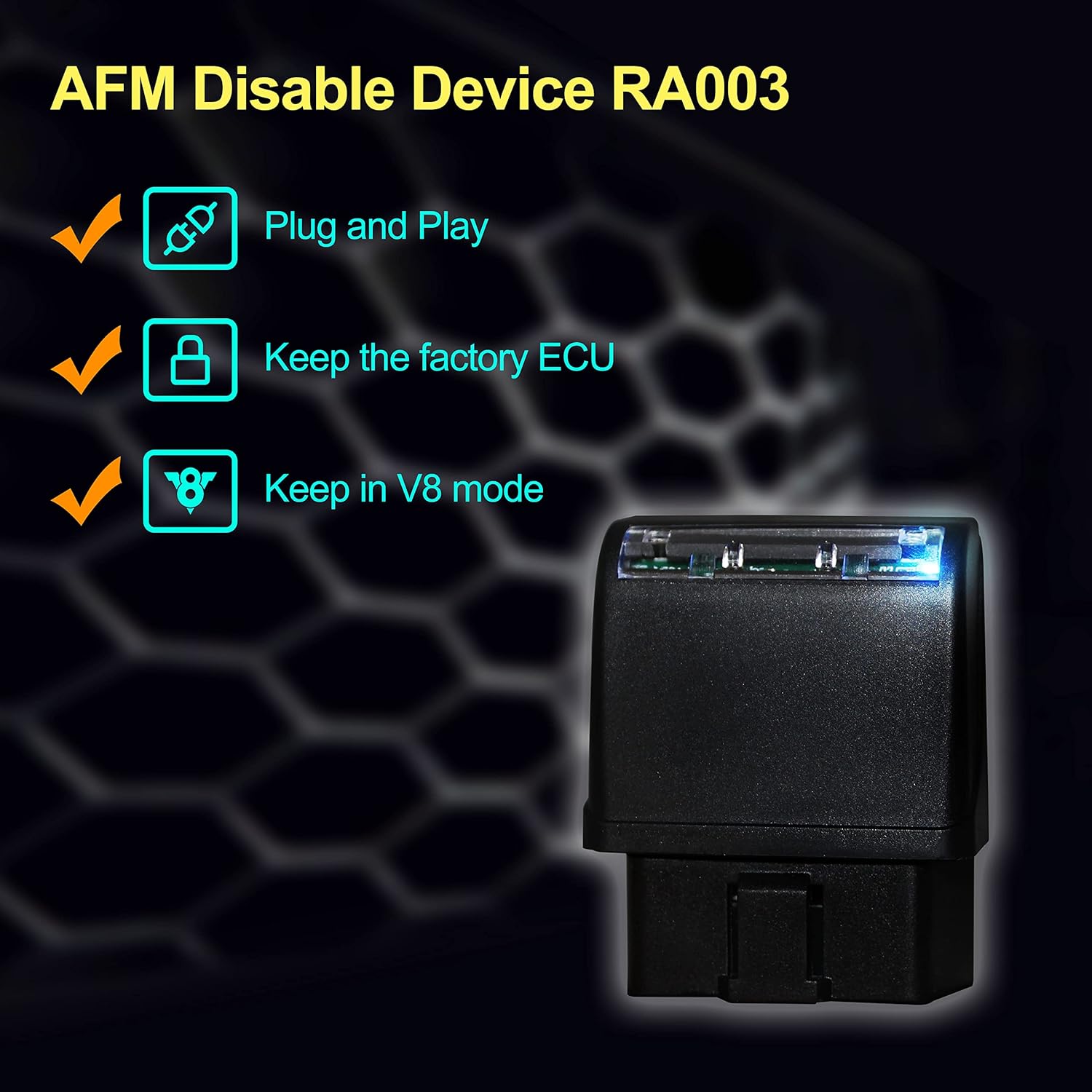
Image 2.1: Visual representation of the RA003 device's key features.
3. Compatibility
The GTMOTOR RA003 device is compatible with most GM V6 and V8 vehicles. Please refer to the detailed compatibility tables below to confirm your vehicle's suitability.
Important Note:
- The product is currently not compatible with 2019+ 5.3L 10-Speed or 6.2L 10-SPEED models.
- Modified vehicles should exercise caution when considering this product.
3.1. Compatibility Table 1 (Pontiac, Chevrolet)
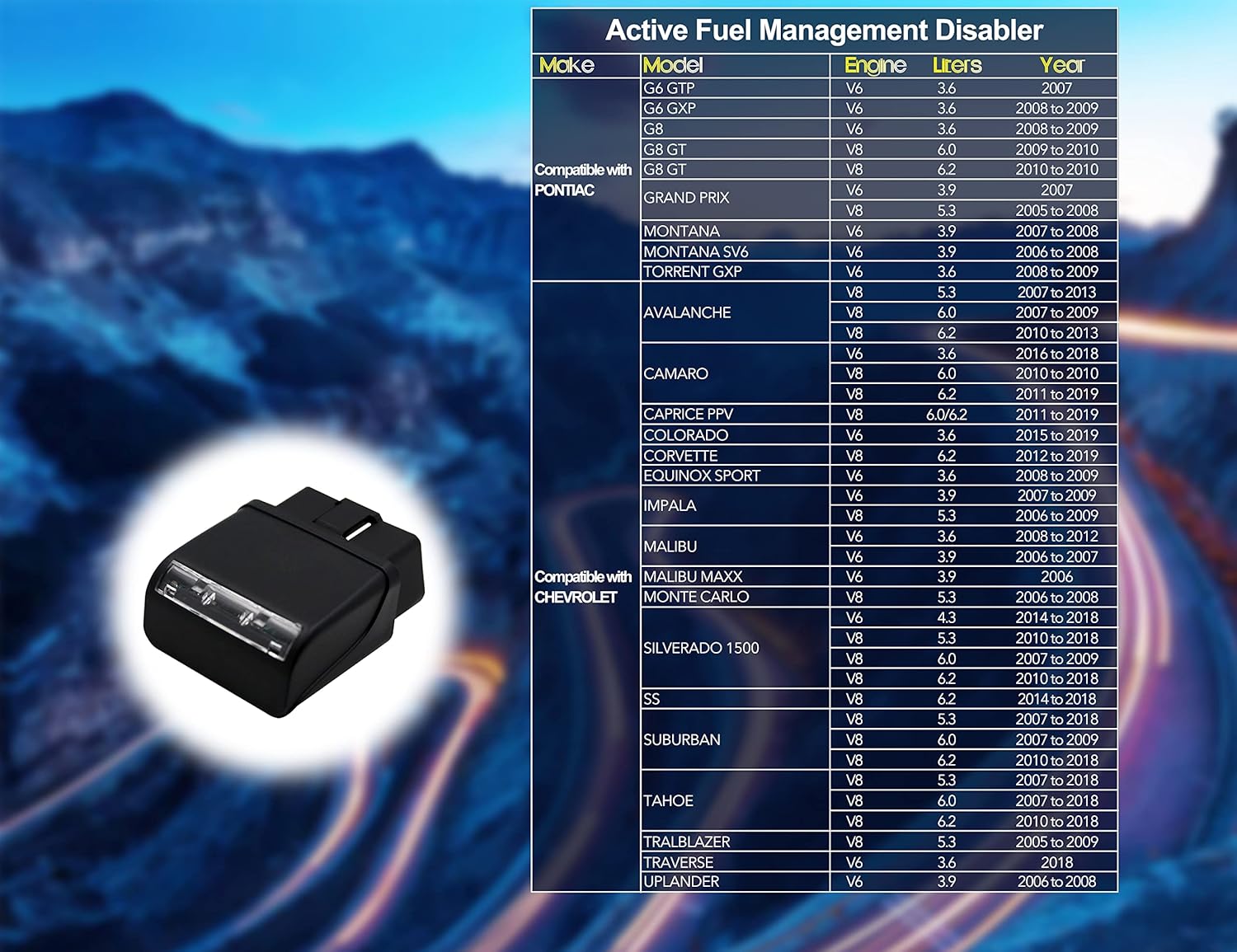
Image 3.1: Compatibility list for various Pontiac and Chevrolet models, including engine types and years.
3.2. Compatibility Table 2 (Buick, Holden, Saturn, Cadillac)
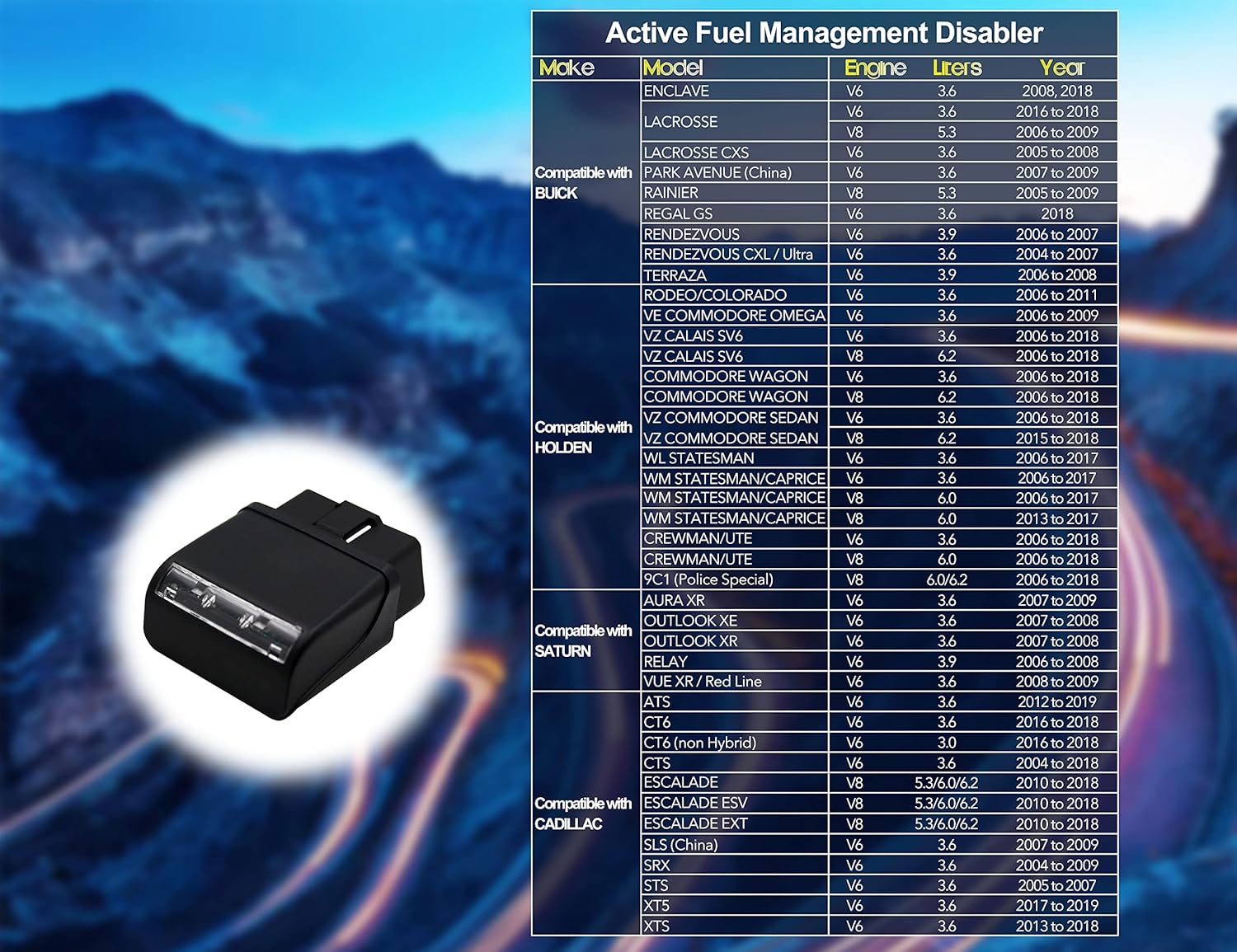
Image 3.2: Compatibility list for various Buick, Holden, Saturn, and Cadillac models, including engine types and years.
3.3. Compatibility Table 3 (Isuzu, Suzuki, GMC, Saab)

Image 3.3: Compatibility list for various Isuzu, Suzuki, GMC, and Saab models, including engine types and years.
4. Setup and Installation
The RA003 device is designed for simple plug-and-play installation. Follow these steps carefully:
- Locate the OBD-II Port: The On-Board Diagnostics II (OBD-II) port is typically located under the dashboard on the driver's side of your vehicle.
- Disconnect Battery (Recommended): For optimal safety and to ensure proper initialization, it is recommended to disconnect the negative terminal of your vehicle's battery before plugging in the device. This step helps reset the vehicle's computer.
- Plug in the Device: With the vehicle's ignition off, firmly plug the GTMOTOR RA003 device into the OBD-II port. Ensure it is securely seated.
- Reconnect Battery (If Disconnected): If you disconnected the battery, reconnect the negative terminal.
- Observe Indicator Lights: The device will typically cycle through its indicator lights upon initial connection. Wait for the lights to settle, indicating it is active.
Note: Some users have reported successful installation without disconnecting the battery, by simply plugging it in while the engine is off. However, disconnecting the battery is the manufacturer's recommended procedure for best results.
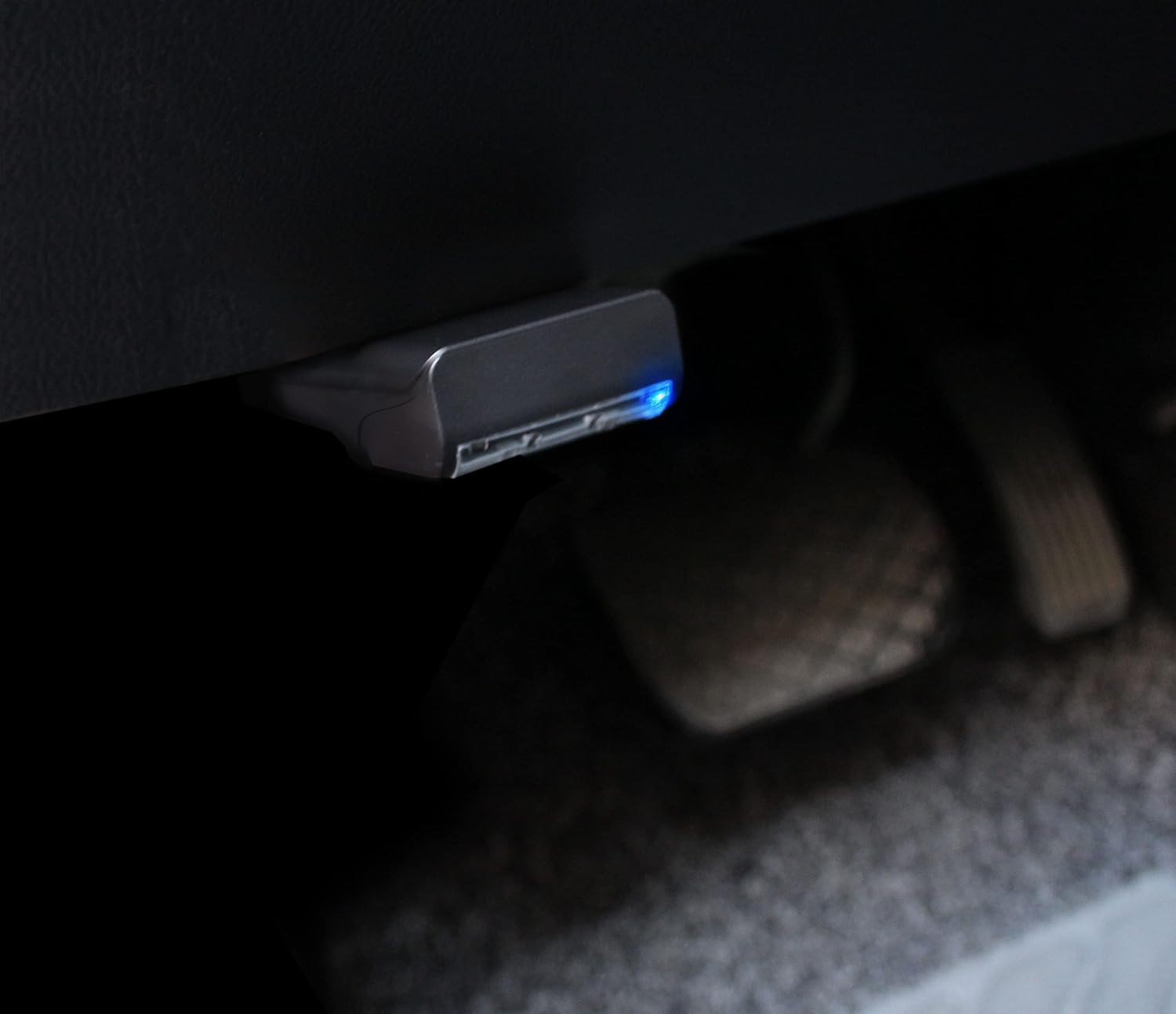
Image 4.1: The RA003 device installed in a vehicle's OBD-II port, typically located under the dashboard.
5. Operation
Once installed, the GTMOTOR RA003 device operates automatically. It continuously sends signals to your vehicle's ECU to prevent the activation of Active Fuel Management (AFM) or Dynamic Fuel Management (DFM) systems.
- Your vehicle will remain in its full cylinder mode (e.g., V8 for V8 engines, V6 for V6 engines) at all times.
- There are no buttons or settings to adjust on the device itself. Its operation is entirely automatic once plugged in.

Image 5.1: The RA003 device actively maintaining the engine in V8 mode, as indicated by a dashboard display.
6. Maintenance
The GTMOTOR RA003 device requires minimal maintenance. Follow these guidelines to ensure its longevity and proper function:
- Storage: If you do not plan to use the device for an extended period, it is recommended to unplug it from the OBD-II port. Store it in a cool, dry place.
- Cleaning: Keep the device clean and free from dust or debris. Use a soft, dry cloth for cleaning. Do not use liquid cleaners.
- Handling: Handle the device with care. Avoid dropping it or subjecting it to excessive force. When unplugging, grip the main body of the device firmly to prevent separation of components.
7. Troubleshooting
If you encounter issues with your GTMOTOR RA003 device, consider the following:
- Device Not Lighting Up:
- Ensure the device is fully and securely plugged into the OBD-II port.
- Check your vehicle's battery connection.
- Try unplugging and re-plugging the device.
- AFM/DFM Still Activating:
- Verify that your vehicle model and year are listed as compatible in Section 3.
- Ensure the device is properly installed as per Section 4, including the recommended battery disconnection.
- Confirm your vehicle is not a 2019+ 5.3L 10-Speed or 6.2L 10-SPEED model, as these are incompatible.
- Increased Water Temperature:
- Keeping all cylinders running (V8 mode) may lead to a slight increase in engine water temperature during driving. This is a known characteristic of maintaining full cylinder operation. Monitor your vehicle's temperature gauge. If temperatures exceed normal operating ranges, consult a qualified mechanic.
- Device Separates When Unplugging:
- The device casing may separate if pulled incorrectly. Always grip the main body of the device firmly when removing it from the OBD-II port to prevent the cover from detaching from the internal circuit board. If it separates, carefully reassemble the components.
If troubleshooting steps do not resolve the issue, please contact GTMOTOR customer support.
8. Specifications
| Brand | GTMOTOR |
| Model Number | RA003 |
| Item Weight | 1.76 ounces |
| Product Dimensions | 4.72 x 3.94 x 3.94 inches |
| Manufacturer | GREATUS |
| ASIN | B07TTRC3MM |
9. Warranty and Support
For warranty information or technical support, please refer to the documentation included with your purchase or contact the seller directly through the platform where the product was acquired.
Keep your purchase receipt or order number handy when contacting support, as it may be required for verification.
