1. Introduction
This manual provides essential information for the safe and effective use of your FITHOOD Replacement Ni-MH Battery, Model CS-MKT102PW. This battery is designed as a high-quality replacement for various Makita power tools.
Compatible Models: Makita 6041D, 6043D, 6041DW, 6043DWK
Compatible Battery Part Number: 678102-6
2. Safety Information
Please read and understand all safety instructions before using this battery. Failure to follow these instructions may result in electric shock, fire, or serious injury.
- Do Not Disassemble: Never attempt to disassemble, open, or service the battery pack. This will void the warranty and poses a safety risk.
- Proper Replacement: Replace only with the battery pack designated for your specific power tool model. Ensure compatibility before installation.
- Avoid Damage: Do not crush, puncture, or short external contacts of the battery. Physical damage can lead to fire or explosion.
- Temperature Control: Do not dispose of the battery in fire or water. Do not store the battery above 60°C (140°F). High temperatures can damage the battery and pose a fire hazard.
- Initial Charge: Recharge the battery before its first use to ensure optimal performance and to reduce the risk of fire or burns.
- Certifications: This battery is RoHS approved for toxic-free materials and holds CE and ISO9001 certificates for quality assurance.

Image 1: FITHOOD Replacement Ni-MH Battery showing important warning labels. Always read and adhere to all warnings printed on the battery itself.
3. Setup and Installation
Before installing the new battery, ensure your power tool is turned off and disconnected from any power source.
- Verify Compatibility: Carefully confirm that the battery model (CS-MKT102PW) and part number (678102-6) match your device's requirements. Refer to your power tool's original manual for specific battery specifications.
- Remove Old Battery: Locate the battery release mechanism on your power tool and remove the old battery pack.
- Insert New Battery: Align the new FITHOOD replacement battery with the battery slot on your power tool. Slide the battery into place until it clicks securely. Ensure the battery is fully seated and does not wobble.
- Initial Charge: For optimal performance and longevity, fully charge the new battery before its first use. Refer to the 'Operating Instructions' section for charging guidance.

Image 2: View of the FITHOOD Replacement Ni-MH Battery, highlighting the connection terminals. Ensure these match your tool's battery interface.
4. Operating Instructions
This Ni-MH battery is designed for use with compatible Makita power tools. Always follow the operating instructions provided with your specific power tool.
- Charging: Use only the original or a compatible charger designed for Ni-MH batteries of this voltage (4.8V). Connect the charger to a power outlet and then connect the battery. Follow the charger's instructions for charging times and indicators.
- Usage: Once fully charged and installed, the battery powers your tool. Monitor the tool's performance for signs of low battery, such as reduced power or speed.
- Discharging: It is generally recommended to fully discharge Ni-MH batteries periodically before recharging to help maintain battery health and capacity, though modern Ni-MH batteries have reduced memory effect.
5. Maintenance
Proper maintenance ensures the longevity and performance of your FITHOOD battery.
- Cleaning: Keep battery terminals clean and free from dirt or corrosion. Use a dry cloth to wipe them if necessary.
- Storage: When not in use for extended periods, store the battery in a cool, dry place, away from direct sunlight and extreme temperatures. Ensure the battery is partially charged (around 50%) before storage. Do not store above 60°C (140°F).
- Regular Use: If storing for a long time, it is advisable to fully charge and discharge the battery every few months to maintain its capacity.
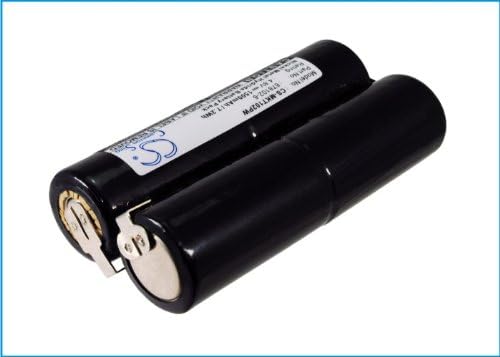
Image 3: Another angle of the FITHOOD Replacement Ni-MH Battery, showing the 'CS' manufacturer logo.
6. Troubleshooting
If you encounter issues with your FITHOOD replacement battery, consider the following:
- Battery Not Fitting: Double-check the compatibility of the battery model and part number with your power tool. Ensure there are no obstructions in the battery slot and that the battery is aligned correctly.
- Battery Not Charging: Verify that the charger is properly connected to both the power outlet and the battery. Ensure the charger is compatible with Ni-MH 4.8V batteries. Check for any damage to the battery or charger terminals.
- Short Run Time: Ensure the battery has been fully charged. Over time, all rechargeable batteries experience a decrease in capacity. If the battery is old, it may be nearing the end of its lifespan.
- Tool Not Powering On: Confirm the battery is fully charged and securely installed. Test the tool with another known-good battery if available, or test the battery in another compatible tool to isolate the issue.
If troubleshooting steps do not resolve the issue, please contact customer support for further assistance.
7. Specifications
| Brand | FITHOOD |
| Model Number | CS-MKT102PW |
| Battery Type | Ni-MH (Nickel-Metal Hydride) |
| Voltage | 4.8V |
| Capacity | 1500mAh |
| Watt-Hours (Wh) | 7.20Wh |
| Dimensions (L x W x H) | 87.91 x 46.00 x 22.70 mm (3.46 x 1.81 x 0.89 inches) |
| Weight | 250g / 8.82 oz |
| Certifications | ISO9001, RoHS, CE |
8. Warranty and Support
For specific warranty information regarding your FITHOOD replacement battery, please refer to the purchase documentation or contact the seller directly. The battery is manufactured under ISO9001 quality standards and is RoHS and CE certified.
If you have any questions, require assistance, or need professional suggestions regarding your battery, please contact the seller with your battery details or pictures. They will be able to provide support.