
1. Introduction and Overview
The Unihertz Jelly Pro is a compact 4G smartphone designed for portability and essential functionality. Running on Android 8.1 Oreo, it offers a full smartphone experience in a miniature form factor. This manual will guide you through its features and operation.

Figure 1: Front and back view of the Unihertz Jelly Pro smartphone.
2. What's in the Box
Please check the contents of your Unihertz Jelly Pro package. If any items are missing or damaged, contact customer support.
- Unihertz Jelly Pro Smartphone
- USB Cable
- Earphone
- Adapter (Note: Charger is not included in the box)
- User Manual (this document)
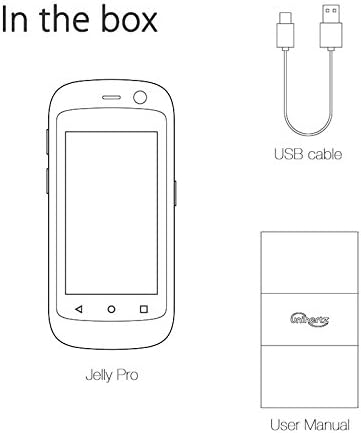
Figure 2: Diagram illustrating the contents typically found in the Unihertz Jelly Pro package.
3. Setup
3.1 Inserting SIM Card(s) and Battery
The Unihertz Jelly Pro supports dual SIM cards for flexible network usage. It also features a removable battery.
- Carefully remove the back cover of the phone.
- Insert your Nano SIM card(s) into the designated slots. Ensure the gold contacts are facing down.
- Insert the battery into its compartment, aligning the contacts.
- Replace the back cover securely.

Figure 3: View of the internal components, including SIM card slots and battery compartment.
3.2 Initial Power On
Press and hold the Power button located on the side of the device until the Unihertz logo appears. Follow the on-screen prompts to complete the initial setup, including language selection, Wi-Fi connection, and Google account setup.
3.3 Network Compatibility
Important: The Unihertz Jelly Pro supports T-Mobile network only in the United States.

Figure 4: Visual representation of the Unihertz Jelly Pro's network compatibility, specifically highlighting T-Mobile support.
4. Operating Your Unihertz Jelly Pro
4.1 Basic Navigation
The Jelly Pro features a 2.45-inch touchscreen. Navigate by tapping, swiping, and pinching. The physical home button below the screen also serves as a notification LED.

Figure 5: A hand demonstrating interaction with the Jelly Pro's small touchscreen interface, displaying various application icons.
4.2 Calls and Messaging
Use the Phone app for making and receiving calls. The Messages app allows for sending and receiving SMS/MMS. Due to the compact screen size, consider using voice input or gesture typing for easier text entry.
4.3 Internet and Connectivity
Connect to the internet via Wi-Fi or 4G cellular data. The phone also supports Bluetooth for connecting to accessories like headphones or speakers.
4.4 Camera Functions
The Jelly Pro is equipped with both front and rear cameras. Open the Camera app to capture photos and videos. The rear camera is 8MP AF, and the front camera is 2MP FF.
4.5 Multimedia Playback
Enjoy music and videos on your device. The phone includes a 3.5mm audio jack for wired headphones. You can also use it as a portable MP3 player.

Figure 6: The Unihertz Jelly Pro being used as a portable music player with wired headphones.
4.6 GPS and Pedometer
The built-in GPS allows for navigation and location-based services. The integrated pedometer can track your steps, distance, pace, and time, making it suitable for exercise tracking.

Figure 7: The Unihertz Jelly Pro displaying a map, highlighting its built-in GPS capabilities.

Figure 8: The Unihertz Jelly Pro secured in an armband, demonstrating its suitability for exercise and activity tracking.
4.7 Voice Assistant
Utilize the voice assistant feature for hands-free operation, searching for information, setting reminders, and more.
4.8 Product Overview Video
Watch this official video for a visual guide to the Unihertz Jelly Pro's features and daily usage scenarios.
Video 1: Unihertz Jelly Pro, The Smallest 4G Smartphone Android 8.1. This video provides a comprehensive overview of the phone's design, features, and how it integrates into various aspects of daily life, from communication to fitness tracking.
5. Maintenance
5.1 Battery Charging
The Jelly Pro is powered by a 950 mAh Lithium Ion battery. Use the provided USB cable with a compatible adapter (not included) to charge the device. A full charge provides approximately 6 hours of talk time.
5.2 Cleaning
To clean your device, use a soft, lint-free cloth. Avoid using abrasive cleaners or solvents that may damage the phone's surface.
5.3 Safety Information
For your safety, please adhere to the following guidelines:

Figure 9: Important safety warning: Do not attempt to disassemble or replace the battery yourself, as this may lead to battery leakage, overheating, fire, or explosion.
6. Troubleshooting
If you encounter issues with your Unihertz Jelly Pro, try the following common troubleshooting steps:
- Device not powering on: Ensure the battery is charged. Connect the phone to a power source and try again.
- Poor network signal: Verify that your SIM card is properly inserted and that you are within T-Mobile's coverage area.
- Apps crashing or freezing: Restart the device. Clear the cache of the problematic app or reinstall it.
- Battery draining quickly: Reduce screen brightness, close unused apps, and disable unnecessary features like Wi-Fi or Bluetooth when not in use.
- Touchscreen unresponsiveness: Restart the device. If the issue persists, consider a factory reset (note: this will erase all data).
For more complex issues, please refer to the support section or contact Unihertz customer service.
7. Specifications
| Feature | Specification |
|---|---|
| Model Name | Jelly Pro |
| Operating System | Android 8.1 Oreo |
| RAM | 3 GB |
| Internal Storage | 32 GB |
| Screen Size | 2.45 Inches |
| Resolution | 1920 x 1080 (Scanner Resolution, likely screen resolution) |
| Rear Camera | 8 MP AF |
| Front Camera | 2 MP FF |
| Battery Capacity | 950 mAh Lithium Ion |
| Talk Time | 6 Hours |
| Dimensions (L x W x H) | 3.64 x 1.69 x 0.51 inches |
| Item Weight | 2.13 ounces (60.4 Grams) |
| Connectivity | 4G Cellular, Wi-Fi, Bluetooth, USB |
| Audio Jack | 3.5 mm |
| GPS | Yes |
| CPU Speed | 1.2 GHz |
8. Warranty and Support
For warranty information and customer support, please visit the official Unihertz website or contact their customer service department. Keep your purchase receipt as proof of purchase for warranty claims.
You can also visit the Unihertz Store on Amazon for additional product information and support resources.


