1. Introduction
This manual provides essential information for the proper installation, operation, and maintenance of your VSYSTO Waterproof Case and Handlebar Mount. This accessory is specifically designed for use with VSYSTO M2F, E2F, D2F, and D2D motorcycle dash camera systems. Please read these instructions carefully before installation and use to ensure optimal performance and longevity of your product.
Important Note:
- This waterproof case and handlebar mount is exclusively compatible with VSYSTO products.
- Before purchasing, it is recommended to contact the seller and confirm compatibility with your specific VSYSTO dash camera model.
2. Product Overview
The VSYSTO Waterproof Case and Handlebar Mount provides protection and secure mounting for your compatible VSYSTO dash camera display unit. It is designed to withstand various weather conditions, ensuring your device remains operational during your rides.
2.1 Components
- Waterproof Case (clear housing)
- Handlebar Mount (adjustable clamp and arm)
- Mounting Hardware (screws, washers, Allen key if applicable)
2.2 Dimensions
| Component | Measurement |
|---|---|
| Case Length | 92mm (3.62 inches) |
| Case Height | 58mm (2.28 inches) |
| Case Depth | 28mm (1.10 inches) |
| Mount Arm Length | 55mm (2.17 inches) |
| Mount Clamp Width | 50mm (1.97 inches) |
Note: All measurements are approximate and may vary slightly.

Figure 1: Product dimensions of the waterproof case and handlebar mount.
3. Setup and Installation
Follow these steps to properly install the waterproof case and handlebar mount for your VSYSTO dash camera system.
3.1 Attaching the Case to the Mount
- Align the mounting bracket on the back of the waterproof case with the corresponding attachment point on the handlebar mount arm.
- Secure the case to the mount using the provided screw and nut. Ensure it is tightened firmly but do not overtighten to avoid damage.
3.2 Mounting to the Handlebar
- Choose a suitable location on your motorcycle's handlebar that does not obstruct your view or interfere with controls.
- Open the clamp of the handlebar mount.
- Place the clamp around the handlebar and secure it by tightening the screw. Ensure the mount is stable and does not rotate freely.
- Adjust the angle of the case for optimal viewing.
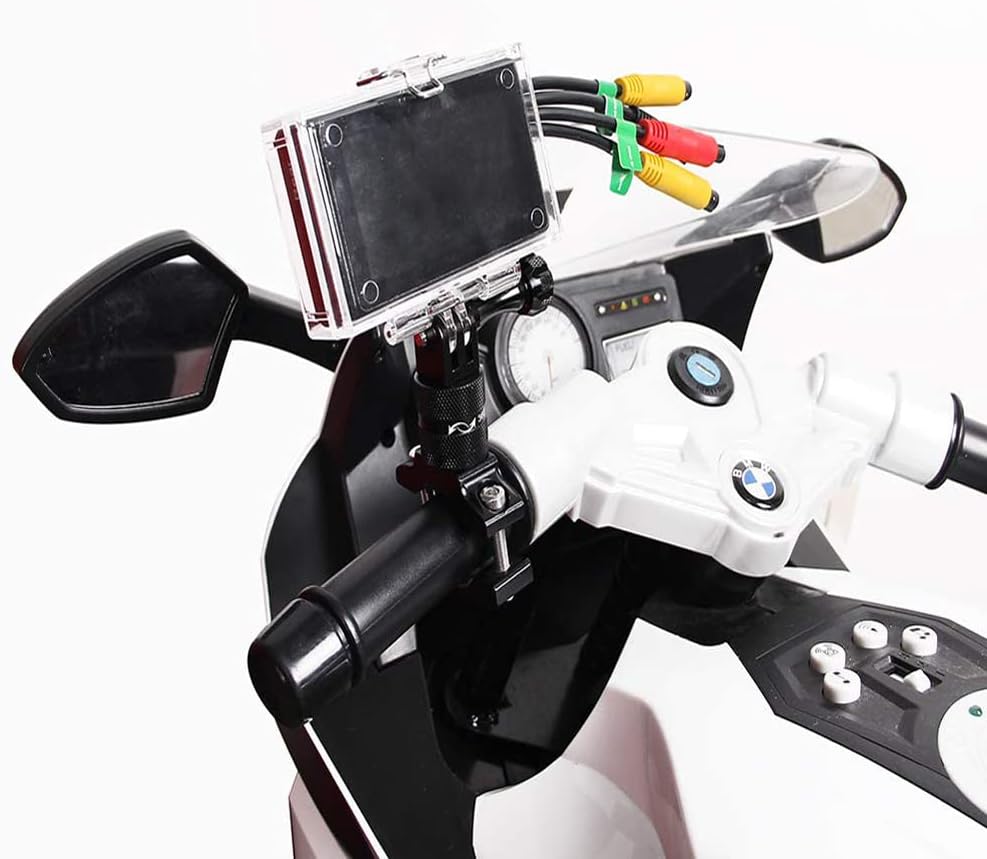
Figure 2: Example installation of the waterproof case and mount on a motorcycle handlebar.
3.3 Inserting the Dash Camera Display Unit
- Open the latches on the waterproof case.
- Carefully place your VSYSTO dash camera display unit (M2F, E2F, D2F, or D2D) inside the case. Ensure it fits snugly and the screen is visible through the clear cover.
- Close the latches securely. Verify that the seal is properly seated around the edges of the case to maintain its waterproof integrity.
4. Operating Instructions
Once installed, the waterproof case protects your dash camera display unit from water and dust. The operation of your VSYSTO dash camera itself is independent of the case and should be performed according to the specific user manual provided with your dash camera model.
- Waterproof Integrity: Always ensure the case is securely closed and the seals are properly seated before exposing it to water or adverse weather conditions.
- Screen Visibility: The clear cover allows for full visibility of your dash camera's display.
- Button Access: Depending on your specific dash camera model, external buttons may or may not be accessible through the case. Refer to your dash camera's manual for remote control options if direct button access is limited.

Figure 3: The waterproof case protecting the dash camera display unit from water.
5. Maintenance
Regular maintenance helps ensure the continued performance and protection offered by your waterproof case and mount.
- Cleaning: Clean the exterior of the case with a soft, damp cloth. Avoid abrasive cleaners or solvents that could damage the plastic or seals.
- Seal Inspection: Periodically inspect the rubber seals around the case opening for any signs of wear, cracks, or debris. A damaged seal can compromise the waterproof integrity.
- Mount Tightness: Check the tightness of all screws on the handlebar mount and case attachment regularly, especially after riding on rough terrain.
- Storage: When not in use, store the case and mount in a clean, dry place away from direct sunlight and extreme temperatures.
6. Troubleshooting
If you encounter issues with your VSYSTO Waterproof Case and Handlebar Mount, refer to the following common problems and solutions:
| Problem | Possible Cause | Solution |
|---|---|---|
| Water inside the case | Case not properly closed; damaged or dirty seal. | Ensure latches are fully secured. Inspect the rubber seal for debris or damage; clean or replace if necessary. |
| Mount is loose or rotates | Mounting screws are not tight enough. | Tighten the handlebar clamp screw and the screw connecting the case to the mount. |
| Dash camera does not fit | Incompatible dash camera model. | This case is only compatible with VSYSTO M2F, E2F, D2F, and D2D models. Verify your dash camera model. Contact VSYSTO support if unsure. |
7. Specifications
- Product Dimensions: 2.56 x 2.28 x 0.79 inches (Case only, approximate)
- Item Weight: 1.89 pounds (Total package weight, approximate)
- Water Resistance Level: Waterproof
- Compatible VSYSTO Models: M2F, E2F, D2F, D2D
- UPC: 713721011605
- Manufacturer: VSYSTO
- Date First Available: July 1, 2019
8. Warranty and Support
Specific warranty details for the VSYSTO Waterproof Case and Handlebar Mount are not provided in the available product information. For warranty claims, technical support, or further inquiries, please contact VSYSTO directly through their official website or the retailer where the product was purchased.
You can often find support information on the VSYSTO brand store page: VSYSTO Store on Amazon
9. Official Product Videos
No official product videos specifically detailing the VSYSTO Waterproof Case and Handlebar Mount were found in the provided data. For general VSYSTO product information or installation guides, please refer to the VSYSTO official website or their official channels.