
1. Introduction and Overview
This manual provides essential information for the safe and effective use of your Accessory USA 15V AC/DC Adapter. This power supply is designed to provide stable 15V DC power, specifically compatible with the Brookstone BoomBucket Speaker BL646 and similar devices requiring 15VDC 4000mA (4A) power.
Please read this manual thoroughly before operating the device to ensure proper functionality and to prevent damage.
2. Safety Information
Your Accessory USA AC/DC Adapter is designed with safety in mind and is certified to meet various international standards. Adhere to the following safety guidelines:
- Compatibility: Always verify that the adapter's voltage (15V) and current (4A) specifications match the requirements of your device (e.g., Brookstone BoomBucket Speaker BL646). Incorrect voltage or current can damage your device.
- Protection Features: This adapter includes Over Voltage Protection (OVP), Over Current Protection (OCP), and Short Circuit Protection (SCP) to safeguard both the adapter and your connected device.
- Environment: Use the adapter in a dry environment. Avoid exposure to water, moisture, or extreme temperatures.
- Ventilation: Ensure adequate ventilation around the adapter during use to prevent overheating. Do not cover the adapter.
- Handling: Do not drop, disassemble, or attempt to repair the adapter. Refer servicing to qualified personnel.
- Cord Care: Do not place heavy objects on the power cord or allow it to be pinched. Always grasp the plug, not the cord, when disconnecting from the power outlet.
3. Package Contents
The package should contain the following item:
- 1 x Accessory USA 15V AC/DC Adapter
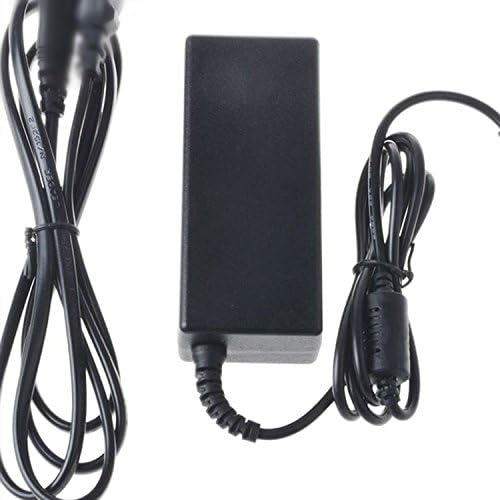
Image: The Accessory USA 15V AC/DC Adapter, showing the main power brick unit and its attached input and output cables. The power brick is black and rectangular, with a barrel connector on the output cable.
4. Setup
- Verify Compatibility: Before connecting, ensure your device (e.g., Brookstone BoomBucket Speaker BL646) requires a 15V DC input with a current draw of 4A or less. Check your device's specifications or original power supply.
- Connect to Device: Insert the barrel connector of the adapter's output cable firmly into the DC input port of your Brookstone BoomBucket Speaker or compatible device.
- Connect to Power Outlet: Plug the AC input cord of the adapter into a standard wall power outlet (100-240V AC).
- Power On: Once connected, your device should receive power. Turn on your device if it has a power switch.
5. Operating Instructions
The Accessory USA 15V AC/DC Adapter operates automatically once connected to a power source and a compatible device. It provides a continuous and stable power supply.
- Ensure all connections are secure before use.
- The adapter is designed for continuous operation within its specified limits.
- Disconnect the adapter from the power outlet when not in use for extended periods.
6. Maintenance
To ensure the longevity and optimal performance of your adapter, follow these maintenance tips:
- Cleaning: Disconnect the adapter from all power sources before cleaning. Use a soft, dry cloth to wipe the surface. Do not use liquid cleaners or aerosols.
- Storage: Store the adapter in a cool, dry place away from direct sunlight and extreme temperatures.
- Cable Management: Avoid sharp bends or kinks in the cables. Do not wrap the cables too tightly around the adapter.
7. Troubleshooting
If you encounter issues with your adapter, refer to the following common troubleshooting steps:
| Problem | Possible Cause | Solution |
|---|---|---|
| No power to device |
|
|
| Adapter feels hot |
|
|
If troubleshooting steps do not resolve the issue, please contact Accessory USA customer support.
8. Specifications
| Feature | Detail |
|---|---|
| Brand | Accessory USA |
| Model | BL646 (Compatible) |
| Input Voltage | 100-240V AC (Global Compatibility) |
| Output Voltage | 15V DC |
| Output Current | 4000mA (4A) |
| Wattage | 15 Watts |
| Connector Type | Barrel Connector |
| Compatible Devices | Brookstone BoomBucket Speaker BL646, MP3 Players, Speakers (requiring 15VDC 4A) |
| Certifications | CE, FCC, RoHS |
| Protection Features | OVP (Over Voltage Protection), OCP (Over Current Protection), SCP (Short Circuit Protection) |
9. Warranty and Support
This product is supplied by Accessory USA. For warranty claims or technical support, please refer to the seller's return policy or contact Accessory USA directly through your purchase platform.
Typically, a 30-day refund/replacement policy is offered for defective products. Please retain your proof of purchase for any warranty claims.
For further assistance, you may visit the seller's page on Amazon: Accessory USA Seller Page