
Easyricambi SANYO SAP KCR/KR Series Compatible Filters
Easyricambi Air Conditioner Filter Replacement Manual
Model Compatibility: SANYO SAP KCR/KR Series
1. Introduction
This manual provides essential information for the installation, maintenance, and optimal use of your Easyricambi Air Conditioner Filters. These filters are designed to maintain clean and fresh air within your home by effectively capturing dust, pollen, and other allergens.
Regular replacement of air filters is crucial for the efficient operation of your air conditioning system and for ensuring a healthy indoor environment.
2. Product Overview
The Easyricambi filter set includes two types of filters to provide comprehensive air purification:
- 1 Electrostatic Filter: Designed to attract and trap fine airborne particles such as dust, pet dander, and pollen.
- 1 Catalyzed Deodorizing Filter: Works to neutralize odors and harmful gases, contributing to fresher indoor air.
Each filter measures approximately 300x50mm (30 x 5 cm), ensuring a precise fit for compatible air conditioner models.

Image: The two types of filters included in the package, showing their distinct textures and designs.
3. Compatibility
These Easyricambi air conditioner filters are specifically designed for the following SANYO air conditioner models:
- SANYO SAP KCR 73 E (EK)
- SANYO SAP KCR 93 E (EK)
- SANYO SAP KCR 123 E (EK)
- SANYO SAP KCR 74 E (EK)
- SANYO SAP KCR 94 E (EK)
- SANYO SAP KCR 124 E (EK)
- SANYO SAP KR 73 E/EH MULTISPLIT
- SANYO SAP KR 93 E/EH MULTISPLIT
- SANYO SAP KR 123 E/EH MULTISPLIT
- SANYO SAP KR 74 EHA
- SANYO SAP KR 94 EHA
- SANYO SAP KR 124 EHA
Important: If your air conditioner model is not listed, or if you are unsure about compatibility, always verify the type and measurements of your existing filters against the provided dimensions (300x50mm or 30 x 5 cm) before purchase or installation.
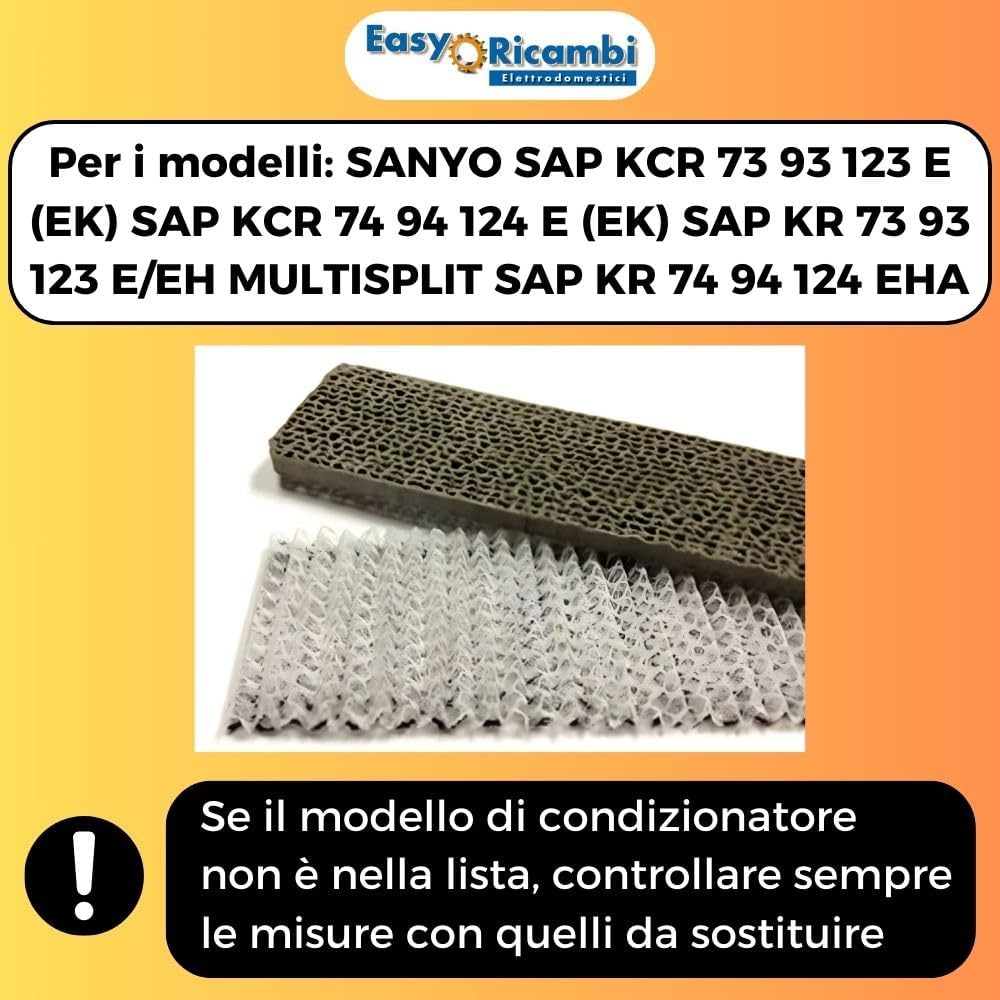
Image: Visual representation of filter compatibility with specific SANYO air conditioner models.
4. Installation (Setup)
Replacing your air conditioner filters is a straightforward process that does not require professional assistance. Follow these general steps:
- Power Off: Before beginning, ensure your air conditioner unit is turned off and disconnected from the power supply to prevent accidental activation.
- Locate Filter Compartment: Refer to your air conditioner's user manual to locate the filter compartment. This is typically behind the front panel or a dedicated access door.
- Remove Old Filters: Carefully slide out the old, dirty filters. Note their orientation to ensure correct placement of the new filters.
- Insert New Filters: Insert the new Easyricambi filters into the compartment. Ensure they are seated correctly and securely. The electrostatic filter and the deodorizing filter should be placed according to your unit's design, usually side-by-side or in designated slots.
- Close Compartment: Close the filter compartment door or reattach the front panel.
- Restore Power: Reconnect the air conditioner to the power supply and turn it on.
For specific instructions tailored to your SANYO model, consult your air conditioner's original instruction manual.
5. Operating Principles
Once installed, the Easyricambi filters operate passively as air passes through your air conditioning unit. The electrostatic filter uses static electricity to attract and hold airborne particles, while the catalyzed deodorizing filter chemically reacts with and neutralizes odors and certain volatile organic compounds (VOCs).
These filters work continuously whenever your air conditioner is running, contributing to improved indoor air quality and system efficiency.
6. Maintenance
Regular maintenance of your air conditioner filters is vital for optimal performance and air quality. These filters are designed for replacement, not cleaning.
- Replacement Frequency: It is recommended to inspect your filters monthly and replace them every 3 to 6 months, depending on usage, indoor air quality, and the presence of pets or allergies. Heavily used units or homes with pets may require more frequent replacement.
- Benefits of Regular Replacement:
- Improved Air Quality: Ensures continuous removal of dust, allergens, and odors.
- Enhanced Energy Efficiency: Clean filters allow for unrestricted airflow, reducing the strain on your air conditioner and lowering energy consumption.
- Extended Unit Lifespan: Prevents dust and debris buildup within the unit, which can lead to mechanical issues and reduce the lifespan of your air conditioner.

Image: Visual representation of how changing filters improves air quality and system efficiency.
7. Troubleshooting
If you experience issues after replacing your filters, consider the following:
- Reduced Airflow: Ensure the filters are correctly seated and not obstructing the airflow. Verify that the air conditioner's main filter (if separate) is also clean.
- Persistent Odors: While the deodorizing filter is effective, strong or unusual odors might indicate a deeper issue within the air conditioning unit, such as mold growth or refrigerant leaks. Consult a qualified technician if odors persist.
- No Improvement in Air Quality: Confirm that the filters are the correct size and type for your unit. Ensure regular replacement. If issues persist, consider professional inspection of your HVAC system.
- Filter Damage: If a filter appears damaged upon arrival, do not install it. Contact customer support for a replacement.
8. Specifications
| Attribute | Detail |
|---|---|
| Brand | Easyricambi |
| Material | Electrostatic |
| Dimensions (each filter) | 300mm x 50mm (30 cm x 5 cm) |
| Number of Items | 2 (1 Electrostatic, 1 Catalyzed Deodorizing) |
| Compatible Devices | Air Conditioner (SANYO SAP KCR/KR Series) |
| MERV Classification | 6.5 |
| Item Weight (package) | 2 kg |
9. Warranty and Support
For information regarding returns or warranty policies, please refer to the retailer's specific terms and conditions at the time of purchase. Generally, products can be returned within 30 days of receipt if you change your mind. For defective or damaged products, specific assistance pages are available from the retailer.
For further assistance or inquiries about Easyricambi products, please visit the official Easyricambi store or contact their customer service channels as provided by your point of purchase.
Related Documents - SANYO SAP KCR/KR Series Compatible Filters
 |
SANYO DC Inverter Multi-System Air Conditioner Technical & Service Manual Technical and service manual for SANYO DC Inverter Multi-System Air Conditioners, covering indoor units SAP-KMRV93GJH, SAP-KMRV123GJH, SAP-KMRV183GJH, and SAP-KMRV243GJH. Includes specifications, installation instructions, troubleshooting, and component details. |
 |
SANYO DC Inverter Split System Air Conditioner Technical & Service Manual Technical and service manual for SANYO DC Inverter Split System Air Conditioners, models SAP-KRV93EH, SAP-CRV93EH, SAP-KRV123EH, and SAP-CRV123EH. Covers specifications, installation, maintenance, troubleshooting, and electrical data for these advanced inverter units. |
 |
SANYO AHX0752 Indoor Unit Parts List and Diagram Comprehensive parts list and exploded view diagram for the SANYO AHX0752 indoor air conditioner unit. Find part numbers, descriptions, and quantities for service and replacement. |
 |
Downtime-Optimized Conversion to SAP S/4HANA: Upgrade Guide Comprehensive guide for performing a downtime-optimized conversion of SAP ERP systems to SAP S/4HANA using SAP's Software Update Manager (SUM). Covers planning, preparation, execution, and troubleshooting steps. |
 |
SAP Customer Activity Repository applications bundle 4.0 SPS04 Installation Guide This guide provides comprehensive instructions for installing SAP Customer Activity Repository applications bundle 4.0 SPS04, covering prerequisites, software installation, and application setup for enterprise retail solutions. |
 |
SAP Analysis for SAP Analytics Cloud Administrator Guide Comprehensive guide for administrators on installing, configuring, and managing SAP Analysis for Microsoft Office, edition for SAP Analytics Cloud. Covers BI platforms, security, and troubleshooting. |