
Introduction
This manual provides essential information for the proper setup, operation, and maintenance of your INTECHING AXD7534 AV Receiver Remote Control. This remote is designed as a replacement for specific Pioneer AV receiver models, offering full functionality without the need for complex programming.
Please read this manual thoroughly before using the remote control to ensure optimal performance and longevity.
Setup
Battery Installation
- Locate the battery compartment on the back of the remote control.
- Slide the battery compartment cover downwards or press the latch and lift to open.
- Insert two (2) AAA batteries (not included) into the compartment, ensuring the positive (+) and negative (-) terminals align correctly with the indicators inside.
- Replace the battery compartment cover by sliding it back into place until it clicks securely.

Figure 1: Back of the remote control showing the battery compartment cover.
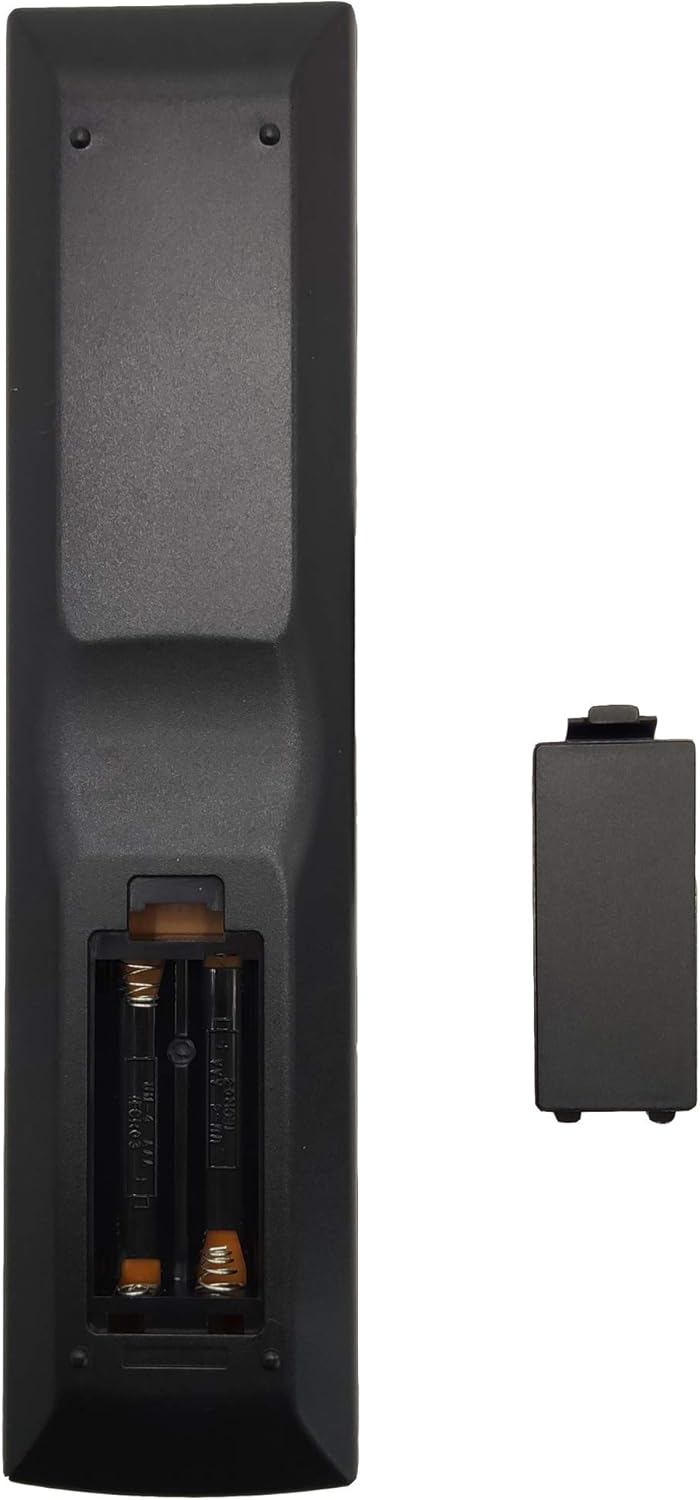
Figure 2: Battery compartment with cover removed, illustrating battery placement.
Initial Use
Once batteries are installed, the remote control is ready for use. No programming, pairing, or additional setup is required. It is designed to function immediately with compatible Pioneer AV receiver models.
Operating Instructions
Compatibility
This remote control is compatible with the following Pioneer AV receiver models:
- Pioneer SX-319V
- Pioneer SX-319V-K
- Pioneer VSX-519V
- Pioneer VSX-519V-K
- Pioneer VSX-519V-S
Basic Functions
The remote control provides access to standard AV receiver functions. Point the remote directly at your AV receiver when operating.

Figure 3: Front view of the remote control with key layout.
- Power On/Off: Use the RECEIVER ON/OFF buttons located at the top right to power your AV receiver on or off.
- Input Selection: Use the INPUT SELECT buttons (e.g., BD, TV, DVR, CD, TUNER) to switch between different audio/video sources.
- Volume Control: Adjust the master volume using the MASTER VOLUME +/- buttons.
- Mute: Press the MUTE button to temporarily silence the audio output.
- Navigation: Use the directional arrow buttons and ENTER button for menu navigation.
- Sound Modes: Buttons like AUTO DIRECT, STEREO, STANDARD, and ADV SURR allow selection of various audio processing modes.
Important Notice:
Ensure there are no obstacles between the remote control and your AV receiver when operating the device to maintain an unobstructed infrared signal.
Maintenance
Battery Replacement
Replace the batteries when the remote control's responsiveness decreases or it stops functioning. Always replace both AAA batteries simultaneously with new ones. Do not mix old and new batteries, or different types of batteries.
Cleaning
To clean the remote control, gently wipe its surface with a soft, dry cloth. For stubborn dirt, slightly dampen the cloth with water. Avoid using harsh chemicals, abrasive cleaners, or excessive moisture, as these can damage the remote's finish or internal components.
Storage
When not in use for extended periods, it is recommended to remove the batteries to prevent leakage, which can cause damage to the remote control.
Troubleshooting
Remote Control Not Responding
- Check Batteries: Ensure batteries are inserted correctly with the correct polarity (+/-) and are not depleted. Replace with fresh AAA batteries if necessary.
- Line of Sight: Verify that there is a clear path between the remote control's infrared emitter and the AV receiver's sensor. Remove any obstructions.
- Distance: Ensure you are within the effective operating range of the remote control.
Specific Button Issues
While this remote is designed for direct compatibility, some users have reported that certain numerical keys (e.g., Test Tone, Dimmer, Speakers, '0' key) may have different functions than those labeled or found on an original Pioneer remote. For example, the '0' key, labeled as "louaspeaker" (misspelled), may activate the same function as the '8' key on an original Pioneer remote (e.g., turns Speakers on/off). This is a characteristic of some replacement units.
If you encounter unexpected behavior with specific buttons, refer to your AV receiver's original manual for alternative ways to access those functions or adapt to the remote's specific mapping.
Specifications
| Model Number | AXD7534 |
| Product Dimensions | 8.27 x 1.97 x 0.79 inches (21 x 5 x 2 cm) |
| Item Weight | 2.82 ounces (80 grams) |
| Batteries Required | 2 x AAA (not included) |
| Compatible Devices | Pioneer SX-319V, SX-319V-K, VSX-519V, VSX-519V-K, VSX-519V-S AV Receivers |
| Color | Black |
Support
For any questions or assistance regarding your INTECHING AXD7534 remote control, please contact our customer service. Our support team aims to respond to messages within 24 hours.
Please refer to the retailer's website or your purchase documentation for specific contact information.
