
Hanchen 120g/ 0,1mg Manuelle Kalibrierung
Hanchen Analytical Balance Scale User Manual
Model: 120g/ 0.1mg Manual Calibration
1. Introduction
This manual provides detailed instructions for the Hanchen Analytical Balance Scale (Model: 120g/0.1mg Manual Calibration). This high-precision digital scale is designed for laboratory use, pharmacies, chemical factories, and jewelry businesses, offering accurate measurements with a resolution of 0.1mg. Please read this manual thoroughly before operating the device to ensure proper use, optimal performance, and longevity.

Figure 1: Hanchen Analytical Balance Scale with a calibration weight inside the glass windshield.
2. Product Components and Features
The Hanchen Analytical Balance Scale is equipped with several key components and features designed for precision and ease of use.

Figure 2: Labeled diagram showing the main components of the analytical balance scale, including the glass windshield, tray, LCD display, level adjustors, ON/OFF button, Unit Conversion, CAL (calibration) button, TARE button, RS232 Data Port, and Power Socket.
- Glass Windshield: Three-door sliding design made of tempered glass to protect the weighing pan from air currents and dust, ensuring stable readings.
- Weighing Pan: Made of 316 corrosion-resistant stainless steel, suitable for medical quality applications.
- LCD Display: Clear digital display for showing weight readings and other information.
- Control Panel: Features buttons for ON/OFF, Unit Conversion, CAL (Calibration), and TARE (Peeling Function).
- RS232 Data Output: Allows connection to a computer or printer for data transfer.
- Level Adjustors: Adjustable feet to ensure the scale is perfectly level for accurate measurements.
- Aluminum Alloy Casing: Lightweight and robust housing.
- Electromagnetic Shielding: Ensures interference-free and stable operation of the internal precision circuit.
- Electromagnetic-BII Sensor: Creative overall structure with special alloy material for enhanced stability and high precision signal acquisition.
- High-speed Digital Chip: Features an innovative dual-core parallel computing circuit for faster calculation speed and higher fault tolerance.
3. Setup and Installation
Proper setup is crucial for the accurate operation of your analytical balance scale. Follow these steps carefully:
- Unpacking: Carefully remove the scale from its packaging. Retain all packaging materials for future transport or storage.
- Placement: Place the scale on a stable, level surface free from vibrations, drafts, and direct sunlight. Ensure the operating temperature is between 18-23°C (64.4-73.4°F) and humidity is between 45-60% RH.
- Leveling: Use the adjustable level adjustors at the bottom of the scale to ensure the bubble in the spirit level (usually located near the front or side of the scale) is centered. This ensures the weighing mechanism is perfectly horizontal.
- Power Connection: Connect the power cable to the power socket on the rear of the scale and then to a 220V / 50Hz power outlet.
- Initial Power On: Press the ON/OFF button to turn on the scale. Allow the scale to warm up for at least 30 minutes before performing any measurements for optimal stability.
- Windshield Assembly: Ensure the glass windshield is properly assembled and all three sliding doors operate smoothly.
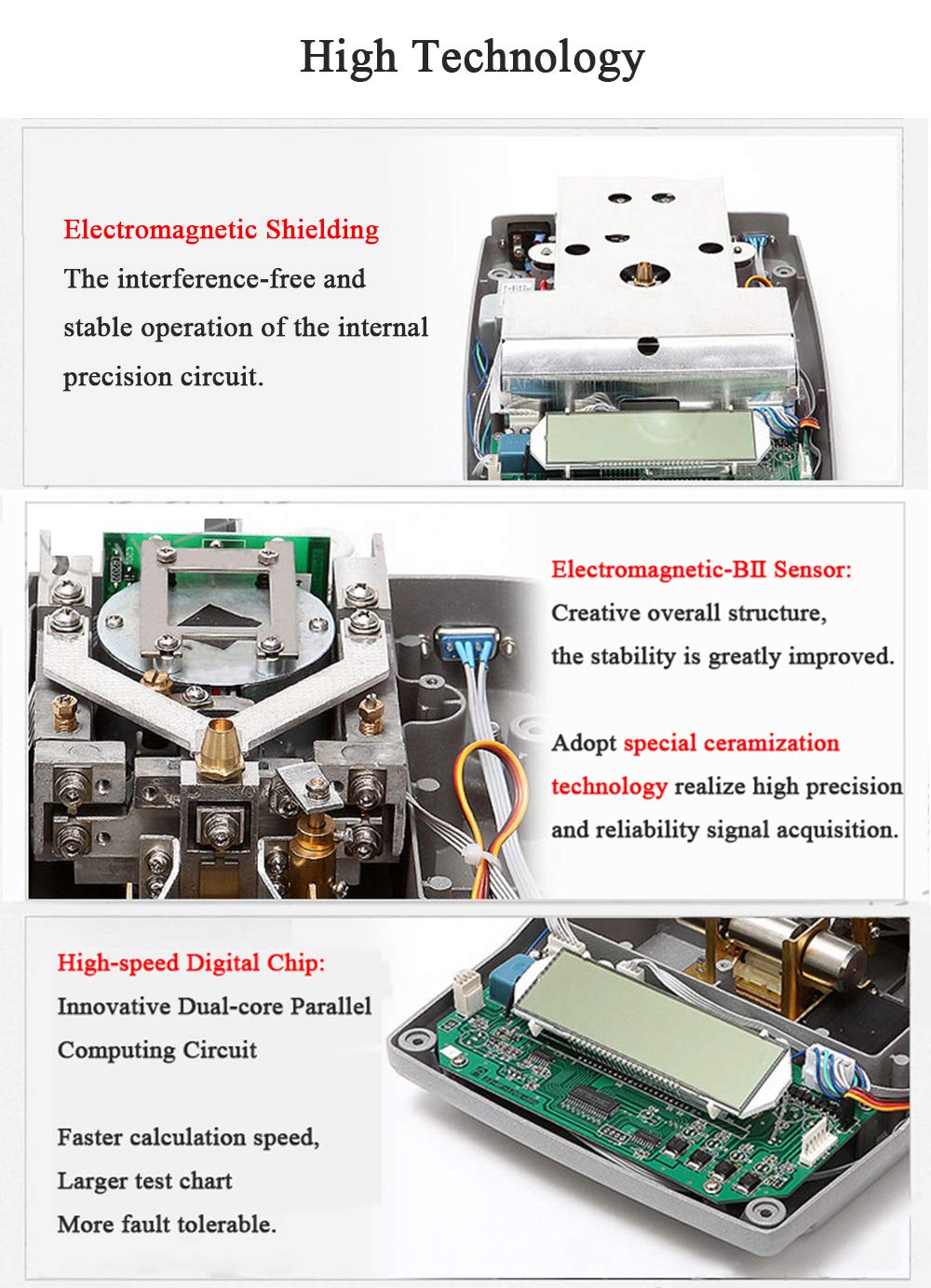
Figure 3: Dimensions of the Hanchen Analytical Balance Scale, showing approximate measurements of 330mm (length), 212mm (width), and 340mm (height).
4. Operating Instructions
This section details the functions and operations of your Hanchen Analytical Balance Scale.

Figure 4: Close-up view of the scale's LCD display and control buttons, including ON/OFF, Unit Conversion, CAL, and TARE.
4.1. Basic Weighing
- Ensure the scale is level and has warmed up.
- Press the ON/OFF button to turn on the scale. The display will show "0.0000g" after self-check.
- Carefully place the item to be weighed onto the center of the weighing pan.
- Read the stable weight displayed on the LCD.
- Remove the item from the pan.
4.2. Unit Conversion
The scale supports conversion between seven different units.
- Supported Units: g (Gram), ct (Carat), ozt (Troy Ounce), oz (Ounce), GN (Grain), dwt (Pennyweight), lb (Pound).
- To change the unit, press the Unit Conversion button (often indicated by a double arrow or "UNIT" symbol) repeatedly until the desired unit is displayed.
4.3. Tare (Peeling) Function
The tare function allows you to zero out the weight of a container, so only the net weight of the contents is measured.
- Place the empty container on the weighing pan.
- Wait for the reading to stabilize.
- Press the TARE button. The display will reset to "0.0000g".
- Add the substance to be weighed into the container. The display will show the net weight of the substance.
4.4. Counting Function
The scale can count samples based on a pre-set sample quantity.
- Sample Quantities: 1, 10, 20, 50, 100.
- Refer to your scale's specific counting mode activation (usually by pressing a "PCS" or "COUNT" button, if available, or a combination of buttons).
- Place the specified number of sample items on the pan, confirm the count, then add more items to count the total.
4.5. Manual Calibration (External Calibration)
Regular calibration ensures the accuracy of your scale. This model supports manual external calibration.
- Ensure the scale is stable and free from any items on the pan.
- Press and hold the CAL button until the display shows "CAL" or a calibration weight value.
- Place the specified calibration weight (e.g., 100g or 120g, depending on the model and calibration procedure) onto the center of the weighing pan.
- Wait for the scale to complete the calibration process. The display will typically show "PASS" or return to "0.0000g" once complete.
- Remove the calibration weight.
Note: Use a certified calibration weight appropriate for your scale's capacity.
4.6. RS232 Data Output
The RS232 port allows the scale to connect to a computer or printer for data logging and analysis.
- Connect a compatible RS232 cable from the scale's RS232 port to your computer's serial port or a USB-to-serial adapter.
- Use appropriate software on your computer to receive data from the scale. Refer to the software's manual for specific instructions.
5. Maintenance and Care
Proper maintenance ensures the longevity and accuracy of your Hanchen Analytical Balance Scale.
- Cleaning:
- Regularly clean the weighing pan (316 corrosion-resistant stainless steel) and the glass windshield with a soft, damp cloth.
- For stubborn stains, use a mild, non-abrasive cleaning solution. Avoid harsh chemicals or abrasive materials that could scratch the surfaces.
- Ensure no liquids enter the internal components of the scale.
- Environmental Conditions:
- Keep the scale in a clean, dry environment, away from excessive dust, moisture, and extreme temperature fluctuations.
- Avoid placing the scale near strong electromagnetic fields or vibrating machinery.
- Handling:
- Handle the scale with care. Avoid dropping or subjecting it to sudden impacts.
- When moving the scale, lift it from the base, not the windshield or weighing pan.
- Storage:
- If storing for an extended period, ensure the scale is clean and dry.
- Store it in its original packaging or a protective case in a stable environment.

Figure 5: Detailed view of the 316 corrosion-resistant stainless steel weighing pan, highlighting its smooth, easy-to-clean surface.
6. Troubleshooting
If you encounter issues with your Hanchen Analytical Balance Scale, refer to the following common problems and their solutions:
| Problem | Possible Cause | Solution |
|---|---|---|
| Scale does not turn on. | No power supply; loose power cable. | Check power connection and outlet. Ensure the power cable is securely plugged in. |
| Inaccurate or unstable readings. | Scale not level; vibrations; drafts; temperature fluctuations; needs calibration. | Ensure the scale is level using the spirit level. Place on a stable surface away from vibrations and drafts. Allow adequate warm-up time. Perform manual calibration. |
| Display shows "OVERLOAD" or "E". | Weight exceeds maximum capacity. | Remove excess weight from the pan. Ensure the weight is within the scale's 120g capacity. |
| Tare function not working. | Item already on pan before taring; button malfunction. | Ensure the pan is empty or only contains the container you wish to tare before pressing TARE. If issue persists, contact support. |
| Cannot connect via RS232. | Incorrect cable; driver issues; software settings. | Verify the RS232 cable is correct and securely connected. Install necessary drivers for your RS232 adapter. Check software communication settings (baud rate, parity, etc.). |
If the problem persists after attempting these solutions, please contact Hanchen customer support for further assistance.
7. Technical Specifications
Detailed specifications for the Hanchen Analytical Balance Scale (Model: 120g/0.1mg Manual Calibration).
| Parameter | Value |
|---|---|
| Weighing Range | 0 - 120 g |
| Resolution | 0.1 mg |
| Power Supply | 220 V / 50 Hz |
| Pan Size | 80 mm |
| Operating Temperature | 18 - 23 °C (64.4 - 73.4 °F) |
| Operating Humidity | 45 - 60% RH |
| Serial Port | RS232 |
| Net Weight | Approx. 10 kg |
| Dimensions (L x W x H) | 220 x 360 x 345 mm (as per description) / 330 x 212 x 340 mm (as per image) - Note: Image dimensions are more precise for the overall unit. |
| Display Type | LCD |
| Material | Thermoplast, PTFE (Polytetrafluoroethylene), Glass |
| Special Features | Portable, Lightweight, Robust |
8. Warranty and Support
Hanchen is committed to providing high-quality products and excellent customer service.
- Customer Support: For any questions, technical assistance, or support needs, please contact Hanchen Instrument (UK) directly. Timely after-sales support is available.
- Product Updates: Hanchen continuously updates products based on customer feedback and needs.
- Manuals: Manuals in local languages may be available for certain products.
Please refer to your purchase documentation or the Hanchen official website for specific warranty terms and conditions applicable to your region.
Ask a question about this manual
Ask about setup, troubleshooting, compatibility, parts, safety, or missing instructions. Manuals+ will review the question and use this page’s manual context to help answer it.