
1. Product Overview
The newbaby Video Baby Monitor SM935 provides wireless monitoring of your baby with a 3.5-inch LCD screen. It features digital pan, tilt, and zoom capabilities, two-way audio communication, infrared night vision, and temperature detection to help you maintain a comfortable environment for your child.

Image: The newbaby Video Baby Monitor system, showing the camera unit and the 3.5-inch parent monitor unit displaying a sleeping baby.
Key Features:
- 3.5-inch TFT LCD Screen: Provides a clear, high-resolution color video feed.
- Wireless 2.4GHz Digital Transmission: Ensures privacy and security with a range up to 900 feet in open space.
- Remote Pan & Tilt: Camera can be remotely panned 355° horizontally and tilted 110° vertically for comprehensive room coverage.
- Two-Way Audio: Built-in microphone and speaker allow you to hear your baby and speak back to them.
- Infrared Night Vision: Automatically adjusts to low light conditions, providing a clear image in darkness.
- Temperature Detection: Displays real-time room temperature on the parent unit.
- Lullabies: Five built-in lullabies to help soothe your baby to sleep.
- Low-Battery Alarm: Alerts you when the parent unit's battery is low.
- Multi-Camera Support: One parent unit can connect to up to four baby units (additional cameras sold separately).
2. Safety Information
- Always keep the camera unit out of reach of babies and young children to prevent strangulation hazards from power cords.
- Ensure all power adapters and cords are securely placed and not accessible to children.
- Do not place the camera or monitor near water or heat sources.
- Use only the provided power adapters.
- This product is intended for monitoring purposes only and should not replace proper adult supervision.
3. What's in the Box
Verify that all components are present before setup:
- 1 x 2.4GHz Camera Unit
- 1 x 3.5" Parent Receiver Unit
- 1 x US Power Adapter for Camera
- 1 x US Power Adapter for Receiver
- 1 x User Manual

Image: All components included in the newbaby Video Baby Monitor package.
4. Setup Guide
4.1 Charging the Parent Unit
Before initial use, fully charge the parent unit. Connect the small end of the parent unit power adapter to the charging port on the parent unit and the other end to a power outlet. The battery indicator on the screen will show charging status. A full charge is recommended for optimal battery life.
4.2 Camera Placement
Place the baby unit (camera) in a suitable location that provides a clear view of your baby. Ensure it is at least 3 feet (1 meter) away from your baby to avoid potential hazards and to ensure proper night vision functionality. Adjust the camera's viewing angle until you are satisfied with the image displayed on the parent unit.

Image: The camera unit positioned to monitor a baby in a crib.
4.3 Powering On
Connect the camera unit to a power outlet using its dedicated power adapter. Press and hold the ON/OFF switch on the parent unit to turn it on. The units should automatically pair. If pairing fails, refer to the troubleshooting section.
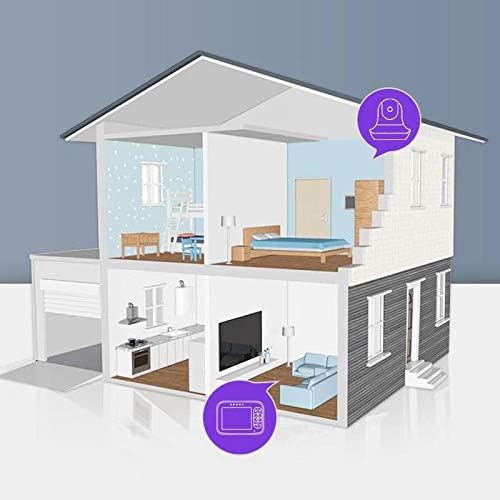
Image: An illustration demonstrating the wireless range of the monitor within a typical home environment.
5. Operating Instructions
5.1 Parent Unit Controls
The parent unit features a 3.5-inch LCD screen and control buttons for various functions.

Image: The 3.5-inch high-resolution screen of the parent unit, showing control buttons on the side.
5.2 Pan, Tilt, and Zoom
Use the directional buttons on the parent unit to remotely adjust the camera's view. Press the appropriate arrow buttons to pan the camera left or right (355°) and tilt it up or down (110°). The zoom function allows for a closer view of your baby.

Image: Diagram illustrating the 360-degree pan and 60-degree tilt capabilities of the camera unit.
5.3 Two-Way Audio
Press and hold the microphone button on the parent unit to speak to your baby through the camera's speaker. Release the button to hear your baby's sounds.
5.4 Night Vision
The monitor automatically activates infrared night vision in low-light conditions, providing a clear black and white image of your baby. No manual adjustment is required for this feature.
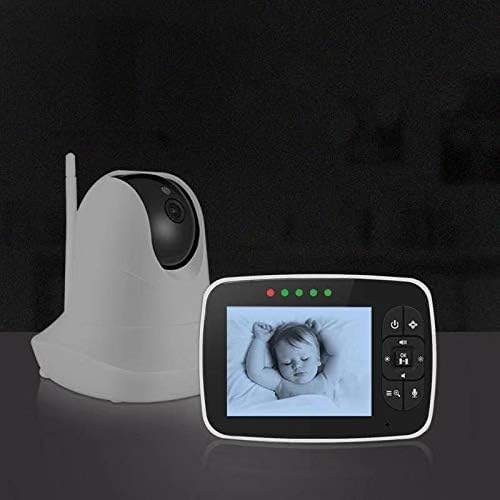
Image: The parent unit screen showing a baby in a crib under night vision, with a clear monochrome display.
5.5 Temperature Monitoring
The current room temperature is displayed on the parent unit screen. This helps ensure your baby's room remains at a comfortable temperature.
Image: The camera unit positioned near a sleeping baby, highlighting the temperature monitoring feature.
5.6 Lullabies
Access the menu on the parent unit to select and play one of the five built-in lullabies to help calm your baby.
5.7 ECO Mode (Sound Sensitivity)
The ECO mode allows you to adjust the sound sensitivity of the monitor. When set to a specific level (Low, Mid, High), the screen and sound on the parent unit will activate only when sounds above the set threshold are detected. If set to 'Off', the screen and sound will remain continuously active. This unit does not feature a VOX (Voice Operated Exchange) mode that completely turns off the screen and sound until a sound is detected; instead, the ECO mode manages sound activation based on sensitivity levels.
6. Maintenance
- Clean the monitor and camera units with a soft, dry cloth. Do not use abrasive cleaners or solvents.
- Ensure the camera lens is clean for optimal image quality.
- Store the units in a dry, dust-free environment when not in use.
7. Troubleshooting
- No Picture/Sound:
- Ensure both the camera and parent unit are powered on and connected to power.
- Check that the units are within range (up to 900 feet in open space). Walls and other obstacles can reduce range.
- Verify that the parent unit's volume is not muted or set too low.
- Poor Picture Quality:
- Ensure the camera lens is clean.
- Adjust the camera's position for better lighting.
- Move the units closer to each other to improve signal strength.
- Parent Unit Battery Drains Quickly:
- Ensure the parent unit is fully charged before use.
- Continuous screen activity and high volume settings can reduce battery life.
- The advertised battery life of 6 hours may vary based on usage patterns.
- Screen and Sound Always On (No VOX Mode):
- This model features an ECO mode for sound sensitivity, not a true VOX mode that completely turns off the screen and sound.
- In ECO mode, the screen and sound will activate when noise exceeds the set sensitivity level (Low, Mid, High). If ECO mode is set to 'Off', the screen and sound will remain continuously active.
- There is no "Power Savings" option in the settings that would completely turn off the screen and sound based on silence.
- Inaccurate Temperature Reading:
- Ensure the camera unit is not placed near heat sources or in direct sunlight, which can affect the sensor.
- Keep the temperature sensor wire (if applicable) away from the unit's main body to prevent heat interference.
8. Specifications
| Model Number | SM935 |
| Screen Size | 3.5 Inches |
| Connectivity Technology | Wireless (2.4GHz) |
| Wireless Communication Technology | Wi-Fi (Note: This refers to the wireless communication standard, not necessarily internet connectivity for the monitor itself.) |
| Pan Angle | 355 degrees |
| Tilt Angle | 110 degrees |
| Night Vision | Infrared |
| Two-Way Audio | Yes |
| Temperature Sensor | Yes |
| Lullabies | 5 Built-in |
| Power Source | Battery Powered (Parent Unit), AC Powered (Camera Unit) |
| Parent Unit Battery | 1 Lithium Ion battery required |
| Product Dimensions | 6 x 3 x 1 inches |
| Item Weight | 8 ounces |
9. Warranty and Support
For warranty information or technical support, please refer to the contact details provided with your purchase documentation or visit the official newbaby website. Keep your purchase receipt as proof of purchase for warranty claims.