

The iLive Water Resistant Wireless Speaker, Model ISBW249B, shown in black.
Introduction
This manual provides instructions for the iLive Water Resistant Wireless Speaker, Model ISBW249B. This portable speaker offers multiple playback options including Bluetooth, Aux-in, USB, SD, and FM radio. Its IPX4 water-resistant design makes it suitable for various environments. Please read this manual thoroughly before using your speaker.
Package Contents
- iLive Water Resistant Wireless Speaker (ISBW249B)
- 3.5mm Audio Cable
- Micro-USB to USB Charging Cable
- User's Guide
- Warranty Information
Product Features
- Portable Bluetooth wireless speaker with IPX4 water resistance.
- Supports automatic device reconnect.
- Voice prompts announce speaker functions.
- FM scan radio function.
- 3.5mm audio input (Aux-in).
- Speakerphone capability.
- Built-in rechargeable battery providing approximately 6 hours of battery life at 50% volume.
- USB and SD card playback options.

The iLive ISBW249B speaker features an IPX4 water-resistant design, protecting it from splashes and light rain. This image shows water droplets on the speaker's surface, demonstrating its water resistance.
Controls and Indicators
Familiarize yourself with the speaker's controls for optimal use.
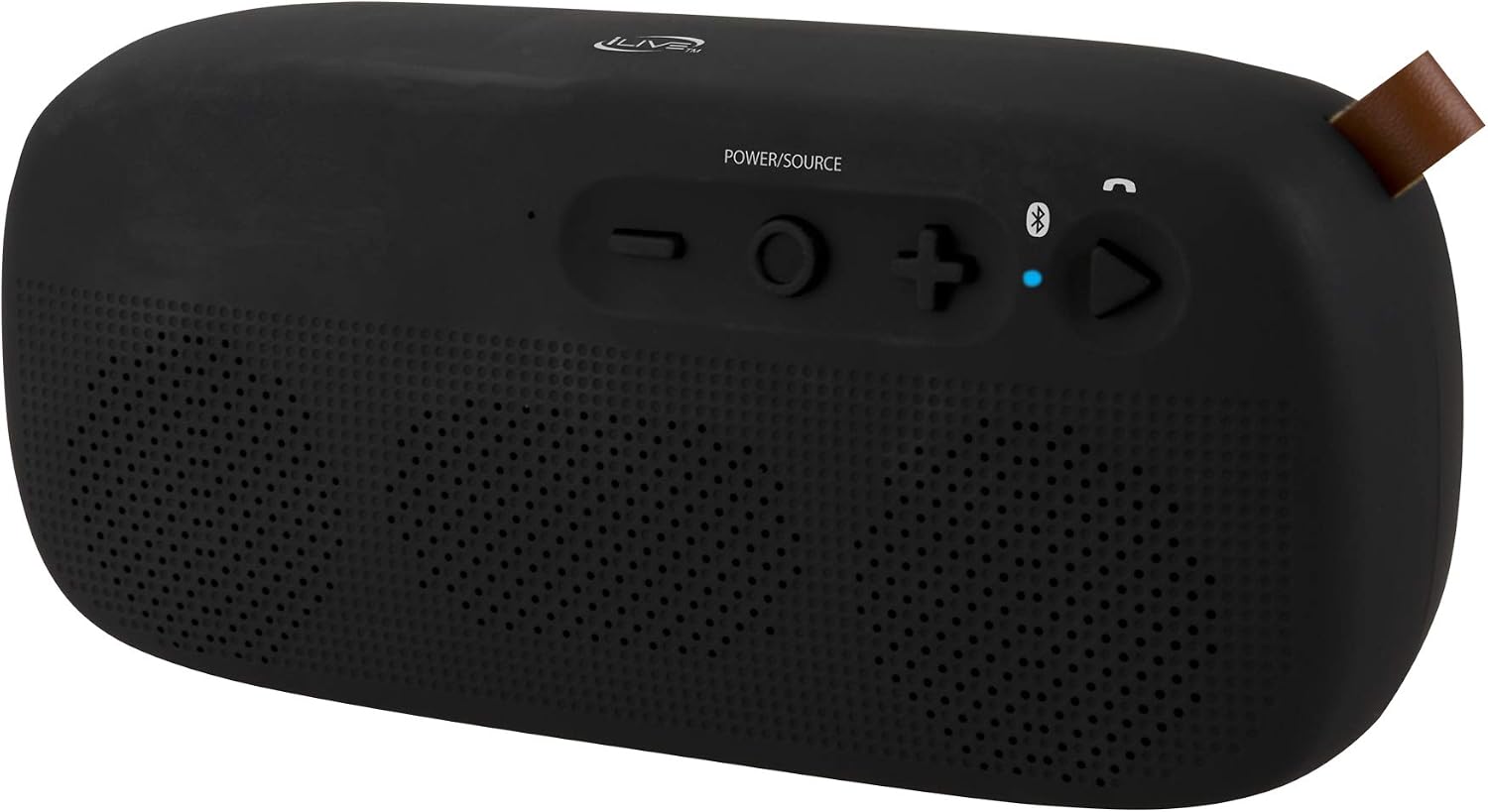
This image displays the top panel of the iLive ISBW249B speaker, highlighting the control buttons. From left to right, these include Volume Down (-), Power/Source (circle), Volume Up (+), Bluetooth pairing button, and Play/Call button (triangle with phone icon).
- Power/Source Button: Press and hold to power on/off. Press briefly to switch between input sources (Bluetooth, FM Radio, Aux-in, USB, SD).
- Volume Down (-): Press to decrease volume. Press and hold to skip to the previous track (in Bluetooth/USB/SD mode) or tune down (in FM mode).
- Volume Up (+): Press to increase volume. Press and hold to skip to the next track (in Bluetooth/USB/SD mode) or tune up (in FM mode).
- Bluetooth Button: Press to enter Bluetooth pairing mode.
- Play/Call Button: Press to play/pause audio. Press to answer/end a phone call. Press and hold to reject a call.
- LED Indicator: Indicates power status, charging status, and Bluetooth pairing status.
Setup
Charging the Speaker
- Locate the Micro-USB charging port on the speaker.
- Connect the Micro-USB end of the provided charging cable to the speaker's charging port.
- Connect the standard USB end of the cable to a USB power source (e.g., computer USB port, USB wall adapter).
- The LED indicator will illuminate to show charging status. A full charge typically takes approximately 2.5 hours.
- Once fully charged, the LED indicator will change or turn off (refer to specific LED behavior in the full user guide).
Power On/Off
- To power on: Press and hold the Power/Source button until the speaker powers on and a voice prompt is heard.
- To power off: Press and hold the Power/Source button until the speaker powers off.
Operating Instructions
Bluetooth Pairing
- Ensure the speaker is powered on and in Bluetooth mode. If not, press the Power/Source button repeatedly until the "Bluetooth" voice prompt is heard. The Bluetooth LED indicator will flash, indicating it's in pairing mode.
- On your mobile device (smartphone, tablet, etc.), enable Bluetooth and search for new devices.
- Select "iLive ISBW249B" from the list of available devices.
- Once paired, a "Bluetooth Connected" voice prompt will be heard, and the Bluetooth LED indicator will glow solid.
- The speaker supports automatic device reconnect. If your device was previously paired, it will attempt to reconnect automatically when in range.
FM Radio
- Press the Power/Source button repeatedly until the "FM Radio" voice prompt is heard.
- To auto-scan for stations: Press and hold the Play/Call button. The speaker will scan and save available FM stations.
- To manually tune: Press and hold the Volume Up (+) or Volume Down (-) buttons to fine-tune the frequency.
- To navigate saved stations: Press the Volume Up (+) or Volume Down (-) buttons briefly.
Aux-in Mode
- Connect one end of the 3.5mm audio cable to the speaker's Aux-in port.
- Connect the other end of the cable to the audio output jack of your external device (e.g., MP3 player, computer).
- Press the Power/Source button repeatedly until the "Aux-in" voice prompt is heard.
- Control playback and volume from your connected external device.
USB/SD Card Playback
- Insert a USB flash drive or SD card into the corresponding port on the speaker.
- The speaker should automatically switch to USB or SD mode and begin playing audio. If not, press the Power/Source button until the correct mode is activated.
- Use the Play/Call button to play/pause. Use the Volume Up (+) and Volume Down (-) buttons to skip tracks.
Speakerphone Function
- When a call is received while connected via Bluetooth, the speaker will ring.
- To answer a call: Press the Play/Call button.
- To end a call: Press the Play/Call button.
- To reject a call: Press and hold the Play/Call button.
Maintenance
- Clean the speaker with a soft, dry cloth. Do not use abrasive cleaners or solvents.
- Avoid exposing the speaker to extreme temperatures, direct sunlight, or high humidity for extended periods.
- Ensure all port covers are securely closed when using the speaker near water to maintain its IPX4 water resistance.
- Store the speaker in a cool, dry place when not in use.
Troubleshooting
| Problem | Solution |
|---|---|
| No power | Ensure the speaker is charged. Connect the Micro-USB charging cable and allow it to charge for at least 30 minutes before attempting to power on. |
| Cannot pair via Bluetooth | Ensure the speaker is in Bluetooth pairing mode (flashing LED). Make sure your device's Bluetooth is enabled and within range. Try forgetting the device on your phone and re-pairing. |
| No sound | Check the volume levels on both the speaker and your connected device. Ensure the correct input source is selected (Bluetooth, Aux-in, FM, USB/SD). |
| Poor FM radio reception | Reposition the speaker to improve reception. Ensure no large metal objects are obstructing the signal. |
Specifications

This image illustrates the physical dimensions of the iLive ISBW249B speaker, showing its width of 8.27 inches, depth of 1.8 inches, and height of 3.82 inches.
- Model: ISBW249B
- Brand: iLive Electronics
- Connectivity Technology: Auxiliary, Bluetooth, USB
- Wireless Technology: Bluetooth
- Audio Output Mode: Stereo
- Speaker Maximum Output Power: 3 Watts
- Water Resistance: IPX4 (Splash-proof)
- Battery: Built-in Rechargeable Lithium Ion (1 required, included)
- Battery Life: Approximately 6 hours at 50% volume
- Dimensions (D x W x H): 1.8" x 8.27" x 3.82"
- UPC: 047323024900
Warranty and Support
This product comes with a 90 Day Limited Warranty. For detailed warranty information or technical support, please refer to the included warranty card or visit the official iLive Electronics website.


