
DG-TH1981
Digoo DG-TH1981 Weather Station User Manual
Model: DG-TH1981
1. Introduction
Welcome to the user manual for the Digoo DG-TH1981 Weather Station. This manual provides essential information for the proper setup, operation, and maintenance of your device. Please read it thoroughly before using the product.
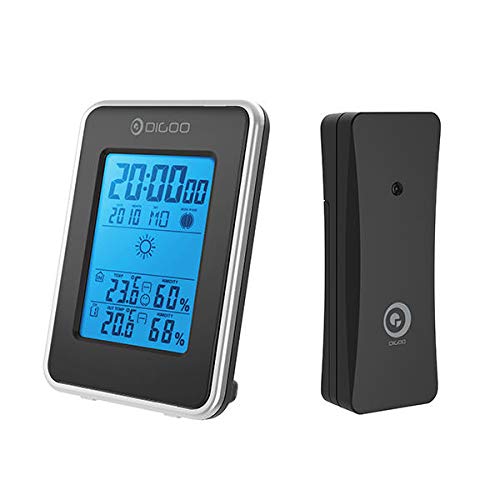
Figure 1: Digoo DG-TH1981 Weather Station main display unit and remote outdoor sensor.
2. Safety Information
To ensure safe operation and prevent damage, observe the following safety precautions:
- Do not expose the device to extreme temperatures, direct sunlight, or high humidity.
- Avoid dropping or subjecting the device to strong impacts.
- Do not attempt to disassemble or repair the device yourself. Refer to qualified personnel.
- Use only specified battery types.
- Keep out of reach of children.
3. Setup
3.1 Package Contents
Verify that all items are present in the package:
- Digoo DG-TH1981 Main Display Unit
- Outdoor Wireless Sensor
- User Manual (this document)
3.2 Battery Installation
The device requires batteries for operation. Batteries are not included.
- Locate the battery compartment on the back of the main display unit and the outdoor sensor.
- Open the battery covers.
- Insert the required batteries (e.g., AA or AAA, typically 2-3 per unit) according to the polarity indicators (+/-).
- Close the battery covers securely.
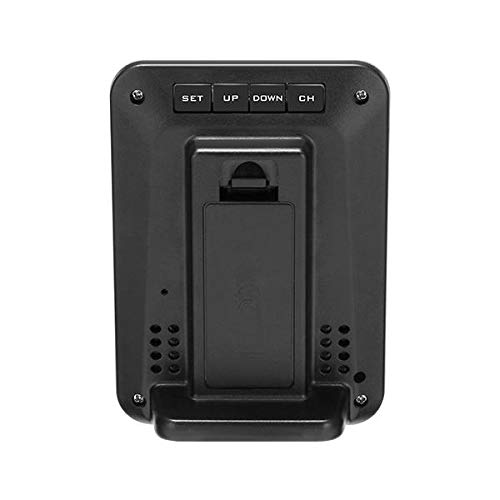
Figure 2: Rear view of the main display unit, showing the battery compartment and control buttons.
3.3 Sensor Placement
For accurate outdoor readings, place the wireless sensor in a suitable location:
- Place the sensor outdoors, away from direct sunlight and heat sources.
- Ensure it is protected from direct rain and snow.
- Maintain a clear line of sight or minimal obstructions between the sensor and the main unit for optimal wireless signal transmission.
- The maximum wireless range is approximately 30 meters (100 feet) in open air.
4. Operating Instructions
4.1 Initial Power-On and Synchronization
After installing batteries:
- The main unit display will light up.
- It will automatically search for the outdoor sensor. This may take a few minutes.
- Once synchronized, the outdoor temperature and humidity will appear on the main display.
4.2 Display Overview
The main display shows various information:
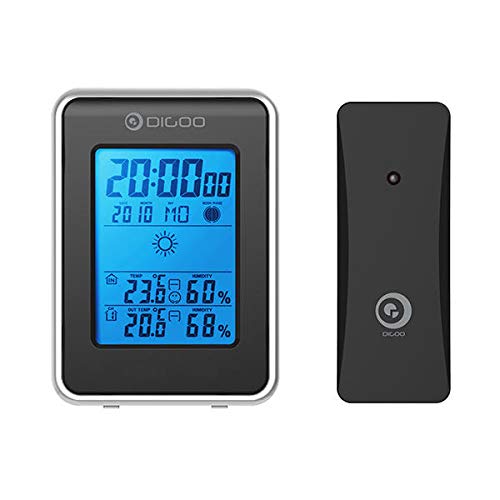
Figure 3: Front display of the main unit, showing various readings and forecast.
- Time and Date: Located at the top of the display.
- Indoor Temperature & Humidity: Displays current indoor conditions.
- Outdoor Temperature & Humidity: Displays current outdoor conditions received from the sensor.
- Weather Forecast: Icons indicating predicted weather (e.g., sunny, cloudy, rainy).
- Comfort Level Indicator: (If applicable) An icon showing indoor comfort based on temperature and humidity.
4.3 Setting Time and Date
Use the buttons on the back of the unit (SET, UP, DOWN, CH) to adjust settings.
- Press and hold the SET button to enter time setting mode.
- The hour digits will flash. Use UP or DOWN to adjust.
- Press SET again to move to minutes, then year, month, and day.
- Press SET to confirm each setting and exit.
4.4 Temperature Unit Selection (°C/°F)
Briefly press the UP button to switch between Celsius (°C) and Fahrenheit (°F).
4.5 Channel Selection (if multiple sensors supported)
If you have multiple outdoor sensors (not typically included with this model but a common feature):
- Press the CH button to cycle through different sensor channels.
5. Maintenance
- Clean the display and casing with a soft, dry cloth. Do not use abrasive cleaners or solvents.
- Replace batteries when the low battery indicator appears on the display.
- If the device will not be used for an extended period, remove the batteries to prevent leakage.
6. Troubleshooting
| Problem | Possible Cause | Solution |
|---|---|---|
| No display on main unit. | Batteries are dead or incorrectly inserted. | Check battery polarity or replace with new batteries. |
| Outdoor temperature/humidity not displayed. | Sensor out of range, batteries dead in sensor, or interference. | Move sensor closer to main unit, replace sensor batteries, or relocate away from electronic interference. Re-synchronize if necessary (power cycle both units). |
| Inaccurate readings. | Sensor exposed to direct sunlight, heat sources, or moisture. | Relocate sensor to a shaded, well-ventilated area protected from elements. |
7. Specifications
- Model: DG-TH1981
- Brand: GENERIC
- Power Source: Battery Powered (Batteries not included)
- Special Feature: Clock, Weather Forecast, Indoor/Outdoor Temperature & Humidity
- Display Type: Blue Backlit LCD
- Temperature Range (Indoor): Typically 0°C to 50°C (32°F to 122°F)
- Temperature Range (Outdoor): Typically -20°C to 60°C (-4°F to 140°F)
- Humidity Range: 20% to 95% RH
- Wireless Range: Up to 30 meters (100 feet) in open area
- Dimensions: (Approximate, based on typical weather stations) Main Unit: 150mm x 90mm x 25mm; Sensor: 90mm x 50mm x 20mm
8. Warranty and Support
This product is covered by a standard manufacturer's warranty. Please refer to your purchase documentation for specific warranty terms and conditions. For technical support or service inquiries, please contact your retailer or the manufacturer's customer service department.
Note: Warranty terms may vary by region and retailer. Keep your proof of purchase for warranty claims.
Ask a question about this manual
Ask about setup, troubleshooting, compatibility, parts, safety, or missing instructions. Manuals+ will review the question and use this page’s manual context to help answer it.