
SOCOTRAN T80-Black
SOCOTRAN T80 Walkie Talkies User Manual
Model: T80-Black
Introduction
This manual provides comprehensive instructions for the setup, operation, and maintenance of your SOCOTRAN T80 Walkie Talkies. Please read this manual thoroughly before using the product to ensure proper function and safety.

Image: Two SOCOTRAN T80 Walkie Talkies, showcasing their compact design.
Package Contents
Upon opening the package, verify that all the following items are included:
- 2 Rechargeable walkie talkie radios
- 2 Li-ion Batteries
- 2 Charging Docks
- 2 Chargers
- 2 Belt Clips
- 2 Lanyards
- 1 User’s Manual

Image: The complete package contents, including two walkie talkies, charging docks, batteries, chargers, belt clips, lanyards, and the user manual.
Video: An unboxing demonstration of the SOCOTRAN T80 Walkie Talkies, showing all included accessories.
Product Overview
The SOCOTRAN T80 Walkie Talkie is designed for clear and reliable two-way communication. Familiarize yourself with its components:

Image: A detailed diagram highlighting key components of the walkie talkie, including the antenna, PTT button, flashlight key, select key, power switch/volume adjust, LCD display, headphone jack, and microphone.
- Antenna: For transmitting and receiving signals.
- PTT Button (Push-to-Talk): Press and hold to transmit your voice.
- Flashlight Key: Activates the built-in LED flashlight.
- Select Key: Used for menu navigation and selection.
- Power Switch/Volume Adjust: Rotates to turn the unit on/off and adjust volume.
- LCD Display: Shows channel, battery status, and other indicators.
- Headphone Jack: For connecting an external earpiece or microphone.
- Microphone (MIC): Captures your voice for transmission.
- Menu Button: Accesses the device settings and features.
- Lock Button: Locks the keypad to prevent accidental changes.
Setup
Battery Installation
The SOCOTRAN T80 Walkie Talkies use rechargeable Li-ion batteries. Follow these steps to install them:
- Locate the battery compartment cover on the back of the walkie talkie.
- Slide the cover downwards to open the compartment.
- Insert the Li-ion battery into the compartment, ensuring the contacts align correctly.
- Replace the battery compartment cover and slide it upwards until it clicks securely into place.
- Attach the belt clip if desired by sliding it onto the designated slot on the back of the unit.
Video: Demonstration of battery installation and attaching the belt clip to the walkie talkie.
Charging Instructions
To charge your walkie talkies, use the provided charging docks and chargers:
- Connect the charger cable to the charging dock.
- Plug the charger into a standard wall outlet.
- Place the walkie talkie into the charging dock. Ensure it is seated properly.
- The indicator light on the charging dock will illuminate (typically red) to show that charging is in progress.
- Once fully charged, the indicator light will change color (typically green). Remove the walkie talkie from the dock.
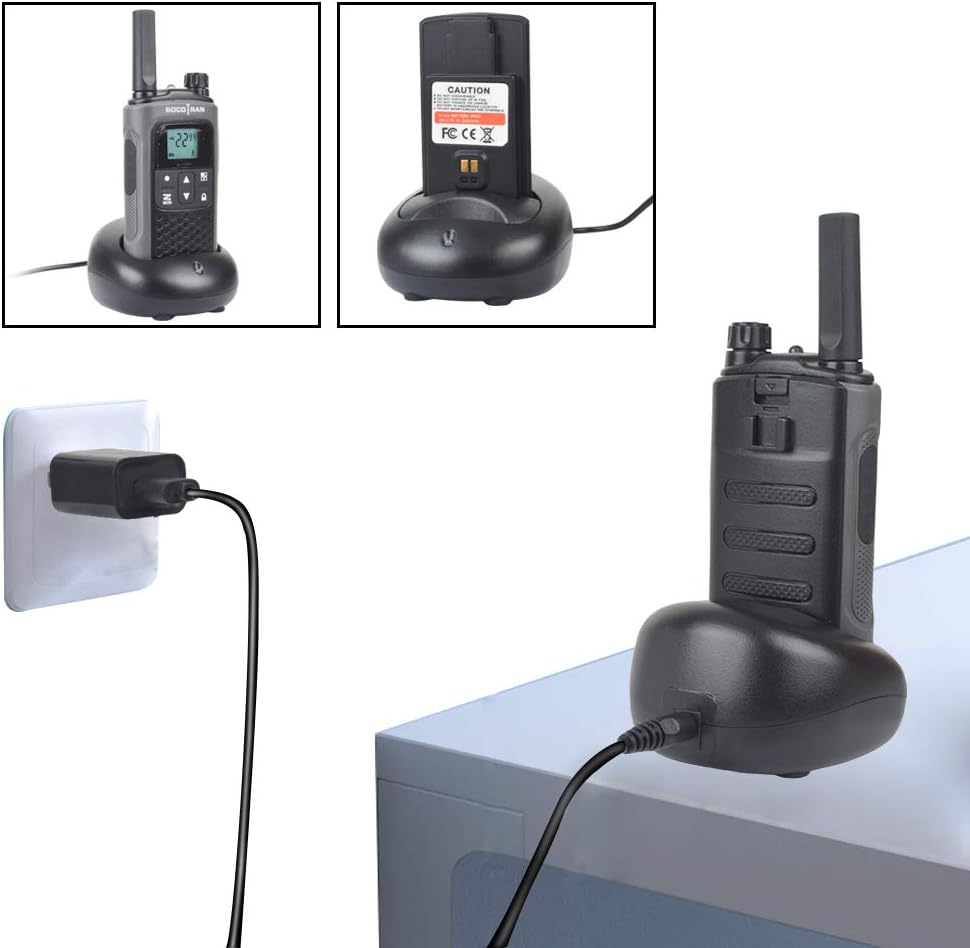
Image: A SOCOTRAN T80 Walkie Talkie placed in its charging dock, connected to a power outlet.
Video: Instructions on how to connect the charging dock and place the walkie talkie for charging.
Operating Instructions
Power On/Off and Volume Adjustment
To turn the walkie talkie on or off, rotate the Power Switch/Volume Adjust knob clockwise or counter-clockwise. Continue rotating to adjust the volume level.
Video: Demonstrates how to power on the walkie talkie and adjust its volume.
Channel Selection and Privacy Codes
Your SOCOTRAN T80 features 22 channels and 121 privacy codes. To communicate with another FRS radio, both units must be on the same channel and privacy code.
- Press the Menu button to enter the channel selection mode.
- Use the Up or Down arrow buttons to select your desired channel (1-22).
- Press Menu again to confirm the channel.
- To set a privacy code, press Menu until the privacy code setting appears.
- Use the Up or Down arrow buttons to select a privacy code (1-121).
- Press Menu to confirm and exit.
Use the auto-scan feature to find active channels. This helps in identifying channels currently in use.
Video: Illustrates how to change channels on the walkie talkie.
Push-to-Talk (PTT) Communication
To transmit your voice, press and hold the PTT button located on the side of the walkie talkie. Speak clearly into the microphone. Release the PTT button to listen for a response.

Image: Various scenarios depicting individuals using the walkie talkies for effective communication.
Video: Shows the walkie talkies in action, demonstrating clear two-way communication.
VOX (Voice Operated Exchange) Function
The VOX function allows for hands-free operation. When activated, the radio will automatically transmit when it detects your voice, eliminating the need to press the PTT button.
- Press the Menu button until the VOX setting appears on the LCD.
- Use the Up or Down arrow buttons to select the desired VOX sensitivity level (e.g., 1-5, with 5 being most sensitive).
- Press Menu to confirm and exit.
Keyboard Lock Function
To prevent accidental changes to settings, you can lock the keypad:
- Long press the Lock button (usually indicated by a padlock icon) to activate or deactivate the keypad lock.
- When locked, a padlock icon will appear on the LCD.
Flashlight Operation
The walkie talkie includes a built-in LED flashlight for convenience in low-light conditions.
- Press the Flashlight Key to turn the flashlight on or off.
Image: The walkie talkie demonstrating its integrated LED flashlight feature.
Video: Shows how to activate the flashlight feature on the walkie talkie.
Maintenance
Proper maintenance ensures the longevity and optimal performance of your walkie talkies:
- Cleaning: Use a soft, damp cloth to clean the exterior of the walkie talkie. Avoid using harsh chemicals or abrasive cleaners.
- Storage: Store the walkie talkies in a cool, dry place away from direct sunlight and extreme temperatures.
- Battery Care: For long-term storage, remove the batteries from the units. Recharge batteries periodically if not in use for extended periods to maintain their health.
- Avoid Water: While the product has some water resistance, avoid submerging it in water or exposing it to heavy rain.
Troubleshooting
If you encounter issues with your SOCOTRAN T80 Walkie Talkies, try the following solutions:
| Problem | Possible Cause | Solution |
|---|---|---|
| No Power | Battery not installed correctly or depleted. | Ensure battery is properly inserted. Recharge the battery. |
| Cannot Transmit or Receive | Incorrect channel/privacy code, out of range, or low battery. | Verify both radios are on the same channel and privacy code. Move closer to the other radio. Recharge battery. |
| Poor Audio Quality | Interference, low signal, or microphone/speaker obstruction. | Change channels. Move to an area with less obstruction. Check for debris blocking microphone or speaker. |
| Keypad Not Responding | Keypad lock is active. | Long press the Lock button to deactivate the keypad lock. |
Specifications
| Feature | Detail |
|---|---|
| Model Number | T80-Black |
| Item Weight | 1.76 ounces |
| Product Dimensions | 3.93 x 1.96 x 0.78 inches |
| Battery Type | 1 Lithium Ion battery required (2000mAh) |
| Standby Time | Up to 72 hours |
| Number of Channels | 22 |
| Privacy Codes | 121 |
| Frequency Range | 300 MHz - 3 GHz |
| Maximum Talking Range | Up to 5 Miles (Actual range varies by terrain and conditions) |
| Tuner Technology | UHF |
| Voltage | 5 Volts |
| Water Resistance Level | Waterproof |
| Special Features | Keypad Lock, Lightweight, Long Range, VOX, Built-in Flashlight |
Warranty and Support
For warranty information or technical support, please refer to the contact details provided with your purchase or visit the official SOCOTRAN website. Keep your purchase receipt as proof of purchase.
For additional assistance, you may contact SOCOTRAN customer service through their Amazon store page: SOCOTRAN Store.
Ask a question about this manual
Ask about setup, troubleshooting, compatibility, parts, safety, or missing instructions. Manuals+ will review the question and use this page’s manual context to help answer it.