
MTX Audio JH15001
MTX Audio JH15001 Jackhammer Series 1500W Monoblock Class-D Car Audio Amplifier
Official Instruction Manual
Introduction
This manual provides detailed instructions for the installation, operation, and maintenance of your MTX Audio JH15001 Jackhammer Series 1500W Monoblock Class-D Car Audio Amplifier. The JH15001 is a high-performance monoblock amplifier designed to deliver powerful and clear audio to your car's subwoofer system. It features a Class-D design for efficiency, robust power output, and a range of adjustable controls to fine-tune your sound.
Key features include:
- 1500W Monoblock Class-D Amplifier
- Flexible power output: 650 watts x 1 ch. at 4 Ohm, 1100 watts x 1 ch. at 2 Ohm, 1650 watts x 1 ch. at 1 Ohm
- Wide frequency response: 20Hz - 250Hz
- Variable Low Pass Filter (40Hz - 250Hz, 12dB/Oct)
- Variable Subsonic Filter (20Hz - 50Hz, 12dB/Oct)
- Adjustable Bass Boost (0 - 12dB) at 45Hz
- Includes Remote Bass Knob for convenient control
Safety Information
Please read all instructions carefully before installing and operating your amplifier. Failure to follow these guidelines may result in damage to the amplifier, your vehicle, or personal injury. Keep this manual for future reference.
- Power Source: Always disconnect the vehicle's battery negative terminal before making any power connections to prevent electrical shorts.
- Wiring: Use appropriate gauge wiring for power, ground, and speaker connections as recommended in the installation section. Improper wiring can lead to overheating and fire.
- Mounting: Mount the amplifier securely in a dry, well-ventilated area away from direct sunlight, heat sources, and moisture. Ensure adequate airflow around the amplifier for proper cooling.
- Volume Levels: Prolonged exposure to high volume levels can cause hearing damage. Adjust volume responsibly.
- Professional Installation: If you are unsure about any aspect of the installation, seek assistance from a qualified car audio professional.
Product Overview
The MTX Audio JH15001 amplifier is designed for robust performance and ease of use. Below are images illustrating the amplifier's design and control panel.

Figure 1: Front view of the MTX Audio JH15001 amplifier, showing the MTX Audio logo and Jackhammer JH15001 model name, along with the control knobs for Gain, LPF, Subsonic, and Bass Boost.
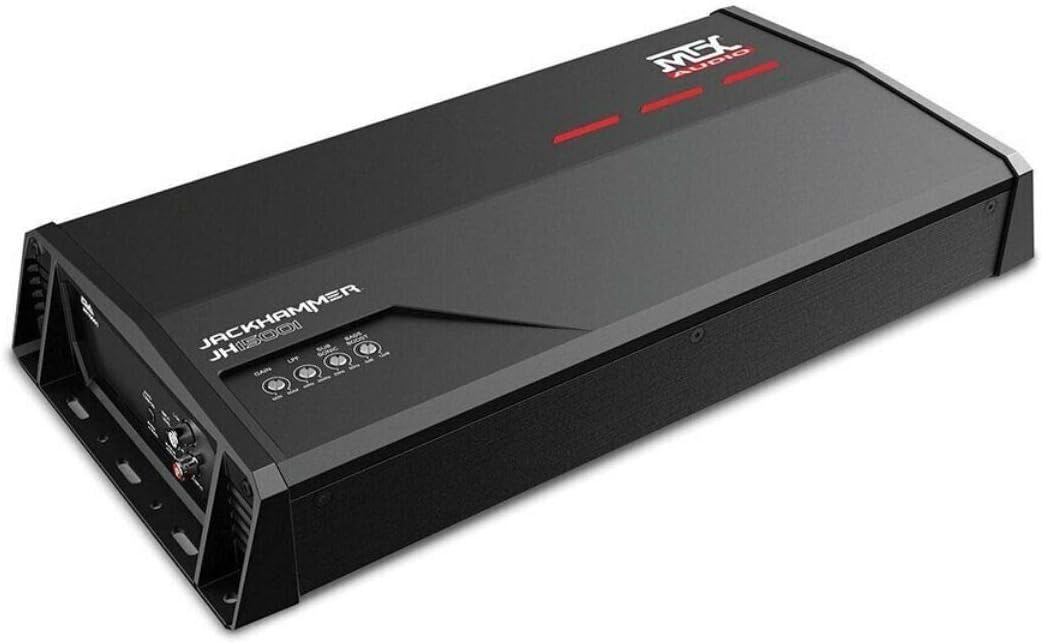
Figure 2: Angled view of the MTX Audio JH15001 amplifier, providing a perspective of its compact design and heat sink fins.
Setup and Installation
Proper installation is crucial for optimal performance and safety. Follow these steps carefully.
Wiring Considerations
- Always use high-quality power and ground cables. For the JH15001, a minimum of 4-gauge power and ground wire is recommended.
- Install an in-line fuse holder within 18 inches of the vehicle's battery. The fuse rating should match the amplifier's requirements (typically 80-100A for this power level).
- Ensure all connections are clean, tight, and free from corrosion.
Power Connections

Figure 3: Rear view of the MTX Audio JH15001 amplifier, detailing the Power Input (GND, REM, +12V) and Speaker Output terminals.
- Ground (GND): Connect the ground terminal to a clean, unpainted metal surface of the vehicle's chassis. The ground wire should be as short as possible, ideally less than 3 feet (1 meter).
- Remote (REM): Connect the remote terminal to the remote turn-on output of your head unit. This wire signals the amplifier to turn on when the head unit is active.
- +12V: Connect the +12V terminal to the positive terminal of your vehicle's battery, via the in-line fuse holder.
Speaker Connections
The JH15001 is a monoblock amplifier, designed for a single subwoofer or multiple subwoofers wired to a single channel. Refer to Figure 3 for the speaker output terminals.
- Connect your subwoofer(s) to the "SPEAKER OUTPUT" terminals. Ensure correct polarity (+ to + and - to -).
- The amplifier is stable down to 1 Ohm. Ensure your subwoofer's impedance (or combined impedance of multiple subwoofers) matches the amplifier's capabilities for optimal performance and to prevent damage.
Input Connections

Figure 4: Rear view of the MTX Audio JH15001 amplifier, showing the Line Input (RCA) and Auto Turn On switch.
- Line Input (RCA): Connect the RCA output from your head unit or signal processor to the "LINE INPUT" (L CH and R CH) on the amplifier.
- Auto Turn On: This switch allows the amplifier to turn on automatically by sensing a DC offset or audio signal on the input. Set to "REM" if using a dedicated remote wire, or "AUDIO" if using signal sensing.
- Input Level: This switch adjusts the input sensitivity for either "PRE IN" (low-level RCA input) or "SPK IN" (high-level speaker input, if using a line output converter).
Remote Bass Knob
Connect the included remote bass knob to the "EBC" port on the amplifier (refer to Figure 4). This allows for convenient adjustment of the bass level from the driver's seat.
Operating Instructions
Once installed, you can fine-tune the amplifier's settings for optimal audio performance.
Gain Adjustment
The "GAIN" knob (refer to Figure 1) matches the amplifier's input sensitivity to the output voltage of your head unit. This is not a volume control. To set the gain:
- Turn the gain knob all the way down (counter-clockwise).
- Set your head unit's volume to about 75-80% of its maximum.
- Slowly turn the amplifier's gain knob clockwise until you hear slight distortion, then back it off slightly until the sound is clean.
Low Pass Filter (LPF)
The "LPF" knob (refer to Figure 1) controls the low-pass crossover frequency. This filter allows only frequencies below the set point to pass through to the subwoofer. Adjust this between 40Hz and 250Hz to blend the subwoofer's output with your main speakers.
Subsonic Filter
The "SUBSONIC" knob (refer to Figure 1) controls a high-pass filter specifically for the subwoofer channel, preventing extremely low, inaudible frequencies from being played. These frequencies can waste amplifier power and potentially damage the subwoofer. Adjust this between 20Hz and 50Hz, typically set slightly below your LPF or subwoofer's resonant frequency.
Bass Boost
The "BASS BOOST" knob (refer to Figure 1) provides an adjustable boost (0-12dB) at 45Hz. Use this sparingly to enhance bass impact. Excessive bass boost can lead to distortion and potential damage to your subwoofer.
Auto Turn On
As mentioned in the input connections, the "AUTO TURN ON" switch (Figure 4) allows the amplifier to power on without a dedicated remote wire. If your head unit does not have a remote output, set this to "AUDIO" to detect an audio signal, or "DC" (if available, though not explicitly labeled as DC on this model, it's implied by "AUDIO" vs "REM") to detect a DC offset on the speaker lines. For best results and reliability, using the "REM" setting with a remote wire from the head unit is recommended.
Maintenance
Your MTX Audio amplifier requires minimal maintenance to ensure long-lasting performance.
- Cleaning: Periodically wipe the amplifier's exterior with a soft, dry cloth. Do not use harsh chemicals or abrasive cleaners.
- Ventilation: Ensure that the amplifier's cooling fins are free from dust and debris. Good airflow is essential to prevent overheating.
- Connections: Occasionally check all power, ground, and speaker connections to ensure they remain tight and secure. Loose connections can cause performance issues or damage.
Troubleshooting
If you experience issues with your amplifier, consult the table below for common problems and solutions.
| Problem | Possible Cause | Solution |
|---|---|---|
| No Power / Amplifier Not Turning On | Blown fuse, loose power/ground/remote wire, incorrect Auto Turn On setting. | Check in-line fuse, verify all power connections are secure, ensure remote wire has +12V, or adjust Auto Turn On switch. |
| No Sound Output | Loose RCA cables, incorrect input level setting, speaker wires disconnected, amplifier in protect mode. | Check RCA connections, ensure Input Level switch is correct (PRE IN/SPK IN), verify speaker wiring, check for protect light (usually red). |
| Distorted Sound | Gain set too high, LPF/Subsonic settings incorrect, poor ground connection, damaged speaker. | Reduce gain, adjust LPF/Subsonic filters, check ground connection, inspect speaker for damage. |
| Amplifier Overheating | Insufficient ventilation, impedance too low, gain set too high. | Ensure proper airflow around amplifier, verify speaker impedance is not below 1 Ohm, reduce gain. |
Specifications
Detailed technical specifications for the MTX Audio JH15001 amplifier.
| Feature | Specification |
|---|---|
| Model | JH15001 |
| Type | Monoblock Class-D Car Audio Amplifier |
| Number of Channels | 1 |
| RMS Power Output (4 Ohm) | 650 watts x 1 channel |
| RMS Power Output (2 Ohm) | 1100 watts x 1 channel |
| RMS Power Output (1 Ohm) | 1650 watts x 1 channel |
| Frequency Response | 20Hz - 250Hz |
| Low Pass Filter (Variable) | 40Hz - 250Hz, 12dB/Octave |
| Subsonic Filter (Variable) | 20Hz - 50Hz, 12dB/Octave |
| Bass Boost | 0 - 12dB at 45Hz |
| Voltage | 12 Volts (DC) |
| Operating Temperature | 40 Degrees Celsius |
| Item Dimensions (L x W x H) | 18 x 12 x 6 inches |
| Item Weight | 10.18 pounds |
| Mounting Type | Surface Mount |
| Manufacturer | MTX Audio |
| Specification Met | FCC |
| UPC | 715442242115 |
Warranty and Support
MTX Audio products are designed for reliability and performance. For information regarding warranty coverage, please refer to the warranty card included with your product or visit the official MTX Audio website. For technical support, troubleshooting assistance beyond this manual, or service inquiries, please contact MTX Audio customer service through their official channels.
Always ensure you have your product model number (JH15001) and purchase details available when contacting support.
Ask a question about this manual
Ask about setup, troubleshooting, compatibility, parts, safety, or missing instructions. Manuals+ will review the question and use this page’s manual context to help answer it.