
1. Introduction
Thank you for choosing the Energy Sistem Urban Box 2 Ocean portable Bluetooth speaker. This manual provides detailed instructions for setting up, operating, and maintaining your device to ensure optimal performance and longevity. Please read this manual thoroughly before using the product.

Image 1: Front view of the Energy Sistem Urban Box 2 Ocean speaker, showcasing its compact, cylindrical design and blue fabric finish.
2. Safety Information
- Do not expose the device to extreme temperatures, direct sunlight, or high humidity.
- Avoid dropping or subjecting the speaker to strong impacts.
- Keep the device away from water and liquids. This product is not waterproof.
- Do not attempt to disassemble or repair the device yourself. Refer all servicing to qualified personnel.
- Use only the provided or approved charging cables and accessories.
- Listen at moderate volume levels to prevent hearing damage.
3. Package Contents
Ensure all items are present in the package:
- Energy Sistem Urban Box 2 Speaker
- 3.5 mm Audio Cable
- USB Charging Cable
- Quick Guide
4. Product Overview
4.1. Controls

Image 2: Side view of the speaker, highlighting the control panel with power, volume, track, and mode buttons.
- Power Button: Press and hold to turn the speaker On/Off. Short press to play/pause in Bluetooth/USB/MicroSD mode, or answer/end calls.
- Volume Up / Next Track: Short press for Volume Up. Long press for Next Track.
- Volume Down / Previous Track: Short press for Volume Down. Long press for Previous Track.
- Mode Button: Short press to switch between Bluetooth, FM Radio, USB, MicroSD, and Audio-in modes.
- Microphone: For hands-free calls.
4.2. Ports
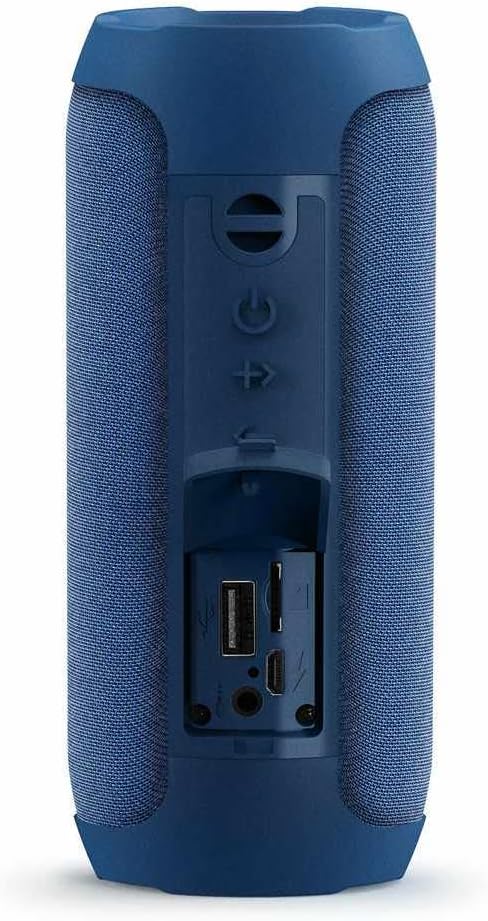
Image 3: Side view of the speaker with the protective cover open, revealing the USB, MicroSD, AUX, and charging ports.
- USB Port: For playing MP3 files from a USB flash drive.
- MicroSD Card Slot: For playing MP3 files from a MicroSD card.
- AUX-in (3.5mm) Port: For connecting external audio devices via the 3.5mm audio cable.
- Micro USB Charging Port: For charging the speaker's internal battery.
5. Setup
5.1. Charging the Battery
Before first use, fully charge the speaker. Connect the supplied USB charging cable to the Micro USB charging port on the speaker and the other end to a USB power adapter (not included) or a computer's USB port. The charging indicator light will illuminate during charging and turn off when fully charged.
5.2. Power On/Off
Press and hold the Power Button for approximately 3 seconds to turn the speaker On or Off. A sound prompt will indicate the power status.
5.3. Bluetooth Pairing
- Turn on the speaker. It will automatically enter Bluetooth pairing mode, indicated by a flashing LED light.
- Enable Bluetooth on your smartphone, tablet, or laptop.
- Search for available Bluetooth devices and select "Energy Sistem Urban Box 2" from the list.
- Once paired, the LED indicator will stop flashing and remain solid, and you will hear a confirmation sound.
5.4. True Wireless Stereo (TWS) Pairing
To enjoy stereo sound, you can pair two Urban Box 2 speakers together:
- Ensure both Urban Box 2 speakers are turned on and not connected to any other Bluetooth device.
- On one of the speakers (this will be the master speaker), double-press the Mode Button. The speaker will enter TWS pairing mode.
- The two speakers will automatically search for and connect to each other. A confirmation sound will indicate successful TWS pairing.
- Once TWS paired, connect your device to the master speaker via Bluetooth as described in section 5.3.
6. Operating
6.1. Bluetooth Mode
After successful Bluetooth pairing, you can play audio from your connected device. Use the speaker's volume buttons or your device's volume controls to adjust the sound. Short press the Power Button to play/pause music. Long press the volume buttons to skip tracks.
6.2. USB / MicroSD Playback
Insert a USB flash drive or a MicroSD card (with MP3 files) into the corresponding port. The speaker will automatically switch to USB/MicroSD mode and begin playing music. Use the volume/track buttons to control playback.
6.3. FM Radio
Press the Mode Button repeatedly until you enter FM Radio mode. To auto-scan and save available stations, press and hold the Mode Button. Use the volume/track buttons to navigate between saved stations.
6.4. Audio-in (AUX) Mode
Connect one end of the 3.5mm audio cable to the AUX-in port on the speaker and the other end to the audio output of your external device. Press the Mode Button to select AUX-in mode. Audio will play from your connected device.
6.5. Call Function
When connected via Bluetooth to a smartphone, the integrated microphone allows you to answer calls hands-free. Short press the Power Button to answer an incoming call or end an ongoing call.
7. Maintenance
- Clean the speaker with a soft, dry cloth. Do not use abrasive cleaners or solvents.
- Store the speaker in a cool, dry place when not in use.
- Avoid prolonged exposure to direct sunlight or extreme temperatures.
- Charge the battery regularly, even if not in frequent use, to maintain battery health.
8. Troubleshooting
| Problem | Solution |
|---|---|
| Speaker does not turn on. | Ensure the battery is charged. Connect the speaker to a power source using the USB cable. |
| No sound. | Check the volume level on both the speaker and your connected device. Ensure the correct mode (Bluetooth, AUX, USB, MicroSD) is selected. |
| Cannot pair via Bluetooth. | Ensure the speaker is in Bluetooth pairing mode (flashing LED). Make sure your device's Bluetooth is enabled and within 10 meters. Try unpairing and re-pairing. |
| Poor FM radio reception. | Move the speaker to a location with better signal. Extend the USB cable (if connected) as it can act as an antenna. |
| USB/MicroSD playback not working. | Ensure the files are in MP3 format. Check if the USB drive or MicroSD card is properly inserted and not corrupted. |
9. Specifications
| Feature | Detail |
|---|---|
| Model Name | Urban Box 2 |
| Connectivity Technology | Bluetooth, USB |
| Wireless Communication Technology | Bluetooth |
| Special Features | High-res audio, MP3 Bluetooth, Integrated Microphone, USB Port, True Wireless Stereo |
| Speaker Type | Multi-room |
| Maximum Speaker Output Power | 10 Watts |
| Speaker Size | 40 Millimeters |
| Subwoofer Diameter | 69 Millimeters |
| Frequency Response | 100 Hz |
| Supported Formats | MP3 |
| Power Source | Battery Powered (1 Lithium-polymer included) |
| Maximum Range | 10 Meters |
| Control Method | Touch |
| Product Dimensions (L x W x H) | 6.8 x 6.8 x 16 cm |
| Item Weight | 450 Grams |
| Color | Ocean |
| Is Waterproof | False |
10. Warranty
The Energy Sistem Urban Box 2 Ocean speaker comes with a 3-year warranty against manufacturing defects from the date of purchase. This warranty covers defects in materials and workmanship under normal use. It does not cover damage caused by misuse, accidents, unauthorized modifications, or normal wear and tear.
Spare parts availability is guaranteed for 2 years.
11. Support
For further assistance, technical support, or warranty claims, please refer to the official Energy Sistem website or contact their customer service department. Please have your product model and purchase information ready when contacting support.
You can find more information and contact details at: www.energysistem.com