
1. Introduction
Thank you for choosing the Leten SM400 Super Masturbator. This manual provides essential information for the safe and effective use, maintenance, and care of your device. Please read it thoroughly before first use and retain it for future reference.

Image 1.1: Leten SM400 Super Masturbator and packaging.
The Leten SM400 is a rechargeable device designed to provide a unique experience through its telescopic and rotating movements. It features 7 programs and 3 speeds, along with a 'Sex Moaning' function. The device includes a removable and washable silicone body for easy cleaning.
2. Safety Information
- Not Waterproof: This device is not waterproof. Do not submerge it in water or expose it to excessive moisture. Water damage is not covered by warranty.
- For Adult Use Only: This product is intended for adult use only. Keep out of reach of children.
- Personal Lubricant: Always use a water-based lubricant with the device to ensure comfort and prevent damage to the silicone sleeve.
- Hygiene: Clean the device thoroughly before and after each use to maintain hygiene.
- Discontinue Use: If you experience any discomfort, pain, or irritation during use, discontinue use immediately and consult a medical professional.
- Charging: Use only the provided charging cable. Do not use the device while it is charging.
3. Product Overview
The Leten SM400 consists of an outer casing and an internal, removable silicone sleeve. Key controls are located on the device body.

Image 3.1: Side view of the SM400 with control panel.

Image 3.2: Front view of the SM400.
Components:
- Outer Casing: Houses the motor and battery.
- Silicone Sleeve: The internal, textured sleeve that provides stimulation. This is removable for cleaning.
- Control Panel: Buttons for power, program selection, and speed adjustment.
- Charging Port: Located at the base for USB charging.
4. Setup
- Initial Charge: Before first use, fully charge the device. Connect the USB charging cable to the charging port at the base of the device and to a compatible USB power source (e.g., computer, USB wall adapter). The charging indicator light will show the charging status.
- Clean the Sleeve: Remove the silicone sleeve from the outer casing and wash it thoroughly with mild soap and warm water. Rinse completely and allow it to air dry.
- Insert Sleeve: Once dry, carefully reinsert the silicone sleeve into the outer casing, ensuring it is properly seated.
5. Operating Instructions
- Apply Lubricant: Apply a generous amount of water-based lubricant to the entrance of the silicone sleeve and to yourself.
- Power On: Press and hold the power button (usually marked with a circle and vertical line) for a few seconds to turn on the device.
- Select Program: Press the program button (often marked with a wave or cycle icon) to cycle through the 7 available programs.
- Adjust Speed: Use the speed adjustment buttons (often marked with '+' and '-' or up/down arrows) to select one of the 3 available speeds.
- Enjoy: Gently insert and enjoy the telescopic and rotating sensations.
- Power Off: Press and hold the power button again for a few seconds to turn off the device after use.
6. Charging
The Leten SM400 is USB rechargeable. When the battery is low, the indicator light may flash or the device's performance may decrease.
- Locate the charging port at the base of the device.
- Connect the provided USB charging cable to the device's charging port.
- Connect the other end of the USB cable to a standard USB power source (e.g., computer, USB wall adapter, power bank).
- The charging indicator light will illuminate or change color to indicate that charging is in progress.
- Once fully charged, the indicator light will typically change or turn off. Disconnect the device from the charger.
Important: Do not use the device while it is charging.
7. Maintenance and Cleaning
Proper maintenance ensures the longevity and hygiene of your Leten SM400.
- Disassembly: After each use, carefully remove the silicone sleeve from the outer casing.
- Clean Sleeve: Wash the silicone sleeve thoroughly with warm water and a mild, antibacterial soap or a specialized toy cleaner. Rinse it completely to remove all soap residue.
- Clean Casing: Wipe the outer casing with a damp cloth. Do not rinse or submerge the outer casing in water, as it is not waterproof.
- Drying: Allow both the silicone sleeve and the outer casing to air dry completely before reassembly or storage. Ensure no moisture remains, especially around the charging port.
- Reassembly: Once dry, carefully reinsert the silicone sleeve into the outer casing.

Image 7.1: Internal texture of the silicone sleeve.
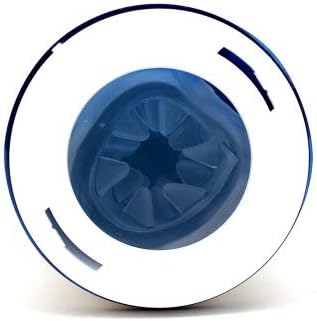
Image 7.2: Internal mechanism of the SM400.
8. Storage
Store the device in a clean, dry, and cool place, away from direct sunlight and extreme temperatures. Keep it away from other toys made of different materials to prevent material degradation or reactions.
9. Troubleshooting
| Problem | Possible Cause | Solution |
|---|---|---|
| Device does not turn on. | Battery is depleted. | Charge the device fully using the provided USB cable. |
| Device stops working during use. | Low battery. | Recharge the device. |
| Movements feel weak or slow. | Low battery; insufficient lubricant; sleeve not properly inserted. | Charge the device; apply more water-based lubricant; ensure the silicone sleeve is correctly seated. |
| Device makes unusual noises. | Sleeve not properly inserted; internal obstruction. | Remove and reinsert the silicone sleeve. If the problem persists, discontinue use and contact customer support. |
| Charging indicator not working. | Faulty cable or power source; device fully charged. | Try a different USB cable or power source. If the device is already fully charged, the light may turn off. |
10. Specifications
| Model: | SM400 |
| Brand: | Leten |
| Dimensions: | Ø 10.5 cm x 33 cm (Diameter x Length) |
| Weight: | Approximately 1448 g |
| Material: | ABS, TPE (Silicone for inner sleeve) |
| Power: | USB Rechargeable |
| Programs: | 7 |
| Speeds: | 3 |
| Water Resistance: | Not waterproof (Do not submerge) |
| Care Instructions: | Hand wash silicone sleeve, wipe casing. |
11. Warranty and Support
For warranty information or technical support, please refer to the retailer where you purchased the Leten SM400 or visit the official Leten website. Please retain your proof of purchase for warranty claims.
Manufacturer: Leten
Model Number: 4328
ASIN: B07TCML9V1