
ChefWave CW-FD10
ChefWave Commercial Countertop Electric Food Dehydrator Machine
Model: CW-FD10
Introduction
Thank you for purchasing the ChefWave Commercial Countertop Electric Food Dehydrator Machine. This appliance is designed to efficiently remove moisture from food, preserving nutrients, flavor, and extending shelf life. With its advanced features and durable construction, you can easily create a variety of healthy and delicious dried snacks at home.

The ChefWave Food Dehydrator, shown with multiple trays filled with sliced fruits and vegetables, ready for dehydration.
Important Safety Instructions
Please read all instructions carefully before using this appliance to ensure safe and efficient operation. Keep this manual for future reference.
- Always unplug the dehydrator from the power outlet when not in use, before cleaning, or before moving.
- Do not immerse the appliance, cord, or plug in water or any other liquid.
- Ensure the appliance is placed on a stable, flat, heat-resistant surface, away from walls or other appliances to allow for proper ventilation.
- Do not operate the dehydrator with a damaged cord or plug, or if the appliance malfunctions or has been damaged in any manner.
- Close supervision is necessary when any appliance is used by or near children.
- Do not block air vents during operation. Ensure proper airflow for optimal performance and to prevent overheating.
- Use only accessories and attachments recommended by the manufacturer.
- This appliance is for household use only. Do not use outdoors.
Components and Features
Familiarize yourself with the parts of your ChefWave Food Dehydrator:
- Main Unit: The primary housing containing the heating element and fan.
- Digital Control Panel: Located on the top front, used to set temperature and time.
- Transparent Door: Allows for easy monitoring of the dehydration process without opening the unit.
- Stainless Steel Trays (10): Durable and food-safe racks for holding food items.
- Mesh Sheets (2): Used for smaller items like herbs or berries to prevent them from falling through the trays.
- Teflon Sheets (3): Non-stick sheets ideal for fruit leathers or sticky foods.
- Drip Tray (1): Collects any drips from food during dehydration, making cleanup easier.
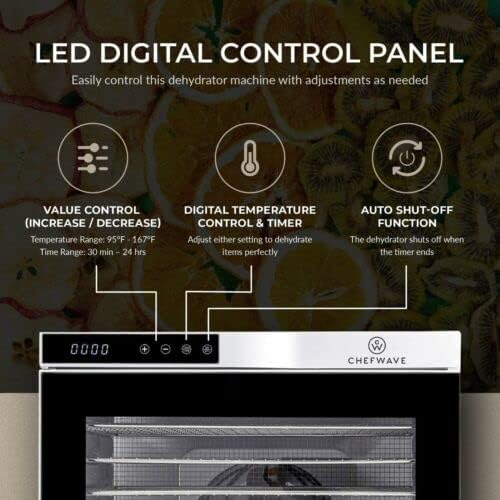
The LED Digital Control Panel allows precise temperature and time adjustments, featuring an auto shut-off function.

The dehydrator utilizes 360° airflow circulation for thorough and uniform drying without the need for tray rotation.

All essential accessories are included: fine mesh sheets for small foods, a drip tray for easy cleaning, non-stick Teflon sheets, and durable stainless steel trays.
Setup
- Unpack: Carefully remove the dehydrator and all accessories from the packaging. Retain packaging for future storage or transport.
- Inspect: Check the appliance for any signs of damage. If damaged, do not operate and contact customer support.
- Clean Before First Use: Before initial use, wash all removable parts (trays, mesh sheets, Teflon sheets, drip tray) in warm, soapy water. Rinse thoroughly and dry completely. Wipe the interior and exterior of the main unit with a damp cloth.
- Placement: Place the dehydrator on a clean, dry, stable, and heat-resistant surface. Ensure there is adequate space around the unit for proper ventilation (at least 6 inches from walls or other objects).
- Insert Trays: Slide the stainless steel trays into the designated slots inside the dehydrator. If using, place mesh or Teflon sheets on top of the stainless steel trays.
Operating Instructions
- Prepare Food: Wash, peel, core, or slice food as required. Ensure uniform thickness for even drying.
- Load Trays: Arrange food in a single layer on the trays, leaving space between pieces for optimal airflow. Do not overload trays.
- Close Door: Securely close the transparent front door.
- Plug In: Connect the power cord to a grounded electrical outlet. The LED display will illuminate.
- Set Temperature: Press the 'TEMP' button, then use the '+' or '-' buttons to adjust the desired temperature. The temperature range is 95°F to 167°F (35°C to 75°C).
- Set Timer: Press the 'TIME' button, then use the '+' or '-' buttons to set the desired drying time. The timer can be set from 30 minutes to 24 hours.
- Start Dehydration: Press the 'START/STOP' button to begin the dehydration process. The fan and heating element will activate.
- Monitor Progress: Periodically check the food through the transparent door. For best results, rotate trays if necessary, though the 360° airflow minimizes this need.
- Completion: Once the set time expires, the dehydrator will automatically shut off.
- Cool Down: Allow the food to cool completely before storing.
Dehydration Guidelines
The drying time and temperature vary depending on the type, thickness, and moisture content of the food. Refer to a reliable dehydration guide or the included recipe book for specific recommendations.
- Fruits: Wash, peel (if desired), and slice uniformly. Pre-treatment (e.g., with lemon juice) can prevent browning. Typical drying times range from 6-18 hours at 135°F (57°C).
- Vegetables: Wash and slice. Blanching some vegetables (e.g., carrots, broccoli) can help preserve color and flavor. Typical drying times range from 4-12 hours at 125°F (52°C).
- Meats (Jerky): Use lean cuts of meat. Slice thinly and uniformly. Marinate for flavor. Ensure proper food safety practices. Typical drying times range from 4-15 hours at 160°F (71°C).
- Herbs: Wash gently and pat dry. Place whole leaves or small sprigs on mesh sheets. Typical drying times range from 2-6 hours at 95°F (35°C).
Always ensure food is completely dry before storing to prevent spoilage. Properly dried food should be leathery or brittle, depending on the food type.
Maintenance and Cleaning
Regular cleaning will ensure the longevity and optimal performance of your dehydrator.
- Before Cleaning: Always unplug the dehydrator and allow it to cool completely.
- Removable Parts: The stainless steel trays, mesh sheets, Teflon sheets, and drip tray are dishwasher safe. Alternatively, wash them by hand in warm, soapy water, rinse thoroughly, and dry completely.
- Main Unit: Wipe the interior and exterior of the dehydrator with a damp cloth. For stubborn stains, use a mild detergent. Do not use abrasive cleaners or scouring pads, as they may scratch surfaces.
- Fan and Heating Element: Do not immerse the main unit in water. Use a soft brush or vacuum cleaner to gently remove any food particles from the fan area at the back of the unit.
- Storage: Once clean and dry, store the dehydrator in a cool, dry place.
Troubleshooting
| Problem | Possible Cause | Solution |
|---|---|---|
| Dehydrator does not turn on. | Not plugged in; power outlet issue; unit malfunction. | Ensure the power cord is securely plugged into a working outlet. Check your circuit breaker. If problem persists, contact customer support. |
| Uneven drying. | Overloaded trays; food sliced unevenly; blocked vents. | Ensure food is in a single layer with space for airflow. Slice food uniformly. Check that air vents are not obstructed. |
| Dehydrator runs but no heat. | Heating element issue. | Ensure temperature is set above ambient. If the fan runs but no heat is produced, the heating element may be faulty. Contact customer support. |
| Food not drying properly. | Incorrect temperature/time settings; food too thick; high humidity. | Adjust temperature and time settings according to food type. Slice food thinner. Dehydration may take longer in humid environments. |
Specifications
| Feature | Detail |
|---|---|
| Brand | ChefWave |
| Model Number | CW-FD10 |
| Material | Stainless Steel (Food Safe) |
| Color | Stainless Steel |
| Wattage | 1000 watts |
| Voltage | 220 Volts |
| Item Weight | 45.4 pounds |
| Product Dimensions | 22.5 x 20 x 24.4 inches |
| Number of Trays | 10 |
| Temperature Range | 95°F - 167°F (35°C - 75°C) |
| Timer Range | 30 minutes - 24 hours |
| Dishwasher Safe Parts | Trays, Mesh Sheets, Teflon Sheets, Drip Tray |
Warranty and Support
The ChefWave Commercial Countertop Electric Food Dehydrator Machine comes with a 1-year warranty from the date of purchase. This warranty covers defects in materials and workmanship under normal use.
For warranty claims, technical support, or any questions regarding your product, please contact ChefWave customer service. Keep your proof of purchase for warranty validation.
For more information or to contact support, please visit the official ChefWave website or refer to the contact information provided with your product packaging.
Related documentsCW-FD10

Ask a question about this manual
Ask about setup, troubleshooting, compatibility, parts, safety, or missing instructions. Manuals+ will review the question and use this page’s manual context to help answer it.