1. Product Overview
The VIVIBRIGHT F40 is a Native 1080P Full HD Projector designed for home theater and entertainment. It features a 5.8-inch (1920x1080p) BOE LCD Panel with Blu-ray boost technology for vibrant image projection. Equipped with 2x 10 Watt Chamber Stereo Speakers, it delivers a rich audio experience. The F40 model utilizes an Mstar/V56 Chip with LCD+LED technology, offering 4200 White Light LED Brightness and a dynamic contrast ratio of approximately 15,000:1.
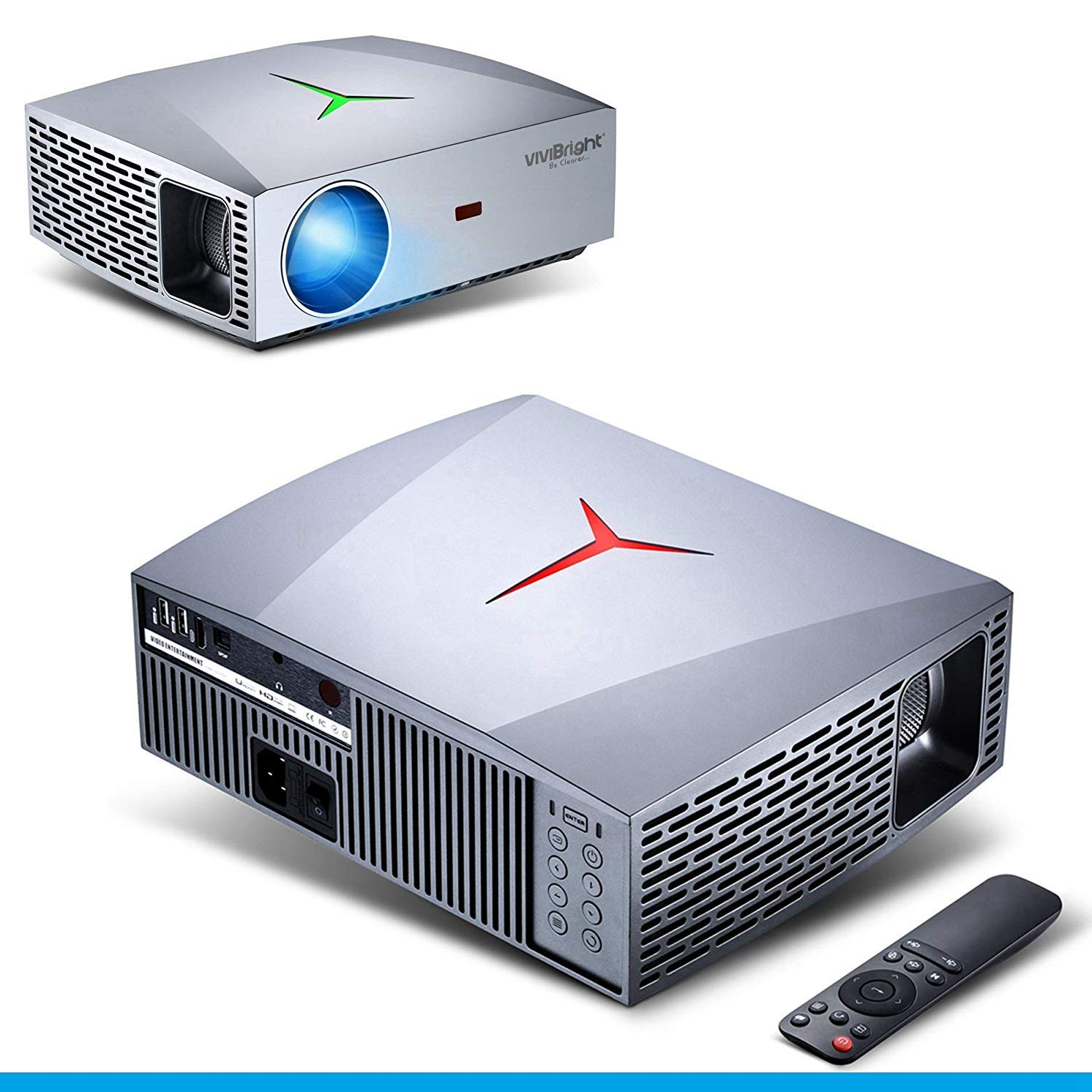
Figure 1: VIVIBRIGHT F40 Projector and Remote Control. This image displays the projector from various angles, highlighting its compact design and the included remote control.
Key Features:
- Native 1080P Full HD Resolution: Provides a sharp and clear image with 1920x1080 physical pixels.
- High Brightness: 4200 Lumens LED white light for vivid colors.
- Superior Sound: Built-in 2x 10 Watt Chamber Stereo Speakers with SPDIF output for HiFi audio.
- Wide Connectivity: HDMI, dual USB ports with multimedia direct play, SPDIF out, and audio output.
- Large Display Size: Supports clear image sizes from 60" to 120", with a maximum projection size up to 300".
- Keystone Adjustment: Supports ±15 degrees vertical keystone adjustment.

Figure 2: Key Features of the VIVIBRIGHT F40 Projector. This image visually represents the main specifications and capabilities of the projector, including its resolution, brightness, and audio features.
2. Setup
2.1 Unpacking and Initial Inspection
Carefully remove all components from the packaging. Verify that all items listed in the packing list are present and undamaged. If any items are missing or damaged, contact customer support immediately.
2.2 Placement
Position the projector on a stable, flat surface. Ensure adequate ventilation around the unit to prevent overheating. Maintain a clear path between the projector lens and the projection surface (screen or wall). The projection distance varies between 1.2 and 6.8 meters to achieve screen sizes from 60 inches to 300 inches diagonally.
- For a 100-inch screen, the recommended projection distance is approximately 2.8 meters.
- The projector does not have a zoom function; adjust the physical distance to achieve the desired screen size.
2.3 Power Connection
- Connect the power cord to the projector's power input port.
- Plug the other end of the power cord into a suitable electrical outlet.
2.4 Connecting Input Devices
The VIVIBRIGHT F40 supports various input sources:
- HDMI: Connect devices such as TV sticks, PS4, Xbox, Blu-ray players, or laptops using an HDMI cable.
- USB: Insert USB drives for direct multimedia playback (photos, videos, audio). The projector features dual USB ports.
- AV: Use the AV port for older devices.
- SPDIF Out: For connecting to external audio systems for enhanced sound quality.
- Audio Out: For connecting headphones or external speakers.
3. Operating Instructions
3.1 Powering On/Off
- Press the power button on the projector or the remote control to turn the unit on.
- The projector will display the startup screen.
- To power off, press the power button again.
3.2 Focusing the Image
The F40 model uses a fixed lens with manual focus. Rotate the focus ring on the projector lens until the projected image appears clear and sharp.
3.3 Adjusting Keystone Correction
If the projected image appears trapezoidal (wider at the top or bottom), use the keystone adjustment feature. The projector supports ±15 degrees vertical keystone correction. Adjust this setting via the projector's menu or dedicated button on the remote control to square the image.
3.4 Selecting Input Source
Use the "Source" button on the remote control or the projector's control panel to cycle through available input sources (HDMI1, HDMI2, USB1, USB2, AV).
3.5 Audio Settings
The projector has built-in 10W stereo speakers. Volume can be adjusted using the remote control. For external audio, connect speakers or a sound system to the SPDIF out or Audio out ports.

Figure 3: VIVIBRIGHT F40 Audio Capabilities. This image illustrates the projector's integrated HiFi stereo speakers and SPDIF output for high-quality sound.
4. Maintenance
4.1 Cleaning the Lens
Use a soft, lint-free cloth specifically designed for optical lenses to gently wipe the projector lens. Do not use abrasive cleaners or excessive force, as this can scratch the lens.
4.2 Cleaning the Projector Body
Wipe the exterior of the projector with a soft, dry cloth. For stubborn marks, a slightly damp cloth can be used, but ensure no liquid enters the ventilation openings.
4.3 Ventilation
Ensure that the projector's ventilation ports are not blocked. Dust accumulation can impede airflow and lead to overheating. Periodically check and gently clean the vents if necessary using a soft brush or compressed air.
4.4 Storage
When not in use for extended periods, store the projector in a cool, dry place, away from direct sunlight and extreme temperatures. It is recommended to cover the projector to protect it from dust.
5. Troubleshooting
| Problem | Possible Cause | Solution |
|---|---|---|
| No image projected | Power cable disconnected; Incorrect input source selected; Lens cap on. | Check power connection; Select correct input source; Remove lens cap. |
| Image is blurry | Lens out of focus; Incorrect projection distance. | Adjust the manual focus ring; Adjust the projector's distance from the screen. |
| Image is trapezoidal | Projector not perpendicular to screen. | Adjust keystone correction (±15 degrees vertical). |
| No sound | Volume too low; External speakers not connected properly; Muted. | Increase volume; Check audio cable connections; Unmute the projector. |
| Projector overheats | Blocked ventilation; Prolonged use in hot environment. | Ensure vents are clear; Operate in a well-ventilated area; Allow cool-down periods. |
6. Specifications
| Feature | Detail |
|---|---|
| Model | F40 |
| Native Resolution | 1920 x 1080 (Full HD) |
| Brightness | 4200 Lumens (LED White Light) |
| Contrast Ratio | 15,000:1 (Dynamic) |
| Display Technology | LCD + LED |
| Aspect Ratio | 16:9 (Native) |
| Projection Throw Ratio | 1.38:1 (100" @ 2.8m) |
| Projection Distance | 1.2m - 6.8m |
| Projection Size | 60" - 120" (Clear Image), up to 300" (Max) |
| Keystone Correction | ±15 degrees Vertical |
| Speakers | 2x 10 Watt Chamber Stereo Speakers |
| Input Interfaces | HDMI, 2x USB, AV |
| Output Interfaces | SPDIF Out, Audio Out |
| Power Consumption | 140 Watts |
| Item Weight | 4.54 kg |
7. Warranty and Support
7.1 Warranty Information
This VIVIBRIGHT F40 Projector comes with a 1 Year Warranty from the date of purchase. This warranty covers manufacturing defects and malfunctions under normal use. Please retain your proof of purchase for warranty claims. The warranty does not cover damage caused by misuse, accidents, unauthorized modifications, or improper maintenance.
7.2 Customer Support
For technical assistance, troubleshooting, or warranty inquiries, please contact VIVIBRIGHT customer support. Refer to the product packaging or the official VIVIBRIGHT website for the most current contact information.
When contacting support, please be prepared to provide the following information:
- Product Model: VIVIBRIGHT F40
- Date of Purchase
- Detailed description of the issue


