
Introduction
Welcome to the instruction manual for your new Diesel Mega Chief Ana-Digi Watch. This timepiece combines classic analog hands with a modern digital display, offering versatile timekeeping and additional functions. Designed for durability and style, this manual will guide you through setting up, operating, and maintaining your watch to ensure its longevity and optimal performance.
Your Diesel Mega Chief watch features a robust 51MM stainless steel case, a distinctive gunmetal finish with red accents, and a comfortable strap. It is water-resistant up to 10 BAR (100 meters), making it suitable for everyday wear and various water activities.

Front view of the Diesel Mega Chief Ana-Digi Watch, showcasing its gunmetal case, red digital display, and red strap.
Setup
Before using your watch, please familiarize yourself with its components and initial setup procedures.
1. Setting Analog Time
- Gently pull out the crown (the knob on the right side of the watch case) to the first or second click position (depending on the model, usually the second click for time setting).
- Rotate the crown clockwise or counter-clockwise to move the hour and minute hands to the correct time.
- Once the time is set, push the crown back into its original position to start the watch movement.

Side view of the watch, highlighting the crown and pushers used for setting and operating functions.
2. Setting Digital Time, Date, and Day
The digital display offers additional functionalities including time, date, day of the week, chronograph, timer, and alarm. Refer to the specific markings on your watch for button identification (e.g., 'MODE', 'ADJ', 'START', 'RESET').
- Press the 'MODE' button (typically bottom-left) repeatedly to cycle through different digital modes (Time, Chronograph, Timer, Alarm).
- When in the desired setting mode (e.g., Time setting), press and hold the 'ADJ' (Adjust) button (typically top-left) until the digits begin to flash.
- Use the 'START' or 'RESET' buttons (typically top-right and bottom-right) to adjust the flashing digits (hours, minutes, year, month, day).
- Press 'ADJ' again to confirm the setting and exit the setting mode.
3. Strap Adjustment
Your watch comes with a durable strap. Adjust the buckle to ensure a comfortable and secure fit on your wrist. The strap should be snug but not too tight, allowing for proper circulation.

Rear view of the watch, showing the strap and buckle with Diesel branding.
Operating Your Watch
1. Reading Time and Date
- Analog Display: Read the time using the hour, minute, and second hands against the main dial markers.
- Digital Display: The primary digital display shows the current time (HH:MM:SS) and can be toggled to show the date (MM/DD) and day of the week (MON, TUE, etc.).
2. Using the Chronograph (Stopwatch)
The chronograph function allows you to measure elapsed time.
- Navigate to the 'CHM' (Chronograph) mode using the 'MODE' button.
- Press the 'START' button to begin timing.
- Press 'START' again to pause the timing.
- Press 'RESET' to clear the measured time and return to zero.
3. Using the Timer (TMR)
The timer function allows for countdown timing.
- Navigate to the 'TMR' (Timer) mode using the 'MODE' button.
- Use the 'ADJ' and 'START/RESET' buttons to set the desired countdown time.
- Press 'START' to begin the countdown. An alarm will sound when the timer reaches zero.
4. Setting and Using the Alarm (ALM)
Set an alarm to be notified at a specific time.
- Navigate to the 'ALM' (Alarm) mode using the 'MODE' button.
- Use the 'ADJ' and 'START/RESET' buttons to set the desired alarm time.
- Activate or deactivate the alarm using the designated button (refer to your watch's specific button layout).
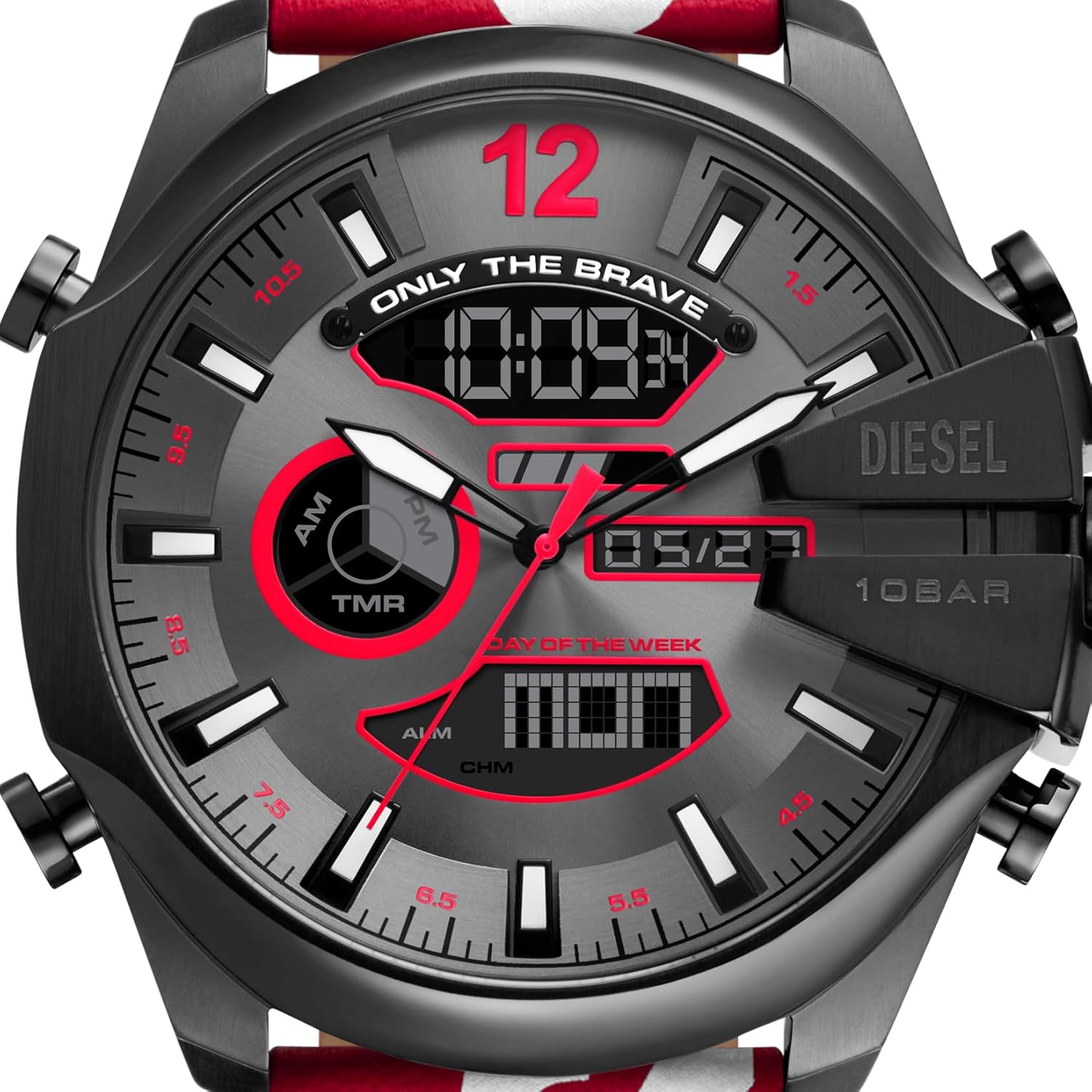
Detailed view of the watch face, highlighting the analog hands and the digital display showing time, date, and day of the week.
5. Water Resistance
Your Diesel Mega Chief watch is water-resistant up to 10 BAR (100 meters). This rating means it is suitable for showering, swimming, and snorkeling. It is not recommended for high-impact water sports or scuba diving. Always ensure the crown is fully pushed in before exposing the watch to water.

The Diesel Mega Chief watch worn on a wrist, demonstrating its size and fit.
Maintenance
Proper care will help preserve the appearance and functionality of your Diesel watch.
1. Cleaning
- Wipe the watch case and strap regularly with a soft, dry cloth to remove dust and dirt.
- For more thorough cleaning, use a slightly damp cloth with mild soap, then wipe dry immediately. Avoid harsh chemicals or abrasive materials.
2. Battery Replacement
Your watch is powered by a long-lasting battery. When the watch stops or the digital display fades, it indicates the battery needs replacement. It is highly recommended to have the battery replaced by an authorized Diesel service center or a professional watchmaker to ensure proper sealing and maintain water resistance.
3. Water Resistance Care
- Avoid exposing the watch to extreme temperature changes (e.g., hot showers, saunas) as this can affect the seals.
- After exposure to saltwater, rinse the watch with fresh water and dry it thoroughly.
- Do not operate the crown or pushers when the watch is wet or submerged.
4. Storage
When not in use, store your watch in a cool, dry place, away from direct sunlight and extreme temperatures. The original watch box is ideal for storage.

The red Diesel watch box, suitable for safe storage of your timepiece.
Troubleshooting
If you encounter any issues with your watch, please refer to the following common problems and solutions:
| Problem | Possible Cause | Solution |
|---|---|---|
| Watch not running (Analog) | Battery depleted; Crown not pushed in; Mechanical issue. | Ensure crown is fully pushed in. If not, battery may need replacement. Consult a professional. |
| Digital display is blank or flickering | Battery low; Digital module error. | Battery replacement is likely needed. If issue persists after battery change, seek professional service. |
| Incorrect time/date (Analog/Digital) | Time/date not set correctly; Accidental adjustment. | Refer to the 'Setup' section to reset the time and date. |
| Condensation inside the crystal | Exposure to extreme temperature changes; Seal compromise. | Immediately take the watch to an authorized service center to prevent damage to the movement. |
Specifications
Key technical specifications for your Diesel Mega Chief Ana-Digi Watch:
| Feature | Detail |
|---|---|
| Model Number | DZ4647 |
| Product Dimensions | 2.01 x 1.02 x 0.55 inches |
| Item Weight | 1.06 ounces |
| Case Size | 51MM |
| Movement | Analog and Digital (Ana-Digi) |
| Water Resistance | 10 BAR (100 meters) |
| Batteries | 1 Product Specific battery (included) |
| Department | Womens (Note: Product title indicates Men's, but Amazon category lists Womens. Please verify for specific model.) |
| Manufacturer | Diesel |
| ASIN | B07T53XJHH |

Visual comparison of different watch sizes, including the 51MM Mega Chief model.
Warranty Information
Diesel watches typically come with a limited warranty covering manufacturing defects. The specific terms and duration of your warranty are usually provided in the warranty booklet included with your purchase. Please retain your proof of purchase for any warranty claims.
For detailed warranty information, including coverage, exclusions, and how to make a claim, please refer to the official Diesel website or contact an authorized Diesel service center.
Customer Support
For further assistance, service, or genuine spare parts, please contact Diesel customer support or visit an authorized service center. You can find contact information and service center locations on the official Diesel website.
You can also visit the official Diesel store on Amazon for product information and other offerings: Diesel Store on Amazon


