
1. Introduction and Safety Instructions
Thank you for choosing the MELONI Digital Food Dehydrator M042-D. This manual provides essential information for the safe and efficient operation of your appliance. Please read all instructions carefully before use and retain this manual for future reference.
Important Safety Precautions:
- Always ensure the dehydrator is placed on a stable, level, and heat-resistant surface.
- Do not immerse the main unit, cord, or plug in water or other liquids.
- Unplug the appliance from the outlet when not in use, before assembling or disassembling parts, and before cleaning.
- Keep the appliance out of reach of children and pets.
- Do not operate the dehydrator with a damaged cord or plug, or after the appliance malfunctions or has been damaged in any manner.
- Ensure adequate ventilation around the dehydrator during operation. Do not block air vents.
- This appliance is designed for household use only. Do not use outdoors.
- The appliance operates on 220 Volts. Ensure your power supply matches this requirement.
2. Product Overview
The MELONI M042-D is a digital food dehydrator designed for efficient food preservation. It features a robust rectangular design with multiple trays and a precise digital temperature control panel.

Figure 2.1: MELONI M042-D Food Dehydrator with key components and dimensions. The main unit measures approximately 40 cm in length, 30 cm in width, and 20 cm in height. The digital control panel unit adds an additional 8 cm in height on top.
Components:
- Main Unit: The primary housing containing the heating element and fan.
- Digital Control Panel: Located on top of the main unit, featuring a digital display and control knobs for temperature and operation.
- Dehydration Trays: Five removable trays for holding food items during the dehydration process.
- Transparent Front Cover: A clear cover that allows observation of the dehydration process without opening the unit.
Control Panel Functions:

Figure 2.2: Detailed view of the digital control panel. It includes a digital display, a ventilation switch, and a heating switch.
- Digital Display: Shows the current temperature or set temperature.
- Temperature Control Knob: Used to set the desired dehydration temperature.
- Ventilation Switch (VENTILAÇÃO LIGA/DESLIGA): Turns the internal fan ON or OFF. The fan circulates air for even drying.
- Heating Switch (AQUECIMENTO LIGA/DESLIGA): Turns the heating element ON or OFF.
3. Setup
- Unpacking: Carefully remove the dehydrator and all its components from the packaging. Retain packaging for storage or future transport.
- Initial Cleaning: Before first use, wipe the main unit with a damp cloth. Wash the dehydration trays and transparent front cover in warm, soapy water, rinse thoroughly, and dry completely.
- Placement: Place the dehydrator on a clean, dry, stable, and heat-resistant surface. Ensure there is at least 15 cm (6 inches) of clear space around all sides of the unit for proper air circulation. Do not place near heat sources or flammable materials.
- Tray Installation: Slide the clean, dry trays into the designated slots within the main unit. Ensure they are seated correctly.
- Power Connection: Plug the power cord into a grounded 220 Volt electrical outlet.
4. Operating Instructions
Preparation of Food:
- Wash and prepare food items (e.g., fruits, vegetables, herbs, meats).
- Slice food into uniform thickness for even drying. Thinner slices dry faster.
- Some foods may benefit from pre-treatment (e.g., blanching vegetables, soaking fruits in lemon juice to prevent browning). Refer to specific dehydration recipes for best results.
Loading Trays:
- Arrange food in a single layer on the dehydration trays. Do not overlap items.
- Leave a small space between food pieces to allow for proper air circulation.
- Slide the loaded trays into the dehydrator.

Figure 4.1: The dehydrator with trays loaded with various fruits such as apples, limes, bananas, oranges, and pineapple, arranged in a single layer for optimal drying.
Operating the Dehydrator:
- Set Temperature: Turn the temperature control knob to select the desired drying temperature. The digital display will show the set temperature. Recommended temperatures vary by food type (e.g., fruits 50-60°C, vegetables 55-65°C, meats 65-70°C).
- Activate Fan: Turn the "VENTILAÇÃO LIGA/DESLIGA" switch to "LIGA" (ON) to start the fan.
- Activate Heating: Turn the "AQUECIMENTO LIGA/DESLIGA" switch to "LIGA" (ON) to start the heating element.
- Monitor Drying: Drying times vary significantly based on food type, thickness, moisture content, and ambient humidity. Check food periodically for desired dryness.
- Rotate Trays (Optional): For very large batches or specific items, you may rotate trays periodically to ensure more even drying, though the fan is designed to minimize this need.
- Completion: Once food is dried to your preference, turn both the Ventilation and Heating switches to "DESLIGA" (OFF). Unplug the unit.
Cooling and Storage:
- Allow dehydrated food to cool completely to room temperature before storing.
- Store dried food in airtight containers in a cool, dark, and dry place.
5. Maintenance and Cleaning
Regular cleaning ensures optimal performance and extends the life of your dehydrator.
- Unplug: Always unplug the dehydrator from the power outlet and allow it to cool completely before cleaning.
- Clean Trays: Remove the dehydration trays. Wash them in warm, soapy water. For stubborn residue, a soft brush can be used. Rinse thoroughly and dry completely before re-inserting or storing.
- Clean Main Unit: Wipe the exterior and interior of the main unit with a damp cloth. Do not use abrasive cleaners or scourers. Ensure no water enters the control panel or electrical components.
- Transparent Front Cover: Wash with warm, soapy water, rinse, and dry.
- Storage: Store the clean and dry dehydrator in a cool, dry place.
6. Troubleshooting
If you encounter issues with your MELONI M042-D, refer to the following common problems and solutions:
| Problem | Possible Cause | Solution |
|---|---|---|
| Dehydrator does not turn on. | Not plugged in; power outlet malfunction; switches are OFF. | Ensure unit is securely plugged into a working 220V outlet. Check that both "VENTILAÇÃO" and "AQUECIMENTO" switches are set to "LIGA" (ON). |
| Food is not drying or drying too slowly. | Temperature too low; food slices too thick; trays overloaded; high ambient humidity; heating element OFF. | Increase temperature setting. Slice food thinner. Do not overload trays, ensure proper air circulation. Check that the "AQUECIMENTO" switch is ON. |
| Uneven drying. | Overloaded trays; food not uniformly sliced. | Ensure food is in a single layer with space between items. Slice food to consistent thickness. Consider rotating trays periodically. |
| Unusual noise during operation. | Fan obstruction; unit not on a stable surface. | Check for any foreign objects obstructing the fan. Ensure the unit is on a flat, stable surface. If noise persists, discontinue use and contact support. |
If the problem persists after attempting these solutions, please contact MELONI customer support.
7. Specifications
| Brand: | MELONI |
| Model: | M042-D |
| Voltage: | 220 Volts |
| Color: | White |
| Shape: | Rectangular Prism |
| Number of Trays: | 5 |
| Approximate Dimensions (Main Unit): | 40 cm (Length) x 30 cm (Width) x 20 cm (Height) |
| ASIN: | B07T4HZ7WL |
| EAN: | 7898962681091 |
8. Warranty and Support
MELONI is committed to providing quality products and excellent customer service. Your MELONI Digital Food Dehydrator M042-D is backed by comprehensive support.
MELONI Support Advantages:
- INMETRO Certified: Our products meet national quality and safety standards.
- Specialized After-Sales Support: Access to expert consultants for assistance.
- Established National Company: Over 24 years of market experience.
- Fast and Efficient Technical Assistance: Prompt support for any technical issues.
- Permanent Stock of Maintenance Parts: Ensures availability of spare parts for repairs.
For warranty claims, technical assistance, or any product-related inquiries, please refer to the contact information provided with your purchase or visit the official MELONI website.
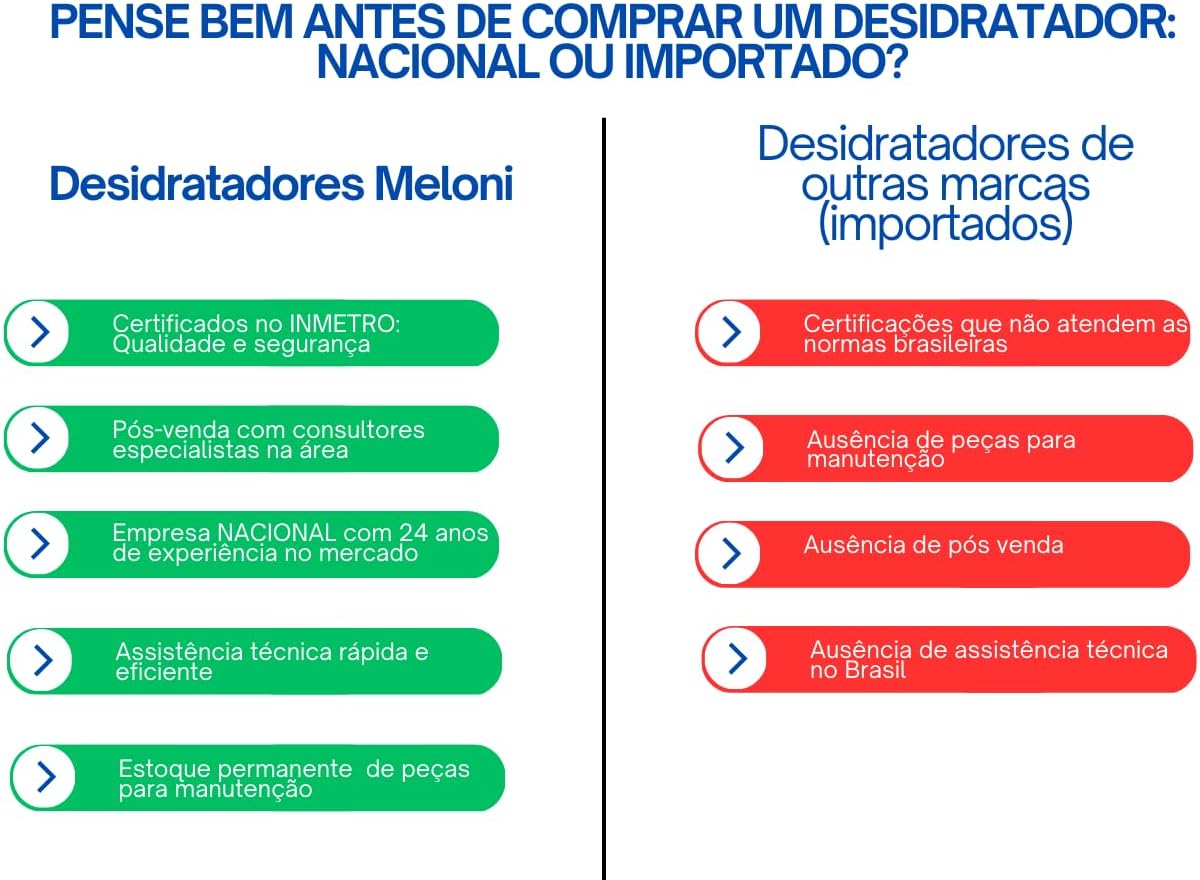
Figure 8.1: MELONI's commitment to quality and customer support, including INMETRO certification, specialized after-sales, efficient technical assistance, and readily available maintenance parts.