
H HOLDPEAK HP-605A
HOLDPEAK HP-605A AC/DC Current Clamp Probe Tester 600A Instruction Manual
Model: HP-605A
1. Introduction
The HOLDPEAK HP-605A is an AC/DC current clamp adapter designed to extend the current measurement capabilities of a standard digital multimeter. This device allows for non-contact measurement of AC and DC currents up to 600A, making it suitable for various electrical testing applications without interrupting the circuit. It is an essential tool for circuit maintenance, automotive diagnostics, home appliance repair, and industrial testing.
2. Safety Information
Please read and understand all safety instructions before using this product. Failure to follow these instructions may result in electric shock, fire, or serious injury.
- Always connect the clamp adapter to a multimeter set to the appropriate voltage range (typically mV) before clamping onto a conductor.
- Ensure the multimeter's input impedance is suitable for current clamp adapters.
- Do not attempt to measure currents exceeding the specified 600A limit.
- Never touch the conductor being measured with bare hands or conductive materials.
- Verify that the clamp jaws are fully closed around a single conductor for accurate readings.
- Keep the device dry and clean. Do not operate in wet or damp conditions.
- Replace the battery promptly when the low battery indicator appears to ensure accurate measurements.
3. Package Contents
Upon opening the package, please verify that all items listed below are present and undamaged:
- HOLDPEAK HP-605A AC/DC Current Clamp Adapter
- Test Leads (Red and Black)
- Instruction Manual
- 9V Battery (may be included separately or pre-installed)

Image: The package contents, including the HP-605A clamp adapter, test leads, instruction manual, and a 9V battery.
4. Product Overview
The HP-605A features an open jaw design for easy clamping around conductors. Key components include:
- Clamp Jaws: For non-contact current measurement. Maximum jaw opening is 45mm.
- Power Button: To turn the device on and off.
- AC/DC Switch: Selects between Alternating Current (AC) and Direct Current (DC) measurement modes.
- Power LED: Indicates the device is powered on.
- Output Cable with Banana Plugs: Connects to a multimeter.
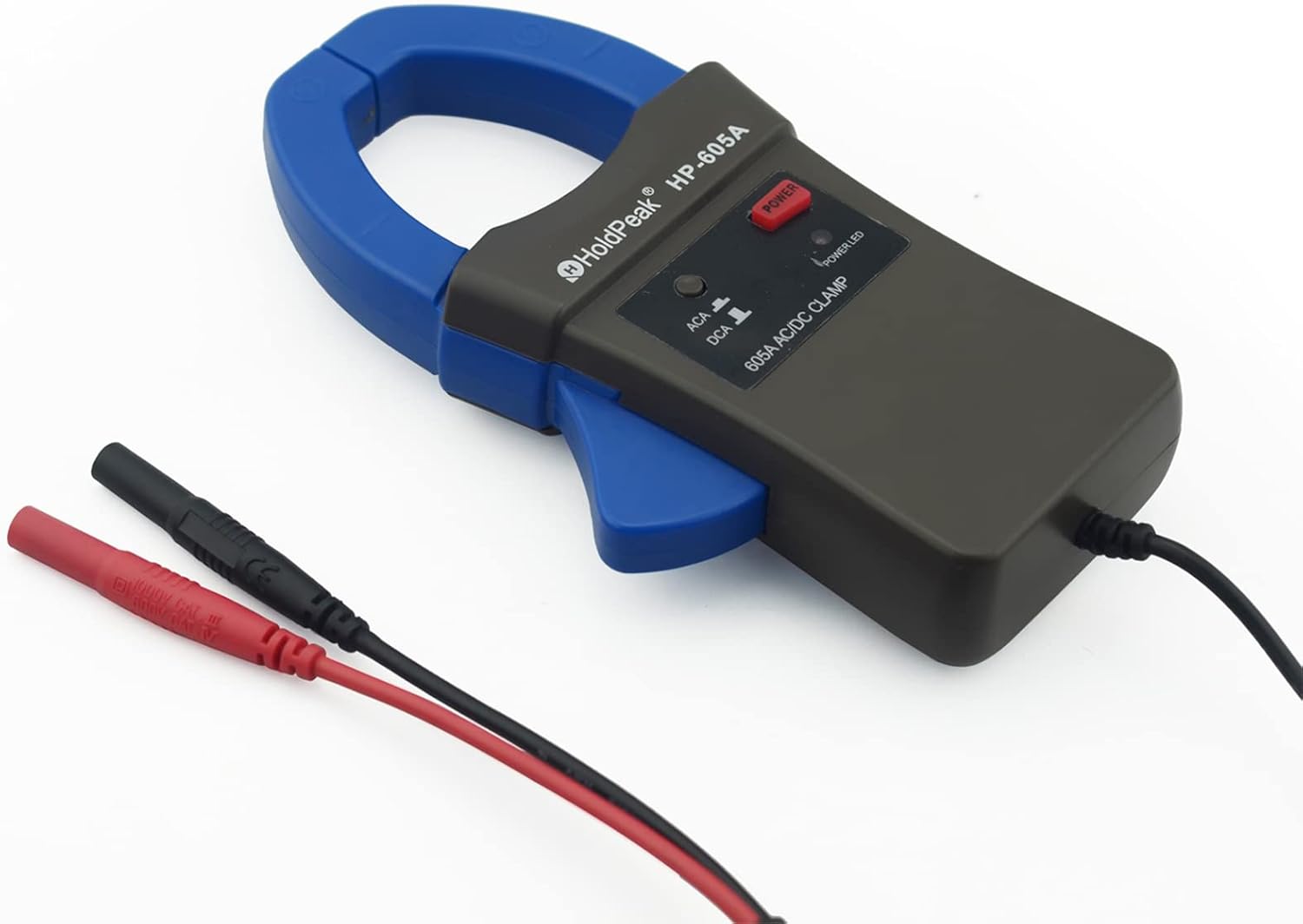
Image: A detailed view of the HP-605A clamp adapter, showing the jaws, power button, AC/DC switch, and output cable.

Image: A diagram highlighting the key features of the clamp adapter, including AC/DC current measurement, signal output, DC/AC switch, power indicator, and jaw caliber.

Image: This image displays the physical dimensions of the HP-605A clamp adapter and indicates its compatibility with most standard multimeters, showing a jaw opening of 45mm.
5. Setup
To prepare the HP-605A for use, follow these steps:
- Install Battery: Open the battery compartment and insert a fresh 9V battery, observing polarity. Close the compartment securely.
- Connect to Multimeter: Connect the black banana plug of the HP-605A's output cable to the 'COM' (common) socket on your multimeter. Connect the red banana plug to the 'mV' (millivolt) input socket on your multimeter.
- Set Multimeter: Set your multimeter's selector switch to the appropriate mV range for current measurement. For many multimeters, 1mV will correspond to 1A when using this clamp adapter. Refer to your multimeter's manual for specific mV ranges and current conversion factors.

Image: The HP-605A clamp adapter's output leads are shown connected to the COM and mV input jacks of a digital multimeter.
6. Operation
Follow these steps to measure AC or DC current using the HP-605A clamp adapter:
- Power On: Press the 'POWER' button on the clamp adapter. The 'POWER LED' should illuminate.
- Select Current Type: Use the 'AC/DC' switch on the clamp adapter to select either AC or DC measurement mode, corresponding to the type of current you intend to measure.
- Zeroing (DC Measurement Only): When performing DC current measurement, always press the 'REL' (Relative) button on your multimeter until it reads zero. This compensates for any offset.
- Clamp onto Conductor: Open the clamp jaws and position them around a single conductor of the circuit to be measured. Ensure the conductor is centered within the jaws for optimal accuracy.
- Read Measurement: Read the current value from your multimeter's LCD panel. Remember that 1mV on the multimeter typically equals 1A of current. For DC measurements, an arrow on the clamp jaw may indicate the direction of positive current flow.

Image: A visual guide detailing the seven steps for performing DC and AC 600A current measurements using the HP-605A clamp adapter and a multimeter.

Image: The HP-605A clamp adapter is shown actively measuring current on a wire, with the reading displayed on a connected multimeter and a waveform visible on an oscilloscope, demonstrating its versatility.
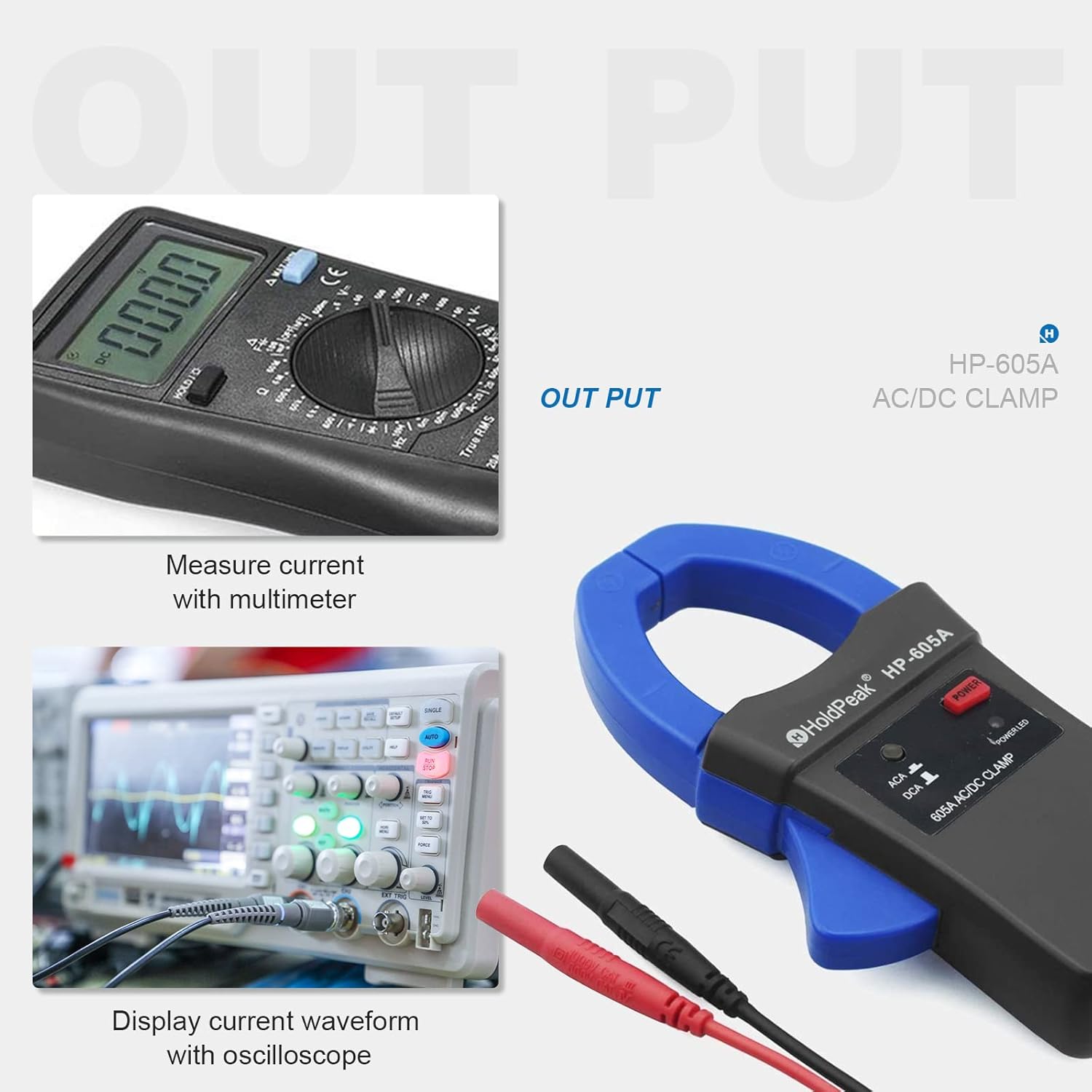
Image: This graphic illustrates how the HP-605A's output can be used to measure current with a multimeter or display current waveforms on an oscilloscope.
7. Maintenance
- Cleaning: Wipe the device with a dry, soft cloth. Do not use abrasive cleaners or solvents.
- Storage: Store the clamp adapter in a cool, dry place away from direct sunlight and extreme temperatures. If storing for an extended period, remove the 9V battery to prevent leakage.
- Battery Replacement: When the low battery indicator appears, replace the 9V battery immediately to maintain measurement accuracy.
8. Troubleshooting
If you encounter issues with your HP-605A, consider the following:
- No Power: Check if the 9V battery is correctly installed and has sufficient charge. Replace if necessary.
- Inaccurate Readings:
- Ensure the multimeter is set to the correct mV range.
- Verify the clamp jaws are fully closed around a single conductor and the conductor is centered.
- For DC measurements, ensure the multimeter has been zeroed using the 'REL' function.
- Check for external magnetic fields that might interfere with readings.
- No Reading on Multimeter: Confirm the banana plugs are securely connected to the correct input jacks on the multimeter (COM and mV). Ensure the clamp adapter is powered on.
9. Specifications
| Feature | Specification |
|---|---|
| Brand | H HOLDPEAK |
| Model Number | HP-605A |
| Measurement Type | AC/DC Current (Ammeter, Multimeter Adapter) |
| Current Range | 0-600A |
| Jaw Opening | 45mm |
| Power Source | 9V Battery (Adapter) |
| Minimum Operating Voltage | 9 Volts |
| Material | ABS |
| Item Dimensions (L x W x H) | 7.05 x 3.54 x 1.42 inches (17.9 x 9 x 3.6 cm) |
| Item Weight | 12.3 ounces |
| Measurement Accuracy | ±(2.5% of reading + 5 digits) (as per image) |
10. Warranty and Support
The HOLDPEAK HP-605A AC/DC Current Clamp Probe Tester comes with a 1-year warranty from the date of purchase.
For any questions, technical assistance, or warranty claims, please contact HOLDPEAK customer service. We are committed to providing quality service and will respond to inquiries within 24-48 hours.
Related Documents - HP-605A
 |
HoldPeak HP-7200-APP Wireless Bluetooth Clamp Meter User Manual User manual for the HoldPeak HP-7200-APP Wireless Bluetooth Clamp Meter. This guide covers features such as 6000 Count Auto Range, DC/AC True RMS, and Continuity Buzzer functionality. |
 |
VICTOR 615B Digital Clamp Multimeter User Manual Comprehensive user manual for the VICTOR 615B Digital Clamp Multimeter and High-Voltage Test Socket, detailing specifications, operation, safety precautions, and technical characteristics for accurate electrical measurements. |
 |
Etekcity MSR-C600 Digital Clamp Multimeter User Manual User manual for the Etekcity MSR-C600 Digital Clamp Multimeter, detailing its features, operation, safety precautions, and specifications for electrical measurements including AC/DC voltage, AC current, resistance, diode, and continuity testing. |
 |
Klein Tools CL810 Instruction Manual: 600A AC/DC Auto-Ranging TRMS Clamp Meter with Work Light Instruction manual for the Klein Tools CL810 clamp meter, detailing its features, specifications, and operating procedures for electrical measurements including AC/DC current, voltage, resistance, continuity, frequency, capacitance, diode testing, NCV detection, and work light functionality. |
 |
ANENG ST181 Mini Digital Clamp-On Multimeter Operation Manual Operation manual for the ANENG ST181 Mini Digital Clamp-On Multimeter, detailing safety information, specifications, panel description, and step-by-step instructions for measuring AC/DC voltage, current, resistance, capacitance, frequency, temperature, and performing continuity and diode tests, along with Non-Contact AC Voltage Detection (NCV). |
 |
MAYILON HT206D AC/DC Digital Clamp Meter User Manual Comprehensive user manual for the MAYILON HT206D AC/DC Digital Clamp Meter, detailing safety instructions, features, measurement descriptions, specifications, and maintenance procedures. |
Ask a question about this manual
Ask about setup, troubleshooting, compatibility, parts, safety, or missing instructions. Manuals+ will review the question and use this page’s manual context to help answer it.