
1. Product Overview
The CHUNGHOP KT-N898 is a universal air conditioner remote control designed to operate a wide range of air conditioning units from over 2000 brands. It features a large LCD screen for clear display, comfortable handling, and functions such as digital automatic code searching, built-in clock, on/off timer, and night illumination.
Note: This remote control is not suitable for window or portable air conditioners.

Image 1.1: Front view of the CHUNGHOP KT-N898 Universal Air Conditioner Remote Control, displaying its LCD screen and primary buttons.
2. Getting Started
2.1 Battery Installation
The remote control requires two AAA (R03) batteries. Ensure correct polarity when inserting.
- Locate the battery compartment cover on the back of the remote control.
- Slide the cover downwards to open the compartment.
- Insert two AAA batteries, matching the positive (+) and negative (-) terminals as indicated inside the compartment.
- Slide the cover back into place until it clicks securely.

Image 2.1: Back view of the remote control, illustrating the battery compartment and wall mount bracket.
2.2 Remote Control Layout
The remote features a clear LCD display at the top, showing temperature, mode, fan speed, and timer settings. Below the display are the main control buttons, which become visible when the sliding cover is moved down.

Image 2.2: The CHUNGHOP KT-N898 remote control with its sliding cover retracted, revealing the full button panel for various functions.
3. Programming the Remote Control
Before using the remote, it must be programmed to control your specific air conditioner unit. There are two methods: Manual Code Entry and Automatic Code Search.
3.1 Manual Code Entry
This method requires you to find the specific 4-digit code for your air conditioner brand from the provided code table.
- Identify Code: Refer to the code table (Image 3.1) to find the codes corresponding to your air conditioner brand. There may be multiple codes listed for a single brand. Start with the first group of codes.
- Enter Programming Mode: Press the "SELECT" key. The 4-digit code on the LCD will begin to flash.
- Input Code: Enter the 4-digit code using the numeric keys (0-9) in sequence. For example, if the code is "0252":
- Press "0". The first digit will stop flashing, and the remaining three digits will flash.
- Press "2". The next digit will stop flashing, and the remaining two digits will flash.
- Press "5". The next digit will stop flashing, and the last digit will flash.
- Press "2". All four digits of the code "0252" will stop flashing.
- Test Functionality: Turn on your air conditioner and test various functions (e.g., power, temperature, mode). If all functions work correctly, the programming is complete.
- Try Next Code: If the air conditioner does not respond or functions do not work well, repeat steps 2-4 with the next group of codes for your brand until full functionality is achieved.
Important: The remote control supports codes up to 1999. If a code is larger than 1999, it is invalid for this device.
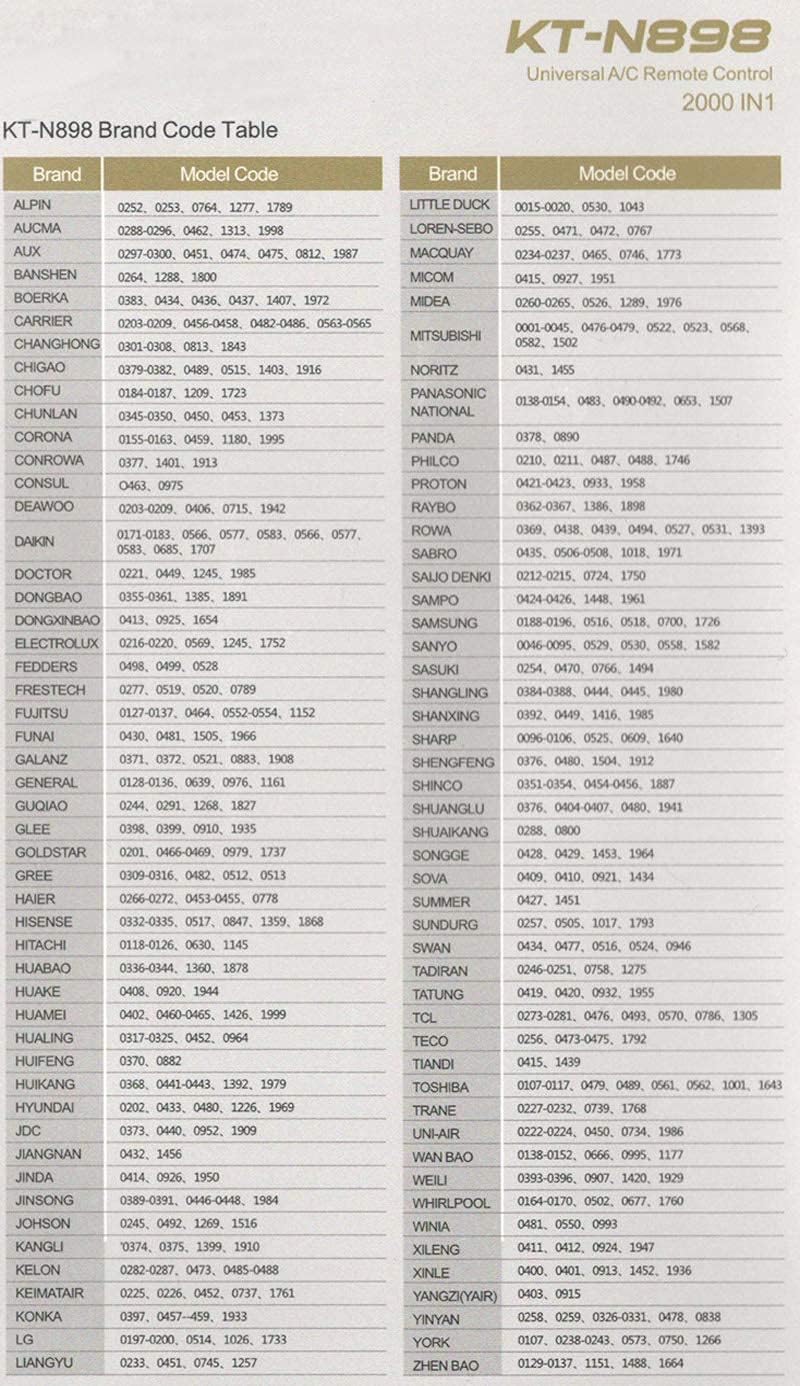
Image 3.1: The KT-N898 Universal A/C Remote Code Table, listing various air conditioner brands and their corresponding 4-digit programming codes.
3.2 Automatic Code Search
Use this method if you do not know your air conditioner's brand or if your brand is not listed in the code table.
- Aim Remote: Point the remote control directly at your air conditioner unit.
- Initiate Auto-Search: Press and hold the "SELECT" key for 5 seconds, then release it. The remote control will enter auto-search status, continuously sending signals. The code on the LCD will flash and increment.
- Confirm Code: When your air conditioner receives a signal and emits a buzzer sound, immediately press any key on the remote control to confirm the code and exit auto-search mode.
- Test Functionality: Test other function keys. If they do not work correctly, repeat the above steps until the correct code is found and all functions operate as expected.
4. Basic Operations
4.1 Power On/Off
Press the Power button (usually a circle with a vertical line) to turn the air conditioner on or off.
4.2 Temperature Adjustment
Use the Temperature Up (+) and Temperature Down (-) buttons to adjust the desired temperature.
4.3 Mode Selection
Press the MODE button to cycle through available operating modes (e.g., Cool, Heat, Fan, Dry, Auto).
4.4 Fan Speed Adjustment
Press the FAN button to adjust the fan speed (e.g., Low, Medium, High, Auto).
4.5 Swing/Vane Control
Use the SWING or VANE buttons to control the air conditioner's louver movement, if supported by your unit.
4.6 Temperature Unit Conversion (°F to °C)
To switch between Fahrenheit (°F) and Celsius (°C) display:
- Press the C/F button.
- The display will change to the alternate temperature unit.

Image 4.1: The remote control displaying temperature in Celsius, demonstrating the unit conversion feature.
5. Advanced Features
5.1 Clock Setup
- Press the CLOCK key. The clock signal on the LCD will flash.
- Use the TIME+ and TIME- keys to adjust the time to the current hour and minute.
- Press the CLOCK key again to confirm. The clock signal will stop flashing, and the time setting is complete. If no key is pressed, the setting will automatically finish after 15 seconds.
5.2 Timer On/Off
The remote allows you to set a timer for the air conditioner to turn on or off automatically.
Timer On Setting
- Press the ON TIMER key. The time on the LCD will flash.
- Use the TIME+ and TIME- keys to adjust the desired time for the air conditioner to turn on.
- The setting will automatically complete after 15 seconds if no further input is received.
Timer Off Setting
- Press the OFF TIMER key. The time on the LCD will flash.
- Use the TIME+ and TIME- keys to adjust the desired time for the air conditioner to turn off.
- The setting will automatically complete after 15 seconds if no further input is received.
5.3 Night Illumination Function
The remote control includes a night illumination function for easier use in low-light conditions. Refer to your air conditioner's manual for specific compatibility or activation details if this feature is not immediately apparent.
6. Maintenance
6.1 Battery Replacement
Replace batteries when the remote's operating range decreases or the display becomes dim. Always replace both batteries at the same time with new AAA batteries. Do not mix old and new batteries, or different types of batteries.
6.2 Cleaning
Wipe the remote control with a soft, dry cloth. Do not use liquid cleaners or abrasive materials, as these can damage the remote's surface or internal components.
6.3 Storage
If the remote control will not be used for an extended period, remove the batteries to prevent leakage, which can cause damage to the device.
7. Troubleshooting
- Remote not responding:
- Check if batteries are inserted correctly and have sufficient power. Replace if necessary.
- Ensure there are no obstructions between the remote and the air conditioner's receiver.
- Verify that the correct code has been programmed for your air conditioner. Try re-programming using either manual or auto-search methods.
- Functions not working correctly after programming:
- If some functions work but others do not, it indicates that the current code is not fully compatible. Repeat the programming process (either manual or auto-search) and try the next available code for your brand until all functions operate correctly.
- LCD display is dim or blank:
- Replace the batteries.
- Code flashing continuously:
- If the code on the LCD flashes and increases, it means the remote is in auto-search mode. Press any key to confirm the code once your air conditioner responds.
8. Specifications
| Feature | Detail |
|---|---|
| Model Number | KT-N898 |
| Brand | CHUNGHOP |
| Compatible Devices | Air Conditioner (Universal, over 2000 brands) |
| Power Supply | DC 3V (2 x AAA batteries) |
| Control Distance | Approximately 8 meters |
| Dimensions | Approximately 136mm x 57mm x 19.5mm |
| Weight | Approximately 110g (without batteries) |
| Color | Silver |
9. Warranty and Support
For warranty information or technical support, please refer to the product packaging or contact CHUNGHOP customer service directly. Contact details are typically available on the manufacturer's official website or through your retailer.