
1. Introduction
The Jansite P009 Car Camera is a versatile and durable camera designed to enhance driving safety by providing clear visibility in blind spots. This camera can be utilized as a side-view, front-view, or rear-view camera, offering flexibility for various vehicle applications. It features a wide-angle lens, IP68 waterproofing, and night vision capabilities for reliable performance in diverse conditions.
2. Package Contents
Please verify that all components are present in your package:
- Camera Unit (1)
- Camera Power Cable (1)
- Video Extension Cable (1)

Image: Contents of the Jansite P009 car camera package, including the camera, power cable, and video extension cable.
3. Product Features
- Versatile Application: Can be used as a side, front, or rear camera to eliminate blind spots.
- Wide-Angle Lens: Equipped with a 120-degree diagonal wide-angle lens for broad visibility.
- Image Orientation Control: Supports switching between positive and mirror images.
- Parking Line Function: Ability to enable or disable parking reference lines.
- Durable and Waterproof: IP68 waterproof rating ensures reliable operation in various weather conditions.
- Night Vision: Features low-light night vision compatibility for clear images in dim environments.
- Adjustable Lens: The camera lens can rotate 360 degrees for optimal angle adjustment.
- Easy Mounting: Bracket design allows for surface mounting without the need for drilling.

Image: Illustration of the camera's key features, including 120° wide-angle, IP68 waterproof rating, and the function of cutting white and green cables for image and parking line settings.
4. Setup and Installation
4.1 Camera Placement
The camera is designed for surface mounting. Choose a location on your vehicle that provides the desired viewing angle (e.g., side mirror, front bumper, rear bumper). The bracket allows for direct adhesion without drilling.

Image: Diagram showing typical installation points for the camera (B) and monitor (A) on a car, illustrating the 'no drilling' adhesive mounting method.
4.2 Wiring Connection
- Connect the camera's power cable to a 12V power source in your vehicle. Ensure proper polarity (red to positive, black to negative).
- Connect the camera's video output (RCA connector) to the video input of your car monitor or display unit using the provided video extension cable.
4.3 Lens Adjustment
The camera features a 360-degree rotatable lens. After mounting, gently rotate the lens to achieve the optimal viewing angle for your application.

Image: Illustration demonstrating the 360-degree free rotation capability of the camera lens, allowing for flexible angle adjustment.
5. Operation
5.1 Image Orientation (Positive/Mirror Image)
The camera's default setting is typically a mirror image (suitable for rear view). To switch to a positive image (suitable for front or side view), locate the small white cable loop on the camera's wiring harness. Cut this white cable loop to change the image from mirror to positive. If the cable is already cut, connecting it will revert to a positive image (though typically, cutting is for switching).
5.2 Parking Reference Lines
The camera's default setting may have parking reference lines enabled or disabled. To toggle the parking lines, locate the small green cable loop on the camera's wiring harness. Cut this green cable loop to enable or disable the parking reference lines. If the cable is already cut, connecting it will toggle the state.
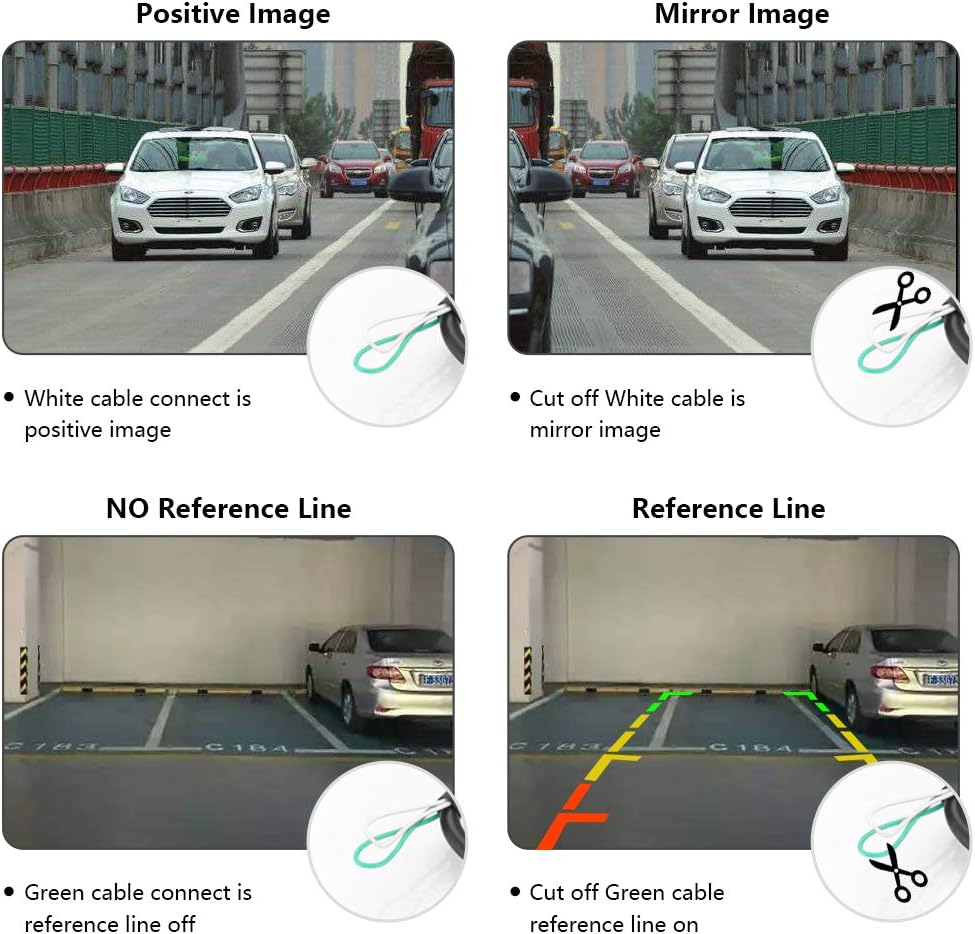
Image: Visual guide showing how cutting the white cable switches between positive and mirror images, and cutting the green cable toggles the parking reference lines on or off.
6. Maintenance
- Cleaning: Regularly clean the camera lens with a soft, damp cloth to ensure clear image quality. Avoid abrasive cleaners.
- Connection Check: Periodically inspect all cable connections to ensure they are secure and free from corrosion.
- Mounting Security: Verify that the camera remains firmly attached to its mounting surface.
7. Troubleshooting
- No Image on Monitor:
- Check all power connections to the camera and monitor.
- Ensure the video cable is securely connected to both the camera and the monitor's video input.
- Verify the monitor is set to the correct video input channel.
- Flickering or Distorted Image:
- Check for loose video cable connections.
- Ensure the power supply to the camera is stable (12V).
- Avoid routing video cables near high-voltage wires or sources of electromagnetic interference.
- Incorrect Image Orientation (Mirror/Positive):
- Refer to Section 5.1 and check the status of the white cable loop. Cut or reconnect as needed to achieve the desired image orientation.
- Parking Lines Not Appearing/Disappearing:
- Refer to Section 5.2 and check the status of the green cable loop. Cut or reconnect as needed to toggle the parking lines.
8. Specifications
| Feature | Specification |
|---|---|
| Model Number | P009 |
| Brand | Jansite |
| Dimensions (L x W x H) | 45 x 25 x 25 millimeters |
| Compatible Devices | Monitor |
| Installation Type | Surface Mount |
| Voltage | 12 Volts |
| Optical Sensor Technology | CCD |
| Lens Type | Wide Angle |
| Actual View Angle | 120 degrees |
| Connector Type | RCA |
| Optical Sensor Size | 1/4 inch or 1/3 inch |
| Display Technology | LCD (for compatible monitors) |
| Video Capture Resolution | 1080p (output resolution, depends on monitor) |
| Video Capture Format | MP4 (for compatible recording devices) |
| Waterproof Rating | IP68 |

Image: Front and side views of the Jansite P009 car camera with key dimensions (45mm length, 25mm height) and an illustration of its blind spot coverage.
9. Warranty and Support
For warranty information or technical support, please refer to the documentation provided with your purchase or contact Jansite customer service through their official channels. Keep your purchase receipt for warranty claims.


