
1. Introduction
The MANTO Portable Bluetooth Speaker (Model: UK-LYYX-JS-M8-B) delivers exceptional audio quality with powerful bass and clear stereo sound. Designed for portability and durability, this speaker is IPX6 waterproof, making it ideal for various indoor and outdoor environments. It offers versatile connectivity options including Bluetooth, AUX, and Micro SD card playback, ensuring your favorite music is always accessible. With a long-lasting battery, enjoy extended playtime wherever you go.

Image: MANTO Portable Bluetooth Speaker, showcasing its splash-proof design with water droplets.
2. What's in the Box
Upon unboxing your MANTO Portable Bluetooth Speaker, please ensure all the following items are present:
- 1x MANTO-M8 Bluetooth Speaker
- 1x 3.5mm Audio Cable
- 1x USB Charging Cable
- 1x Carabiner Clip
- 1x User Manual (this document)
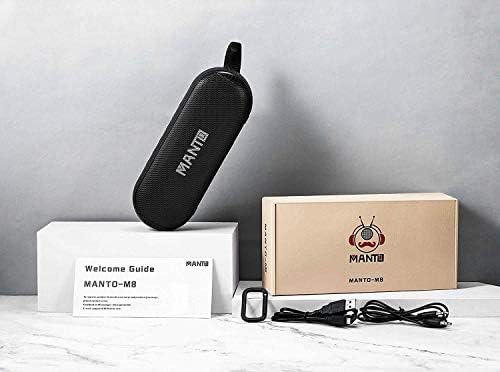
Image: The complete package contents of the MANTO-M8 speaker, including the speaker, charging cable, audio cable, carabiner, and user guide.
3. Product Features
- Astonishing Sound with Bass Technology: Dual high-performance drivers deliver exceptional clarity and enhanced bass with zero distortion.
- Easy to Pair and Play: Advanced Bluetooth 4.2 technology ensures instant pairing and a strong connection up to 33 feet. Compatible with smartphones, tablets, computers, and more.
- 20-Hour Long-lasting Battery Life: Built-in Li-Ion 2200mAh rechargeable battery provides up to 20 hours of playtime at 50% volume. Full recharge in approximately 4 hours.
- Portable & IPX6 Waterproof: Comes with a carabiner for easy attachment to bags, tents, or bikes. Resilient IPX6 waterproof construction protects against dust, sand, and water splashes. Note: Speaker cannot be submerged in water.
- Multiple Playback Modes: Supports wireless Bluetooth connection, 3.5mm AUX input, and Micro SD card playback.
- Built-in Microphone: For convenient hands-free calling.

Image: Visual representation of the speaker's 20-hour battery life.

Image: The MANTO speaker demonstrating its IPX6 waterproof rating with water splashing over it.

Image: An exploded view illustrating the two high-performance drivers and subwoofer for enhanced sound.

Image: The compact and portable design of the MANTO speaker, shown with its carabiner clip for easy carrying.
4. Controls and Ports
Familiarize yourself with the speaker's controls and connection ports for optimal use.

Image: Top panel of the MANTO speaker, indicating the Power, Mode, Play/Pause, Previous/Volume Down, Next/Volume Up, and EQ Switch buttons.
- Power Button: Press and hold to turn the speaker On/Off.
- Mode Button (M): Short press to switch between Bluetooth, AUX, and Micro SD card modes.
- Play/Pause Button: Press to play or pause audio.
- Previous Track / Volume Down (-): Short press for previous track, long press to decrease volume.
- Next Track / Volume Up (+): Short press for next track, long press to increase volume.
- EQ Switch: Toggles between different equalizer settings (e.g., indoor/outdoor, bass boost).

Image: Side panel of the MANTO speaker, highlighting the Micro SD card slot, 3.5mm AUX In jack, and Micro-USB charging port, protected by a rubber cover.
- Micro SD Card Slot: Insert a Micro SD card with MP3 audio files for direct playback.
- AUX In Jack (3.5mm): Connect external audio devices using the provided 3.5mm audio cable.
- DC IN (Micro-USB): Connect the provided USB charging cable to charge the speaker.
5. Setup
5.1 Charging the Speaker
- Connect the Micro-USB end of the charging cable to the DC IN port on the speaker.
- Connect the USB-A end of the charging cable to a USB power adapter (not included) or a computer's USB port.
- The charging indicator light will illuminate. A full charge takes approximately 4 hours.
- Once fully charged, the indicator light will change or turn off (refer to specific light behavior in the manual if available).
5.2 Bluetooth Pairing
- Ensure the speaker is fully charged.
- Press and hold the Power button to turn on the speaker. It will automatically enter Bluetooth pairing mode, indicated by a flashing blue LED light.
- On your device (smartphone, tablet, etc.), enable Bluetooth and search for available devices.
- Select "MANTO-M8" from the list of devices.
- Once successfully paired, the blue LED light will stop flashing and remain solid. The speaker will also remember your last connected device for effortless reconnection.
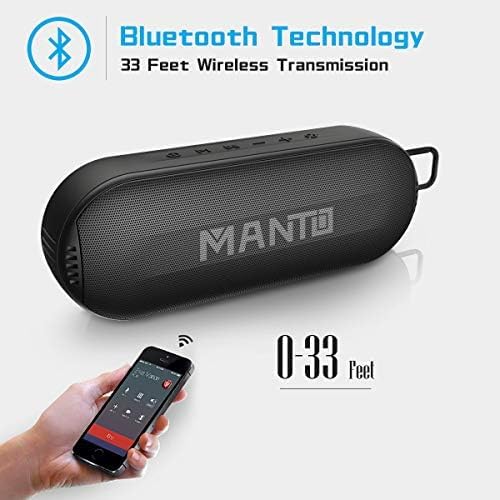
Image: Illustration of the MANTO speaker's Bluetooth connectivity, showing a wireless transmission range of up to 33 feet.
6. Operating Instructions
6.1 Switching Modes
Short press the Mode (M) button on the top panel to cycle through the available playback modes: Bluetooth, AUX, and Micro SD card.

Image: The speaker's versatility in playing music from various sources, including Bluetooth devices, 3.5mm audio cord, and MP3/MP4 players.
6.2 Audio Playback
- Play/Pause: Press the Play/Pause button.
- Volume Adjustment: Long press the '-' button to decrease volume, and long press the '+' button to increase volume.
- Track Navigation: Short press the '-' button for the previous track, and short press the '+' button for the next track.
6.3 Hands-Free Calling
When connected via Bluetooth, the built-in microphone allows for hands-free calls.
- Answer/End Call: Press the Play/Pause button to answer an incoming call or end an ongoing call.
- Reject Call: Long press the Play/Pause button to reject an incoming call.
7. Maintenance
- Keep the speaker clean by wiping it with a soft, dry cloth.
- Avoid using harsh chemicals or abrasive cleaners.
- Ensure the rubber cover for the ports is securely closed when not in use, especially in wet or dusty environments, to maintain IPX6 protection.
- Store the speaker in a cool, dry place when not in use for extended periods.
8. Troubleshooting
| Problem | Possible Cause | Solution |
|---|---|---|
| Speaker does not turn on. | Low battery. | Charge the speaker fully. |
| Cannot pair via Bluetooth. | Speaker not in pairing mode; device Bluetooth off; too far from speaker. | Ensure speaker is in pairing mode (flashing blue LED). Turn on device Bluetooth. Move device closer to speaker (within 33 ft). Forget "MANTO-M8" on your device and try pairing again. |
| No sound from speaker. | Volume too low; incorrect mode selected; AUX cable not fully inserted. | Increase volume on both speaker and connected device. Press 'M' button to select correct mode. Ensure AUX cable is fully inserted. |
| Micro SD card not playing. | Incorrect file format; card not inserted correctly. | Ensure audio files are in MP3 format. Reinsert the Micro SD card firmly. |
9. Specifications
| Feature | Detail |
|---|---|
| Brand | MANTO |
| Model Name | M8 |
| Item Model Number | UK-LYYX-JS-M8-B |
| Connectivity Technology | Bluetooth, Auxiliary, USB |
| Wireless Communication Technology | Bluetooth |
| Bluetooth Range | 10 Meters (33 Feet) |
| Speaker Type | Surround Sound |
| Speaker Maximum Output Power | 4 Watts |
| Signal-to-Noise Ratio | 100 dB |
| Battery Capacity | 2200 mAh |
| Battery Life | Up to 20 hours (at 50% volume) |
| Charging Time | 4 Hours |
| Water Resistance Level | IPX6 Waterproof (Splash-proof) |
| Product Dimensions | 2.3"D x 4.1"W x 8.6"H |
| Item Weight | 353 Grams (12.5 ounces) |
| Material | HD Stereo Bass, Plastic |
| Audio Encoding | MPEG-3 (MP3) for Micro SD |
10. Warranty and Support
MANTO provides a hassle-free 12-month warranty for this product. If you encounter any issues or have questions regarding your MANTO Portable Bluetooth Speaker, please contact MANTO customer support for assistance. Your problem can be solved as soon as possible.
For support, please refer to the contact information provided in the original product packaging or on the official MANTO website.